Program: GIMP 2 Steps: 16 (though some can be omitted) Difficulty: Uber easy. Like, seriously. 8D
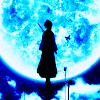
The final icon is a bit brighter than the one made with Photoshop. That's basically because GIMP doesn't have Exclusion layers to mute the colours, but it still works all the same, so. x3
My concerns lie only with the excution (i.e. making gifs, possibly from video clips, sizing of gifs and canvas so everything is equal, etc.) and not the coloring. :) As detailed as possible would be great; I'm rusty with GIMP and even worse with animations. I use Windows and GIMP 2.2.4. Thanks!
I imagine that this is a question that has been asked more than once, but I can't seem to find the answer anywhere, so apologies if so! I'm pretty new to GIMP.
I want to use GIMP for icon making, but my past experience is all photoshop - in PS, there is the option, when cropping an image, to set the 'size' so that the crop actually crops and resizes in one go.
For example, I'd set the size to 100x100, but rather than just giving me a 100x100 box like GIMP does, it'd restrain the ratio and let me make it any size I wanted as long as it was a square, and then resize the final image 'box' down to 100x100. This was fantastic for trying out different crops quickly. Does anyone know if there is any way to replicate this in GIMP?
On a related but different note, I have accidentally closed the 'crop' menu bar (I use the 'photoshop layout' available for GIMP) and now I can't seem to get it back any way I try. Can anyone help?
This is going to sound like a total n00b question and I'm sorry for that. But it's driving me insane and I don't know what the problem is.
I'm running Windows XP and GIMP 2.4.1. I've had no problems since upgrading to the newest version. No crashing or drama or anything. The only thing that's weird is when I resize a picture.
I've been downloading all of the pictures from my digital camera and resizing them using GIMP. But it seems that when I resize them they become pixelated. It's only been the last couple of weeks that this has happened. Before when I would resize the pictures the quality would stay the same despite the size. But now when I shrink them they pixelate and make it look like I have a crappy camera or can't take a photo to save my life. Normally I'll do it via Image > Scale Image.
Am I resizing them incorrectly or something? Is there an easier/better way? Should I change the file type? Literally is there anything I can do to help maintain the quality of my photos when I resize them?


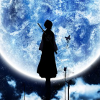 ===>
===> 

 confused