
Endurance Testing (Soak Testing) is a type of non-functional testing that evaluates how a system performs under continuous load over a long period. It helps ensure the application remains stable, responsive, and reliable during extended usage.
- Identifies issues like memory leaks and resource exhaustion during prolonged usage.
- Ensures long-term system stability and reliability under continuous load.
Endurance Testing Graph Explanation
This graph shows how Endurance Testing is performed over time using virtual users (load).
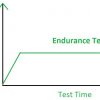
X-axis: Test Time (long duration)
Y-axis: Virtual Users (number of users/load)
Phases in the Graph
- Ramp-Up Phase: At the beginning, the number of users is gradually increased. This helps the system reach the desired load smoothly without sudden stress.
- Steady State (Endurance Phase) : The load is kept constant for a long period. This is the most important phase where the system is observed for memory leaks, performance degradation, and stability.
- Ramp-Down Phase: At the end, the load is gradually reduced. This ensures the system shuts down smoothly without errors.
Types of Endurance Testing
Endurance Testing includes different types based on system behavior and testing goals.
- Load-Based Endurance Testing: The system is tested under a constant expected user load for a long time. It checks if performance remains stable without degradation.
- Stress-Based Endurance Testing: The system is tested with high or near-maximum load for an extended period. It helps identify system limits and failure points over time.
- Volume-Based Endurance Testing: A large amount of data is processed continuously to check system performance. It ensures the system can handle heavy data loads without issues.
- Configuration-Based Endurance Testing: Testing is performed with different system configurations (hardware/software). It ensures consistent performance across environments.
- Memory Leak Testing: Focuses on detecting memory leaks during long execution. It checks whether memory usage increases continuously and affects performance.
- Performance Stability Testing: Verifies consistent system performance during prolonged execution.
Example: A social media app is tested with constant user activity for 72 hours to verify that it maintains performance without memory leaks or crashes.
Endurance Testing Process
This diagram illustrates the step-by-step process of Endurance Testing, from environment setup to test closure.
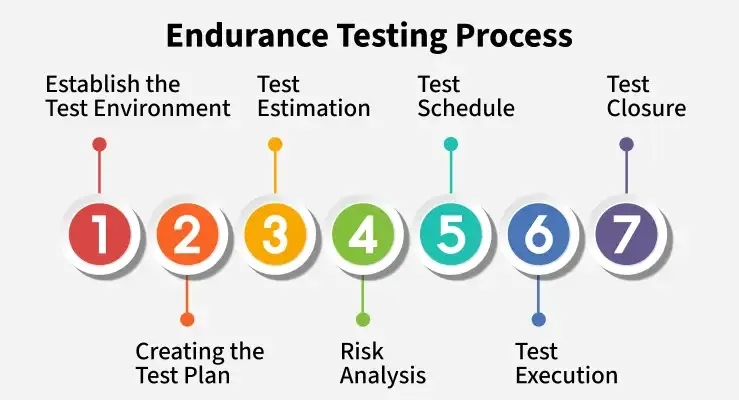
- Establish the Test Environment : Set up a production-like environment with proper hardware, software, and network configuration to get accurate results.
- Create Test Plan: Define objectives, scope, workload, success criteria, and testing approach for the endurance test.
- Test Estimation: Estimate required resources like tools, time, data, and manpower needed for long-duration testing.
- Risk Analysis: Identify possible risks (e.g., system crash, data loss) and prepare strategies to minimize them.
- Test Schedule: Prepare a timeline for all testing activities. Include phases like data preparation, execution, monitoring, and result analysis.
- Test Execution: Run the system under continuous load for a long duration. Monitor system behavior, collect performance data, and identify bottlenecks.
- Test Closure: Analyze results, compare with expected outcomes, and prepare a final report with findings and improvements.
Metrics of Endurance Testing
Metrics of Endurance Testing are used to measure system performance and stability over a long duration.
- Response Time: Measures the time taken by the system to respond to user requests. It should remain stable throughout long execution.
- Throughput: Indicates the number of requests processed per second. Consistent throughput shows good system performance over time.
- CPU Utilization: Tracks how much CPU is used during testing. High or continuously increasing usage may indicate performance issues.
- Memory Usage: Monitors memory consumption over time. A steady increase may indicate memory leaks.
- Disk I/O: Measures read/write operations on disk. High disk activity can slow down system performance.
- Error Rate: Counts the number of failed or incorrect requests. Increasing errors over time indicate system instability.
- Network Usage: Tracks data transfer across the network. Helps identify bottlenecks in communication.
- System Stability/Uptime: Measures how long the system runs without failure. Longer stable uptime indicates better endurance.
Example: During a 48-hour test, increasing response times and resource usage may indicate system instability.
Endurance Testing Tools
Here are some commonly used tools for performing endurance testing and monitoring long-term system performance:
- JMeter: Open-source tool widely used for web application performance testing with customizable test scripts and reporting features.
- LoadRunner: Enterprise-grade testing tool that supports multiple protocols and advanced performance analysis for large-scale applications.
- Gatling: Developer-friendly load testing tool that uses code-based scripting for scalable and efficient performance testing.
- New Relic: Application performance monitoring tool used to track server health, resource usage, and application behavior during endurance tests.
Automation and Monitoring Integration
Modern endurance testing is often integrated with CI/CD pipelines and monitoring systems to enable continuous performance validation and faster issue detection.
- CI/CD Integration: Tools like Jenkins and GitHub Actions automatically execute endurance tests during deployment pipelines.
- Monitoring Dashboards: Platforms such as Grafana and Kibana help visualize CPU, memory, response time, and system health metrics in real time.
- Alert Systems: Alerting tools notify teams when performance thresholds, failures, or resource usage limits are exceeded during testing.
Advantages of Endurance Testing
Endurance testing helps evaluate long-term system stability, identify hidden performance issues, and ensure reliable application behavior during continuous usage.
- It determines the amount of workload a system can handle.
- It helps in the identification of performance problems that occur when the system is used for a long period.
- It helps in identifying the amount of memory leakage.
- If the testing is done effectively then there will be a reduction in maintenance costs.
- It ensures client and customer satisfaction.
Application of Endurance Testing
Endurance testing is widely used in applications that require continuous operation, long-duration stability, and consistent performance under sustained workloads.
- E-commerce Platforms: Used to verify system stability and performance during long-duration sales events and continuous high user traffic.
- Banking and Financial Systems: Ensures reliable transaction processing and detects resource exhaustion during continuous operations and batch processing.
- Streaming and Media Platforms: Validates uninterrupted audio/video streaming performance during extended user sessions.
- SaaS and Enterprise Applications: Ensures consistent application availability and responsiveness for users across different time zones.
- Healthcare and Gaming Systems: Helps maintain continuous uptime and reliable operation in mission-critical and real-time environments.
Load Testing Vs Endurance Testing
| Basis | Load Testing | Endurance Testing |
|---|---|---|
| Purpose | Check performance under expected load | Check stability over long duration |
| Duration | Short-term testing | Long-term testing (hours/days) |
| Focus | Response time, throughput | Memory leaks, performance degradation |
| Goal | Ensure system handles expected users | Ensure system runs continuously without failure |
| Load Type | Normal or peak load | Constant load for long period |
| Issues Detected | Bottlenecks, slow response | Memory leaks, resource exhaustion |
| Testing Nature | Immediate performance check | Long-term reliability check |