
Exploratory Testing is a type of software testing where testers actively explore the application without predefined test cases. It combines learning, test design, and execution at the same time. This approach is useful for quickly identifying defects and understanding system behavior.
- No predefined test cases; testing is based on tester’s knowledge and intuition .
- Helps in discovering unexpected bugs and edge cases.
- Flexible and suitable for early-stage or rapidly changing applications.
Example: For example, a tester may directly explore a login page using valid, invalid, and empty inputs to find unexpected issues.
Exploratory Testing Process
Exploratory Testing follows an iterative and flexible process where learning, test design, and execution happen simultaneously. The tester continuously explores the application to discover defects and improve understanding.
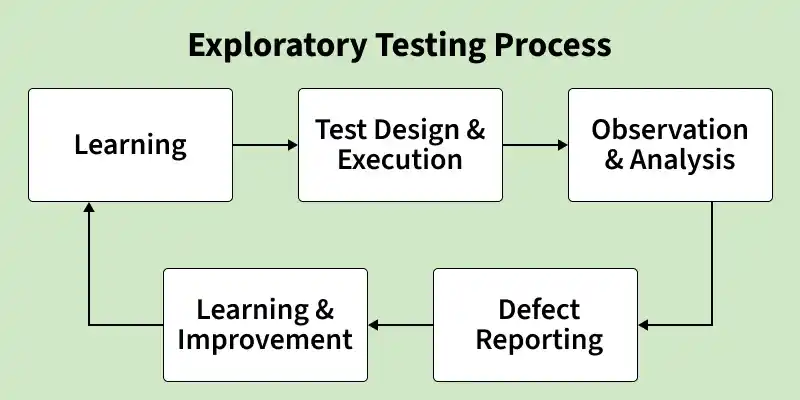
1. Learning
The tester studies the software to understand its features, behavior, and requirements. It helps in identifying important areas to test.
- Identifies key functionalities and how different modules interact.
- Finds high-risk and critical areas that need deeper testing.
- Gains overall system knowledge to plan better exploratory session.
2. Test Design & Execution
The tester simultaneously designs and executes tests without predefined test cases. Testing is done using real-time scenarios.
- No predefined test cases are used; testing is flexible and dynamic.
- Uses different inputs, actions, and user flows during exploration.
- Continuously adapts testing based on system behavior and responses.
3. Observation & Analysis
The tester observes system responses and analyzes results to find defects. It ensures the system behaves as expected.
- Compares actual system output with expected behavior.
- Identifies defects, inconsistencies, and usability issues.
- Detects unexpected or unusual system responses during testing.
4. Defect Reporting
The tester reports bugs with proper details for easy understanding and fixing.
- Clearly documents bugs with proper descriptions and evidence.
- Includes detailed steps to reproduce the issue.
- Helps developers understand context for faster bug fixing.
5. Learning & Improvement (Feedback Loop)
The tester learns from results and improves the testing approach. The process is repeated to enhance quality.
- Gains new insights from previous testing sessions.
- Updates and improves testing strategies based on results.
- Repeats the cycle for continuous quality improvement.
Types of Exploratory Testing
Exploratory Testing can be categorized into the following types:
1. Freestyle Exploratory Testing
Involves testing the application without any predefined plan or structure, allowing complete freedom to the tester.
- No documentation, test cases, or strict guidelines are followed.
- Tester explores the application randomly based on intuition and experience.
- Useful for discovering unexpected issues during initial testing.
Example: Tester randomly navigates through an app to find unexpected issues
2. Scenario-Based Exploratory Testing
Involves testing based on real-life user scenarios to validate system behavior.
- Focuses on realistic user workflows and end-to-end scenarios.
- Based on practical use cases and user behavior patterns.
- Ensures the application works correctly in real-world conditions.
Example: Testing online shopping flow -> search -> add to cart -> checkout
3. Strategy-Based (Guided) Exploratory Testing
Involves testing with some guidelines, such as checklists, risks, or specific areas to focus on.
- Follows a defined strategy or testing checklist.
- Focuses on high-risk or critical system functionalities.
- More structured than freestyle testing but still flexible.
Example: Testing only payment module using a checklist
4. Session-Based Exploratory Testing
Involves testing within a fixed time session with clear objectives and documentation.
- Testing is performed within a defined time limit (sessions).
- Each session has specific goals and scope.
- Results, observations, and defects are documented during the session.
Example: Testing login module for 1 hour with focus on security and usability
5. Charter-Based Exploratory Testing
Involves testing based on a predefined charter that defines the scope, objectives, and focus areas of testing.
- Testing is driven by a clearly defined charter statement.
- Focuses on specific features, functionalities, or risk areas.
- Provides direction while still allowing flexibility in execution.
Example: Charter: “Test login functionality with invalid inputs” -> Tester explores different invalid cases like wrong password, empty fields, special characters
6. Time-Boxed Exploratory Testing
Involves performing testing within a fixed time limit to ensure focused and efficient exploration.
- Conducted within a strict time limit (e.g., 30–60 minutes).
- Helps maintain focus and avoid unnecessary exploration.
- Often used in combination with session-based testing.
Example: Tester explores the payment module for 45 minutes to identify usability and functional issues
Techniques Used in Exploratory Testing
Exploratory testing uses various techniques to help testers effectively explore the application, find defects, and improve test coverage.
- Error Guessing: Involves predicting possible defects based on tester’s experience and intuition, without any formal rules, focusing on common problem areas.
Example: Testing blank fields, invalid inputs, special characters
- Boundary Value Analysis (BVA): Involves testing values at the boundaries of input ranges where defects are most likely to occur.
Example: Range 1–100 -> test 0, 1, 100, 101
- Equivalence Partitioning: Involves dividing input data into valid and invalid groups and testing one representative value from each group.
Example: Age 18–60 -> test 17, 30, 61
- Checklist-Based Testing: Involves using a predefined checklist to ensure all important functionalities are covered during testing.
Example: Login checklist -> username, password, error messages
- Mind Mapping: Involves creating a visual map of features and test ideas to organize testing and improve coverage.
Example: Mapping modules like login, dashboard, settings
- Session-Based Testing: Involves testing within a fixed time session with defined goals and scope, and documenting the results.
Example: Testing payment module for 1 hour
- Pair Testing: Involves two testers working together where one performs testing and the other observes, analyzes, and records defects.
Example: One tester executes while another logs issues
Best Practices for Exploratory Testing
Encourages structured exploration using charters, time-boxing, and documentation to improve effectiveness and defect discovery.
- Understand the customer: Approach the software from different user perspectives and expectations.
- Clear testing objectives: Know what to test and why; maintain focused notes during testing.
- Proper documentation: Record test coverage, risks, execution logs, and issues systematically.
- Track issues: Keep a clear record of questions and defects discovered during testing.
Advantages of Exploratory Testing
Exploratory Testing offers several benefits that make it highly effective for quickly identifying defects and improving software quality.
- Minimal preparation: No need for extensive test planning or scripts.
- Quickly finds critical defects: Helps uncover major issues early.
- Improves productivity: Testers use their skills and experience to explore more test scenarios and enhance software quality.
- Encourages creativity: Promotes intuition and generates new ideas during testing.
Limitations of Exploratory Testing
Exploratory testing has some limitations and challenges due to its unstructured and experience-based nature.
- Difficult to track test coverage and ensure all areas are tested.
- Hard to reproduce defects due to lack of predefined test cases.
- Relies heavily on tester’s skill, experience, and intuition.
- Challenging to maintain proper documentation of all actions.
Exploratory Testing Vs Automated Testing
Below are the differences between exploratory testing and automated testing:
| Parameter | Exploratory Testing | Automated Testing |
|---|---|---|
| Documentation | Minimal or no documentation needed | Requires detailed documentation |
| Test Cases | Created during testing | Prepared in advance |
| Reproducibility | Only defects can be reproduced | Tests can be fully reproduced |
| Investment | Low initial effort in documentation | High initial effort for scripts and tools |
| Spontaneity | Flexible and guided by tester’s exploration | Structured and planned based on requirements |
| Cost | Low initial cost, may rise with long-term manual testing | High initial cost, but saves time in long-term execution |
| Skills Required | Relies on tester’s intuition, experience, and creativity | Requires technical expertise for scripting and maintenance |