Nintendo console


Nintendo consoles,[1] also known as Nintendo systems,[2] are furniture items in Animal Crossing: New Horizons introduced in version 3.0 that can be interacted with to play an emulated game from that console. There are seven consoles—Famicom, NES, Famicom Disk System, Game Boy, Super Famicom, and both the NTSC and PAL versions of the Super NES—each with a different game (with the exception of both versions of the Super NES, which share a game). All of the Nintendo consoles can be purchased from the Resort Hotel's souvenir shop for  500 Hotel Tickets each. Playing a Nintendo console's corresponding game requires an active Nintendo Switch Online membership.
Nintendo consoles are similar to the NES games from the first-generation Animal Crossing games.
List of games
| Item | Game | Title screen | Game original release date(s) |
|---|---|---|---|
 Famicom |
 Clu Clu Land |

|
 November 22, 1984 November 22, 1984 October 18, 1985 October 18, 1985 February 15, 1987 February 15, 1987
|
 NES |
 Ice Climber |

|
January 30, 1985 October 18, 1985 September 1, 1986
|
 Famicom Disk System |
 Ice Hockey |

|
January 21, 1988 March 1988 April 15, 1988
|
_NH_Icon.png) Game Boy |
 Dr. Mario |

|
July 27, 1990 December 1, 1990 April 30, 1991
|
 Super Famicom |
 Panel de Pon |

|
October 27, 1995
|
_NH_Icon.png) Super NES (NTSC version) |
 F-Zero |

|
November 21, 1990 August 23, 1991 June 4, 1992
|
_NH_Icon.png) Super NES (PAL version) |
 F-Zero |
Functionality
When interacting with any of the console furniture items for the very first time, a message will display to inform the player that a Nintendo Switch Online subscription is required in order to play the games available on them. This message is shown regardless of the player's current subscription status.
The implementation of the emulators are similar to, but not the same, as the ones found in the Nintendo Classics apps on Nintendo Switch and Nintendo Switch 2. There are several notable differences between the two:
- The background around the game screen is flat black with dark grey polka dots, instead of the white-to-black polka dot gradient used in the Nintendo Classics apps.
- Controls for the game are displayed to the right side of the game screen, with the game screen itself displayed on the left side of the main display. Visibility of the controls can be manually disabled to center the game screen, but this must be done every time a game is launched.
- All games are displayed in 4:3, except for Dr. Mario on the Game Boy, which is displayed in 10:9. All games are displayed a slightly smaller scale than in the Nintendo Classics apps. The display options and filters offered by those apps are not available.
- The suspend menu of the Nintendo Classics apps is not present, and the rewind, control customization, and suspend point features are not available.
- The online multiplayer functionality offered by the Nintendo Classics apps is not available.
Controls
| Action | Button |
|---|---|
| Controller button mapping | |
| +Control Pad |  / / 
|
| A | 
|
| B | 
|
| X[nb 1] | 
|
| Y[nb 1] | 
|
| L[nb 1] | 
|
| R[nb 1] | 
|
| SELECT | 
|
| START | 
|
| Other controls | |
| Turn guide on | 
|
| Exit game | 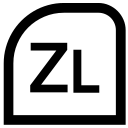 + + 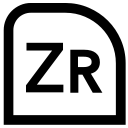 (hold) (hold)
|
See also
Notes
References
- ↑ "Collect Nintendo items like the Ultra Hand and Nintendo consoles in-game to add some classic flair to your island." Nintendo of America (October 30, 2025). "Animal Crossing: New Horizons sails ashore with a Nintendo Switch 2 Edition and free content update Jan. 15". nintendo.com. Retrieved October 30, 2025.
- ↑ "These match nicely with the Nintendo system items available in the free 3.0 update." Nintendo (February 3, 2026). "Nintendo Classic System Custom Designs". Nintendo Today!. Retrieved July 3, 2026.
| ||||||||||||||||

| |||||||||||||||