Type Builder
NEWLast updated
The Type Builder is a cloud-based interface for content modeling directly in the Prismic web UI. Use it to create and manage page types, custom types, and slices by hand.
If you work with AI tools like Claude Code, Codex, or Cursor, point them to the Prismic CLI for content modeling instead.
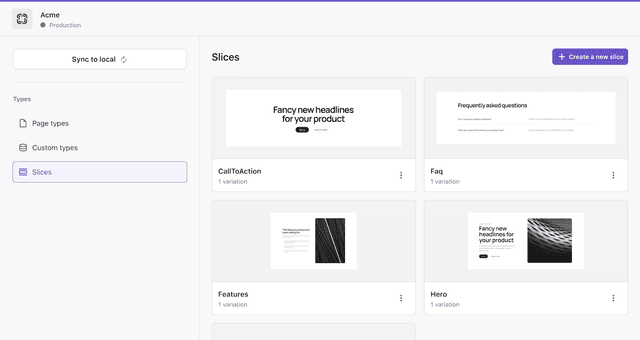
The Type Builder’s Slices view in the Prismic web UI.
Access the Type Builder
To access the Type Builder, open your repository in Prismic and click on the Switch to type builder button. The sidebar lists three categories: Page types, Custom types, and Slices. Select a category to view and manage its items.
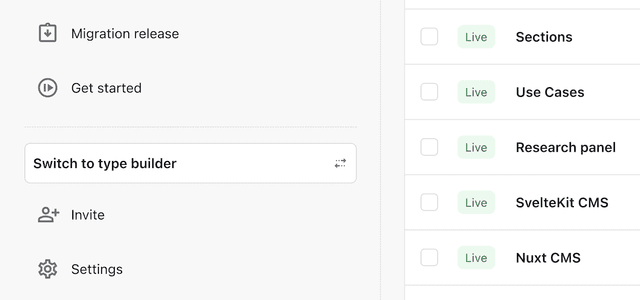
The Switch to type builder button in the Prismic sidebar.
Features
The Type Builder is used to model content:
- Page types: Define the structure of your website’s pages.
- Custom types: Define non-page content like settings, navigation, and categories.
- Slices: Create reusable page sections made up of fields.
- Fields: Add and configure fields for your content models.
Changes made in the Type Builder are saved directly to your Prismic repository.
Connect your application
Use the Prismic CLI to connect the Type Builder to your local codebase. The CLI syncs content models, generates TypeScript types, and integrates Prismic into your website.
Type Builder and Slice Machine
The Type Builder and the Prismic CLI together replace Slice Machine. Previously, content modeling required running Slice Machine locally. Now, the Type Builder handles content modeling in the browser, and the Prismic CLI handles syncing models, generating types, and generating component files.
Here’s how the two approaches compare:
| Type Builder | Slice Machine | |
|---|---|---|
| Content modeling | In the Prismic web UI (browser) | Locally in your development environment |
| Setup | None, accessible from the Prismic web UI (browser) | npx @slicemachine/init |
| Pushing changes | Changes are saved directly | Changes must be pushed to Prismic |
| TypeScript types | Generated via the Prismic CLI | Generated by Slice Machine |
| Slice simulator | In the Prismic web UI (browser) | Hosted by Slice Machine |
Slice Machine is still supported in existing projects.
Migrate to the Type Builder
Follow these steps to move an existing Slice Machine project to the Type Builder. The migration takes a few minutes and is mostly automated.
Push local changes
If you have unpushed local changes in Slice Machine, push them before continuing. Start Slice Machine, click Review changes, and Push.
Install the skill
If you are using Prismic with an AI tool like Claude Code, Codex, or Cursor, install the Prismic skill. The skill teaches your agent how to use the Prismic CLI alongside the Type Builder.
Learn more about Prismic with AInpx skills add --global prismicio/skillsRun the automatic migration
Call the Prismic CLI’s
initcommand to migrate from Slice Machine to the Type Builder.npx prismic initThe command performs the following:
- Replaces
slicemachine.config.jsonwithprismic.config.json. - Pulls models from Prismic into your project.
- Uninstalls Slice Machine and your project’s adapter.
You can now use the Type Builder, and agents will use the Prismic CLI.
- Replaces