Table
Last updated
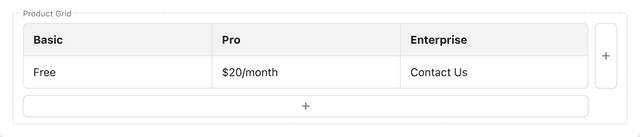
A table field in the Page Builder.
The table field allows content writers to create and manage tabular data. Content can be organized in rows and columns, ideal for specification sheets and documentation.
Prismic provides components for Next.js, Nuxt, and SvelteKit to display tables.
import { PrismicTable } from "@prismicio/react";
import { Table } from "@/components/Table";

<PrismicTable
  field={slice.primary.my_table_field}
  components={{
    table: ({ children }) => <Table>{children}</Table>,
    tbody: ({ children }) => <tbody className="my-tbody">{children}</tbody>,
  }}
/>;Add a table field to a content model
Table fields are added using the Type Builder, a tool for building by hand, or the Prismic CLI, a tool for AI agents.
Watch for changes
In your local website project, start the Prismic CLI’s
synccommand. The CLI will watch for changes in the Type Builder and pull them into your project.npx prismic sync --watchAdd a table field
In the Type Builder, navigate to the slice, page type, or custom type you want to modify. Add a table field and provide the following:
- Label: The label shown to content writers in the Page Builder. Use an easily understandable name.
- API ID: The property name in the Content API. Use a short, snake-cased name.
You can now close the Prismic CLI
synccommand or add your next field.
Add a table field
Use the
prismic field add tablecommand to add a table field to a slice.npx prismic field add table specs --to-slice MySliceUse
--to-typeto add the field to a page type or custom type instead.npx prismic field add table specs --to-type page
Open Slice Machine
In your Prismic project, start Slice Machine to begin editing content models:
npx start-slicemachine --openAdd a table field
In Slice Machine, navigate to the slice, page type, or custom type you want to modify. Add a table field.
The label determines the label shown to content writers in the Page Builder. Use an easily understandable name.
The API ID determines the property name in the Content API. Use a short, snake-cased name.
Display tables
Prismic provides table components for Next.js, Nuxt, and SvelteKit.
import { PrismicTable } from "@prismicio/react";

<PrismicTable field={slice.primary.my_table_field} />;
See the <PrismicTable> documentation to learn more.
Style tables
Tables can be styled using CSS and a wrapper element.
import { PrismicTable } from "@prismicio/react";

<div className="prismic-table">
  <PrismicTable field={slice.primary.my_table_field} />
</div>;
.prismic-table table {
width: 100%;
border-collapse: collapse;
}
.prismic-table th,
.prismic-table td {
border: 1px solid #ddd;
padding: 10px;
text-align: left;
}
.prismic-table th {
background-color: #f4f4f4;
font-weight: bold;
}Use custom UI components
Prismic’s table component can render custom components for each block type using the components prop. This prop allows you to use component libraries like Mantine, MUI, or your own.
import { PrismicTable } from "@prismicio/react";
import { Table } from "@/components/Table";

<PrismicTable
  field={slice.primary.my_table_field}
  components={{
    table: ({ children }) => <Table>{children}</Table>,
    tbody: ({ children }) => <tbody className="my-tbody">{children}</tbody>,
  }}
/>;
Learn more about the components prop
Use custom UI components globally
To set custom components once and use globally, create your own wrapper component containing <PrismicTable> and your custom components. Use your component in place of @prismicio/react’s <PrismicTable>.
You can use the following example as a starting point — just customize your default components. It supports the same props as the base <PrismicTable>.
import {
  PrismicTable as BasePrismicTable,
  PrismicTableProps,
  JSXTableMapSerializer,
} from "@prismicio/react";

const defaultComponents: JSXTableMapSerializer = {
  table: ({ children }) => (
    <table className="w-full border-collapse">{children}</table>
  ),
};

export function PrismicTable({ components, ...props }: PrismicTableProps) {
  return (
    <BasePrismicTable
      components={{ ...defaultComponents, ...components }}
      {...props}
    />
  );
}Check if a table field has a value
Use isFilled.table() from @prismicio/client to check if a table field has a value.
import { isFilled } from "@prismicio/client";

if (isFilled.table(slice.primary.my_table_field)) {
  // Do something if `my_table_field` has a value.
}
Learn more about isFilled
API response
Here is what a table field looks like from the Content API:
{
  "example_table": {
    "head": [
      {
        "cells": [
          {
            "type": "header",
            "content": [{ "type": "paragraph", "text": "GET", "spans": [] }]
          },
          {
            "type": "header",
            "content": [{ "type": "paragraph", "text": "DELETE", "spans": [] }]
          }
        ]
      }
    ]
    "body": [
      {
        "cells": [
          {
            "type": "data",
            "content": [
              {
                "type": "paragraph",
                "text": "For basic retrieval of information...",
                "spans": []
              }
            ]
          },
          {
            "type": "data",
            "content": [
              {
                "type": "paragraph",
                "text": "To destroy a resource and remove...",
                "spans": []
              }
            ]
          }
        ]
      }
    ]
  }
}
Prismic returns a JSON representation of the field’s formatted content. Prismic’s table component is the best way to display the JSON content.