Releases: AdguardTeam/AdguardForAndroid
Release list
4.13.1

We recently released AdGuard for Android v4.13, and now we’re following up with a quick hotfix to address a couple of bugs.
Please note that for Integration mode to work properly, you need to update both AdGuard and AdGuard VPN to their latest versions.
AdGuard for Android direct download links:
AdGuard for Android TV direct download links:
4.13
Please welcome the much anticipated AdGuard for Android v4.13! We set ambitious goals for this release, and did our best to deliver: a lot of work was done both in terms of big features as well as the usual behind the scenes routine of fixing bugs and oiling gears for a better performance. Let’s see the details below.
With this release, we introduced differential filter updates to AdGuard for Android! To achieve this, we integrated the FiltersListManager library into the app. Now, your filters will load automatically without consuming tons of traffic and overloading servers.
We also added post-quantum cryptography support to DnsLibs. Now AdGuard for Android, like our other full ad-blocking products, keeps your DNS requests protected against future threats.
Another significant change is our adoption of CRLite by Mozilla to verify revoked certificates. Using this instead of the more outdated OCSP (Online Certificate Status Protocol) or letting the app check each certificate against the CRL (Certificate Revocation List) not only speeds up website loading, but also increases your privacy and safety while browsing.
To improve security in Integration mode with AdGuard VPN, we changed the connection protocol, introducing the use of credentials. With the release of AdGuard for Android v4.13, our ad blocker and VPN cooperate seamlessly and securely, with no additional action required on the user’s part for them to synchronize. No third-party apps will be able to spy on your activities, as an added bonus.
In previous versions, in-app instructions for installing HTTPS certificates were added, as the process could differ in regards to your device’s make and model. In AdGuard for Android 4.13, we added support for ColorOS (Oppo) to those instructions.
And last, but not least, we have done a lot of work on our filtering engines and fixed bugs that had accumulated over time. Scriptlets and CoreLibs were updated for better app performance.
You can consult the changelog below to see all the fixes and improvements.
Changelog
Improvements
- Added possibility to copy an applied rule in request details in the filtering log 5637
- Added support for Google Backup 5879
- Excluded 2ndLine application from filtering by default 5116
- Displayed information about updated DNS filters in the DNS list 5519
- Added possibility to copy package_name in request details in the filtering log 5636
- Improved the Check for updates button’s behavior on the update check screen 5923
- Eliminated the possibility to add an empty user rule through the recent activity tab 5193
- Added color distinction for updated content on the Updates screen 5886
- Improved voicing of TalkBack voice assistant elements for Private browser
- Restructured the inputs/dialogs in Tracking protection
- Updated crash reports and app usage data names and dialogs
- Added the option to find requests by applied rules in recent activity
- Added validation to Mask your IP address screen
- Added auto-refreshing of the webpage after toggling the Website protection switch for it in Private browser
- Added authentication for the local proxy
- Added possibility to clear
.hprofwhen it’s not needed - Added an app update error screen for TV
- Improved video playback in the YouTube player in the background and picture-in-picture (PiP) mode
Fixes
-
A blocking rule for the
$networktype is added via the Add allowing rule button in request details 5390 -
The Disable all? popup appears on the User rules screen even if the rules list is empty 5175
-
CA certificate installation instructions are not relevant for ColorOS 5827
-
DNS filters shows
nullinstead of the time of the last update 5902 -
Firewall is activated automatically after granting the Usage access system permission 5927
-
High battery consumption starting from v4.12 5893
-
Impossible to block a domain, unblocked in DNS filter, using the filtering log only 5880
-
Incorrect subdomains appear in statistics 5868
-
Many apps stop working when AdGuard is active 5617
-
Recent activity log lags heavily after updating to v4.12.1 5882
-
Problems while editing extensions in language modes other than English 5914
-
Recent activity log fails to be cleared instantly in AdGuard v4.14 nightly 4 5908
-
Subdomains duplicate in Statistics 5840
-
The custom DNS server disappears after importing settings that were just exported 5892
-
The title of videos doesn’t minimize when clicking the share button while in horizontal mode 5612
-
Turning on AdGuard using tile closes the notification panel 5915
-
Filters update without authorization 5309
-
User regex in Ad blocking and DNS filtering rules breaks after AdGuard v4.14 nightly 5 5916
-
When attempting to update a beta version (e.g. RC), the update proceeds to the latest release version 5920
-
Configuration can’t be imported via link, even if the versions are consistent 5912
-
Rules duplicate themselves in the Applied rules section
-
Failed to move the AdGuard Personal CA to the system store via the Move button in the app
-
Custom content filter lists disappear after time
-
Protection resumes every few seconds with HTTPS filtering and FakeDNS enabled
-
An error snack appears after editing a userscript
-
The switch on the Extensions setting does not respond when tapping the setting name
-
After rebooting the phone, blocked URLs no longer show the reason why they were blocked in the log
-
The Protection may not work properly while the hotspot is active notification is displayed for Android 10+
-
Impossible to add a blocking rule with additional modifiers from Recent activity
-
Impossible to select a custom DNS server by tapping Save and select
-
Actual DNS protocol doesn’t match with what is shown on the DNS server details screen after settings import
-
Empty space below the navigation bar after opening extensions editor
-
AdGuard does not start after reboot
-
Incorrect display of onboarding for certificate installation when importing settings via a link
-
Integration mode dialogue doesn’t open consistently at app’s first launch
-
Search query is not displayed on the Recent activity screen if the header was not collapsed after returning from request details
-
The Open button for DNS providers opens the browser but not the website on Xiaomi TV Box
-
The Can’t update license info snack is not displayed on the TV license screen after license check timeout
-
Focus reset to default after pressing the Refresh status button on the License screen on TV
-
The Certificate wasn’t installed dialog is shown after certificate installation via settings sharing
-
Custom filter version is not updated after the filter update
-
Text clipping, header overlap, and content being covered by the keyboard in Rule editor
-
The YouTube button in the AdGuard player restarts video
-
On the Quick actions screen firewall notifications are displayed for both blocked and allowed apps when the Show blocked only filter is selected
-
Scrolling User rules overlaps another view
-
Scroll focus moves out of viewport during rapid scrolling of App management on TV
-
Sharing from YouTube Music to AdGuard player doesn’t work
-
AdGuard’s notification brings the device’s screen out of sleep mode
-
Private browser does not open other apps from webpages
-
Filter rule editor accepts any non-empty string as valid rule without syntax validation
-
Dynamic theme does not apply to the AdGuard app after closing Private browser
-
With Kazakh or Kyrgyz as system language, AdGuard erroneously displays it as Russian
-
The number of blocked requests is displayed incorrectly in notifications in languages that use hieroglyphs
DnsLibs (DNS filtering engine)
- Updated DnsLibs to v2.8.45 5961
Improvements
- Added Post-Quantum cryptography support to DnsLibs 245
- Added an option to remove
h3from thealpnparameter of HTTPS RR [257](AdguardTeam/DnsLibs#257...
4.12.3

This is a technical update aimed to increase the app stability and fix minor bugs.
Changelog
Fixes
- No internet access when protection is enabled #5897
CoreLibs (Filtering engine)
- Updated CoreLibs to v1.19.48 #6011
Scriptlets (JavaScript enhancement for filtering rules)
- Updated Scriptlets to v2.2.10
Improvements
- Improve 'href-sanitizer ' — support uBO arguments #493
AdGuard for Android direct download links:
AdGuard for Android TV direct download links:
4.12.2
This is a technical update aimed to increase the app stability and fix minor bugs.
AdGuard for Android direct download links:
AdGuard for Android TV direct download links:
4.12.1

We found two bugs after the latest update of AdGuard for Android: the app didn’t launch automatically and filters stopped auto-updating for some users. We are now rolling out a quick fix to address these issues and get your ad-blocking back to normal.
Changelog
Fixes
AdGuard for Android direct download links:
AdGuard for Android TV direct download links:
4.12
With this release, using AdGuard for Android on tablets has become more convenient — thanks to everyone who voted for the landscape mode. We’ve also added the new Share settings feature and made improvements to CoreLibs. Read more about the new features below and don’t forget to update to version 4.12!
Landscape mode
As we always say, your feedback is really important to us, and this time we’ve added one of the most requested features — landscape mode. Using AdGuard on a tablet is now even more convenient.
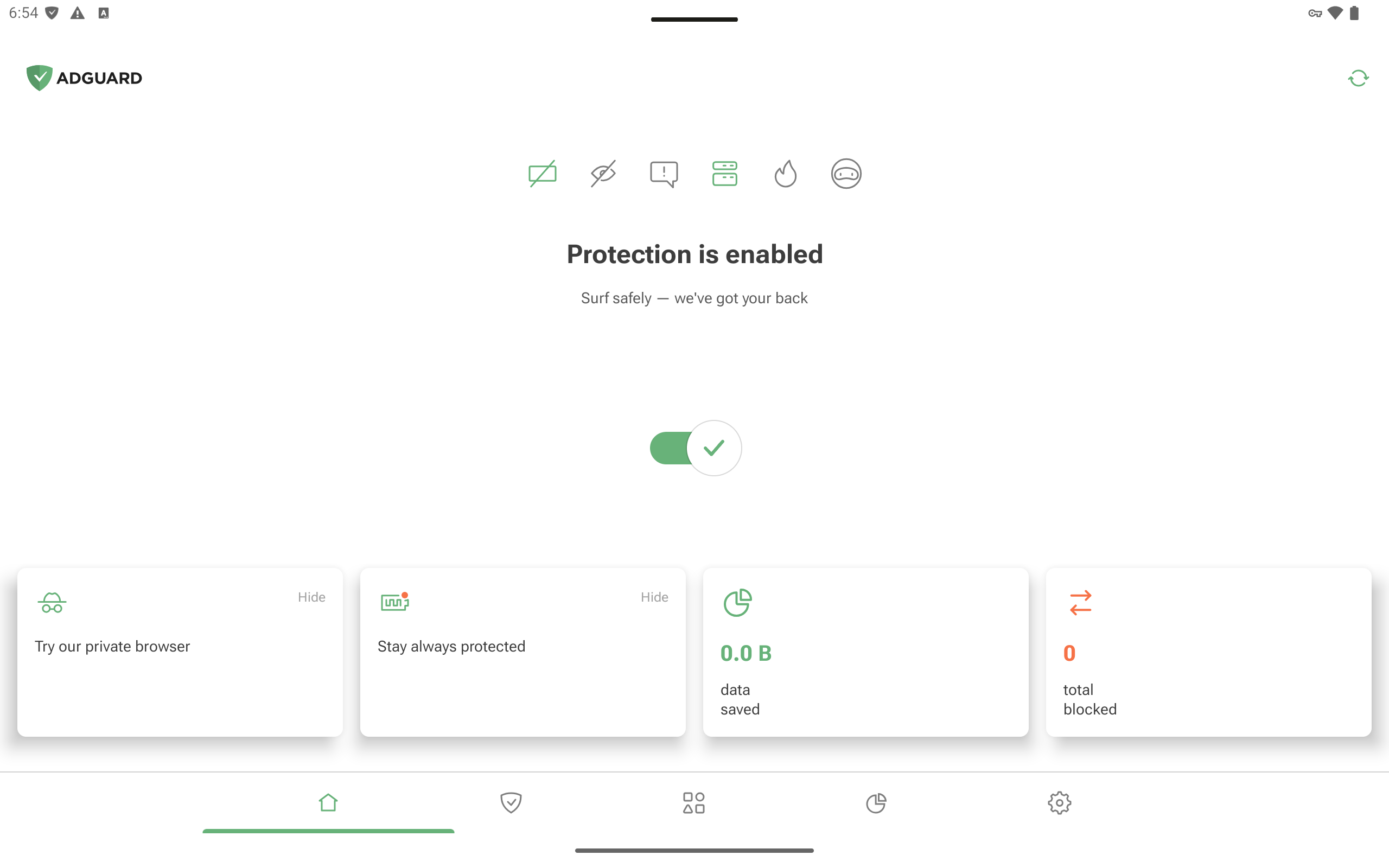
Some screens still need polishing, but we’re actively working on them!
Share settings
We’ve also added the Share settings feature. Now you don’t need to reconfigure everything on a new device or spend time describing your settings when reporting a missed ad — just share a link or scan a QR code.
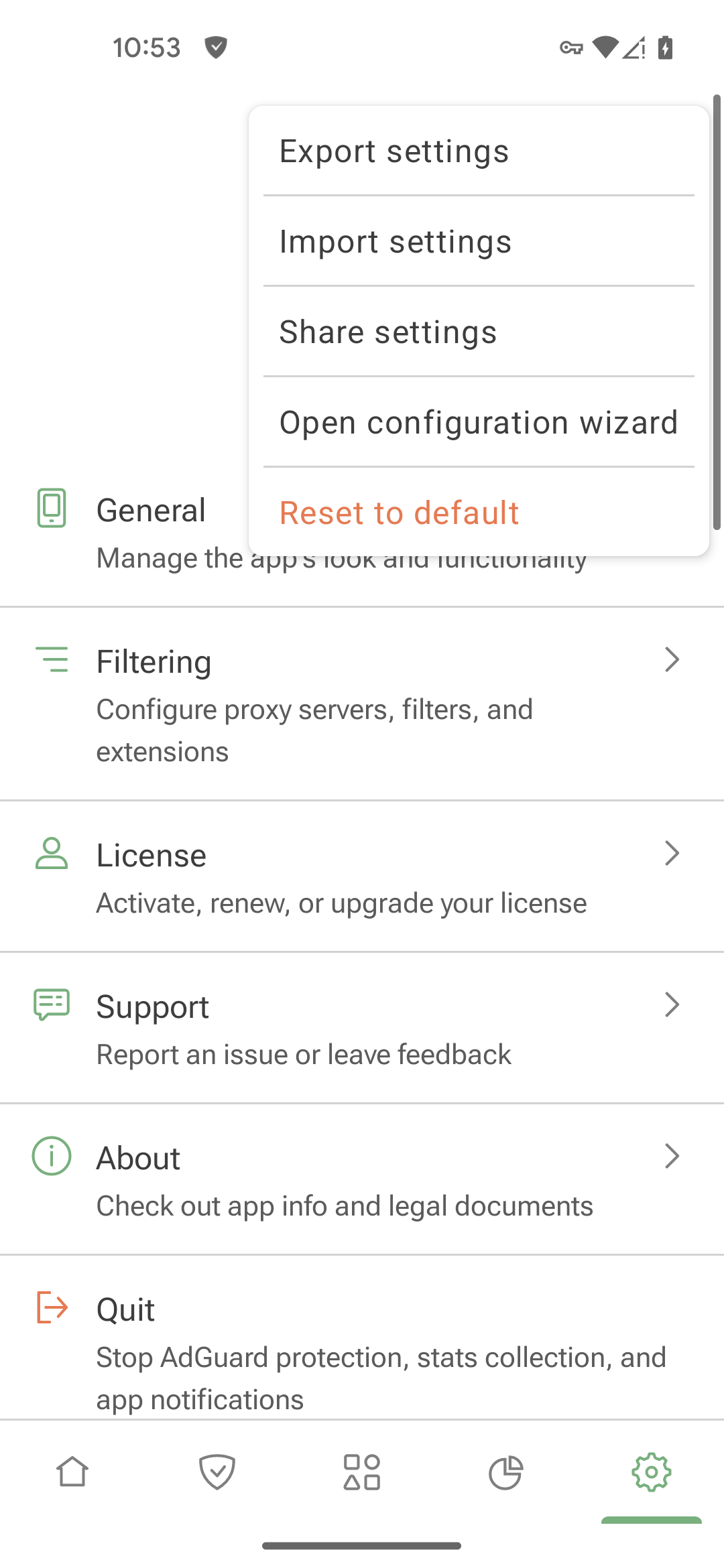
To share your settings, go to Settings → Menu (⋮) → Share settings. If someone sends you a link, just open it in a browser and tap Import.
CoreLibs
The new CoreLibs release includes bug fixes and various improvements. For example, userscripts now work more reliably on SPA (Single Page Application) websites. Check the changelog for full details.
Changelog
Improvements
- Disabled “Route traffic through AdGuard” option for com.bKash.customerapp to ensure the app works correctly #5788
Fixes
- CA certificate installation instructions are not relevant for Honor #5779
- Impossible to add app-specific HTTPS exclusion #5290
- Custom DNS filter is not shown in the Update section #5821
- Tapping the cross on the snackbar about downloading a new app version doesn’t stop the download #5760
- Some images are missing in a banking app due to AdGuard filtering #5819
CoreLibs (Filtering engine)
- Updated CoreLibs to v1.19.28 #5830
Improvements
- Improved the
$appmodifier: added support for wildcards and regexps
#1906 - Added support for ALPS extension #1987
Fixes
- Wrong tracking protection option shown in the log #5739
- Filtering disabled on some websites due to performance warnings (new.lewd.ninja) #1994
- “Use FakeDNS” option in Proxy Server interrupts the connection of bypassed apps #5355
- Some extensions do not work after update to v2.17 #1993
- XHR timeout with the
immersivetranslateuserscript #2000 - Content-type modifiers do not work with the
$urltransformmodifier #1978 - DNS filters do not apply #5851
DnsLibs (DNS filtering engine)
- Updated DnsLibs to v2.6.20 #5834
Scriptlets (JavaScript enhancement for filtering rules)
- Updated Scriptlets to v2.2.9
Improvements
- Added a new scriptlet — 'trusted-replace-argument' #405
Fixes
- 'prevent-element-src-loading' — TrustedScriptURL is not defined in Firefox #514
- 'trusted-replace-node-text' — quotes are escaped incorrectly #517
- Compilation error in Safari 15 due to unsupported regex lookbehind #519
AdGuard for Android direct download links:
AdGuard for Android TV direct download links:
4.11
This release includes some under-the-hood improvements, a substantial number of bug fixes, and a CoreLibs update. As a result, overall app stability has been significantly improved.
Changelog
Fixes
- The Create button overlaps the checkbox on the trial activation screen #5039
- AdGuard player doesn’t open when sharing a video from the YouTube app #5780
- AdGuard identifies AdGuard VPN as a third-party VPN in Integration mode #5567
- Apps excluded by UID are routed through AdGuard #5731
- Invalid filter update date format for Japanese, Korean, and Chinese #5703
- Missing string for private browser notification #5741
- Private browser onboarding is displayed twice #5752
- Private browser crashes after tapping browser settings #5781
- The “Nothing found” warning is missing on some screens #5038
- The “Apps operating through proxy” screen is displayed in gray in Integration mode #5732
- The app asks for permission to run in the background even though permission has already been granted #5560
- Titles and descriptions of DNS servers, extensions, and filters are translated into the system language if a different language is selected in AdGuard #5709
- Two similar graphs can be displayed at the same time #4915
- The app icon does not fill the designed area on the Amazon Fire TV Stick 4K Max #5476
com.carsheringis broken when routed through AdGuard #5464- Rules don’t get removed from the firewall after tapping “Remove rule” #5613
CoreLibs (Filtering engine)
- CoreLibs updated to v1.18.28 #5792
Improvements
- Added support for ABP’s CSS injection syntax #1927
- Added permission to remove content with empty attribute #1934
- Improved content script performance by using the browser cache properly #1929
- Improved performance of content script loading #1930
- Removed complicated logic for the
$domainmodifier #1875 - Added encoding support for “zstd” #1976
Fixes
$removeparamdoes not work when paired with the$domainmodifier #1999- Some React-based sites aren’t loaded correctly due to “Minified React error” #1953
urltransformcombined with$~3pdoesn’t modify the request URL if it’s opened directly in the address bar #1931paramountplus.comis broken #1937dailydot.comis continually reloading #1925- Content script is not injected in
www.huya.com#1897 - Error in content script when the
$jsinjectexception is applied #1960
Scriptlets (JavaScript enhancement for filtering rules)
- Scriptlets updated to v2.2.8
Improvements
- Add more examples to scriptlet docs #392
- Add new scriptlet — 'trusted-replace-argument' #405
- Improve 'prevent-fetch' — add ability to set random response content #416
- Improve 'set-cookie' — add an empty object value #497
- Update AGTree to v3 #247
Fixes
- Fix 'inject-css-in-shadow-dom' — scriptlet does not work if adoptedStyleSheets is overridden #477
- Fix 'json-prune' — handle 'null' values while checking specified key in object #504
- Fix 'prevent-element-src-loading' — TrustedScriptURL is not defined in Firefox #514
- Fix 'spoof-css' — DOMRect is set incorrectly #498
- Fix 'trusted-replace-node-text' — output literal quotes for escaped quotes #440
- Fix 'trusted-replace-node-text' — some quotes are incorrectly escaped #517
- Fix 'trusted-set-cookie-reload' — prevent infinite reload for constantly changing values #489
- Fix 'trusted-suppress-native-method' — reset 'isMatchingSuspended' when stack is not matched #496
- Fix scriptlets compilation error in Safari 15 due to unsupported regex lookbehind #519
AdGuard for Android direct download links:
AdGuard for Android TV direct download links:
4.10
AdGuard for Android v4.10 introduces important improvements to the HTTPS certificate installation process, making it more intuitive and accessible for users.
When you install AdGuard and launch the app for the first time, you’re prompted to install an HTTPS certificate. This step is essential because the certificate plays a key role in ensuring effective ad filtering in browsers. Without it, filtering quality is significantly reduced. That’s why it’s crucial for all users, beginner or advanced, to be able to complete the installation without difficulty.
We knew there was room for improvement in the whole process — the previous instructions often didn’t reflect the actual settings found on devices from different manufacturers, and there was also a bug that prevented users from returning to the instructions after leaving the app.
To address these issues, we’ve added in-app guides for the most common devices — including Google Pixel, Samsung, Huawei, Xiaomi, and OnePlus — with adjustments based on Android OS version and user locale. We’ve also fixed the bug mentioned above.
Changelog
Improvements
- Added HTTPS filtering by default for the Lemur browser #5577
Fixes
- AdGuard gets disabled when WebView is stopped or updated #5537
- After integration with Tor, Tor via Orbot isn’t the default proxy #4908
- Updated filters aren’t displayed after the app is restarted #5638
- QUIC filtering is disabled for WeChat and AliExpress #5497
- WeChat is excluded from HTTPS filtering by default #5689
- The app is not fully translated #5418
- Filtering status is not saved if it’s changed twice #5701
- Recent activity log lags when scrolling slowly #5369
- Some parameters are not included in the link when reporting an incorrect blocking #5520
- When opening a link in a browser, two AdGuard apps appear in the list of browsers, and one of which does not work as expected #5592
CoreLibs (Filtering engine)
- CoreLibs updated to v1.17.157 #5725
Fixes
- Naver Smartstore cannot be accessed properly #1971
- Some React-based websites aren’t loaded correctly due to a
Minified React error#1953 - User rule for domains does not block the request completely #5539
DnsLibs (DNS filtering engine)
- DnsLibs updated to v2.6.6 #5724
Scriptlets (JavaScript enhancement for filtering rules)
- Scriptlets updated to v2.1.7
Improvements
- ’prevent-addEventListener’ — added ability to match specific element #480
AdGuard for Android direct download links:
AdGuard for Android TV direct download links:
4.9
We’ve added a major feature in AdGuard v4.9 for Android: native support for userstyles. This feature has been available in AdGuard for Windows and AdGuard for Mac for a while, and now we are bringing it to AdGuard for Android!
Userstyles are similar to userscripts in a way, but they only focus on changing the appearance of websites using CSS, without getting into their code. Now customizing websites — like adding a dark theme — becomes an easy task. You can create your own userstyles in the app itself, or install ready-made styles from trusted online sources.
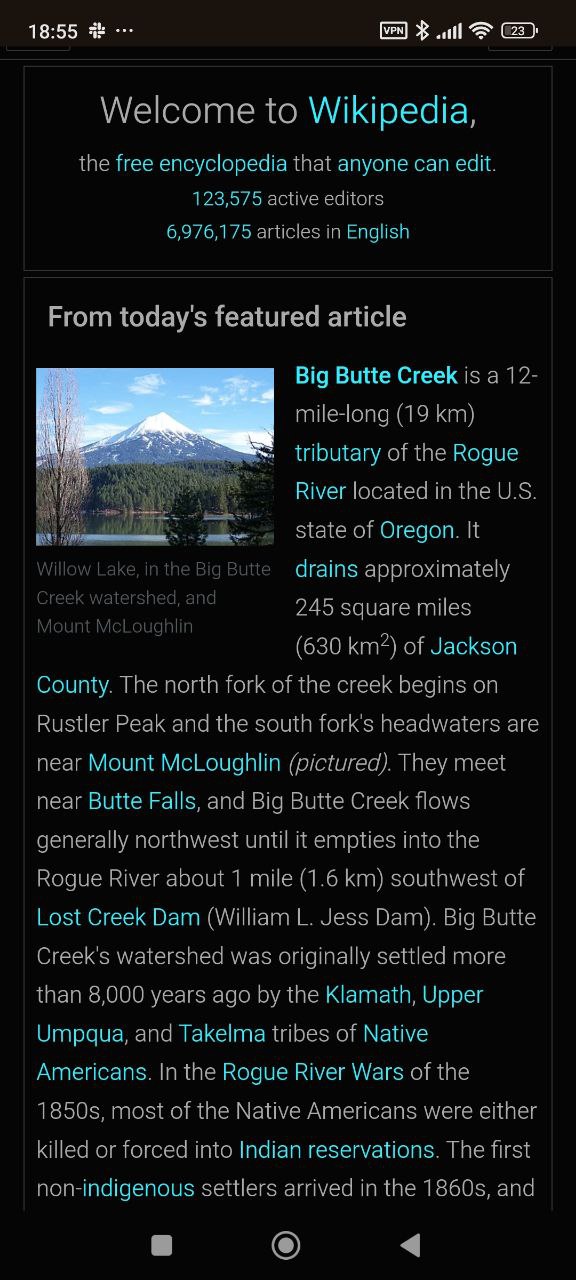
To add a userstyle, go to Settings → Filtering → Extensions→ Add extension → Import from file or URL. To create your own style, tap Add extension → Create userstyle.
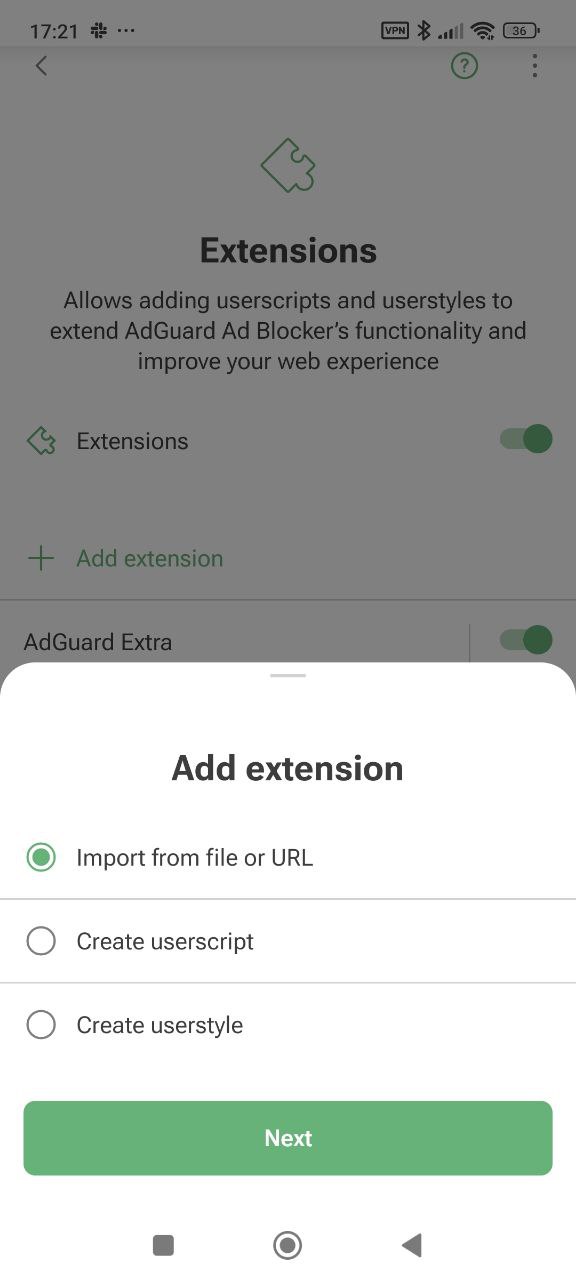
Also, some users might have recently faced a bug that was increasing statistics to ridiculously huge values. We fixed the issue, and once you install AdGuard v4.9 for Android, you will see normal numbers in the Statistics tab.
Please note that statistics accumulated earlier than the last 24 hours will be heavily pruned.
Aside from this serious issue, we have also worked on fixing smaller bugs. As always, we’ve updated CoreLibs and Scriptlets for better functionality of the app.
Changelog
Improvements
Fixes
- Billion values on statistic counters do not convert to abbreviations #5633
- Clicking AdGuard's protection status notification leads to mobile view on Amazon Fire TV stick #5498
- DNS filters are able to be updated if the DNS filters switch is disabled #5382
- Domain with the
$appmodifier fails to be added to HTTPS-filtered website exclusions #5587 - Option Filter secure DNS changes by itself after rebooting #5379
- Statistics bar overlaps the counter description in the Statistics tab #5138
- Impossible to download the Android system update #5651
- Unable to log in to the Adguard Ad Blocker app on Android TV
#5669
CoreLibs (filtering engine)
- CoreLibs updated to v1.17.118 #5654
Fixes
Scriptlets (JavaScript enhancement for filtering rules)
- Scriptlets updated to v2.1.6
Fixes
- Fixed
json-prune— content of array was incorrectly removed #482
AdGuard for Android direct download links:
AdGuard for Android TV direct download links:
4.7.2

In this update, we’ve fully fixed a problem that slipped through in the previous release: AdGuard protection would shut off whenever WebView was stopped or updated. With this version, Android 7 and 8 users can finally enjoy uninterrupted protection as well.
Changelog
Fixes
- AdGuard gets disabled when WebView is stopped or updated #5537