
Footprinting is the first phase of ethical hacking where a security professional collects information about a target system, network, or organization. The goal is to gather as much data as possible to understand the target’s infrastructure and identify potential security weaknesses before launching further testing.
- Identifies potential attack surfaces such as open services, domains, and network structures.
- Helps understand the target environment including technologies, employees, and infrastructure.
- Reduces the effort in later hacking phases by providing a clear roadmap of the target system.
- Allows organizations to detect information leaks that attackers could exploit.
Types of Footprinting
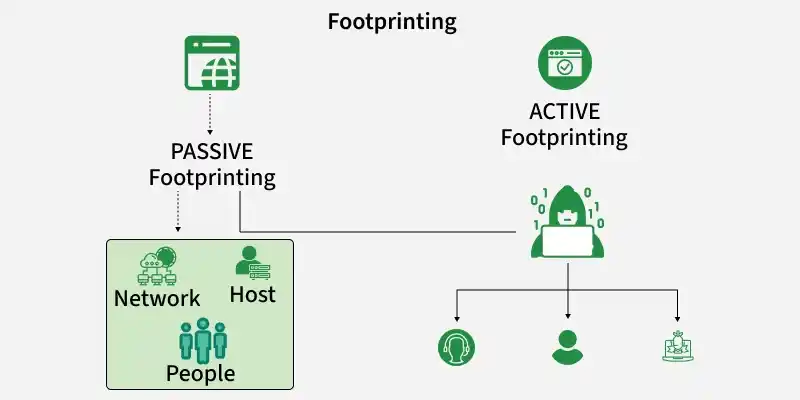
1. Passive Footprinting
Passive footprinting involves collecting information without directly interacting with the target system. This method is harder to detect because it relies on publicly available data.
Examples:
- Searching information on search engines
- Checking social media profiles
- Gathering information from public websites
- Looking up domain registration details (WHOIS)
2. Active Footprinting
Active footprinting involves direct interaction with the target system or network to gather information. This method is more accurate but may be detected by security systems.
- Network scanning
- Port scanning
- DNS queries
- Using tools like Nmap
Information Gathered During Footprinting
1. Domain Information
This information focuses on details related to the organization’s domain and DNS configuration.
- Domain and Subdomains: Identifying the main domain and associated subdomains helps discover additional services such as development sites, admin panels, or internal portals.
- DNS Records Analysis: Records such as A, MX, TXT, and NS reveal server locations, mail servers, and domain configuration details.
- Domain Registration Details: Information from WHOIS databases may include registrar data, domain owner details, and registration dates.
2. Network Information
Network footprinting helps ethical hackers understand the structure and accessibility of the organization’s network.
- IP Addresses and Network Ranges: Identifying public IP addresses and network blocks used by the organization helps map the target network.
- Network Infrastructure: Gathering information about routers, firewalls, and gateways used within the network environment.
- Accessible Servers and Services: Locating publicly exposed systems that may be targeted for further scanning and security testing.
3. System Information
System footprinting focuses on identifying technologies and platforms running on the target systems.
- Operating Systems Identification: Determining whether systems run Windows, Linux, or other operating systems.
- Web Technologies and Software: Identifying web servers, frameworks, CMS platforms, and programming technologies used by the target.
- Software Versions: Discovering application or server versions that may contain known vulnerabilities.
4. Employee Information
Employee footprinting collects publicly available information related to staff members within the organization.
- Employee Names and Roles: Gathering details about key employees, departments, and management structure.
- Email Addresses and Patterns: Identifying official email formats used by employees within the organization.
- Public Profiles and Documents: Collecting information from sources like company websites, social media platforms, or publicly available reports.
Sources of Information for Footprinting
Social Media
Social media platforms often contain a large amount of personal and organizational information that can be useful during footprinting.
- Employee Information: Profiles may reveal employee names, job roles, work locations, and contact details.
- Organizational Details: Posts, photos, and updates may expose company activities, technologies used, or internal projects.
- Fake Accounts for Information Gathering: Attackers sometimes create fake profiles to connect with employees and obtain sensitive information.
Job Websites
Job portals can unintentionally expose technical information about an organization.
- Technology Disclosure: Job postings often mention technologies, frameworks, or servers used within the organization.
- System and Software Information: Details like required skills may reveal specific software versions or platforms used by the company.
- Infrastructure Insights: Hiring for roles such as server administrators or security engineers can indicate the organization’s technical environment.
Google and Search Engines
Search engines are powerful tools for discovering publicly available information about a target.
- Advanced Search Operators: Operators such as
inurl:,allinurl:, andfiletype:help locate specific files or web pages. - Sensitive Information Discovery: Misconfigured websites may expose documents, login pages, or directories indexed by search engines.
- Google Dorking: A technique that uses advanced search queries to find sensitive information accidentally exposed online.
Social Engineering
Social engineering involves manipulating people or observing behavior to obtain sensitive information.
- Eavesdropping: Listening to private conversations over communication channels like phone calls to collect useful information.
- Shoulder Surfing: Observing someone while they enter confidential data such as passwords or email credentials.
- Human Interaction Techniques: Attackers may trick employees into revealing information through conversation or deception.
Archive.org
Archive websites store historical versions of websites that may contain previously available information.
- Access to Old Website Data: Archived pages may reveal information that has been removed from the current website.
- Technology and Structure Insights: Older versions may show previous server configurations or website structures.
- Hidden or Removed Content: Sensitive data that was once public may still be visible in archived snapshots.
Organization’s Website
A company’s official website is one of the primary sources of information for footprinting.
- Publicly Available Information: Details about company services, infrastructure, and partners are often available.
- Employee and Contact Details: Staff directories, email addresses, and support contacts may be listed.
- Technical Clues: Website code, metadata, and page structures may reveal technologies used by the organization.
Using NeoTrace
NeoTrace is a graphical network tracing tool used to analyze the path between two systems.
- Route Visualization: Displays the path between the user and the target system with intermediate nodes.
- Network Information: Provides details such as IP addresses, network providers, and geographical locations.
- Infrastructure Mapping: Helps understand the network route and identify systems involved in communication.
WHOIS Lookup
WHOIS services provide registration information about domain names.
- Domain Ownership Details: Information about the domain owner, registrar, and registration dates.
- Contact Information: May include administrative and technical contact details.
- Domain Infrastructure Data: Shows name servers and other domain-related configurations.
Popular Tools Used for Footprinting
1. Nmap:
A powerful tool used for network discovery and port scanning.
- Finds active hosts in a network
- Identifies open ports and running services
- Detects operating systems and service versions
2. Maltego:
An OSINT tool used for gathering and visualizing information.
- Collects data about domains, emails, and organizations
- Shows relationships between different entities
- Helps analyze connections using graphical diagrams
3. theHarvester:
A tool used to collect email addresses and domain information.
- Finds emails related to a domain
- Discovers subdomains of a website
- Gathers information from search engines and public sources
4. Recon-ng:
A reconnaissance framework used for automated information gathering.
- Uses modules for different reconnaissance tasks
- Collects data from multiple online sources
- Stores gathered information in a structured database
5. Shodan:
A search engine for internet-connected devices.
- Finds servers and devices connected to the internet
- Displays open ports and running services
- Helps identify exposed systems online