Introduction to Profit & Loss
This guide explains how to track your Profit and Loss (P&L or PnL) on Velocity to understand the performance of your open positions in perpetual markets.
What is P&L?
P&L reflects the potential profit or loss on your open positions. It’s a dynamic value that changes based on the current market price of the underlying asset compared to your average entry price. In simpler terms, it indicates whether your positions are currently trending towards profit or loss.
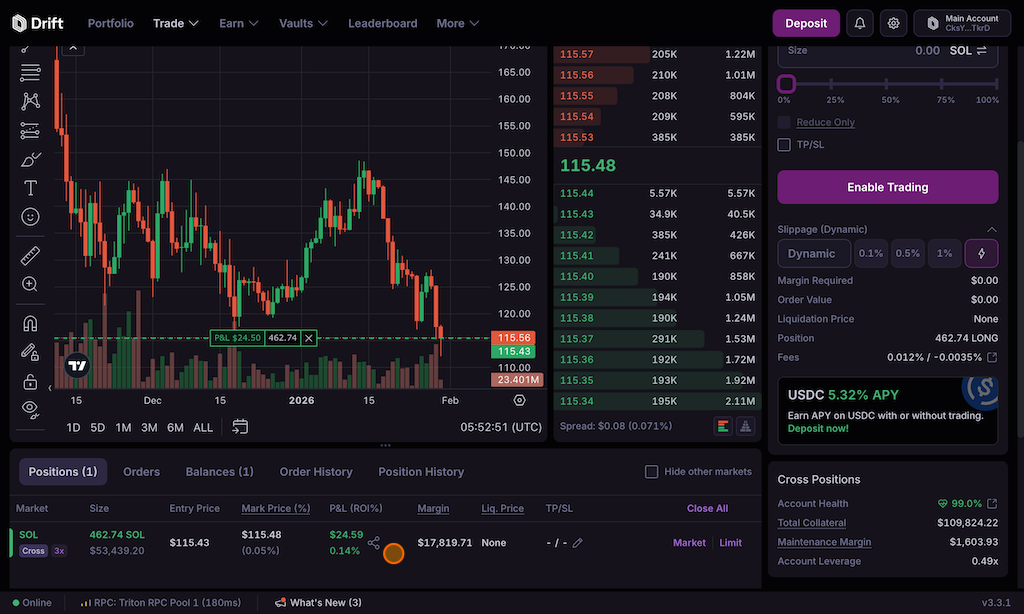
A user’s current position on Velocity is the cumulative sum of all their filled orders (increasing, reducing, or closing) over time. All trading lots, per market and per subaccount, are combined into a single position to determine P&L. The P&L in the table above is calculated as the difference between the position’s Entry Price with the current mark price (can toggle to oracle price) multiplied by the Size (view can be switched between $ and %).
P&L in the Positions tab is unrealised P&L (uP&L) and as such doesn’t represent actual withdrawable amount (claimed and settled P&L). Read the Types of P&L for more details.
Types of P&L
Unrealised P&L (uP&L): Potential profit or loss on open positions based on current market price vs. your entry price. It fluctuates with the market.Settled P&L: The portion of your realised profit or loss that has been transferred out of the perpetual market and applied to your USDT balance — this can happen independently of closing the position.Claimable / Unsettled P&L: Claimable P&L represents the portion of unsettled P&L that is available to be claimed at this moment. It is possible to have unsettled P&L that is not claimable due to insufficient funds in the P&L Pool, invalid oracle, or other reasons.
Example:
Open a position
You open a position (e.g., buying BTC-PERP) creating unsettled P&L of $0 (no initial change). Unsettled P&L reflects the potential profit or loss based on the current oracle price compared to your average entry price. Note: Immediately after you place a position, unsettled P&L can appear as positive or negative due to market trading above or below oracle price.
Price movement affects unsettled P&L
As the price moves, the difference between the current oracle price and your cost basis creates claimable / unsettled P&L. This is the potential profit or loss on your open position.
Closing the position: realising P&L
When you close (or reduce) the position, the closing price is used to calculate your realised P&L. This is the actual profit or loss you lock in, based on the difference between the closing price and your cost basis. Note: realising P&L does not settle it automatically — it only converts unrealised P&L into realised P&L that is still sitting unsettled in the perpetual market.
Settling P&L: a separate action
Realised P&L only becomes settled P&L once a settlePnl action is submitted, moving it out of the perpetual market. This can be done by you, your delegate, or in some cases a third party.
Withdrawal depends on the P&L pool
Once settled, your P&L becomes available for withdrawal from the P&L pool if the pool has enough funds. If not, you might need to wait for others to settle their losses before you can withdraw your profits.
What is the difference between Settling P&L and Realising P&L?
The key difference lies in the availability for withdrawal:
- Realised P&L doesn’t automatically guarantee immediate withdrawal. You need sufficient settled funds in the Market’s P&L Pool, which comes from accumulated settled losses from other users.
- Settled P&L is the realised profit that’s already been processed and added to the pool. This is the portion you can withdraw immediately.
P&L Settlement and Withdrawal
- Settling P&L moves profit/loss from a perpetual market to your USDT balance.
- Requires claiming settled P&L before withdrawal.
- P&L pool liquidity determines if settled P&L pool is claimable immediately.
Withdrawing realised P&L requires settling/claiming it first. Closing your position realizes your P&L, but it doesn’t automatically make it available for withdrawal.
How settlePNL Affects Your Position
Calling settlePNL settles a position’s negative unrealised P&L and sends it to the P&L Pool — but the position itself is unaffected. Instead, the position’s Cost Basis is adjusted so the position stays unchanged even though a portion of its unrealised loss has been realised and settled.

The P&L settled this way shows up in the Unrealised P&L tab, specifically in the Realised P&L column, with the adjusted cost basis reflected in the Cost Basis column:

Claiming Settled P&L
- On any trades screen navigate to the “Balances” tab.
- Select “Claim” for specific positions or “Claim All”.
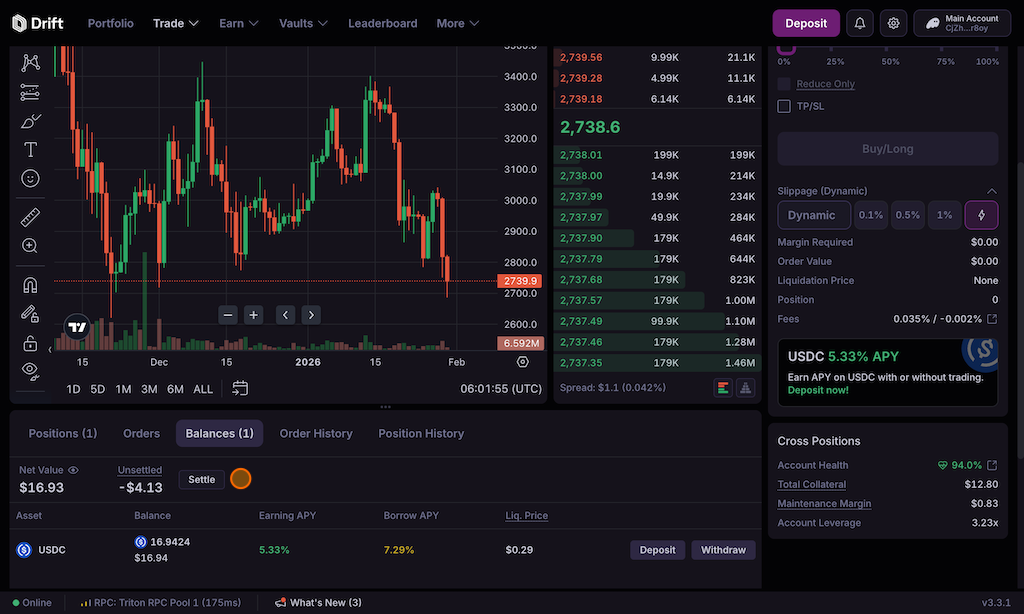
Users can claim positive P&L when:
-
the open position has been closed or reduced (i.e. your uP&L has been partially or wholly realised); note: this step is only necessary when the P&L pool balance is limited
-
the market’s P&L Pool has available balances to claim; and
-
their Cost Basis is below the Entry Price for longs or above the Entry Price for shorts.
Automatic P&L Settlement
Settling a negative unrealised P&L is unconditionally permissionless — anyone can settle it for any account at any time. Settling a positive unrealised P&L on someone else’s behalf, however, is only allowed when the market’s P&L Pool has excess funds available, or when the caller is the position owner or their delegate.
Settling the P&L will improve the accounts health.