

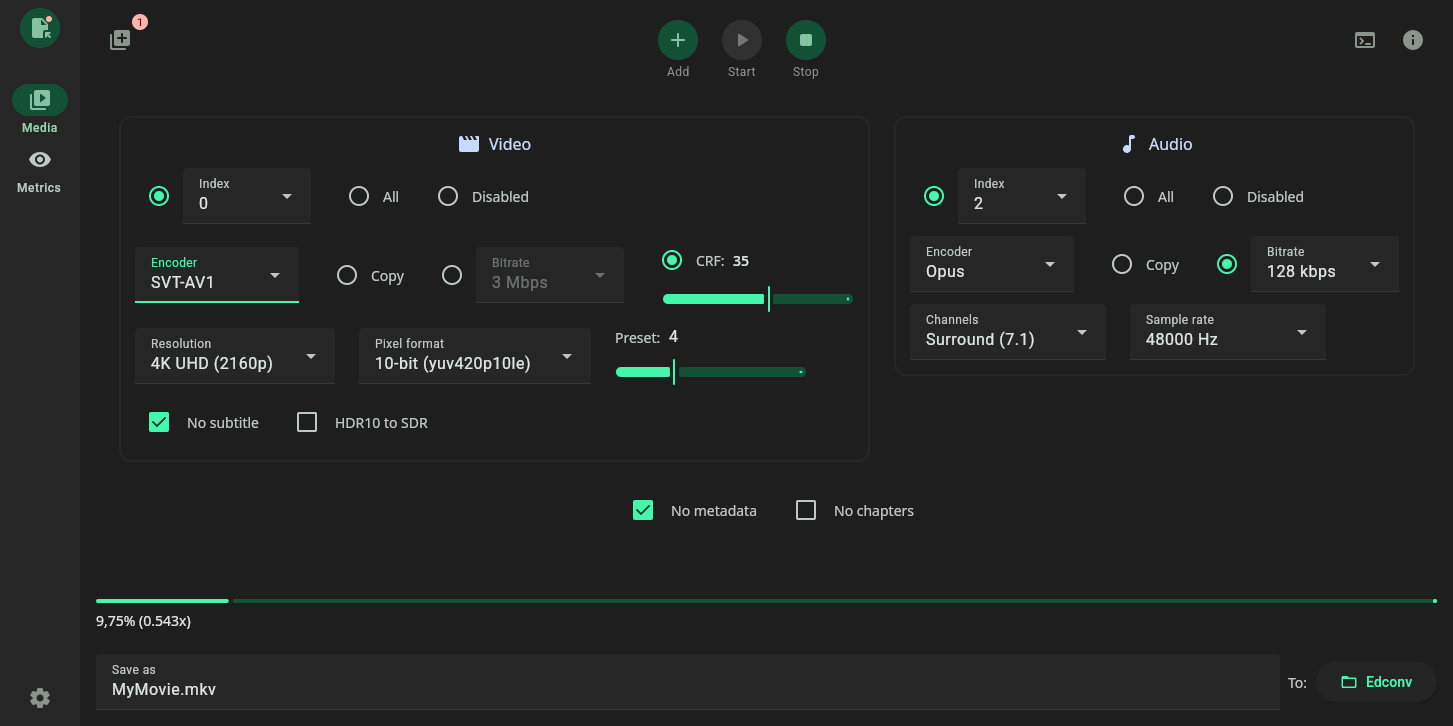
Edconv is a desktop application that gives FFmpeg a more approachable graphical interface for audio and video work.
Instead of relying entirely on terminal commands, users can manage common conversion tasks from a GUI while still taking advantage of FFmpeg’s power. The project also documents Linux installation options including Flatpak, AppImage, and Debian packages, and prompts users to select a local FFmpeg binary on first launch.
This is free and open source software.
Key Features
- Convert both video and audio files with FFmpeg.
- Queue multiple jobs and monitor them as they run.
- Pass custom FFmpeg arguments for advanced control.
- View detailed processing logs from inside the application.
- Inspect media information before processing files.
- Run VMAF, PSNR, and SSIM quality analysis from the GUI.
- Cross-platform support – runs under Linux, macOS, and Windows.
Website: github.com/edneyosf/Edconv
Support:
Developer: Edney Osf
License: GNU General Public License v3.0
Edconv is written in Kotlin. Learn Kotlin with our recommended free books and free tutorials.
Related Software
| Video Converters | |
|---|---|
| HandBrake | Multithreaded cross-platform media transcoding application |
| FFmpeg | Multimedia player, server and encoder |
| Shutter Encoder | Graphical frontend to FFmpeg with editing features |
| FastFlix | GUI for H.264, HEVC and AV1 hardware and software encoding |
| Videomass | Cross-platform GUI for FFmpeg and youtube-dl |
| avconv | Part of libav-tools; fork of FFmpeg |
| VLC | Vdeo player which also converts multimedia to different formats |
| mpv | Cross-platform media player with video encoding support |
| MEncoder | MEncoder is included in MPlayer |
| FFQueue | Graphical frontend to FFmpeg written in C++ |
| Edconv | User-friendly FFmpeg GUI |
| transcode | Utility to encode raw video/audio streams |
| OmniGet | Uses FFmpeg to perform the video conversion |
| MystiQ | GUI for FFmpeg, a powerful media converter |
| Frame | Desktop media conversion utility |
| ffdash | VP9 video encoder |
| Constrict | Compress videos to target sizes |
| Leonardo | Media conversion application |
| Ciano | Easy way to convert your multimedia files to the most popular formats |
| Recoder | GTK4 video transcoding application |
| VidCom | Simple utility for video archiving and compression |
Read our verdict in the software roundup.
 Explore our comprehensive directory of recommended free and open source software. Our carefully curated collection spans every major software category. Explore our comprehensive directory of recommended free and open source software. Our carefully curated collection spans every major software category.This directory is part of our ongoing series of informative articles for Linux enthusiasts. It features hundreds of detailed reviews, along with open source alternatives to proprietary solutions from major corporations such as Google, Microsoft, Apple, Adobe, IBM, Cisco, Oracle, and Autodesk. You’ll also find interesting projects to try, hardware coverage, free programming books and tutorials, and much more. Discovered a useful open source Linux program that we haven’t covered yet? Let us know by completing this form. |
Hi Steve. Edconv is cross-platform.
Thanks Torin, article updated to reflect it runs under Linux, macOS, and Windows. I only test software in Linux.
No problem. I understand that you only test software in Linux. I too use exclusively GNU/Linux. But I always check the main website or GH page for example, to see if it’s also on other platforms.
It’s sometimes a grey area. Easy when the developer provides binaries such as with Edconv.
But a program might say build natively on Windows even if the developer says only Linux is supported and doesn’t provide a Windows binary.
Sometimes the developer says a platform might work but it’s not supported, or (s)he hasn’t tested it. A bit of a minefield.
Why even mention Windows when this is a Linux site?
We get a lot of visits from users running Windows. Now some will be forced to use Windows (e.g. they may be at work), but there are still a lot who like using open source software running on Windows. And a lot of software developed on Linux has a Windows port.
If a FLOSS program on LL is cross-platform, then that should be mentioned.
I agree, it’s useful information for readers. LinuxLinks focuses on Linux, but if a FLOSS program also runs on Windows, macOS, BSD, Android, or the web, that affects who can use it and how portable the software is.
It also avoids giving the impression that the program is Linux-only when it isn’t. The key point is to mention it only when it’s confirmed from the project’s own documentation or repository, not inferred.