

Shop Viral Womens Fashion Now

TP-Link EAP225 Omada AC1350 Gigabit Wireless Access Point Business WiFi Solution w/Mesh Support, Seamless Roaming & MU-MIMO PoE Powered SDN Integrated Cloud Access & Omada App White

Amazon's Choice

Amazon's Choice highlights highly rated, well-priced products available to ship immediately.

Amazon's Choice
Loading Images...
Double-tap to zoom
Brief content visible, double tap to read full content.
Full content visible, double tap to read brief content.
Updated other options based on this selection
{"mobile_buybox_group_1":[{"displayPrice":"$59.99","priceAmount":59.99,"currencySymbol":"$","integerValue":"59","decimalSeparator":".","fractionalValue":"99","symbolPosition":"left","hasSpace":false,"showFractionalPartIfEmpty":true,"offerListingId":"gubWMca75t7cjEdQSUAnWBdOD0TanSfsyWHJNLsiXAQ2yHb8s6%2BiC3HUwJm5V49W%2B0aMREU6FhIi5lCSgGYSO%2FvgxGqCoR7Xkf0jyo5gUJ5FL8BKMv2qxplgQ5fq1KwsQEcu6DyGBJXj8CBOjKwP0w%3D%3D","locale":"en-US","buyingOptionType":"NEW","aapiBuyingOptionIndex":0}, {"displayPrice":"$50.31","priceAmount":50.31,"currencySymbol":"$","integerValue":"50","decimalSeparator":".","fractionalValue":"31","symbolPosition":"left","hasSpace":false,"showFractionalPartIfEmpty":true,"offerListingId":"gubWMca75t7cjEdQSUAnWBdOD0TanSfskksMDNGvTtdWQFtAPwxBB%2Fzy7etEnc2CJHdOW3k%2BvrxPR9smMLOWDnTE3wh7f2FUmfGZFZU7nF8BtCBKUGGfZxAunQ3x4jhutVHK908xuGFL%2BNjHgRL9O866Jen8pQ7UrDOsC%2BWPcj2ocQnLB60pJIi4Lf5cMyoU","locale":"en-US","buyingOptionType":"USED","aapiBuyingOptionIndex":1}]}
Brief content visible, double tap to read full content.
Full content visible, double tap to read brief content.

Purchase options and add-ons

Enjoy fast, free delivery, exclusive deals, and award-winning movies & TV shows.
Buy New
-14% $59.99
FREE delivery Friday, May 22
Ships from: Amazon.com
Sold by: Amazon.com
$59.99 with 14 percent savings
List Price: $69.99
FREE delivery Friday, May 22
Or Prime members get FREE delivery Tomorrow, May 18. Order within 1 hr 47 mins. Join Prime
In Stock
$$59.99 () Includes selected options. Includes initial monthly payment and selected options. Details
Price
Subtotal
$$59.99
Subtotal
Initial payment breakdown
Shipping cost, delivery date, and order total (including tax) shown at checkout.
Shipper / Seller
Amazon.com
Amazon.com
Shipper / Seller
Amazon.com
Returns
FREE 30-day refund/replacement
Quick refund
Usually issued within 24 hours. See exceptions
FREE return
At least one free return option available.
Convenient dropoff
At any of our 50,000 US locations.
See return policy
Payment
Secure transaction
Your transaction is secure
We work hard to protect your security and privacy. Our payment security system encrypts your information during transmission. We donโ€™t share your credit card details with third-party sellers, and we donโ€™t sell your information to others. Learn more
Support
Product support included
What's Product Support?
In the event your product doesn't work as expected or you need help using it, Amazon offers free product support options such as live phone/chat with an Amazon associate, manufacturer contact information, step-by-step troubleshooting guides, and help videos. By solving product issues, we help the planet by extending the life of products. Availability of support options differ by product and country. Learn more
Packaging
Ships in product packaging
black leaf Ships in product packaging

This item has been tested to certify it can ship safely in its original box or bag to avoid unnecessary packaging. Since 2015, we have reduced the weight of outbound packaging per shipment by 41% on average, thatโ€™s over 2 million tons of packaging material.

If you still require Amazon packaging for this item, choose "Ship in Amazon packaging" at checkout. Learn more
Add a protection plan

Monthly protection plan removed

Sorry, your monthly warranty plan was removed because these plans are currently only available for single-item orders.
$50.31 with 28 percent savings
List Price: $69.99
FREE Returns
Looks and functions as if it were new. Item will come in original packaging.
FREE delivery Friday, May 22
Or fastest delivery Thursday, May 21. Order within 1 hr 47 mins
In Stock
$$59.99 () Includes selected options. Includes initial monthly payment and selected options. Details
Price
Subtotal
$$59.99
Subtotal
Initial payment breakdown
Shipping cost, delivery date, and order total (including tax) shown at checkout.
{"mobile_buybox_group_1":[{"displayPrice":"$59.99","priceAmount":59.99,"currencySymbol":"$","integerValue":"59","decimalSeparator":".","fractionalValue":"99","symbolPosition":"left","hasSpace":false,"showFractionalPartIfEmpty":true,"offerListingId":"gubWMca75t7cjEdQSUAnWBdOD0TanSfsyWHJNLsiXAQ2yHb8s6%2BiC3HUwJm5V49W%2B0aMREU6FhIi5lCSgGYSO%2FvgxGqCoR7Xkf0jyo5gUJ5FL8BKMv2qxplgQ5fq1KwsQEcu6DyGBJXj8CBOjKwP0w%3D%3D","locale":"en-US","buyingOptionType":"NEW","aapiBuyingOptionIndex":0}, {"displayPrice":"$50.31","priceAmount":50.31,"currencySymbol":"$","integerValue":"50","decimalSeparator":".","fractionalValue":"31","symbolPosition":"left","hasSpace":false,"showFractionalPartIfEmpty":true,"offerListingId":"gubWMca75t7cjEdQSUAnWBdOD0TanSfskksMDNGvTtdWQFtAPwxBB%2Fzy7etEnc2CJHdOW3k%2BvrxPR9smMLOWDnTE3wh7f2FUmfGZFZU7nF8BtCBKUGGfZxAunQ3x4jhutVHK908xuGFL%2BNjHgRL9O866Jen8pQ7UrDOsC%2BWPcj2ocQnLB60pJIi4Lf5cMyoU","locale":"en-US","buyingOptionType":"USED","aapiBuyingOptionIndex":1}]}
Brief content visible, double tap to read full content.
Full content visible, double tap to read brief content.
Brief content visible, double tap to read full content.
Full content visible, double tap to read brief content.
Added to your cart

Add to your order

  • Coverage for accidental damage including drops, spills, and broken parts, as well as breakdowns (plans vary)
  • 24/7 support when you need it
  • Quick, easy, and frustration-free claims
Cover this product:

3-Year Protection Plan

$7.99

4-Year Protection Plan

$10.99
Cover all of your eligible devices:

Complete Protect: One plan covers all eligible past and future purchases (Best Value)

$16.99/month

Add to your order

  • Coverage for accidental damage including drops, spills, and broken parts, as well as breakdowns (plans vary)
  • 24/7 support when you need it
  • Quick, easy, and frustration-free claims
Cover this product:

Product Protection by Asurion, LLC

  • No Additional Cost: You pay nothing for repairs โ€“ parts, labor, and shipping included.
  • Coverage: Plan starts on the date of purchase. Malfunctions covered after the manufacturer's warranty. Power surges covered from day one. Real experts are available 24/7 to help with set-up, connectivity issues, troubleshooting and much more.
  • Easy Claims Process: File a claim anytime online or by phone. Most claims approved within minutes. We will send you an e-gift card for the purchase price of your covered product. In some instances, we will replace or repair it.
  • Product Eligibility: Plan must be purchased with a product or within 30 days of the product purchase. Pre-existing conditions are not covered.
  • Terms & Details: More information about this protection plan is available within the โ€œProduct guides and documentsโ€ section. Simply click โ€œUser Guideโ€ for more info. Terms & Conditions will be available in Your Orders on Amazon. Asurion will also email your plan confirmation with Terms & Conditions to the address associated with your Amazon account within 24 hours of purchase.

Product Protection by Asurion, LLC

  • No Additional Cost: You pay nothing for repairs โ€“ parts, labor, and shipping included.
  • Coverage: Plan starts on the date of purchase. Malfunctions covered after the manufacturer's warranty. Power surges covered from day one. Real experts are available 24/7 to help with set-up, connectivity issues, troubleshooting and much more.
  • Easy Claims Process: File a claim anytime online or by phone. Most claims approved within minutes. We will send you an e-gift card for the purchase price of your covered product. In some instances, we will replace or repair it.
  • Product Eligibility: Plan must be purchased with a product or within 30 days of the product purchase. Pre-existing conditions are not covered.
  • Terms & Details: More information about this protection plan is available within the โ€œProduct guides and documentsโ€ section. Simply click โ€œUser Guideโ€ for more info. Terms & Conditions will be available in Your Orders on Amazon. Asurion will also email your plan confirmation with Terms & Conditions to the address associated with your Amazon account within 24 hours of purchase.

Product Protection by Asurion, LLC

  • BEST VALUE: Protect all your eligible Amazon purchases including: tech, tools, appliances, furniture and more. All for one low monthly price.
  • ONE SIMPLE PROTECTION PLAN: Covers malfunctions and failures for eligible Amazon purchases, plus drops or spills for portable items. Protection begins immediately for eligible purchases from the past 90 days, plus all eligible future purchases (products used commercially are excluded).
  • CYBERSECURITY INCLUDED: Trusted digital security that keeps your devices and data safer. Includes scam detection for emails and texts ($89.99 in annual savings).
  • QUICK AND EASY CLAIMS: File in minutes at Asurion.com/amazon for fast repair or reimbursement - up to the purchase price.
  • NO HIDDEN FEES. CANCEL ANYTIME. Youโ€™re covered for up to $5,000 in total claims per 12-month period. Your plan renews monthly until canceled (coupons applied at checkout do not renew monthly).

Product Protection by Asurion, LLC

Please ensure you are not covered by existing insurance
  • No Additional Cost: You pay nothing for repairs โ€“ parts, labor, and shipping included.
  • Coverage: Plan starts on the date of purchase. Malfunctions covered after the manufacturer's warranty. Power surges covered from day one. Real experts are available 24/7 to help with set-up, connectivity issues, troubleshooting and much more.
  • Easy Claims Process: File a claim anytime online or by phone. Most claims approved within minutes. We will send you an e-gift card for the purchase price of your covered product. In some instances, we will replace or repair it.
  • Product Eligibility: Plan must be purchased with a product or within 30 days of the product purchase. Pre-existing conditions are not covered.
  • Terms & Details: More information about this protection plan is available within the โ€œProduct guides and documentsโ€ section. Simply click โ€œUser Guideโ€ for more info. Terms & Conditions will be available in Your Orders on Amazon. Asurion will also email your plan confirmation with Terms & Conditions to the address associated with your Amazon account within 24 hours of purchase.
Cover this product:
3-Year Protection Plan
$7.99
4-Year Protection Plan
$10.99
Complete Protect: One plan covers all eligible past and future purchases (Best Value)
$16.99/month

3-Year Protection Plan

from Asurion, LLC
$7.99
  • No Additional Cost: You pay nothing for repairs โ€“ parts, labor, and shipping included.
  • Coverage: Plan starts on the date of purchase. Malfunctions covered after the manufacturer's warranty. Power surges covered from day one. Real experts are available 24/7 to help with set-up, connectivity issues, troubleshooting and much more.
  • Easy Claims Process: File a claim anytime online or by phone. Most claims approved within minutes. We will send you an e-gift card for the purchase price of your covered product. In some instances, we will replace or repair it.
  • Product Eligibility: Plan must be purchased with a product or within 30 days of the product purchase. Pre-existing conditions are not covered.
  • Terms & Details: More information about this protection plan is available within the โ€œProduct guides and documentsโ€ section. Simply click โ€œUser Guideโ€ for more info. Terms & Conditions will be available in Your Orders on Amazon. Asurion will also email your plan confirmation with Terms & Conditions to the address associated with your Amazon account within 24 hours of purchase.

Loading recommendations for you
Continue Shopping

Added to Cart

Not Added

Item is in your Cart

Not Added

There was a problem adding this item to Cart. Please try again later.

Frequently bought together

+
TP-Link TL-SG1005P, 5 Port Gigabit PoE Switch, 4 PoE+ Ports @65W, Desktop, Plug & Play, Sturdy Metal w/ Shielded Ports, Fanle
+
TP-Link Hardware Controller (OC200) โ€“ SDN Integrated, Powered, Manages up to 100 Devices, Intelligent Network Monitoring, Clo

Frequently bought together

Brief content visible, double tap to read full content.
Full content visible, double tap to read brief content.
Total price:ย $00
Details
Added to Cart
Some of these items ship sooner than the others.
Brief content visible, double tap to read full content.
Full content visible, double tap to read brief content.

Product details

About this product

Top highlights

  • ๐’๐ฎ๐ฉ๐ž๐ซ๐ข๐จ๐ซ ๐’๐ฉ๐ž๐ž๐๐ฌ ๐ฐ๐ข๐ญ๐ก ๐Œ๐”-๐Œ๐ˆ๐Œ๐Ž: Designed with the latest 802.11ac Wave 2 MU-MIMO technology, the EAP225 reliably delivers dual-band Wi-Fi speeds up to 1350 Mbps to multiple devices simultaneously.
  • ๐ˆ๐ง๐ญ๐ž๐ ๐ซ๐š๐ญ๐ž๐ ๐ข๐ง๐ญ๐จ ๐Ž๐ฆ๐š๐๐š ๐’๐ƒ๐: Omada's Software Defined Networking (SDN) platform integrates network devices including access points, switches and gateways with multiple control options offered - Omada Hardware controller, Omada Software Controller or Omada cloud-based controller(Contact TP-Link for Cloud-Based Controller Plan Details). Standalone mode also applies.
  • ๐‚๐ฅ๐จ๐ฎ๐ ๐€๐œ๐œ๐ž๐ฌ๐ฌ: Remote Cloud access and Omada app brings centralized cloud management of the whole network from different sitesโ€”all controlled from a single interface anywhere, anytime.
  • ๐’๐ƒ๐ ๐‚๐จ๐ฆ๐ฉ๐š๐ญ๐ข๐›๐ข๐ฅ๐ข๐ญ๐ฒ: For SDN usage, make sure your devices/controllers are either equipped with or can be upgraded to SDN version. SDN controllers work only with SDN Access Points, Switches and Gateways. Non-SDN controllers work only with non-SDN APs.
  • ๐€๐๐ฏ๐š๐ง๐œ๐ž๐ ๐–๐ข๐ซ๐ž๐ฅ๐ž๐ฌ๐ฌ ๐“๐ž๐œ๐ก: Supports Mesh WiFi, Seamless Roaming(Omada Mesh and Seamless Roaming require the use of Omada SDN controllers), Band Steering, Airtime Fairness and Beamforming technologies.
  • ๐Œ๐ฎ๐ฅ๐ญ๐ข๐ฉ๐ฅ๐ž ๐๐จ๐„ ๐Ž๐ฉ๐ญ๐ข๐จ๐ง๐ฌ ๐Ÿ๐จ๐ซ ๐„๐š๐ฌ๐ฒ ๐ˆ๐ง๐ฌ๐ญ๐š๐ฅ๐ฅ๐š๐ญ๐ข๐จ๐ง: EAP225 supports both 802.3af/at PoE and Passive PoE power supply, can be either powered by a PoE switch or the provided PoE adapter, making deployment effortless and flexible.
  • ๐Ÿ“ ๐˜๐ž๐š๐ซ๐ฌ ๐–๐š๐ซ๐ซ๐š๐ง๐ญ๐ฒ: Backed by our industry-leading 5-years warranty and free technical support from 6am to 6pm PST Monday to Fridays, you can work with confidence.
Manufacturerโ€™s warranty can be requested from customer service. Click here to make a request to customer service.

Top Brand: TP-Link

Highly Rated
100K+ customers rate items from this brand highly
Trending
100K+ orders for this brand in past 3 months
Low Returns
Customers usually keep items from this brand
Brief content visible, double tap to read full content.
Full content visible, double tap to read brief content.
  • AC1350 Wireless MU-MIMO Gigabit Ceiling Mount Access Point EAP225 Power Adapter Mounting Kits Installation Guide

EAP225 supports both 802.3af PoE and passive PoE power supply, can be either powered by a PoE switch or the provided PoE adapter, making deployment effortless and flexible.
maximum wireless transmission rates are the physical rates derived from IEEE standard 802.11 Specifications. Range and coverage specifications along with the number of connected devices were defined according to test results under normal usage conditions. Actual wireless transmission rate, wireless coverage, and number of connected devices are not guaranteed, and will vary as a result of 1) environmental factors, including building materials, physical objects and obstacles, 2) network conditions, including local interference, volume and density of traffic, product location, network complexity, and network overhead and 3) client limitations, including rated performance, location, connection quality, and client condition.
mu-mimo capability requires client devices that also support MU-MIMO.
seamless roaming requires both the access point and client devices to support 802.11K and 802.11V protocols.

Important information

Legal Disclaimer

1. Maximum wireless transmission rates are the physical rates derived from IEEE Standard 802.11 specifications. Range and coverage specifications are based upon test results under normal usage conditions. Actual wireless transmission rate and wireless coverage are not guaranteed and will vary as a result of 1) environmental factors, including building materials, physical objects and obstacles, 2) network conditions, including local interference, volume and density of traffic, product location, network complexity, and network overhead and 3) client limitations, including rated performance, location, connection quality, and client condition. 2. Actual network speed may be limited by the rate of the product's Ethernet WAN or LAN port, the rate supported by the network cable, Internet service provider factors and other environmental conditions.

Brief content visible, double tap to read full content.
Full content visible, double tap to read brief content.
Brief content visible, double tap to read full content.
Full content visible, double tap to read brief content.

Safety and product resources

Brief content visible, double tap to read full content.
Full content visible, double tap to read brief content.

Need help in finding the right networking router?

Brief content visible, double tap to read full content.
Full content visible, double tap to read brief content.
Brief content visible, double tap to read full content.
Full content visible, double tap to read brief content.
Brief content visible, double tap to read full content.
Full content visible, double tap to read brief content.
Brief content visible, double tap to read full content.
Full content visible, double tap to read brief content.
Brief content visible, double tap to read full content.
Full content visible, double tap to read brief content.

From the manufacturer

1
2
3

Superior WiFi Speeds and Long-Range Coverage

EAP225 provides boosted WiFi speeds up to 1350 Mbps with Beamforming and ensures long-range coverage while advanced wireless technologies like Load Balancing, Band Steering, and Airtime Fairness optimize the whole network to improve performance and efficiency.
4

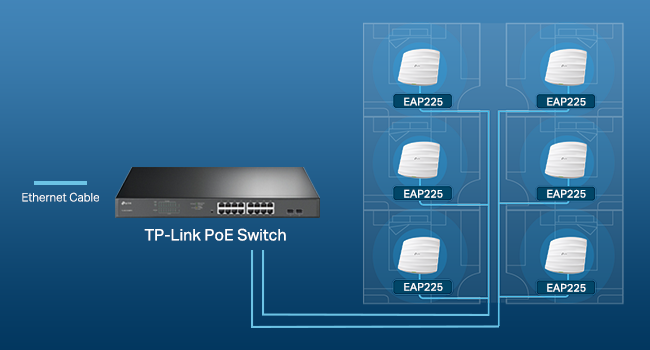
Effortless Deployment with PoE

With 802.3af/802.3at Power over Ethernet (PoE) supported, there is no need to install additional wiring. Simply plug in the existing Ethernet cables and youโ€™re ready to go.

Easy Deployment & Higher Performance by Omada Mesh

1

Easy Pairing with Less Wiring

Omada EAPs with Mesh technology*(Omada Mesh requires the use of Omada SDN controllers) saves you from extra wires by wirelessly extending your WiFi signal and optimizing the best path between EAPs.

1

Self-healing

If one link has an issue, the system will automatically reroute data via the other Omada devices to make sure you stay online.

1

Seamless Roaming

Seamless roaming*(Seamless Roaming requires the use of Omada SDN controllers) switches clients to the AP with the best signal automatically, even when moving. This allows sensitive applications like VoIP and video conferences to go uninterrupted.

2

Omada SDN with Flexible Management and Cloud Access

Omada SDN integrates network devices including access points, gateways & switches w/ multiple control options offered - Hardware controller, Software Controller & Cloud-based Controller*.

9

Smarter Cloud Solution for Business Networking

Remote Cloud access and Omada app brings centralized management of the whole network from different sitesโ€”all controlled from a single interface anywhere, anytime.

  • These models are designed to be compatible SDN platforms: EAP225 v3, EAP245 v3, EAP265 HD, EAP660 HD, EAP610, EAP620 HD, EAP115 v4, EAP110-Outdoor v3, EA225-Outdoor, EAP615-Wall, EAP235-Wall, EAP225-Wall v2 and so on.

  • No, in order to manage non-SDN devices, a non-SDN controller must be used.

  • Currently the use of non-SND and SDN devices together on a network is not supported.

  • Multiple options - Omada hardware controller and Omada software controller. Centralized cloud management allows for remote management of the entire network from different sites via a single interface.

  • Omada Cloud-based controller plan may vary. Please contact TP-Link for further plan details.

Brief content visible, double tap to read full content.
Full content visible, double tap to read brief content.

From the brand

Customers say

Customers find the wireless access point easy to set up and reliable, working right out of the box with good performance. The device provides strong signal strength throughout homes, with one customer noting excellent coverage up to 180 feet, and delivers reading speeds of 1000Mbs. While many customers report no dropped connections, some experience connectivity issues. Customers consider it excellent value for money.
AI Generated from the text of customer reviews

Select to learn more

221 customers mention setup, 194 positive, 27 negative
Customers find the router easy to set up, with quick installation and controller software that simplifies integration. One customer specifically mentions being able to configure a guest network within minutes.AI Generated from the text of customer reviews
These access points are amazing.... easy to setup...easy to deploy...honestly the only problem I have ever had with them was a reporting issue that...Read more
...I used a Wifi extender which was easy to install, just plug into an outlet in my garage, but the software setup was very difficult despite the claim...Read more
Easy setup. Way more functionality than I needed for now but still not hard to deal with. Perfect for the crowded meeting room I installed it in....Read more
Great deal, easy to set up, supports VLANs and PoE. Perfect. Has been running without a hiccup for over a year in a dirty dusty shop environment.Read more
219 customers mention reliability, 169 positive, 50 negative
Customers find the router reliable, noting it works right out of the box with great performance, and one customer mentions it performs well even in metal buildings.AI Generated from the text of customer reviews
Works great! Only complaint is the user interface which, while doing what it is supposed to do, is not easy to use for the average Joe....Read more
Works well and was easy enough to set up. I wish it had the function that I could set it to stop broadcasting a signal at night.Read more
...The access point that this was replacing was old and slow, but it was reliable.Read more
...And still DIDN'T WORKRead more
133 customers mention quality, 122 positive, 11 negative
Customers find the wireless access point to be a great piece of hardware.AI Generated from the text of customer reviews
Great product! Despite being business class, I used it for residential, to improve my performance throught my residence....Read more
This is a great access point that I've been using for many years....Read more
For the price, this is a good product....Read more
Great AP and pretty good non cloud features. I donโ€™t need most of the cloud features so Iโ€™m not using that at the moment....Read more
103 customers mention range, 93 positive, 10 negative
Customers are satisfied with the router's range, reporting good coverage in homes and cluttered environments, with one customer noting it works well for perimeter cameras and another mentioning it provides 200mb coverage.AI Generated from the text of customer reviews
Being POE they are easy to install. They have great range and are easy to set up.Read more
Easy and fast to setup, great coverage. Only downside is that an external controller is needed to setup seamless roaming with multiple units.Read more
Excellent access point. Good range and easy setup....Read more
...front yard, backyard and garage, with one network name and seamless roaming with virtually no disconnection when going from one access point to...Read more
103 customers mention signal strength, 81 positive, 22 negative
Customers praise the router's signal strength, noting it is strong throughout the house and reliable, with one customer specifically mentioning good performance at 180 feet.AI Generated from the text of customer reviews
Mounted in the center of my house and have great signal through out my 1500 square feet house. Very easy to set up. Highly recommend.Read more
...From upstairs to the basement is strong signal. I'll mesh another unit in to get me strong signal into the neighbor's yard. Love it....Read more
...The signal strength and coverage are both great. The throughput is good but TP-Link does offer higher speeds on some of their higher end APs....Read more
...that we no longer have any devices connected to it due to the weak signal....Read more
85 customers mention value for money, 80 positive, 5 negative
Customers find the router to be excellent value for money, offering great performance at an inexpensive price point.AI Generated from the text of customer reviews
...Will update if so. This is a great price for a great piece of hardware whether you use it as a standalone AP or part of a larger system....Read more
An inexpensive access point that has great value. I have 2 of these and the OC-200 hardware controller....Read more
what a product. easy to set up, full of features really worth every pennyRead more
...The browser method in the instructions did not work. Great performance for the priceRead more
67 customers mention speed, 50 positive, 17 negative
Customers praise the router's performance, noting its reading speeds of up to 1000Mbs and quick setup time of less than 5 minutes. One customer mentions smooth power supply via POE, while another notes its responsiveness even under load.AI Generated from the text of customer reviews
...Highly suggest this over an extender. This gets you fast, reliable internet instead of the slow, unreliable internet you get with an extender.Read more
...and giving signal to all my basement devices, gives great signal and speed. I really like the Power over Ethernet, looks cleanRead more
Not happy. The range is fine but the speeds are terrible. Even 10โ€™ away, I get 50 megabits down....Read more
Can't believe how quick and easy this was to install and configure and I am not an IT pro....Read more
94 customers mention connectivity, 54 positive, 40 negative
Customers have mixed experiences with the router's connectivity, with some reporting reliable client connections and no dropped connections, while others experience connectivity issues and frequent drops from the access point.AI Generated from the text of customer reviews
...It does have VLAN support. If you don't know what that is you don't need it. I didn't try it out, so don't know how well it works or not....Read more
...but now I find that I need to reboot the device monthly due to dropped connections....Read more
AMAZING PRODUCT - QUICK INSTALLATION AND WORKS GREAT WITH AMADA ROUTER AT A GREAT PRICE.Read more
...I got a strong wifi signal, *but* no internet connection โ€“ which pointed to the router โ€“ so I contacted TP-Link again for help....Read more

Submit a report

A few common reasons customers report reviews:
  • Harassment, profanity
  • Spam, advertisement, promotions
  • Given in exchange for cash, discounts
When we get your report, we'll check if the review meets our Community guidelines. If it doesn't, we'll remove it.
Sorry we couldn't load the review
Thank you for your feedback

Sorry, there was an error

Please try again later.

Top reviews from the United States

  • 5.0 out of 5 starsVerified Purchase
    Pretty Much As Perfect As It Gets!!
    Reviewed in the United States on May 29, 2021
    Style: w/ PoE AdapterSize: AC1200, 1G Port
    First of all, let's get this out of the way. There's a review that states: "You canโ€™t program this device (create and ssid and password protect your WiFi) without downloading their app that logs all the sites you visit TP Link shares this information...
    First of all, let's get this out of the way. There's a review that states:

    "You canโ€™t program this device (create and ssid and password protect your WiFi) without downloading their app that logs all the sites you visit TP Link shares this information with their 'partners' per their privacy policy..."

    Let me explain what I did and let you be the judge. I installed one. (I ordered two and they're both installed now.) Then I discovered its IP address using Advanced IP Scanner. (I also could have used IPScan or looked at a status page on my router.) At no time did I use a mobile device for anything, let alone download an app. From there, I its (really GOOD) GUI interface, turned off its DHCP and set the IP address I wanted it to be, using Firefox (I could also have used Chrome, Opera, or K-Meleon, all of which I have installed. I then went back in and set everything else the way I wanted it. If the reviewer was talking about the Omada software (which I don't use), he should have stated that. I hope this will allow you to make it past that review and read some "real" reviews.

    There are no cons that I can think of except those dictated by the limits on WiFi imposed by the FCC. The range is not miraculous, but it's VERY good.

    Really nice 360 degree coverage!! (When mounted on the ceiling, anyway!) It's extremely competent and secure, with lots of settings. Guest networks with lots of settings. Pretty much each and every setting can be set for each band (2.14 or 5GHz) and for the guest networks - separately. I have a 10 foot ceiling throughout, with ceiling tiles. I can't tell you how pleased I was that long, thin screws, "fender" washers and wingnuts were included just for that!! I can almost say it's a tool less installation, but you do have to cut a hole in the ceiling tile. I used my Swiss Army Knife. They look really nice. The power LED is very bright and visible and can be turned on or off in the settings, too. Two of them have been running flawlessly for almost two months now. It's a 3000 square foot building and it's notorious for "eating" RF. It's cider block and it even has some cinder block wall on the inside. The best cordless phones made can barely make it from one end to the other and die almost as soon as one walks outside. These two EAP's cover it completely and even reach outside! There is nowhere I can go where the signal strength isn't at least "Good". In most places, it's "Excellent". Now there's WiFi outside, too, as long as one doesn't stray too far. One is powered by the PoE adapter that came with it, and the other is powered by a PoE gigabit switch. They work great either way. And they're as fast as gigabit Ethernet, anyway!

    I can't think of anything I've ordered from Amazon that I like more than these things! I'd be happy if I'd spent twice the money for them; just to avoid the "junk" out there! I'm starting to have all kinds of faith in TP-Link - especially when it comes to WiFi!!
    18 people found this helpful
  • 5.0 out of 5 starsVerified Purchase
    Needed an AP upstairs for kids that I could schedule and not replace my entire existing sytem.
    Reviewed in the United States on February 5, 2024
    Style: w/ PoE AdapterSize: AC1200, 1G Port
    Just received and connected, not a long-term review. I learned basic networking for an Associate's degree in programming I started in 1999. The bubble burst and due to my life commitments I never got into IT but it has helped a lot over the years....
    Just received and connected, not a long-term review.

    I learned basic networking for an Associate's degree in programming I started in 1999. The bubble burst and due to my life commitments I never got into IT but it has helped a lot over the years. Networking sure has come a long way since then. The technologies and acronyms are enough to drive me crazy and I don't have time to figure it all out. In the default configuration the advanced features are there if you need them but this is just for a home network so I'll leave them alone.

    I'm using this as a standalone access point, the Omada software is probably great but I didn't want to add a controller or have a 24/7 server running it. This unit has it's own web UI that lets you set all of the basic info and a lot of advanced features.
    It has a scheduler so I'm just going to put some reasonable times in it for the kids to connect and change the password on our downstairs system.
    We don't have gigabit internet but did recently upgrade to 300Mbps. Our old Apple Airport Express system was certainly faster than our WAN connection but after seeing the insane speeds this AP hits I MAY have to get a controller to use with my TP-Link ER605 and set up a few more of these.

    Again, it's been 20+ years since I went to school and I haven't kept up with all the advances but the screenshot I've included was taken on my Mac Mini with ethernet disabled, wireless connection to the EAP225 connected to our LAN. Somehow I got faster speeds than I pay for but that MIGHT be some quality or service or similar trickery that the AP provides. Either way it's hella fast AND includes a POE injector which is a great deal at this price point.

    I had looked at a LOT of mesh and secure wifi systems but could never find for certain if the RJ-45 ports on the back were manageable. Couldn't find any company that even talked about it. Maybe they are but I didn't want to have to fill the ports with hot glue if they weren't.
    Decided on this instead because it's pretty easy to plug something into the back of one of those but this can be mounted on the ceiling or wall and will kill ALL the wifi upstairs if they try to take it off to get to the ethernet jack.
    The unit is smaller than I thought it would be. The LED is green and doesn't look like it will be horribly bright. However it has the ability to turn it off (genius!) in the UI.

    120 yr old plaster house results using EAP225 connecting to testmy.net:
    *Using 5GHz band in the same room I get 300Mbps or more on iPhone 13 mini, one room over drops to 180, and then in the kitchen it drops to 100. Not horrible.
    *Using 2.4GHz band it drops to 80 in next room and 20Mbps in the kitchen.
    Pretty decent with the 5GHz so if you struggle with plaster walls this works well.

    If you were wondering why we are still using old Apple Airport setup it's because they were able to make a "mesh" system long before they became mass market items. In our impenetrable old house WiFi suffers horribly trying to get through layers of plaster, lath, more lath, and then more plaster so we have Airport units placed where we need them that are connected to a central Airport. They all share the same network name and password so we can roam and automatically connect to the best connection. Usually.
    After this review I've convinced myself to look deeper into the Omada software and may wind up getting a controller and a few more APs. Will update if so.
    This is a great price for a great piece of hardware whether you use it as a standalone AP or part of a larger system. If you want something smaller they have a /Wall version with 3 ethernet ports on the bottom and the WAN port on the back.
    15 people found this helpful
  • 5.0 out of 5 starsVerified Purchase
    Small-business-grade Mesh Networking
    Reviewed in the United States on March 27, 2021
    Style: w/ PoE AdapterSize: AC1200, 1G Port
    I got my first AC1350/EAP225 way back in 2018 during a Black Friday sale. I got a second one this week to see how well the mesh networking feature works. For the price, I am really impressed. Before buying, I was concerned because one other reviewer said his mesh network...
    I got my first AC1350/EAP225 way back in 2018 during a Black Friday sale. I got a second one this week to see how well the mesh networking feature works. For the price, I am really impressed. Before buying, I was concerned because one other reviewer said his mesh network collapsed when he powered down the PC that hosted the controller software, but that hasn't been a problem for me so far. I shut my home PC down over night, and noted that both APs were up and serving traffic just fine when I woke up this morning (before turning on my PC to run the controller software again). My second AP isn't connected to anything other than a garage wall outlet, so I know it's working without the controller running when I'm on the other end of my property surfing YouTube on a laptop. When I fired up my PC and the controller software this morning, I noted half a dozen clients from my in-laws RV in the driveway were already connected and merrily surfing away while my PC remained off.

    Speaking of the controller software, it's pretty nice. Some of the English is a little broken, which I find funny, but otherwise, the software is really high quality, especially for being free. It has lots of features like channel strength scanning, showing a map of clients, event log, available bandwidth, who's using which bands, signal strength, error rate, throughput, and a lot of other stuff. It's pretty fancy.

    It looks like the controller software is built with Java and runs some sort of Java servlet container. You access the UI via browser. I noted that the software uses a self contained Mongo database server. I elected to install the software to my "Program Files" folder, so I had to adjust some NTFS permissions to allow Mongo db write access and make it work correctly, but it otherwise doesn't need to run as Administrator. If you have no idea what I'm talking about here, this EAP setup may not be for you, but if you're an IT person like me, it's great.

    I'm a software engineer that didn't even know what 'mesh networking' was exactly, last week, and I found it pretty easy to learn and implement. The 'Omada' software is available and regularly updated on the TP-Link website, and I had to download new firmware for my APs right off the bat, too. Once the software is running though, it's pretty simple to provision the access points. Just make sure you know what you're doing with WPA2, passwords, etc. to keep your network to yourself, of course.

    The package doesn't have any of the BS bloat that ships with home version mesh network packages like 'Antivirus' junk and 'Parental Controls', that I can tell. Just pure, professional, wireless networking. It does have things like 'Guest Network', and some other bells and whistles geared toward small businesses. This package feels like it was made for IT people and an office, and that's good.
    20 people found this helpful
  • 4.0 out of 5 starsVerified Purchase
    Good router but needed AI help installing
    Reviewed in the United States on April 13, 2025
    Style: w/ PoE AdapterSize: AC1200, 1G Port
    The product, when installed and configured, works very well. I live in a rural area with no cell service and needed to replace an out-building router connected to the main house router by an Ethernet line. The printed installation guide was minimally helpful. I could...
    The product, when installed and configured, works very well. I live in a rural area with no cell service and needed to replace an out-building router connected to the main house router by an Ethernet line. The printed installation guide was minimally helpful. I could not find a video to help me configure the router without wifi or cell service. Salvation came through ChatGPT (accessed through my main router) which guided me though a process neither quick nor easy, since my primary problem turned out to be the Ethernet line. When that was solved, it helped me connect to my devices. The steps were logical, and AI had solutions as problems arose.
    Also, be aware that if you need to install via a PoE the router does not supply the extra Ethernet necessary. Luckily I had an old one I could use. Hence the 4 star review. But once up and working, the speed is faster than my main router.
    One person found this helpful
  • 5.0 out of 5 starsVerified Purchase
    Great wifi access point
    Reviewed in the United States on September 3, 2020
    Style: w/ PoE AdapterSize: AC1200, 1G Port
    I bought one of these for the opposite end of my ranch-style house, since my router's wifi was weak at that distance. I like that it's POE, so I only had to run a CAT5e cable to it and hook it to my POE switch (although it comes with its own POE power injector...
    I bought one of these for the opposite end of my ranch-style house, since my router's wifi was weak at that distance. I like that it's POE, so I only had to run a CAT5e cable to it and hook it to my POE switch (although it comes with its own POE power injector which is a nice bonus). The setup was fairly straight forward using the app to get it set up initially, and later using the built-in web admin page through a browser for additional changes.

    It puts out a decent signal, but I was a bit disappointed in that it didn't quite make it from its location to my office, which is on the same level, but about 50 feet away with about 3 hollow (stud/drywall) walls between. My office seems to be somewhat of a dead zone in the house due to its layout, so I ended up buying another for near my office, creating a triangle around the perimeter of the house with my router and the two APs. When you're within 20-30 feet of the AP and no walls, it works very well and signal is quite strong.

    In my tests, it provided full throughput for my internet service, just make sure you connect it to a gigabit router and/or POE switch or it will only operate at the speed of the slowest link. My existing POE switch was only 100 mbps (for security cameras), so the switch was limited to that throughput, so I added a gigabit POE switch and connected the APs to that instead and they now show full throughput on internet speed tests.

    One feature I really liked was the ability to add additional SSIDs. During initial setup it asks for your 2.4GHz and 5GHz passwords, but I also have a 2.4GHz and 5GHz guest networks on my router. After the initial setup, I went into the browser interface and found a small "add" (+) button near the list of SSIDs and I was able to add the guest network SSIDs for each frequency. I was also able to select them as "Guest" networks in the AP configuration pages. I duplicated the SSIDs from my router and there doesn't seem to be any conflicts. Wirelress devices just seem to pick up their connection from the closest AP or the router depending on where they are in the house, which is how I hoped it would work.

    For installation, the mounting plate attaches to the ceiling, then you "twist" the device into to three "tabs" until it lock in place. This part was a bit tricky as the tabs seemed tight. Getting it to twist into the tabs is difficult to align as you place the AP over the bracket, and I really had to push the AP up and rotate it hard to get it to snap into the bracket. The "snapping" process on one of them took a lot of force and I thought I broke it when it finally locked in, but it was fine. It has a tab you can insert a paper clip into to release it from the bracket for removal. I think the mounting plate design could use a bit of a rework given my experience, but it's certainly not a reason to pass this by.

    Another inconvenience was the fact that updating the firmware causes all your settings to be lost. This happened with both devices. I hope future updates don't require a full reconfiguration of the device each time.

    I'm looking forward to great wifi throughout my house now. So far, the devices that were previously located in a "dead" or "weak" spot (for example, streaming boxes that could only able to get 1-3 mbps) now get 90+ mbps so it definitely solved those issues. Just be aware that depending on the size and layout of your home, you may need more than one. I didn't want this to be visible in the center of my living room ceiling (which is the center of my home), so I had to install them in hallways which are more on the perimeter of the home, thus needing more than one to get full coverage.

    For the price, this was an excellent choice for our home and I highly recommend it.
    64 people found this helpful
  • 5.0 out of 5 starsVerified Purchase
    Need to be a bit tech savy
    Reviewed in the United States on January 14, 2019
    Style: w/ PoE AdapterSize: AC1200, 1G Port
    Update: 12-19-19 The EAP225 V3 is still going strong. But I've added another Access Point (AP) to extend the range of my separate "Smart Things" network. This time I bought the N300, which is the EAP115. There are some major differences between the two and I...
    Update: 12-19-19 The EAP225 V3 is still going strong. But I've added another Access Point (AP) to extend the range of my separate "Smart Things" network. This time I bought the N300, which is the EAP115. There are some major differences between the two and I listed them below.

    EAP115 (N300) -
    - This AP is Wireless N (n,b,g) only, so no 5GHz, it only has the 2.4GHz channel. For Smart Devices (IOT) it's perfect.
    -The LAN port going in is 100Mbps instead of the 1,000Mbps (Gigabit) port on the 225
    - It does NOT come with the PoE injector. This device will work with PoE (Power over Ethernet) but you'd need your own injector or PoE switch - the 225 comes with said injector.

    Original Review of EAP 225 (AC1350)
    I use this AP mainly as my "Smart Things" Access Point but also to extend my 5ghz wifi for my phones etc.

    If you are somewhat tech savvy this is a no brainer. If you aren't, then just read and watch some videos before purchasing and everything should still go smoothly.

    I struggle when it gets around the time I feel I need to buy and/or replace/upgrade my router. With new high end routers going for $400 - $600 I always end up going down the rabbit hole and stress about buying something at the wrong time, or worry about getting stuck with a new piece of tech that has a crap chip in it, or bad software.

    So I decided to just grab this AP during black Friday (for $45) and use it to hold me over. I was definitely not disappointed. You can install these anywhere you want, and even install them like a smoke detector (since it can run without an outlet, when using PoE). That is what I did at first and it worked great. It comes with an injector for PoE, so even if you don't have a PoE switch you are safe and won't have to spend any more money.

    For those that don't know PoE is simply Power over Ethernet. It is something that allows devices, like this and other things, to get their power directly from the Ethernet cable. This means you don't need to run a separate power cord as well as an Ethernet cable to it to use it. It also doesn't take a special Ethernet cable to do so either. But it does take an injector (that has an Ethernet input from your router or switch, and outputs a powered Ethernet line) or a PoE switch.

    I originally installed this in my garage (as pictured) and used it to boost both my 2.4 and 5 signals. Setting it up with the same SSIDs and passwords. Working out how to get the handover to my main router took only a little while. I used the web based interface and was able to set the strength (power level of the antennas) of the signals to the right point for each one so that my main router would take over once I was halfway through the house.

    That worked remarkably well, until I finally decided on a new router. By the time I bought the new router I had also purchased a bunch of smart wifi devices. So I now use this as the access point for them (on the 2.4 GHz) and only use the 5 GHz to extend the range for my other devices. This device is able to setup multiple SSIDs and I am using a different SSID for the 2.4 (and am keeping it isolated to protect my home devices) but I am using the same for the 5 GHz and only allow the phones and tablets (devices that aren't in a fixed place) to connect to it.

    I'm a fairly trust worthy person, but would rather play it safe with my WiFi IoT stuff. So this is a wonderful solution for that problem.

    Update: 8 months later and it's still going strong. 3 2.4 SSID's setup and over 20 wifi smart things connected. With load balancing, QOS and rate limiting I've been able to control all of it. I added a second pic with my speeds on 5GHz wifi (limited by my phone's antenna) and it's as good as my router.
    118 people found this helpful
  • 5.0 out of 5 starsVerified Purchase
    Fast and Easy VLAN capable Multi-Network System, No Need For Controller
    Reviewed in the United States on May 4, 2021
    Style: w/ PoE AdapterSize: AC1200, 1G Port
    I'm a bit of a nerd and I run a home server, so I wanted to split my network up into different subnets using VLANs. My only holdup was wifi devices since I couldn't risk bricking one of my access points using alternate firmware. These are out-of-the-box capable of...
    I'm a bit of a nerd and I run a home server, so I wanted to split my network up into different subnets using VLANs. My only holdup was wifi devices since I couldn't risk bricking one of my access points using alternate firmware. These are out-of-the-box capable of setting VLANs to separate wifi networks, which is a commodity (aside from using open source firmware). You can look at Ubiquiti, but they are more costly than these. At $60 a pop for the EAP225 this was an easy buy and I have had almost no issues setting it all up. If you have a hardware controller with them, then its even easier.

    The hardest part was getting the controller software running in a VM, the dependencies took a bit to get right, but after that was up and running. I could have used the phone app to do it all, but I wanted the extra features you only get with the controller. If you have a raspberry pi or NAS you could forego the controller hardware and still get the features, which is a huge plus, usually big names handcuff you to their hardware to make a few extra bucks, but not in this case! The features you get are beam forming (better range and speed) and fast roaming (faster switching between access points in a mesh).

    These will work just fine without a controller! If you are going cheap you don't have to get it, you can always get it later, just use the phone app to set up the access points.

    These are all POE devices, so it comes with an injector. I haven't done this, but I read that if you set it up in a mesh, you can actually use the POE LAN side to extend to another wired device or switch. So this works as a wireless bridge as well.

    The only part that takes some getting used to is that when you lose your DHCP server (usually your router), the wifi networks disappear entirely. I thought that was very odd and something was wrong, but when it comes back they come back with it. That could be an artifact of how I have the mesh set up, but it is still odd. That really doesn't happen often unless you have a hardware failure, it was mostly when I was messing with VLANs and screwing things up.

    They also have very good range, better than my Asus RT-AC3200 APs that they replaced.
    4 people found this helpful
  • 5.0 out of 5 starsVerified Purchase
    Great value and great product!
    Reviewed in the United States on October 14, 2020
    Style: w/ PoE AdapterSize: AC1200, 1G Port
    This review is for the AC1350 version of the product. Currently I run 4 of these in my home, 5 in a friend's home and 8 in my office building. Before these I was using Velop for my office and home setups. These are way better. Pros: The...
    This review is for the AC1350 version of the product. Currently I run 4 of these in my home, 5 in a friend's home and 8 in my office building.

    Before these I was using Velop for my office and home setups. These are way better.

    Pros:
    The signal, it's ridiculously strong. I have a 2800 Sq ft, 2 story home and so I went overboard and bought 4. But in all honesty, when I had just set up the first one, everything in my home connected (over 40 devices) and nothing skipped a beat. I run a smart home, with all the lights, multiple smart speakers and tvs and switches all through wifi. This kept up without fail.

    Once the others were set up, I simply installed the Omada software on an extra computer I had and connected them all that way.

    I have them set in bridge so they all use the same SSID and I have set hidden alternate SSIDs for devices I want to always connect to the same one. With these units you can configure multiple networks and VLANs and even setup a guest network within minutes.

    These come with a POE injector. Which is awesome for the price. You can also set them up via a phone app, but I really like the omada software. I've had these a few months now and can't brag enough about how solid the wifi has been. There has been zero downtime. Zero. Which is amazing compared to the Velop which would always freeze up.

    You can also turn off the LED so the light won't bother you and you can use the locate feature to blink the LED so you know which is which when renaming them.

    This version also has wireless mesh available if you want to get that configured. It's a one click option and the controller handles the rest.

    Cons: There's only one con for me... And that's that there isn't an extra gigabit port going out. Other than that, these are perfect.
    One person found this helpful

Top reviews from other countries

  • Vijay Kalekar
    5.0 out of 5 starsVerified Purchase
    Best WiFi AP
    Reviewed in India on September 15, 2020
    Style: w/ PoE AdapterSize: AC1200, 1G Port
    I was struggling to find a better access point which would give max speed and best coverage. I now have zero issues with WiFi. Itโ€™s as good as wired network. Go for it without doubt.
  • Mohanad
    5.0 out of 5 starsVerified Purchase
    ู…ู…ุชุงุฒ
    Reviewed in Saudi Arabia on September 30, 2021
    Style: w/ PoE AdapterSize: AC1200, 1G Port
    ุงู„ุชุบุทูŠุฉ ู…ู…ุชุงุฒุฉ ุฌุฏุง ุณุนุฑู‡ ุฑุฎูŠุต ุฌุฏุง ู…ู‚ุงุฑู†ุชุง ุจุงู„ุดุฑูƒุงุช ุงู„ุซุงู†ูŠุฉ ุฌูˆุฏุฉ ุงู„ุชุตู†ูŠุน ู„ุงุจุฃุณ ุจู‡ุง ุงู„ุชุซุจูŠุช ู„ู„ู†ูˆุน ุฐุง ุจุณ ู„ู„ุณู‚ู ุจุชูˆุงุฌู‡ ุตุนูˆุจู‡ ู„ูˆ ุจุชุซุจุชู‡ ุจุงู„ุฌุฏุงุฑ ุงู„ุฌุงู†ุจูŠ
    ุงู„ุชุบุทูŠุฉ ู…ู…ุชุงุฒุฉ ุฌุฏุง
    ุณุนุฑู‡ ุฑุฎูŠุต ุฌุฏุง ู…ู‚ุงุฑู†ุชุง ุจุงู„ุดุฑูƒุงุช ุงู„ุซุงู†ูŠุฉ
    ุฌูˆุฏุฉ ุงู„ุชุตู†ูŠุน ู„ุงุจุฃุณ ุจู‡ุง
    ุงู„ุชุซุจูŠุช ู„ู„ู†ูˆุน ุฐุง ุจุณ ู„ู„ุณู‚ู ุจุชูˆุงุฌู‡ ุตุนูˆุจู‡ ู„ูˆ ุจุชุซุจุชู‡ ุจุงู„ุฌุฏุงุฑ ุงู„ุฌุงู†ุจูŠ
  • Simon Murphy
    5.0 out of 5 starsVerified Purchase
    Excellent
    Reviewed in Australia on October 27, 2022
    Style: w/ PoE AdapterSize: AC1200, 1G Port
    I already had two of these and got this one to replace the Telstra modem Wi-Fi as I replaced the modem with a TP-link router (Er605) but they donโ€™t have Wi-Fi. I connected this unit to a TP-link PoE switch (TL-SG2008P) to provide power to the unit. My other two units are...
    I already had two of these and got this one to replace the Telstra modem Wi-Fi as I replaced the modem with a TP-link router (Er605) but they donโ€™t have Wi-Fi. I connected this unit to a TP-link PoE switch (TL-SG2008P) to provide power to the unit. My other two units are using the PoE injectors that are included. I have my network managed using the Tp-link Omada controller and it was seamless, was able to easy firmware updates and configure SSIDโ€™s etc simply. I would recommend the units as they seem extremely stable and give very good coverage.
  • JuanRa Flo Mur
    5.0 out of 5 starsVerified Purchase
    Muy buen access point
    Reviewed in Mexico on September 22, 2022
    Style: w/ PoE AdapterSize: AC1200, 1G Port
    Es excelente el AP, facil de configurar, trae POE, tiene muy buen alcance y sigue estable con 30 dispositivos conectados, muy buen producto
    Es excelente el AP, facil de configurar, trae POE, tiene muy buen alcance y sigue estable con 30 dispositivos conectados, muy buen producto
  • Ben
    5.0 out of 5 starsVerified Purchase
    Efficacitรฉ 100%
    Reviewed in France on March 24, 2025
    Style: w/ PoE AdapterSize: AC1200, 1G Port
    Super efficasse
    Super efficasse

How customer reviews and ratings work

Customer Reviews, including Product Star Ratings help customers to learn more about the product and decide whether it is the right product for them.Learn more how customers reviews work on Amazon

Product Summary: TP-Link EAP225 Omada AC1350 Gigabit Wireless Access Point Business WiFi Solution w/Mesh Support, Seamless Roaming & MU-MIMO PoE Powered SDN Integrated Cloud Access & Omada App White

From TP-Link

4.6 out of 5 stars, 3,303 ratings

Customer reviews

400+ bought in past month

Price

One-time purchase: $59.99 14% Savings

List Price: $69.99

Purchasing options

Other sellers

Other sellers

About this Item

  • ๐’๐ฎ๐ฉ๐ž๐ซ๐ข๐จ๐ซ ๐’๐ฉ๐ž๐ž๐๐ฌ ๐ฐ๐ข๐ญ๐ก ๐Œ๐”-๐Œ๐ˆ๐Œ๐Ž: Designed with the latest 802.11ac Wave 2 MU-MIMO technology, the EAP225 reliably delivers dual-band Wi-Fi speeds up to 1350 Mbps to multiple devices simultaneously.
  • ๐ˆ๐ง๐ญ๐ž๐ ๐ซ๐š๐ญ๐ž๐ ๐ข๐ง๐ญ๐จ ๐Ž๐ฆ๐š๐๐š ๐’๐ƒ๐: Omada's Software Defined Networking (SDN) platform integrates network devices including access points, switches and gateways with multiple control options offered - Omada Hardware controller, Omada Software Controller or Omada cloud-based controller(Contact TP-Link for Cloud-Based Controller Plan Details). Standalone mode also applies.
  • ๐‚๐ฅ๐จ๐ฎ๐ ๐€๐œ๐œ๐ž๐ฌ๐ฌ: Remote Cloud access and Omada app brings centralized cloud management of the whole network from different sitesโ€”all controlled from a single interface anywhere, anytime.
  • ๐’๐ƒ๐ ๐‚๐จ๐ฆ๐ฉ๐š๐ญ๐ข๐›๐ข๐ฅ๐ข๐ญ๐ฒ: For SDN usage, make sure your devices/controllers are either equipped with or can be upgraded to SDN version. SDN controllers work only with SDN Access Points, Switches and Gateways. Non-SDN controllers work only with non-SDN APs.
  • ๐€๐๐ฏ๐š๐ง๐œ๐ž๐ ๐–๐ข๐ซ๐ž๐ฅ๐ž๐ฌ๐ฌ ๐“๐ž๐œ๐ก: Supports Mesh WiFi, Seamless Roaming(Omada Mesh and Seamless Roaming require the use of Omada SDN controllers), Band Steering, Airtime Fairness and Beamforming technologies.
  • ๐Œ๐ฎ๐ฅ๐ญ๐ข๐ฉ๐ฅ๐ž ๐๐จ๐„ ๐Ž๐ฉ๐ญ๐ข๐จ๐ง๐ฌ ๐Ÿ๐จ๐ซ ๐„๐š๐ฌ๐ฒ ๐ˆ๐ง๐ฌ๐ญ๐š๐ฅ๐ฅ๐š๐ญ๐ข๐จ๐ง: EAP225 supports both 802.3af/at PoE and Passive PoE power supply, can be either powered by a PoE switch or the provided PoE adapter, making deployment effortless and flexible.
  • ๐Ÿ“ ๐˜๐ž๐š๐ซ๐ฌ ๐–๐š๐ซ๐ซ๐š๐ง๐ญ๐ฒ: Backed by our industry-leading 5-years warranty and free technical support from 6am to 6pm PST Monday to Fridays, you can work with confidence.

Product Description

EAP225 supports both 802.3af PoE and passive PoE power supply, can be either powered by a PoE switch or the provided PoE adapter, making deployment effortless and flexible. maximum wireless transmission rates are the physical rates derived from IEEE standard 802.11 Specifications. Range and coverage specifications along with the number of connected devices were defined according to test results under normal usage conditions. Actual wireless transmission rate, wireless coverage, and number of connected devices are not guaranteed, and will vary as a result of 1) environmental factors, including building materials, physical objects and obstacles, 2) network conditions, including local interference, volume and density of traffic, product location, network complexity, and network overhead and 3) client limitations, including rated performance, location, connection quality, and client condition. mu-mimo capability requires client devices that also support MU-MIMO. seamless roaming requires both the access point and client devices to support 802.11K and 802.11V protocols.

Options Available

Style

  • w/ PoE Adapter
  • w/o PoE Adapter

Size

  • AC1200, 1G Port
  • AX1800, 1G Port
  • AX3000, 1G Port
  • AX5400, 2.5G Port
Browse all available options

Important Information

Legal Disclaimer

1. Maximum wireless transmission rates are the physical rates derived from IEEE Standard 802.11 specifications. Range and coverage specifications are based upon test results under normal usage conditions. Actual wireless transmission rate and wireless coverage are not guaranteed and will vary as a result of 1) environmental factors, including building materials, physical objects and obstacles, 2) network conditions, including local interference, volume and density of traffic, product location, network complexity, and network overhead and 3) client limitations, including rated performance, location, connection quality, and client condition. 2. Actual network speed may be limited by the rate of the product's Ethernet WAN or LAN port, the rate supported by the network cable, Internet service provider factors and other environmental conditions.

Feedback

Did you find this product summary feature useful?

Thank you for your feedback. You selected "Yes, it is useful"
Thank you for your feedback. You selected "No, it is not useful"
Product summary presents key information. Close to see all product details.




