ive seen some posts lately about drawing diversity with actually diverse features, aka instead of just having a black character, drawing the character with nigerian features or instead of just drawing a vaguely indigenous character draw them with features from a specific tribe/area and in any case i figured you might want to check out this site because its a world map where you can click anywhere and it’ll show you different human phenotypes based on region and really goes into showing many types of people. like im making a chilean character so clicked on chile and it showed me this
which pops up this and this
its just a pretty neat website to really become better at diversifying and strengthening your character designs
I have some hours before work so I’ll use them to actually detail why I’ve found CSPaint to be so efficient for bastard-aligned painters who like to take shortcuts.
This will seem familiar to most of you guys, but this functions a little bit different from Photoshop. It turns everything you draw on the layer into editable curves, but retains the aliased smoothness of an ordinary raster layer. Practically a cheat to access the whole suite of amazing tools CS offers for lineart. Such as:
The vector eraser is The Best™. You can be as messy as possible and this tool erases the excess. One pen-flick and it’s done. Much faster than cleaning it up by hand. You can also tweak the settings of this brush to encapsulate more/less lines as you erase but that’s getting a little more involved. Anyway, last thing:
Maybe the only thing better than the vector eraser. There are multiple settings, but these three are the most handy. You can smooth wiggly edges, connect broken strokes, and tweak the width/weight to exactly how you want it. This also has a ton of settings you can play around with. It’s great!
There’s a lot more tools you can use, but you get the point! It’s a really good drawing program. I recommend it!
haukkaworks: Hi Makkon! You made the background artwork for Prequel Adventure update, "Katia: Infiltrate", I gotta say that the your work looks amazing, I like that it sort of has painting and pixel art elements mixed together. I would love to see what kind of work process do you have to achieve this kind of look but I'm most curious what kinds of tools and methods did you use to achieve the "grainy look" in parts of the images. I tried to do something similar but always ended looking either too flat or soft
They there! Thanks so much! I’m not a real pixel artist, so I just painted like I normally do. I paint in photoshop CS6, I use the regular brush tool but with a lot of custom brushes, and start at an absurd resolution (the Kvatch map was about 8k with over 100 layers). To turn it into pseudo pixel art I scale it down with the “Nearest Neighbor (preserve hard edges)” resample option. This keeps things crisp without softening the image up with antialiasing. I try to keep my starting resolutions to powers of 2 and my target resolutions the same. For example, starting at 4096x4096 and ending at 256x256. There’s really no reason to start that huge other than I just like to and I’m set in my ways. (well actually it’s so I can have a full resolution version of the painting). The grainy texture is from a blender brush I use that seems to turn into a natural artifact when I resize/resample.
Here’s the settings for that brush, I use it with the Smudge tool, any strength above 50% is fine
This is what the alpha looks like. I’d give you the brush but I don’t remember where I got it and worry that I might have bought it.
Here’s a place where that scatter blender brush looks like when I use it to soften things
and here’s how it looks resampled with Nearest Neighbor (preserve hard edges).
I know that you can do additional artifacting/compression effects such as Save For Web with a limited color palette (which I did for Prequel but I don’t remember the exact settings, mostly PNG-8 with 32 or 64 colors)
but that can look messy, so you gotta be methodical with it.
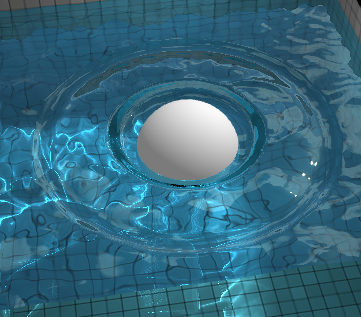
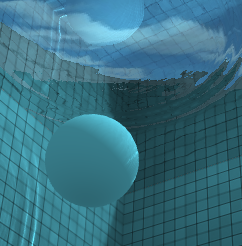
WebGL Wateris a great water simulator, with a sphere that can interact with the water’s surface. It can be paused which means you can then use it as a reference for lighting, reflections, refractions, etc.
!!Note: For some reason, this list does not work on Apple devices, if anyone knows how to fix it, please message me it will help many people who could use these resources. Thank you -QueenSweeties
You can browse the most popular ones or search for certain colors, themes, and even specific hex codes!
When you find one you like, you can download a wallpaper swatch of it and also select the specific colors it uses to look at more palettes that use those same ones.
But what if half your ocs are softys and not made for fighting?
dating sim
this post changed the game
Hey btw if you don’t know how to program, you should check out [novelty], which is a free Visual Novel creation software. Absolutely no programming required, and it’s super easy to use, I played with it some when I was a teen but the only reason I didn’t do much with it is cuz I made my story complicated and had like 5000 different branching routes that kept spawning new routes and made myself confused LMAO
But yeah, it’s a WYSIWYG with a really straight-forward GUI, if I remember correctly.
It even comes with some free backgrounds and characters and stuff, and this is what it looks like:
Did I mention it’s super duper free? It hasn’t been updated since 2010, but it has basically all you’d need to make a simple visual novel.
Just make sure your DirectX runtime is updated, cuz it can act buggy if it’s outdated, but this program is so old that I doubt it’d even be an issue lol
I love how the search function on this site is absolute garbage. I can look up a post word for word and I will NEVER find it
Pro tip:
Wanna find a post?
Write out what you remember into a Google search.
After you write that out, end with site:tumblr.com
Google will search for your text on just tumblr
In my experience, it’s way more effective than searching through Tumblr
(you can use site:SITENAME.com to search any site btws)
This usually works but for some reason a lot of posts get indexed on google from a person’s URL based on the posts that were recently reblogged on page 1, meaning that this is only a tiny bit more reliable.
I HAVE a solution to this, you have to write down site:tumblr.com/post “ “
and then write a direct quote (could be a fraction of a sentence) into the quotations, I’ve been doing this for years, and it’s so useful, it works like 99% of the time
(the more popular a post is the more likely you’ll find it)
Woke up at 2am and couldn’t fall back asleep so I made a tutorial on the Photoshop techniques I use most frequently. Starting with the sketch:
adjustment layers: specifically the hue/saturation slider in this case, allows you to color correct quickly
lasso tool: for sharp edges!
alpha lock: useful for painting within a pre-defined area (especially useful when painting characters)
x (hotkey) : toggle between foreground + background colors- let’s you easily blend between 2 colors
ctrl/cmd click : quickly change current active layer. Especially useful if you’re burdened with too many layers (or just very disorganized)
clipping mask: similar to alpha lock, but can add details without changing/ painting directly on the previous layer. I often use them to test out + apply gradients.
layer styles: I didn’t use any in this image, but the possibilities for layer styles endless, from simply adding a quick outline (useful for die cut demarcations when making stickers!) to creating more seemingly complex appearances. Here’s a gif of Nick Carver using layer styles (a combo of drop shadows + inner shadows) to quickly make the illusion of snow but with simple strokes.
There’s been a lot of amazing zine projects lately, but something I see mentioned a lot is a lack of transparency and organization! By detailing sales and transfers in a spreadsheet, I’m hoping to establish more trust in collaborative efforts. (here’s some tips for avoiding scams!)
I see your free resources with no campaigns and raise you This
If you’re unfamilar with D&D or want a less complicated version, I recommend Fate. https://fate-srd.com You can print out out the character sheets or just keep them on hand in a PDF / image file. The rules are a bit more fast and loose, but still really fun!
hey!! sorry to hijack this post, but there are a bunch of ways you can make videogames without knowing shit about computers!!
for starters, there’s Twine, which is fucking great for making all kinds of interactive experiences (it’s what Crystal Warrior Ke$ha was made in so you KNOW it’s good) at all skill levels (i picked it up and made a game in two minutes a few nights ago)
if you want a bit more involved experience there’s Inform 7 which is a simple language for text-based adventure games that reads like slightly-weird English and also relatively easy to learn
you can do some pretty fucking cool stuff with Unity (my personal engine of choice) but you may need to dig a bit farther to get at the good stuff. there’s lots of really good presets though (i made an entire game just mixing and matching pre-existing templates and adding in my own art, won an award at a game jam for that one) and if you want help the community’s pretty dang friendly from what i’ve seen!
this is just a taste of what’s out there from what i’ve seen, but there’s so many cool resources out there. if anyone wants help getting started, i’m around to give you a leg up on making something in the coolest, most unexplored art medium around!
I’m addin’ to this post because lowering the barrier to entry for making games is super important to me!!!! If y’all have any questions about making games, you’re welcome to come and ask! I made this list a while back with some friends, so it has some of the programs John already mentioned.
2D Editors:
GameMaker : Potential for pure drag-and-drop “programming”. It is recommended to read-up on the program’s functions to make good use of it. Good for prototyping. Uses its own language called Game Maker Language (GML) that is similar to a C language (e.g. C++ or C#). For both Mac and PC; free version available.
Construct2 : Drag and drop level editor that uses an “If-Then” event sheet structure for programming. Good for prototyping and for beginners. For PC; free version available.
GameSalad : Drag and drop with no code requirement. Good for programming. For both Mac and PC; free version available.
Solpeo : HTML5 based game engine for 2D and isometric game development. Some programming knowledge needed. Platforms supported: Chrome, Firefox, Internet Explorer 9+. Free version available.
Stencyl : Drag and Drop “programming,” templates you can edit the variables/values for.
Scratch : Lego-block-style coding platform by MIT; totally free and a great intro to thinking in code. Very kid-friendly and comes with a community site. Browser version available.
3D Editors:
Unity : 3D editor that creates 3D games. Can build games for browser, as an app, or for mobile devices (iOS and Android). For both Mac and PC; free version available.
UDK (Unreal Development Kit) : Full-fledged, highly advanced editor. Features a complete set of tools that go from level design to visual scripting to cut-scene creation. Uses it’s own programming language called Unreal Script that can be arranged with Kismet, a visual code editor. For Mac and PC; free.
2D Art/Animation Software:
GIMP : Free photo editing and digital painting software.
Easy Paint Tool SAI : Free digital painting software with a UI similar to Photoshop.
Mischief : Free digital painting software with an endless canvas.
3D Art/Animation Software:
Sculptris : From the company that created Zbrush, this free software is ideal for beginning 3D sculptors.
Maya : Animation, VFX, lighting, and rendering software.
Magical Voxel : Voxel Art (3D Pixel Art). Very intuitive and quick to pick up.
SketchUp : Architectural modeling software, great for creating 3D environments and buildings. Free version available.
Text-Based Games:
Twine : Create interactive text stories using Twine’s visual map system that links your game together. Easy to learn and use. End result is browser-based. For Mac and PC; free.
Quest : Interactive text stories that you can build in-browser.
Ren’Py : Create visual novels using a modified version of Python that reads like a combination of stage directions and a CYOA novel. For PC, Mac, and Linux; free.
Audio Resources/Editors:
Indie Game Music : This site offers free indie music with no need to worry about royalties or licenses.
Audacity : A free, open-source, cross-platform sound editor that allows you to record and arrange sound.
Super Flash Bros. : This site allows you to record theremin-like (8bit) sounds and export them as .wav files for your games.
Stumbled across this really useful tool for anyone doing NaNoWriMo or planning any writing schedule—Pacemaker.
You can customize a variety of settings for your word count schedule—like writing significantly more on the weekends, or less, taking a few days off, or even generate a random daily word count target. Then you can display the schedule by calendar, graph, or table and share it with others.
Plus you can adjust the date range, so if you fall behind, it’s easy to update the word count plan and catch up.
can randomly generate just about ANYTHING. awesome for dms
Tabletop Audio: background music and sound effects for the ambience.
PCGen - a character creation program that handles all the tricky and tedious parts of building characters, including NPCs.
d20pfsrd.com - all the free information you would ever need to play Pathfinder, an alternative to D&D
DiceCloud: Interactive character sheet that can be edit and shared with yourself or others easily. Pulled up anywhere with internet connection on PC, Mac, or mobile device. Use it to also mark down health, death saving throws, spell slots, experience, and more on the fly.
DnDMagic: List all spells currently available from Player’s Handbook and Elemental Evil.
5th Edition Spellbook app: Make spellbooks for all your characters, manage spells, prepare spells. Keep track of Spell Save DC, and Spell Attack bonus on your mobile device.
Squire - Another character creation and management app. Contains most of the basic info and spells already, with options to create spells, items, classes/subclasses, etc. This is the free version, but pro has more options for DMs, including initiative order control.
dndbeyond.com - character creator, resources, homebrew center. there’s a subscription, but there is plenty available for free! the subscription gets you unlimited character slots (and a few more bits), but you still get a couple of slots without paying.
there is also a critical role homebrew class on dndbeyond that is really cool — called the Blood Hunter and created by Voice Actor and DM Matt Mercer.
If you want to buy anything from the marketplace - official books, supplementary information - you can use the code “beginnings” at checkout for 10% off (thanks Critical Role :D) ** I think the code is beginningS, if that doesn’t work try it without the “s” **
dndbeyond is also mobile compatible :D I use it on an iPad for my games because you can track HP and spell use ~
@saltybuttcombo I saw you reblogged this and I added my own! <3