I have a problem with the DataTable of primeng with Angular 2 when I use sub object. When I put the editable parameter at true. The value disappear.
This is my object :
export class Car {
      year: number;
      type: {`enter code here`
        brand: string;
        model: string;
      };
      color: string;
  }
This is my component :
import { Component, OnInit } from '@angular/core';

import { CARS } from './mock-cars';
import { Car } from './cars';


@Component({
  moduleId: module.id,
  selector: 'app-cars',
  templateUrl: 'cars.component.html'
})
export class CarComponent implements OnInit {
  cars: Car[] = [];
  cols: any[];

  constructor() { }

  ngOnInit(): void {
    this.cars = CARS;

    this.cols = [
            {field: 'year', header: 'Year'},
            {field: 'type.brand', header: 'Brand'},
            {field: 'type.model', header: 'Model'},
            {field: 'color', header: 'Color'}
        ];
  }
}
And this is my html :
    <h3>Cars</h3>
<div class="grid grid-pad">
  <p-dataTable [value]="cars">
    <p-column *ngFor="let col of cols" [field]="col.field" [header]="col.header" [editable]=true></p-column>
  </p-dataTable>

  <p-dataTable [value]="cars">
    <p-column [editable]=true field="year" header="Vin"></p-column>
    <p-column [editable]=true field="type.brand" header="Year"></p-column>
    <p-column [editable]=true field="type.model" header="Brand"></p-column>
    <p-column [editable]=true contenteditable=""field="color" header="Color"></p-column>
</p-dataTable>
</div>
If editable is false, I can see the value
Non editable table:
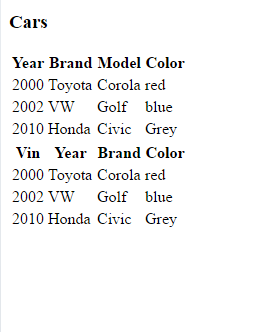
But if editable is true, the value of the sub object disappear :
Editable table:

Someone else have this problem? I don't know if it's a bug in primeng or if I miss something.
Thanks ! :)


