33

Somehow the Angular (v11.0.4) language service in VSCode does not work anymore. I get the following error message.:

[Info  - 17:52:04] Angular language server process ID: 147359
[Info  - 17:52:04] Using typescript/lib/tsserverlibrary v4.0.5 from ~/.vscode-oss/extensions/angular.ng-template-0.1100.2/node_modules/typescript/lib/tsserverlibrary.js
[Info  - 17:52:04] Using @angular/language-service v11.0.3 from ~/.vscode-oss/extensions/angular.ng-template-0.1100.2/server/node_modules/@angular/language-service/bundles/language-service.js
[Info  - 17:52:04] Log file: ~/.config/Code - OSS/logs/20210112T090839/exthost2/Angular.ng-template/nglangsvc.log
[Info  - 17:52:06] Disabling language service for ~/Workspace/NG_PROJECT/tsconfig.json because it is not an Angular project ('@angular/core/core.d.ts' could not be found). If you believe you are seeing this message in error, please reinstall the packages in your package.json.
[Error - 17:52:06] Failed to find project for ~/Workspace/NG_PROJECT/projects/apps/app1/src/app/*.html
[Error - 17:52:53] No config file for ~/Workspace/NG_PROJECT/projects/apps/app1/src/app/*.html
[Error - 17:52:54] No config file for ~/Workspace/NG_PROJECT/projects/apps/app1/src/app/*.html

I already tried:

rm -rf node_modules package-lock.json
npm cache clean --force
npm install

but it does not solve the problem.

What can I do to solve that issue?

2
  • 1
    Did you figure it out? I'm having the same issue. Commented Feb 15, 2021 at 0:49
  • I'm having the same issue. The last thing I remember is I've updated vscode. Commented Feb 16, 2021 at 18:25

4 Answers 4

49

Update to @Begandroide's answer. "Ivy" is no longer considered experimental, and so the Enable-experimental-ivy-prompt is no longer an option. With the latest major version (12.x...) of the Angular Language Service VSCode extension, you must enable the Use legacy View Engine language service option.

enter image description here

Sign up to request clarification or add additional context in comments.

7 Comments

This was required for an older project, ngcc would fail. Thanks!
It work for me, good!
I updated my project to Angular 13. Its not possible to choose the Legacy view engine for Angular 13 and above. Now with ivy the Angular language service is failing. Its really frustrating to work without extension. 😢
Update: I tried it in a new project in Angular 13. So it seems some issue with the config itself. Will keep you posted .....
@JEWELJACOB, any luck? Experiencing the same issues
37

I'm facing the same issue and I resolved it by going to the marketplace of VS Code, then go to Angular language service extension and click on settings, then extension settings enter image description here

Finally, you must disable experimental-ivy and reload window (VS Code) enter image description here

2 Comments

Thanks for the answer @Begandroide, Is there any way to enable this feature without any errors?
Glad i could help, really i don't know if we can enable this feature without errors, i believe we could create a issue on github to the extension of market place (Angular language service).
0

I've just had a good go at this issue myself. I've got ivy enabled in my project, got baseURL set in the tsconfig, checked all the paths in the tsconfigs also are correct. The project builds and runs fine. But no intellisense.

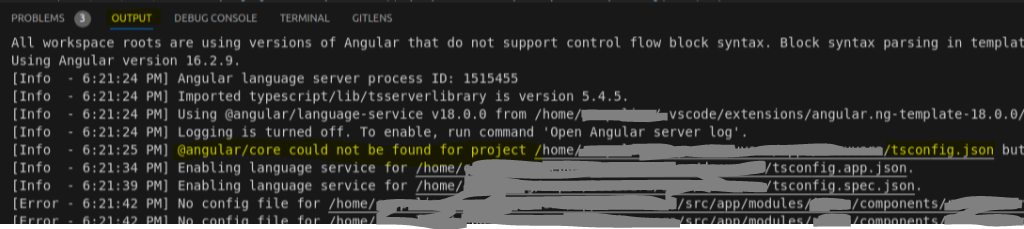
Finally worked out that the @angular/language-service that the extension uses was a completely different version to what I had in my dependencies list in package.json.

So I recommend, as a last resort, downgrade the VS Code extension so the major version matches what you have installed in your node_modules. Also remember to then close and reopen vscode as I haven't found a way to get the extension to restart manually. Open an html file to make sure it works and you can click through and see intellisense popups.

Before: Angular Language Service terminal logging output showing mismatching versions

After: Angular Language Service terminal logging output showing matching major versions

Comments

0

I solved my issue by downgrading Angular language service to the 18.2.12 version

After downgrading

1 Comment

Your answer could be improved with additional supporting information. Please edit to add further details, such as citations or documentation, so that others can confirm that your answer is correct. You can find more information on how to write good answers in the help center.

Start asking to get answers

Find the answer to your question by asking.

Ask question

Explore related questions

See similar questions with these tags.