Rogue Trader (TTRPG) Ship Builder
A downloadable tool
This is a ship building program for the Rogue Trader TTRPG by Fantasy Flight Games. It allows you to select from various ship hulls, install components and weapons, choose backgrounds, and save the ship data as a JSON file that can be loaded by this program.
The Ship Builder displays the rules and text descriptions from the Rogue Trader rulebooks. These are stored as CSV files in the Streaming Assets. Custom hulls, components, and rules can be added to the CSV files, and existing data can be changed. Review the README CSV for instructions.
Custom ship images can be added to the \StreamingAssets\Images folder. The Ship Builder will display the image that matches the hull name of the selected hull.
Sample ships are located in the default save directory \StreamingAssets\SavedShips. When you save your ship, a JSON text file, a PDF file, and a screenshot of the Export Data screen will be saved together in whichever directory you choose.
Download
Install instructions
Download and unzip folder.
Development log
- June 2026 Update37 days ago
- Dev Build for TroubleshootingJan 17, 2026
- December 2025 - Part 2 UpdateDec 05, 2025
- December 2025 UpdateDec 01, 2025
- Minor FixAug 11, 2025
- Minor FixAug 07, 2025
- PDF Export and Bug FixesMar 03, 2025
- Now with Image Export!Jul 31, 2024


Comments
Log in with itch.io to leave a comment.
Spacedock Piers currently prevent mounting ANY weapons in Port or Starboard slots. Per Battlefleet Koronus p.40, "Due to their size, station fittings prevent any weapons with the Broadside rule from being installed (although smaller weapons may still be installed in Port and Starboard weapon capacity slots)."
(There's also some additional weirdness going on when attempting to install Spacedock Piers while weapons are already installed in Port or Starboard weapon slots. Sometimes they'll be removed and the Spacedock Piers installed; sometimes the Spacedock Piers won't be installed, but if the weapons are then uninstalled, the Spacedock Piers magically reappear and install themselves then, and on at least one occasion the Spacedock Piers did not install, but the broadside weapons were "frozen" or "locked" somehow, and I could not uninstall or modify them- clicking them had no effect whatsoever.)
When changing the craftsmanship of most (but weirdly not all) upgrades using the drop-down menu, the description text changes to "Error: invalid Craftsmanship Rating." Once the upgrade is installed, however, the correct description text reappears.
The ability to select a Crew Rating of Elite for 25SP is homebrew/house rules of some kind; only Incompetent, Crack, or Veteran (or the default Competent) are available to the players. (Leaving the option in without an SP cost will likely still be useful to GMs creating opposing vessels.)
The Gothic- and Dominator-class Cruisers are homebrew/houserules of some kind, I believe. Their pre-equipped components do match those listed on Battlefleet Koronus p.25, but those rules simply say that those components are "equipped"- no mention is made of any inability to remove them.
The Conquest-class Star Galleon is able to equip Transport versions of several essential components (plasma drives, warp drives, and the Mezoa Gellar-Void Integrant), where it should only be able to equip the Cruiser versions. Likewise, the dev build's non-canonical Travois has the same issue. (This may be intended, if using a more generous interpretation of the Hybrid Vessel rules that only disallows components which have different versions under the exact same component name, rather than considering them to require the Cruiser version of e.g. Plasma Drives generally, as a category. I'm not even certain it's wrong, although I've never seen it ruled this way in any of my games as either player or GM. Feel free to disregard this point.)
The Mezoa Gellar-Void Integrant can be installed on any (human) ship, rather than only Transports and Raiders.
If Background data (Past History/Machine Spirit Quirk or Background Package) is selected for a ship which should not have it (such as a xenos vessel), there is no way to clear it.
On the History screen, when Complications are selected, the Machine Spirit Quirk/Ship History pane on the right is slightly too wide; its left edge overlaps with the left pane with the selection menus and Confirm button. (This is not the case if a Background Package is selected, as its description pane is narrower.) This is the case (at varying levels of severity) on both 1080p and 4k monitors at the Windows-default UI scaling (125% and 150% respectively).
Non-canonical vessels or those not normally available to players at game start (such as the Hemlock Xenos Vessel and Retribution Battleship) should probably not list made-up SP costs.
The increased Forward armour provided by the Armoured Prow and Reinforced Prow components is not reflected on the Export Data page- adding Armoured Prow to a Lunar only shows "Armour: 20", rather than "Armour: 20 (24)".
On the Export Data page, in the Rated Statistics panel, "Manoeuvre" is mispelled as "Manouevre". (It seems worth pointing out that the sourcebooks consistently use "Manoeuvrability" for the ship characteristic, and "Manoeuvre" for the actions and tests that characteristic adds to.)
The selection and readying of small craft wings (Fighters, Bombers, Assault Boats, Aeronautica, Support Craft) for Launch Bays could be implemented using the same system as is currently used for Torpedoes and Torpedo Tubes.
The Secondary Power Genetorium (the integral component from the Universe Mass-Conveyor) is installable on any voidship. Needless to say, +10 Power for 0 Space is both technically incorrect and a teensy little bit overpowered as fuck- and I have no idea where its supposed 2SP cost came from. The Goliath Factory Ship's Plasma Refinery has the same issue.
The xenotech Energy Drain Matrix appears incorrectly as a miscellaneous supplemental component. (It does also appear correctly, as a weapon, which is weird.)
Certain supplemental components and upgrades incorrectly can (or in two instances cannot) be equipped more than once:
Battle- and Grand Cruiser component restrictions are borked due to an absurd interpretation of the Grand Cruiser and Battlecruiser rules text- I already ranted about it in reply to the relevant comment somewhere below and will spare you the repetition.
The Repulsor Shield Array can be installed on Raiders, Frigates, and (non-Secutor) Light Cruisers.
Naming errors:
The description text for the Markov 1 and Markov 2 Warp Engines does not reflect the errata (the Markov 1 should reduce Warp travel times by 1d10 days per week, and the Markov 2 by 1d5 days per week, unless the voyage was shorter than 1 week before this reduction. It may be further modified by the results of the Navigation(Warp) test).
The Plasma Scoop's rules (Fuel Gathering and Foolhardy Manoeuvre) have no description text, and the latter is misspelled Manoevre.
The four versions of the Mimic Engine (the xenotech plasma drive component from Hostile Acquisitions p.74(rules)/p.75(table)- not to be confused with the "Mimic Drive" Upgrade on p.77) are equipped as supplemental components in addition to the required plasma drive, rather than replacing it (i.e. being equipped as a drive).
The Aconite Solar Sails from Lure of the Expanse p.140 have the same issue, and additionally cost 50 Power rather than generating it.
(I should probably point out that the Aconite Solar Sail rules could be read such that they only generate power and provide propulsion when installed on an Eldar ship; installing them on a human ship would only grant said ship the benefit of its Supreme Manoeuvrability rule, allowing it to perform a Shooting Action in the middle of its Movement Action. The table does clearly indicate "Appropriate Hull Type: Frigate; Power: 50 Generated", so I'm not particularly convinced that this is correct?)
The Munitorium does not correctly increase macrobattery damage by 1.
There is a lot of inconsistency in the use of "Gellar" vs "Geller", "Augur" vs "Auger", and "X-pattern" vs "Y-Pattern" vs "Z Pattern" versus "Q pattern", although this is a problem shared by the original sourcebooks. I can list off the specific corrections here if you want to exactly match the original books, but I think this is a level of nitpicking beyond even my level of pedantry.
Something real weird is going on with certain weapon statistics when modified by other components, resulting in modifiers being applied multiple times when they should not be applied more than once, or even at all. Specific replication steps:
I still need to test more but the most recent update appears to be fully working, at least for me.
Thank you for putting up the Dev build. This has allowed me to solve my problem. And... it's stupid. Files MUST be extracted to a folder named Shipbuilder. All one word. Any variation causes it to not be able to find the Data folder and then it can't load the CSV files. Like I said, it's one of those really dumb things that seems horribly obvious after it's found. I tested it repeatedly after finding it. However the files are set to locate folders, I suggest replacing a lot of it with wildcard sets like ../Shipbuilder_Data or however Unity tracks "in the folder I am running out of" rather than specifying the folder name that contains the program.
Now that is weird. I just use Application.streamingAssetsPath and then the filenames to load the entries; I'll take a look and see if there's something set in Unity that forces this behavior.
Ayep, this is the exact issue.
I tried this and it didn't work, trying the dev build a series of errors appeared in the development console that looks like its trying to use the csv file locations on the dev computer instead of file paths updating to find it on my machine (as an example "C:/Users/redla/Unity/Gen 2/Shipbuilder/Assets/StreamingAssets/..." with it of course looking for each csv file in that location) I don't know if this is a problem specific to the dev build or if this is also occurring in the normal version, I don't know unity so I can only guess that its not resetting the variable that holds the streamingAssetsPath to match the new environment the program is running on.
Those errors are Dev build specific due to them looking for files based on having Unity installed on the dev's PC. But, they were the errors that allowed me to trace what was going on in the released version because the released version just didn't provide any info whatsoever.
Ah ok, I wonder if the location of the folder is causing my problem, since extracting to a folder named Shipbuilder with the normal version didn't seem to work either.
Well, you can create the folder tree for the dev version and use that... it just means you'd have a weird User folder without an actual user...
My apologies, you're correct. This was the issue. The new version I just uploaded should work now.
If anyone has a previous working version, can you do a file compare between the previous version and the new one and see what got changed? It only takes a tiny little thing to break stuff and some things may not be apparent when you have the previous versions already installed. Or if the OP can re-up the previous version, I'll do the comp. I'm failry good at debugging even things I don't know the coding for.
I'm having a similar issue to LegionTanqolRenfield and Nomad48.
The drop menus are not appearing for hull and class selection are not appearing. Almost everything is missing from the components tab menus as well. Only the items under the upgrades menu is accessible.
However, loading a pre-made saved ship loads some data and displays it properly. But, none of the non-upgrade assets are accessible via the menus, so they can't be modified. The components' of a loaded ship will show up and can be clicked on to view the details.
I have tried running the app as admin and that didn't help. I don't think its a permissions issue. I'm using windows 11 home; the older version I was using was running fine, so I don't think its an issues with the default handling of the csv files either.
the CSV files that have loaded are: Backgrounds, Names, Upgrades
the CSV files that have NOT loaded are: Components, Hulls, StrikeCraft, Torpedoes, Weapons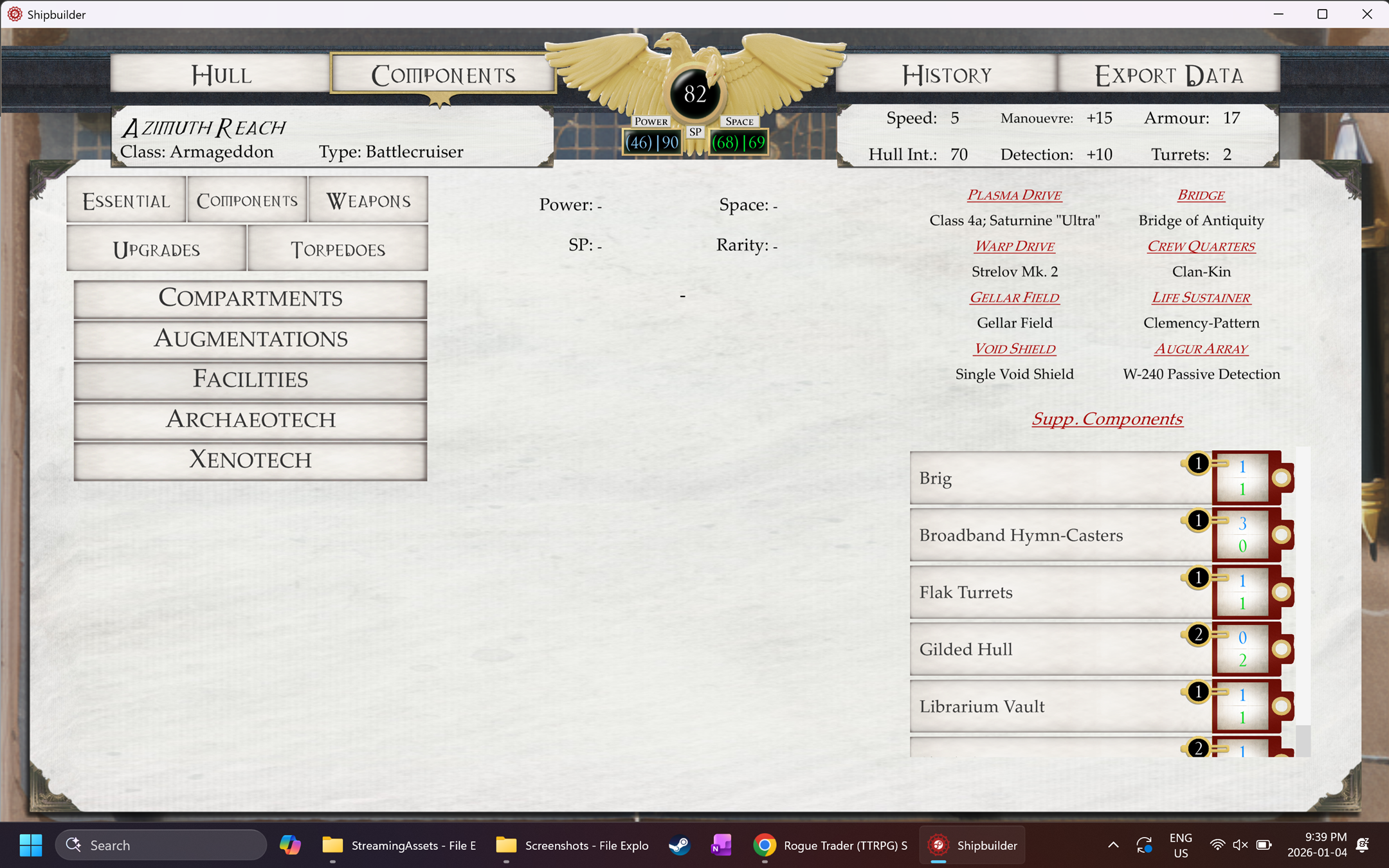
Just downloaded it. First time using it and it doesn't function. Win 10, no files altered, no files in use, tried running as admin - same result.
I have the exact same issue as LegionTanqolRenfield. No CVS files are open, and they have not been edited.
Similar to LegionTanqolRenfield, can't get this new version to work. Program can run but doesn't offer any selectable options for ships to customize anything (see image). Additionally, the layout on the Components and History pages aren't in alignment, will post those in replies.
Component tab UI clipping over things (History tab is the same way).
I've uploaded a new version for the clipping issue. I don't know why it wouldn't load data; I have downloaded the RAR and unzipped it to new folders and everything loads.
Have you edited the CSVs to include custom or homebrew content? Also, what OS?
Nope, haven't messed w/ the CSVs at all. Also just to double check things, I just redownloaded the rar, extracted it into a fresh/different folder and tried again, same error repeats. As for OS, I'm running this in Windows 11.
Sadly doesn't work for me. I can open the prog, but all options are empty. No ships no pictures.
I checked the folder, all the csv files are in the streaming asset folder.
No Idea what I do wrong.
If any of the CSV files are open when you start the program, it won't load the data due to a sharing error.
I checked, but no, it doesn't load any data.
Wow, just found this and love it! A couple of notes, though.
The Repulsive Class Grand Cruiser stats are off for crew and ship size. I know it's fluff, but it seems odd.
Additionally, upgrades such as 'Crew Improvements' and Turbo Batteries are not available. Unless I am just missing them.
It would be helpful to specify the type of torpedoes loaded in the tubes so we can have their statistics handy.
Total Morale doesn't seem to update in the final sheet to show that you have the temple installed for example.
Lastly, the book Stars of Inequity features mods of Archeotech in its treasure generator, which would be helpful to include here.
EDIT: I just noticed I cant add cargo bays to my Grand Cruiser, and ship pdf lists the strength of the weapon as 'pen' or add the +1 dmg from the munitorium to the macrocannons.
I'll put together a quick patch for the simple fixes, but torpedoes, upgrades, and Stars of Inequity will take more time.
For the Cargo Bay, there are no official rules for a cargo hold component available to the Grand Cruiser hull type. I'm not sure if that's just because they didn't errata the Compartmentalized or Lighter Bay variants when Battlefleet Koronus was published, or if that was intended as Main Cargo Hold was never made available to non-Transport hulls. You can edit the Components spreadsheet to include the option for Grand Cruiser hulls or change the existing row to All hull types, or add fanon/homebrew versions to that spreadsheet.
Thank you so much! You are a King, good sir.
Do you know of any good character-building programs like this? I keep seeming to mess up the XP cost when levelling up.
This is farcical. They didn't have to errata the Cargo Hold and Lighter Bay to allow Grand Cruisers to take it for the same reason they didn't have to errata the Vitae-pattern Life Sustainer to allow Grand Cruisers to take it!
The clear intent of the rule is "may use any component that a Cruiser could."* The strict reading of "cruiser-only" would restrict you to "All Ships", "Grand Cruiser", or exclusively "Cruiser"- and there are very few indeed of the latter. In fact, doing so would eliminate:
thereby rendering it impossible to build a Grand Cruiser at all.
I think the error in your logic is that you interpret "cruiser-only" to include both Cruisers and Light Cruisers, and thereby permit Grand Cruisers to equip "Light Cruisers, Cruisers" parts such as the larger versions of the life-sustainers and so on. However, the entire rest of the rules treat Light Cruisers as their own class, not as part of the general "Cruiser" category for any other purpose. Even where a clear rules commonality exists, such as in the rules for prow weapon arcs, the classes are called out individually: "Prow weapons on light cruisers, cruisers, or larger vessels may fire to the fore, port, and starboard." (RT p.219).
The strictest reading of the rules text is clearly broken and not as intended. It is far more consistent to consider the rule to permit "any component whose restrictions include Cruisers", rather than "any component whose restrictions don't include anything EXCEPT Cruisers".
*This is, itself, rather odd, as several Grand Cruisers are called out in their fluff descriptions as out of production because the Imperium no longer can- either "at all" or "practically"- produce their plasma drives. The rule really OUGHT to allow any Cruiser component except the plasma drive, or- in keeping with the precedent set by the Conquest-class Star Galleon- any Cruiser component, but if a Grand Cruiser version exists, they must use the Grand Cruiser version.
Is this still a work in progress? I see most of the things, and there's Xenotech tab, but it's missing almost everything from there, not displaying correctly in the Components section.
I'll have to look into this. All the equipment with rules and stats is in the database but some items don't seem to be showing up.
I've asked a friend if I missed something and he pointed out the obvious - only Xenos vessels actually display Xenotech components to equip(duh), but not Imperial ones. Surely this isn't intended by a game itself. Try to poke at that.
Yep, that's what it was. I just uploaded a new version this morning that has fixed the issue. I think.
Amazing work. I've been using this every time I play with my friends or when I feel like goofing around and building a ship for fun. It is so much easier to have a ship made using this when the only alternative is trying to write it all on paper or an excel sheet.
Happy to see you are still updating it and putting in bug fixes. Thank you so much for your hard work!
Does this have Into the Storm components added? I'm trying to add stuff like Servitor Crew and Atomics but I don't see it.
Also for the Packages, the descriptions go down below the screen and can't be scrolled to or seen.
Otherwise, a spectacularly useful tool!
The reason I didn't add them was because some, like Servitor Crew and Turbo-Weapon Batteries, affect multiple stats and components and I wasn't sure how I could program that in without breaking the current system's way of looking up components and rules. If I do add it in, it will be similar to the backgrounds/packages and not affect the actual stats.
I'm able to scroll through the background screen when long packages are selected. Are you still having an issue with them?
Absolutely amazing, making ships is no longer a headache, the Omnissiah bless you!
two errors I've found:
1. "Storm" Drop Pod Launch Bay misses the +50 Military Endeavour Points bonus it should have.
2. Small Craft Repair Bay accidentally has the Ship's Store's stat instead of its own.
Thank you, these have been fixed.
Great job, kingly work.
This thing is great, but there are a few errors I've found; the Orion-class Star Clipper is missing its Keel mount. I was able to fix that myself. The 'bigger' problem I've found is that when selecting the "-1 Crit" modification for high quality weapon components, it instead adds 1 to the crit rating of the module in question, and I'm not sure how to go about fixing that myself. (IE: a Best quality Godsbane Lance should be able to reduce the default Crit 3 to Crit 2, but when selecting Crit -1 as one of the two modifications, it instead sets it to Crit 4)
Edit: Also, some weapon modifications from quality appear correctly on the "Components" page but are not reflected on the Export image page, despite the improved component being noted. (IE: a Good quality weapon with range improved from 9-->10 will show Range 10 in Components but on the Export page, will list "Good Quality" but only show Range 9.)
Thank you, these should be fixed now.
Does the export show the quality of the required components? Or is it just in the json. BTW, Thanks for such a great tool.
Quality in the image export is based on character and color. Red P for Poor, black C for Common, green G for Good, gold B for Best. The PDF export shows quality as a superscript next to the component name.
Is there any way to export/print these files? I think your efforts have really provided a great tool for those running Rogue Trader.
I have just updated the program to save a screenshot of the Export Data screen to the same folder you save your ship data.
This is really cool. The fact that you can add your own hulls just makes it even better. Are the stats for the battleship self made?
Yes, those are just some numbers I made up that would be appropriate for the hull.
Are you planning on adding a function which will allow us to export ships to a pdf file? Because that would be real handy.
I was thinking about it when I started this project but I didn't have the time to implement it. I may add that functionality later.
This is awesome if you get a chance make it availble to download via the Itch app that would cool
This look very cool, I hope you will keep updating it.