








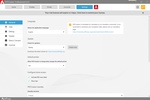

With PDFCreator, you can create any type of PDF document with just a click, and for free. PDFCreator is compatible with any editor that supports document printing. Thanks to this application, you can export any content into the PDF format from the Microsoft Office suite or even from a Windows notepad.
PDFCreator – More than just a PDF Converter
PDFCreator is a versatile and reliable tool designed to streamline your workflow with a range of powerful features. Whether you're working with documents, automating tasks, or ensuring security, PDFCreator simplifies the process and helps you get the job done efficiently.
Automation for seamless workflow
PDFCreator anticipates your needs with its automation capabilities, ensuring that you can focus on the task at hand while it handles the repetitive work. Features like auto-save, auto-merge, and user tokens streamline workflows, saving you significant time and effort. No matter your IT setup or specific requirements, PDFCreator adapts effortlessly, offering a highly flexible interface that fits seamlessly into any working environment.
Effortless conversion and document management
From converting various document types to organizing, securing, and sharing files, PDFCreator provides an all-in-one solution that saves time and enhances productivity.
Catering to both casual and advanced users
PDFCreator caters to both casual and avid users, offering intuitive features for everyday use and advanced tools for those who need them. It ensures that everyone can work efficiently, regardless of their experience level. The software integrates smoothly with services like Dropbox, OneDrive, and Outlook 365, embedding PDF creation directly into your existing workflows. This allows you to maintain your productivity without interruptions.
Your ideal PDF solution
PDFCreator isn't just a PDF converter – it's a comprehensive tool designed to work with your unique needs. Whether you're looking to automate processes, merge files, secure documents, or customize your workflows, PDFCreator has you covered.
Frequent Questions
What operating systems are supported?
PDFCreator works on Microsoft Windows operating systems, including Windows 7, 8, 10 and Windows 11.
Is PDFCreator free?
Yes, PDFCreator Free is available at no cost. However, there are paid business editions like PDFCreator Professional, Server, and Terminal Server with additional features.
What file formats can PDFCreator convert?
PDFCreator can convert documents into formats such as PDF (including variants like PDF/A and PDF/X), PNG, JPEG, TIFF, and TXT.
Does PDFCreator support encryption and security features?
Yes, it offers password protection (user and owner passwords), digital signatures, and permission controls to restrict actions like printing or editing.
Can I automate tasks with PDFCreator?
Yes, automation is possible using tokens for preset values (e.g., date or file name) or custom scripts integrated with .NET framework for advanced workflows.
Where can I find help or more information about using PDFCreator?
Visit the official website's support section or knowledge base for troubleshooting tips, licensing information, and detailed user guides.


 4 reviews




























Comments
The current version is 2.0.1029 (Demo - 30 days). I use version 1.6.1 (Complete - without restrictions). Regards
Very good program, it was very helpful to me, I found it very useful.
it is useful
excellent product, thank you very much, it has been very useful to me