Catalog

The catalog is a feature in the Animal Crossing series that allows the player to view and purchase items they have obtained. It is divided into sections for each type of item, such as furniture or clothing, and items ordered from it are mailed to the player at the next mailing period. Items obtained from certain sources, such as events, cannot be purchased, though they still appear in the catalog; however, some items, mainly downloadable items that cannot be obtained after a certain period of time, do not appear at all in the catalog.
Appearances
In Animal Crossing

In Doubutsu no Mori, Doubutsu no Mori+, Animal Crossing, and Doubutsu no Mori e+, the catalog can be accessed from Tom Nook if spoken to at his store. Items in the catalog include furniture, wallpaper, carpets, clothing, handheld items,[nb 1] stationery, Gyroids, fossils, and music. Items are ordered by number, and the number selected over total number of items obtained is displayed at the bottom-right, with a star appearing beside it if the category is complete. Two furniture items, Ice Climber and Mario Bros, do not appear in the catalog.
The order of furniture items in the catalog differs between Animal Crossing. Additionally, in Doubutsu no Mori, tools do not appear in the catalog.
In Wild World

In Animal Crossing: Wild World, the catalog is accessed from Tom Nook and contains furniture, wallpaper, carpets, tops, umbrellas, headwear and accessories, stationery, and fossils. Unlike in Animal Crossing, handheld items, tools, and songs do not appear in the catalog. Like in Animal Crossing, items are ordered by number, though the number displayed now shows the number obtained over the total number. If any player's mailbox is full, the catalog cannot be used.
The following items appear in the catalog but cannot be ordered:
- Items from the Mush Series
- Items from the Snowman Series
- Furniture from Gulliver, the Happy Room Academy, Katie/Kaitlin, the post office, or the Tom Nook Point System
- The birthday cake, bug trophy, fish trophy, flower trophy, museum model, snowman, and throne
- Wallpapers and carpets from Saharah
- The sea view and ship deck[nb 2]
- Clothing from Gracie
- The work uniform
- The feathers from Boondox
- The crown, halo, royal crown, and turban
- The academy paper, formal paper, fox paper, insurance paper, Nook paper, snowman paper, Tortimer paper, and town-hall paper
- All gyroids and fossils
Downloadable items, including the Mario Theme, pikmin, and Blue Falcon, as well as character pictures, do not appear in the catalog.
In City Folk

In Animal Crossing: City Folk, the catalog, like in previous games, is accessed from Tom Nook and contains the same item types as Wild World. Numbers are no longer displayed in the catalog, though items are still ordered by number.
If the player transfers over their data from Wild World to City Folk, their catalog transfers alongside their character. For some items this is the only way they can be added to the City Folk catalog as they are otherwise unobtainable.
Downloadable items and distributed items do not appear in the Catalog including Red Headgear, Blue Pikmin and Yellow Pikmin.
In New Leaf

In Animal Crossing: New Leaf, the Timmy & Tommy shopping catalog is unlocked when the first upgrade to Timmy and Tommy's store, T&T Mart, is built. It can be accessed via a machine in the store. Items are now displayed in alphabetical order, and specific items can be looked up via a search feature. The Catalog Maniac Bronze, Silver, and Gold badges can be obtained from Phineas after the player completes 20%, 50%, and 80% of the catalog, respectively.
In the Welcome amiibo update, the search feature in the catalog no longer requires an exact match to find items. Also, the player can sell their catalog's contents alongside their town when starting over, which will transfer the value to their new profile.
In New Horizons
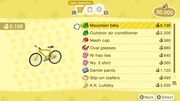
In Animal Crossing: New Horizons, the Nook Shopping catalog is unlocked when Nook's Cranny is built. It can be accessed via the Nook Stop in Resident Services, along with the ABD and Nook Miles rewards. By ordering 100 items via Nook Shopping, the player can unlock the Nook Shopping app, which allows them to view the catalog anywhere via their NookPhone, as long as they are not currently visiting a dream island or Slumber Island. Additionally, the player's catalog can be viewed outside the game via the NookLink mobile app.[nb 3]
Items the player has obtained are divided into three major categories: "furniture", "fashion items", and "wallpaper, flooring, and more". The catalog also contains a "Special Goods" section offering a selection of featured items that rotate each day, as well as posters, promotional/collaboration items, and Nook Shopping seasonal event items. Photos and posters do not appear in the player's catalog, despite the latter being available for purchase in the Special Goods section. All items in the Nook Shopping catalog must be purchased with  Bells, and are packaged in a white box emblazoned with the Nook Inc. logo.
With version 1.5.0, it is possible to hide non-purchasable items in the catalog by pressing the  button. There is a Nook Miles achievement, titled Growing Collection, that is unlocked after the player adds 100, 200, 300, 400, and 500 items to their catalog.
Happy Home Paradise adds the Paradise Planning catalog, offered by Wardell. This catalog contains every item (and all possible variations) the player has unlocked through designing vacation homes, excluding Not for Sale items. The catalog also offers exclusive Paradise Planning-themed novelties. All items from the Paradise Planning catalog must be purchased with  Poki, and are packaged in a red box with the Paradise Planning motif covered with shipping labels.
Version 3.0 adds the hotel catalog, offered by Grams. This catalog is entirely comprised of items exclusively sold in her souvenir shop, some of which are novelties themed after the hotel. This catalog will expand its selection of available goods as the player assists the hotel. All items from the hotel catalog must be purchased with  Hotel Tickets, and are packaged in a blue box with red tape. Although the player can use all three catalogs when designing hotel rooms, the hotel catalog is limited only to the hotel; they must be acquired in order to be used on Harv's Island and Happy Home Paradise.
The player is limited to ordering up to 5 items each day per catalog, but the player can combine different catalog orders to purchase up to 15 items each day.
In Pocket Camp

In Animal Crossing: Pocket Camp, the catalog is accessed from the menu, and it contains furniture, clothing, special items, amenities, fish, bugs, and flowers. Items are further separated by their collection within their respective categories. Details can be viewed for each item, and unlike in the main series, items cannot be purchased from the catalog.
Gallery
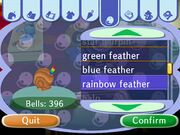
Accessing the catalog in Animal Crossing: City Folk
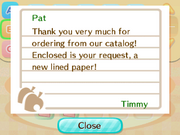
Letter received after ordering item in Animal Crossing: New Leaf


Notes
- ↑ Simply named "items" in-game, this category includes umbrellas, tools, fans, pinwheels, and balloons.
- ↑ Despite these items not being orderable, the furniture items from the Pirate Theme are.
- ↑ Beginning in an update on November 19, 2020.

| ||||||||||||||||||||||||