Technologicon
Table of Contents
Welcome to the Technologicon (which is not an actual word but rather one I made up because I thought it sounded neat), the part of my den that gives you some information about the technology I use and the technology that powers this website! I get new tech all the time and the information on this page will probably be outdated very quickly. I just like getting new stuff and experimenting around with it.
Other than that, I mostly use various Linux distributions on my computers. I briefly (in April 2025) dabbled with FreeBSD on desktop as well, but had a lot of trouble with it in the end so I have since abandoned that, unfortunately. I also use Proxmox for running various VMs and my NAS. I have two M-series MacBooks and two Frameworks, the Framework 12 and the Framework 13. My current main machine (as of April 2026) is the Framework 13 running CachyOS.
I have also started programming again and my current project – Theriodex – is running on a Debian 13 machine and this is also the very first time I have ever used Docker for something! Many thanks to one of my partners who helped me get that up and running. I have set up a CI/CD pipeline as well on Codeberg.
And speaking of Codeberg, I am a member of Codeberg e. V. and a bunch of other technology-related clubs!

Desktop 
My desktop has been through a handful of iterations since I built it back in April 2024. It initially had a Ryzen 5 5600G and a Radeon RX 6600 which I quickly found out was not quite adequate for 1440p gaming which is why I sold it to a coworker and bought a Radeon RX 6750 XT instead. When, after a few months, one of my partners also wants to have his own gaming PC, I decided to give him the RX 6750 XT and 5600G and buy an RX 7900 GRE and 5700X3D for myself. This is the system I am still using at the moment (as of April 2026) and the one that I believe I will continue using for quite a while as this setup is more than adequate for what I do. However, because it is a rather power-hungry setup, this is actually not my main machine at all and reserved only for when I actually want to play games that require a lot of power – which, to be quite frank, is not often.
- Case: ASUS Prime AP201 (white)
- CPU: AMD Ryzen 7 5700X3D
- CPU cooler: Noctua NH-U12S
- GPU: Radeon RX 7900 GRE (Powercolor Hellhound)
- RAM: Corsair Vengeance LPX 32GB (2 x 16GB) DDR4 3600MHz C18
- OS drive: Crucial P3 500GB M.2
- Game drive: Crucial MX500 1TB SATA
- OS: EndeavourOS

Laptops
I have had numerous laptops over the years, most of them having been various ThinkPads. Once Apple released their first MacBook powered by Apple Silicon, I was honestly very impressed by the performance and its low power usage (resulting in great battery life) which is why I ended up buying a base-model M1 MacBook Air that I was using as my main laptop until November 2024 when I bought the new 14” M4 MacBook Pro (also base model). I use the MacBook Pro as a sort of desktop replacement (unless I want to play games) as it is very fast and not very power hungry. I still use the MacBook Air quite frequently, however, and I have installed Asahi Linux on it. I still have one ThinkPad but I am using it for work at the moment (working from home).
In April 2025 when you could finally pre-order the Framework 12, I decided to finally get one and have been using it as my main computer and main laptop ever since I received it at the beginning of July 2025.
- 14” M4 MacBook Pro (2024). 16 GB / 512 GB. Running macOS
- 13” M1 MacBook Air (late 2020). 8 GB / 256 GB. Running macOS
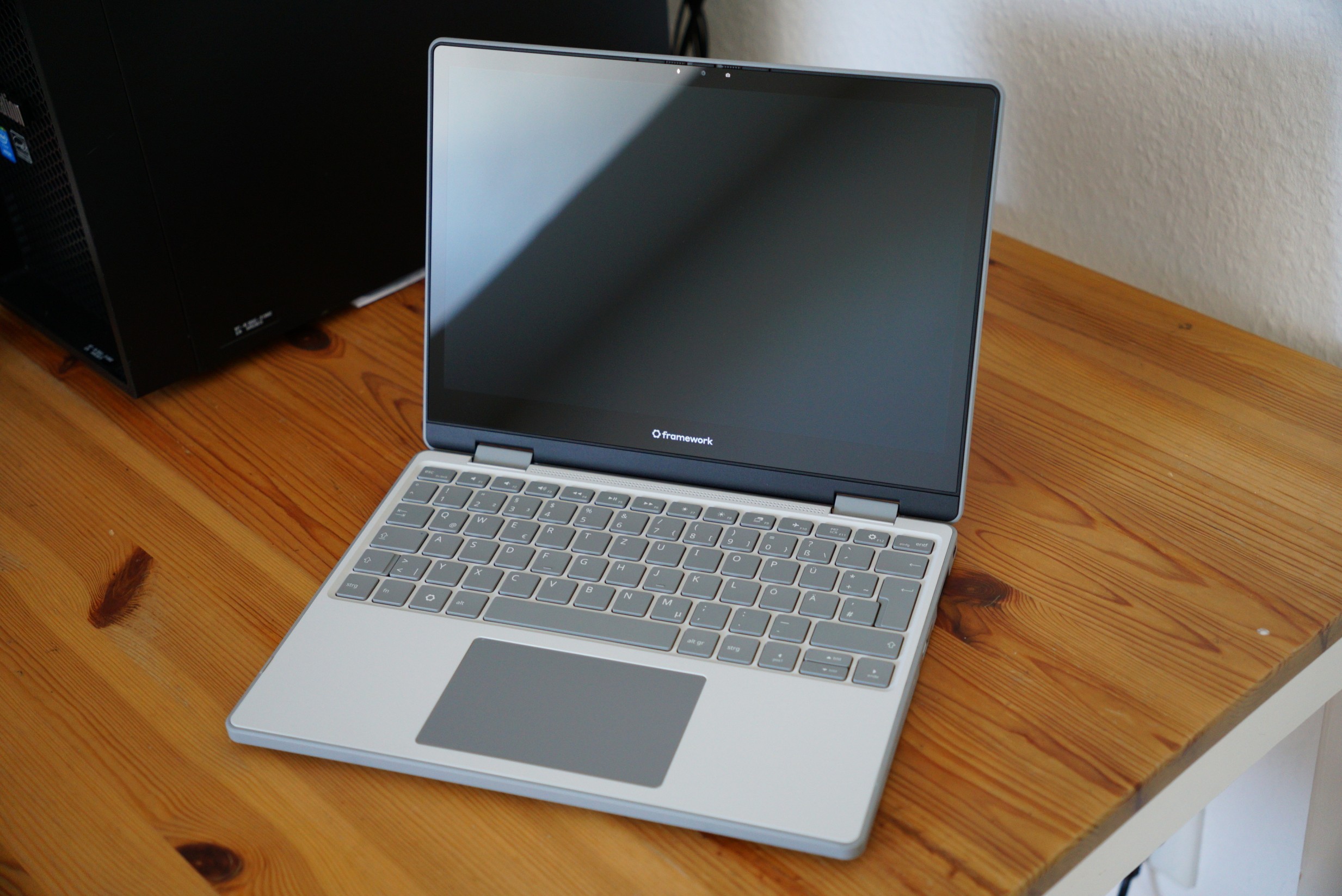
- Framework 12. 48 GB / 1 TB. i3-1315U. Running Fedora 43
- Framework 13. 16 GB / 1 TB. 7640U. Running CachyOS


Framework 13
After having had some trouble with the Framework 12’s performance, I decided to just go ahead and get a Framework 13 with a 7460U and their 2K 120 Hz screen – and honestly, having done that, I realised I should have just done that in the first place. It has now (as of April 2026) become my main machine and I couldn’t be happier with it!
- RAM: ADATA Technology 16 GB DDR5 5600 MT/s (1 x 16 GB)
- CPU: AMD Ryzen 5 7640U
- SSD: 1TB Lexar SSD EQ790
- USB-C Modules: 4 x USB-A, 2 x USB-C (translucent black), 2 x USB-C (translucent purple), 1 x DP, 1 x SD card reader, 1 x HDMI
- OS: CachyOS
Framework 12
I had been toying with the idea of getting a Framework computer for a while and when they announced the Framework 12 and the price was just right for me, I decided to go and get one – and it ended up becoming my main computer for about a year! I wrote a rambly blog post about my experiences with it. Unfortunately, the i3-1315U is not quite as powerufl as I had hoped it would be. According to the benchmarks it would have been, but unfortunately I cannot really get close to those at all.
- RAM: Corsair Vengeance 48 GB DDR5 5200 MT/s (1 x 48 GB)
- CPU: Intel Core i3-1315U
- SSD: 1 TB Crucial P310 (CT1000P310SSD2)
- USB-C Modules: 4 x USB-A, 2 x USB-C (translucent black), 2 x USB-C (translucent purple), 1 x DP, 1 x SD card reader, 1 x HDMI
- OS: Fedora 43 (KDE edition)

Photo
Servers
In the summer of 2024 I started getting into self-hosting a bunch of stuff and have acquired a bunch of servers for doing so since then. But just as my form changes frequently, my server setup is quite ephemeral and things change constantly. As of April 2026, I have one proper server (my PVE Node) and also a Jetson running a bunch of services at home. In addition to these, I have a few VPS which host various services of mine (such as my websites or my own Mastodon instance).
(Eagle) Main PVE Node (self-built)
This was my very first server initially intended as merely a NAS build. My main concern with this one was that it had a very low power consumption and after asking around a bit, I was recommended the Intel Core N100 as a perfect CPU for this use case. It officially supports only 16 GB of RAM, but I managed to make it run very stably even with 32 GB of DDR4 memory (but without XMP). I completely reinstalled it in February 2026 when I ended up replacing my two 4 TB drives with two 8 TB drives. My first attempt at building a NAS was, unfortunately, not the most performant (as it was the first time I had ever done it), but after completely setting up everything from scratch, performance has been great.
- RAM: Corsair Vengeance LPX 32GB (1x32GB) DDR4 3000MHz C16
- CPU: Intel Processor N100 (soldered to motherboard)
- Motherboard: ASRock N100M Intel Q-Core N100 1xDDR4 2xSATA G-LAN
- PSU: 400 Watt be quiet! Pure Power 11 Non-Modular 80+ Gold
- OS drive: 512GB Lexar NM620 M.2 PCIe 3.0 x4 3D-NAND TL (LNM620X512G-RNNN)
- NAS drives: 2 x WD Red Pro NAS Drive WD8005FFBX 8TB 7.2K RPM SATA 3.5“ (OEM)
- Backup drive: SEAGATE EXOS 7E10 ST4000NM000B 4TB 7.2K RPM SATA 3.5“ (OEM)
- Case: Chieftec Cube case with two fans (one intake for the HDD bays and one exhaust at the top)
- OS: Proxmox VE
- VMs / LXCs: OpenMediaVault, Immich, Forgejo, Minecraft Server, various other smaller things

Other PCs
Aside from those, I have a bunch of other computers I use for various tasks.
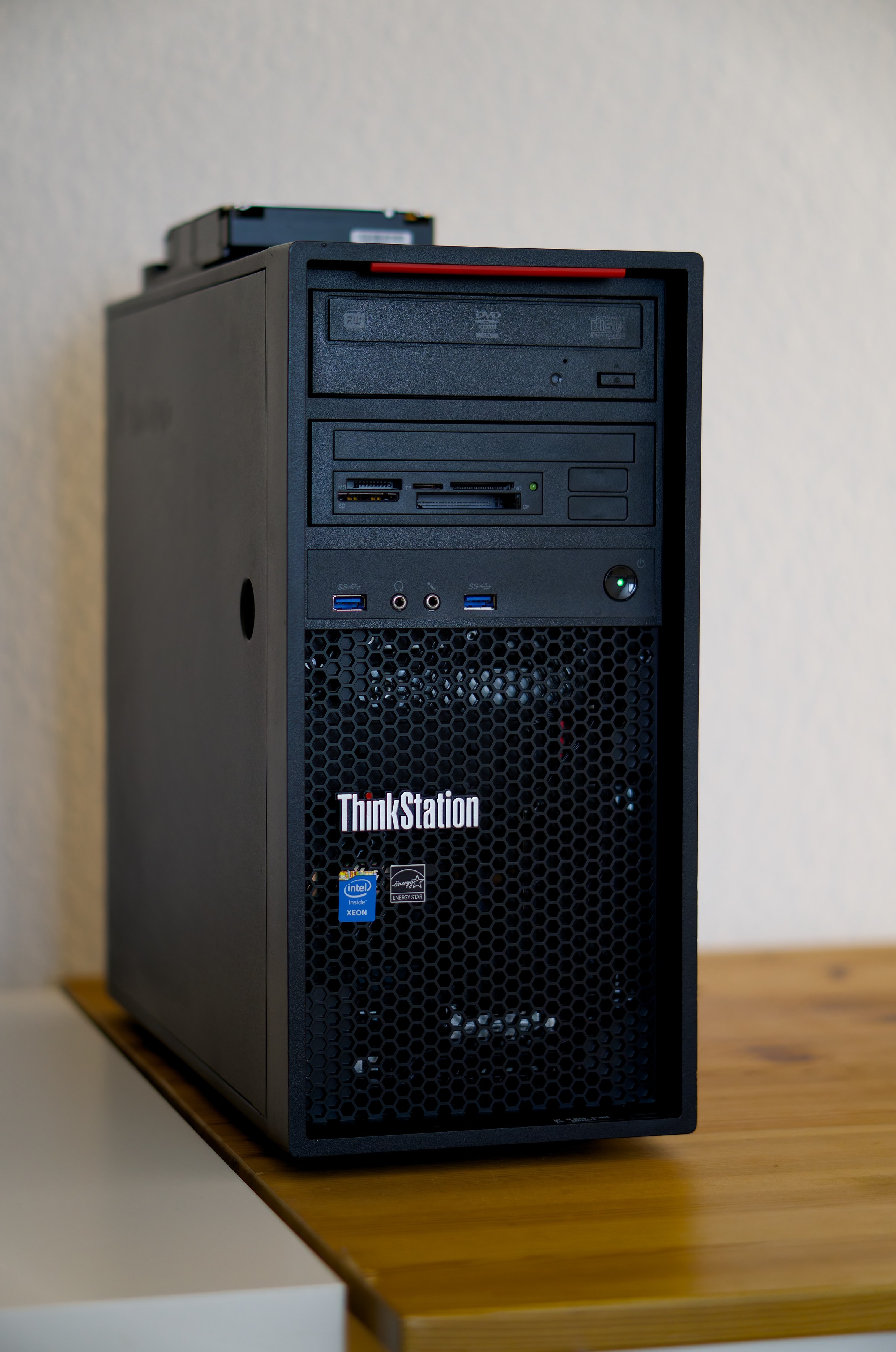
ThinkStation P300 
Old stock from my dad’s company, this one was running FreeBSD up until I stopped using that. It currently has Arch installed but I am not really using it for anything.
I really like this one, however, not only because I love the design, but because it’s an older Xeon with an iGPU (not something I’ve seen all too often) that can easily run my 120 hz 1440p monitor without struggling! This used to be one of the main PCs I used quite a lot because it had a comparatively low power draw (compared to the gaming PC at any rate) but still has enough performance for most tasks I typically perform on a desktop computer; and it’s really quiet as well. I have, however, since moved to my Framework 12 and my MacBook Pro as my main machines.
I have installed FreeBSD on it in an effort to try and find out how viable FreeBSD is as a replacement for Linux (at least for me) and I have even written a blog post about my experience with my experience with that.
- Model: Lenovo ThinkStation P300
- RAM: 4x 8GB DDR3 @ 1600 MT/s (32 GB in total)
- CPU: Intel Xeon E3-1276 v3 @ 3.60GHz
- OS drive: Micron M600 1 TB MTFDDAK1T0MBF (came with the PC, haven’t bothered to replace yet)
- OS: FreeBSD 14.2-RELEASE-p1 (previously), EndeavourOS (currently)
Photo
ThinkCentre (Work from home PC)
This used to be a server of mine but it was not really used much and just ended up using so much electricity that I decided to move all that was on it over to my Eagle PVE node and use this computer as my computer for working from home. It’s not powerful but more than enough for my work-from-home setup!
- Model: Lenovo ThinkCenter M93p SFF
- RAM: 4 x 8 GB DDR3 (32 GB in total)
- CPU: Intel Core i5-4570 (TDP 84 W!)
- OS drive: SP SSD, SATA, 512 GB
- OS: Windows 10
Beelink Mini PC (former PVE Node)
I don’t quite remember why I even bought this PC but I ended up not using it for the purpose I had bought it for and it was just collecting dust in some drawer so I decided to install Proxmox on it and create a cluster, combining it and my other node (Eagle) together into one thing. It is now, however, no longer part of my Proxmox cluster (which has been reduced to just a single PVE node, namely “Eagle”) because it had a tendency to be both very loud and also very warm, despite having only a very low CPU usage. I have moved the services running on this machine over to Falcon and Eagle. I am still keeping it around for various random things I want to try.
- Model: Beelink Mini S12
- RAM: Unknown brand, 16 GB DDR4.
- CPU: Intel Processor N100 (soldered to motherboard)
- OS drive: Unknown brand, 512 GB.
- OS: Varies
Cameras and lenses
I also love photography and have a bunch of cameras and lenses, though I have sold a lot of my older ones I barely used anyway! I mainly use the Canon EOS R10 for bird photography because I am very much a fan of the automatic autofocus it has, it makes focussing on birds much easier than it was with my Canon EOS 70D I had before. The Sony α6000 I use for basically everything else and the Canon EOS-1Ds Mark II gets used only rarely because I don’t actually have many lenses for it (only the one). My favourite lenses are the Sigma 18-50 mm and the Sony 50 mm (in that order). The E PZ 16–50 mm f/3.5-5.6 OSS is honestly kind of trash, don’t get that one, it’s just the kit lens.
Cameras
- Sony α6000 (ILCE-6000)
- Canon EOS-1Ds Mark II
- Canon EOS R10
Lenses
- Sigma 18–50 mm F2.8 DC DN Contemporary (Sony E-mount)
- Sony E 50 mm f/1.8 OSS
- E PZ 16–50 mm f/3.5-5.6 OSS
- Canon EF 50 mm f/1.8 STM
- Canon RF 100–400 mm f/5.6-8 IS USM
Misc Hardware
- Kindle Oasis (10th generation). Jailbroken, running KOReader.
- LCD Steam Deck (originally 64 GB eMMC, upgraded to 512 GB SSD)
- DT 770 Pro 80 Ω Limited Edition
- SteelSeries Arctis Nova 5 Wireless Headset
- CREATIVE Pebble V3 speakers
- Audio-Technica AT-LP120XUSB
- 8Bitdo Ultimate 2.4G Wireless Controller
- Raspberry Pi Zero W
- Some random old HDDs and SSDs in a drawer
- Pixel 8a with GrapheneOS
- Nothing Phone 3a
- Too many mice and keyboards to list
Previous Tech
My websites used to run entirely on OpenBSD and were (almost) entirely hosted using tools available in the base installation of OpenBSD, namely acme-client, httpd and relayd (though things like birds.bateleur.org required a Ruby installation). I have a VPS from obsda.ms running OpenBSD with relayd and httpd. Connected to this VPS via WireGuard were OpenBSD VMs on my servers at home. relayd handled TLS connections and load balancing, balancing the load between itself and the two VMs connected to the VPS via WireGuard. They used to run on Debian but I moved everything over to OpenBSD in March 2025 and then back to Debian in March 2026; you can read more about my trying out OpenBSD in the blog series.
(Falcon) OpenBSD ThinkCentre 
Old entry, decommissioned in February 2026.
The newest addition to my family of servers, I even wrote a blog post about it. I got it off eBay to have a separate physical server for all of my OpenBSD stuff and to figure out how viable using OpenBSD as a VM host would be for my purposes; as it turns out, it is actually very viable despite most posts on Reddit telling me otherwise. The VM functionality of OpenBSD with vmm / vmd is definitely not as advanced as something like Proxmox, but for a lot of what I need VMs for, this is more than adequate, easy to configure and lightweight (blog post soon!). Thus far, two VMs running on this server are connected to relayd on my VPS for load balancing (all of my websites, basically with one VM being for regular websites and the other VM having a Ruby installation).
- Model: Lenovo ThinkCenter M93p SFF
- RAM: 4 x 8 GB DDR3 (32 GB in total)
- CPU: Intel Core i5-4570 (TDP 84 W!)
- OS drive: SanDisk SSD X300, SATA, 256 GB
- VM drive: Silicon Power A55, SATA, 1 TB.
-
Backup drive: Crucial BX500 1TB CT1000BX500SSD1 (for VM backups and as
altroot) - OS: OpenBSD 7.8
- VMs: Websites (OpenBSD), DokuWiki (OpenBSD), Ruby (OpenBSD), Forgejo (Debian)

Photo