
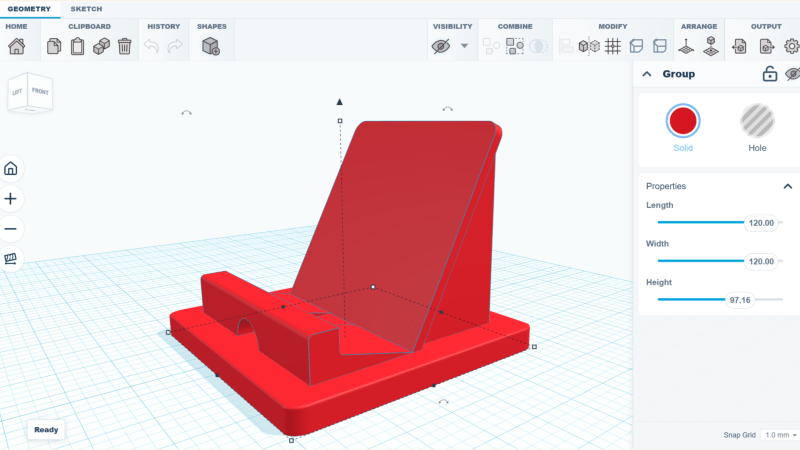
Got an idea and want to make a simple 3D model, but don’t want to install a full-fledged CAD modeling suite and queue up a few hours of tutorial videos? Check out SketchForge, a 3D modeling program that runs locally in one’s browser without any need for an account, or external services.
SketchForge takes a more WYSIWYG approach to 3D modeling by making it easy to put an object together with primitive shapes, and making it extra easy to specify dimensions and align parts with one another. There’s also a sketch feature that makes it easier to create more complex shapes by making a 2D drawing, then extruding or revolving it into a solid. We like that it has STEP format export as an option, making it easy to import your creation into another CAD program of your choice later. Most 3D printer slicers natively support the STEP format nowadays, too.
It’s a bit reminiscent of Tinkercad in concept, but entirely local. It’s still new, but there’s a demo online that gives a good idea of its capabilities if you’d like to give it a spin.
We’re reminded of CaDoodle, another project that takes the “Tinkercad, but local” approach but as a standalone executable, instead of browser-based.












Slick – i like it.
++ for Local
Local, no installation: a win by any other name…
not for me shrug
but anecdotally, when i wanted to print a phone/tablet stand like in the cover photo (for video conferencing during rona), i decided that its complication (low) : amount of material (high) ratio was all wrong for 3d printing and i used a bit of plywood instead :)
It can 3d model other things besides tablet stands..
yes :)
Bit of an aside, but I have been looking for an alternative for fusion360…It was just an easy pickup from my engineering days with solidworks. I’ll have to check this out.
My most recent design/print was an A/C exhaust plate/hose adapter. Free a/c (because missing essential part) is back in service. Hell that one print basically made the printer worth it since I didn’t have to pay $400 for an a/c
I believe there is a legal requirement at this point that someone mention FreeCAD whether or not it sounds like it would meet you needs. I don’t see that anyone else has yet, soooooo….
Have you taken a look at FreeCAD (https://freecad.org)? Not web based, but cross platform (Linux/Windows/MacOS). I can’t compare it to solidworks (never did professional cad) or fusion (never trusted anything cloud-based). Steep learning curve, but many features and in very active development.
FreeCAD is a fanboy version of CATIA, so its UI/UX style is derived from a 1990’s French aerospace corporation where the original is from: it’s compartmentalized into “workbenches” whose functions are overlapping and competing, and often incompatible. It can’t quite decide whether it’s supposed to be a duck or a horse, so it’s both.
FreeCAD has hierarchies that are not quite the same as the rest of the industry, so you have to mind that e.g. a “part” is actually more like an assembly container whereas a “body” is what others would call a part, but a part actually is a single object even though it can contain many objects. This confusion stems from trying to mash Constructive Solid Geometry (CSG) modeling together with Feature Editing in the same program – that’s the duck and the horse – which results in a lot of conflicts and breakage.
As a result, FreeCAD is not a single cohesive application program that does its job well; it’s actually more like a “launcher” for a bunch of smaller CAD tools that each do their own things in their own ways and have some mutual definitions that allow them to work on the same model data, with the risk of breaking it.
With this in mind, if you wish to learn FreeCAD, remember that you’re not learning good practices in modeling as much as you’re learning the particular tricks of how to dodge the minefields in FreeCAD.
And now we also have the FreeCAD is crap comment. All the legal requirements are fulfilled. Thanks, Dude!
My pleasure.
CATIA is used in the industry because of old projects spanning decades, and because of it’s superior surfaces and ability to handle big models. Otherwise pretty much everyone agrees it sucks because it’s ancient, obtuse, and easy to break if you don’t do exactly as you’re told.
FreeCAD doesn’t do any of the good stuff that CATIA does, it just sucks, so the only reason people get into FreeCAD is because it costs nothing. It’s kinda like GIMP: even if they polish the user interface by re-arranging it slightly, it still doesn’t do the right things in the right ways to be really useful.
You can buy chassY SCAFFOLD from us, or download the parts to save money. cliquz ici: https://makechassy.com
I’ll stick with SketchUp2017 while Materializr develops.
Not only is it local without account and more responsive than Tinkercad, it also natively supports Chamfers and Fillets! I will definitely switch, thanks a bunch for sharing
Wow thats actually pretty sick!
Is it only on parametric models or can it do chamfer and fillers on meshes? I’m still looking for a mesh editor that can do that.
It works on both native SketchForge models and imported meshes such as STL files.
Can it do curved text or text on curved surface?
Big ole in tinkercad IMHO.
Working on it!
Any recommendations for an onward route to g-code for CNC?
I’ve had a quick play and reproduced in a few minutes something that took me ages in Fusion360, but with no obvious way to export for CNC, it’s a dead end…
oh! I think Chisel CAD is local and browser based too. you don’t need an account and it does openSCAD-like code
Not sure if tinkercad can import a STL but sketch forge can I used it the otherday to revove a section of a model so a strap on a multi-meter mount fitted without the bulge so the mount sat flatter when on a metal surface .
TinkerCAD can import STL. I do that all the time. I also import SVG’s. Works great.
This looks awesome! I’ve been working on something similar, with a bit more power, also local-first at https://cubbycad.com/editor.
I love how people all across the world have the same ideas at the same time -and make their own versions of a concept!
I’ve been working on a similar free project called “tapCAD”. I like Tinkercad, but didn’t like the forced login and the “always online” engine, I’m also “local-only”. So I made project that combines SketchUp + Tinkercad + OpenSCAD with the goal of simple 3d design for 3d printing via STL (still need a slicer). The SketchForge project definitely uses a modern interface whereas mine is definitely old-school.
Super Cool. Look forward to trying it. The sketch feature sounds extra appealing to me. Maybe sprinkle some parametric feature tree in the mix???
If it can do threads, I’m in.
I’m glad there is a website to test it with. I just wish this was released as normal software with a web interface instead of a docker image.
Seems to work great so far on the site. It’s missing some features such as align, but other than that, it seems great and it can even do chamfers and fillets. I’d like to use this in the future if it’s ever released as software.
Had a quick play. Very clean UX. A few oddities, like, if you choose to chamfer or fillet, and drag an edge, it stops at about 2mm, then you have to input the value manually. Prob a bug, but in general a good start. I use Shapr3D on iPad and desktop, it’s outstanding, but something else is always welcome.
STEP export from a local-in-browser modeler is the useful part. Tinkercad-simple is fine for a first solid. The last mile is still the same: walls, a flat bed face, and geometry you can still edit after the first draft. That’s what I’ve been working on at luphra.com — prompt or sketch in, file meant to manufacture out. Local-first is a plus. You keep the file.