A native macOS command center for running coding agents in parallel.
Run several coding agents side by side from one window: each task gets its own git worktree and its own real terminal. Sessions persist in the background, so quitting the app or dropping an SSH connection loses nothing.
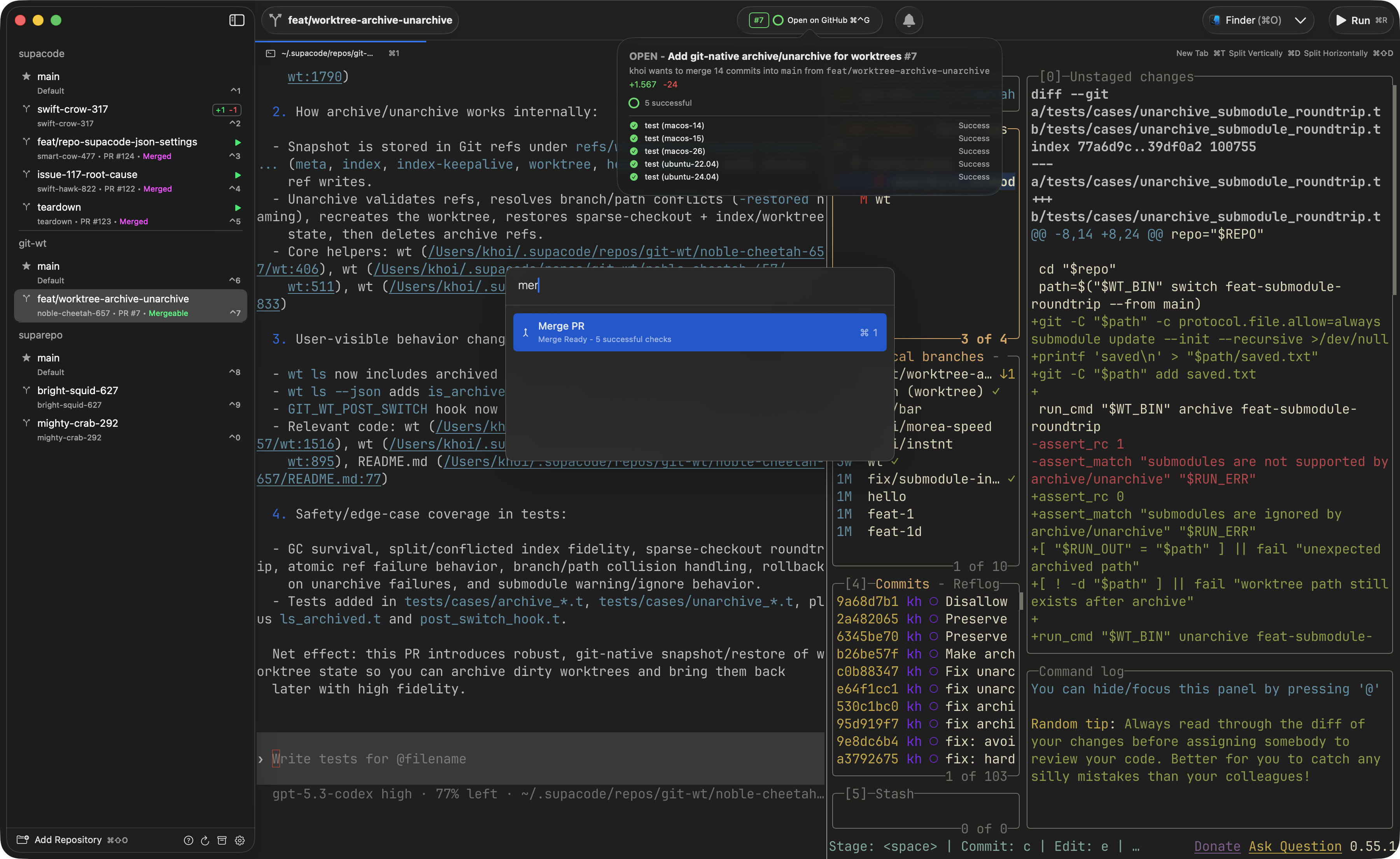
Each task gets its own git worktree and terminal, so agents run in parallel without colliding. Create one from the sidebar, a hotkey, the command palette, the CLI, or a deeplink. The sidebar refreshes branch, file, and pull request state live, nests rows by branch, and hoists the worktrees that need you (an agent awaiting input, a running script) to the top. Pin, archive, auto-delete after N days, and jump to any with ⌃1 to ⌃0.
Sessions run inside zmx, a lightweight session daemon, not as children of the app. Quit and relaunch, and every session reattaches exactly where you left it, scrollback included. On by default; a quit option tears everything down when you want a clean start.
Point Supacode at a repository on a remote host over SSH and it manages that repo's worktrees like a local one. Every git probe and the terminal share one multiplexed SSH connection, so you authenticate (or touch your security key) once. When the host has zmx, remote sessions survive dropped connections and laptop sleep: the connection retries and reattaches instead of restarting. Beta, with some local-only features reduced.
Git repositories and plain folders are both first-class in the sidebar. A folder gets a real persistent terminal rooted there, with the same tabs, scripts, pinning, and appearance as a repo, minus the git-only tools. You can also clone a remote URL straight into a folder.
Supacode detects the agent in each pane and shows a live badge: busy, awaiting input, or idle. It supports the common agents (Claude, Codex, Copilot) through hooks it installs, works locally and over SSH, and drives notifications so you know the moment an agent needs you.
Drive the app from any terminal, script, or other tool. The supacode CLI manages worktrees,
tabs, splits, and repos, and every session exports its repo, worktree, tab, and surface IDs, so
commands default to the session you run them in. Deeplinks (supacode://...) mirror the CLI, so
you can bind an action to a hotkey or fire it from another app.
- A real terminal. libghostty renders every session, with tabs, horizontal and vertical splits, per-surface backgrounds, and theme sync with the app's appearance.
- Command palette. Fuzzy-search and run any action without the mouse: jump to a worktree, open or clone a repo, manage worktrees, run scripts, and drive the full set of pull request actions.
- Pull request tracking. With GitHub integration on, each worktree's PR state, checks, and merge readiness show in the sidebar and refresh live, with configurable merge strategy.
- Notifications and bells. In-app and optional system notifications, a selectable sound, per-surface muting, and an option to float a notified worktree to the top.
- Custom scripts. Named commands with an icon and tint, per repository or global, that run in their own tab and appear in the Script Menu, the palette, and as deeplinks. Repositories also get setup and archive scripts.
- Auto-updates through Sparkle, with a selectable update channel.
- macOS 26.0+
- mise for the pinned toolchain. Add
~/.local/binto yourPATH. - git submodules:
git submodule update --init --recursive - Xcode 26.3 if you are on macOS 26.4+ (see below).
git clone --recursive git@github.com:supabitapp/supacode.git
cd supacode
mise install
make doctor    # check every build prerequisite and print fixes for anything missing
make run-app   # build and launch the Debug app
make doctor verifies mise, submodules, a Zig-linkable Xcode, the Metal Toolchain, and the
pinned tools, and prints the exact command to fix anything that is missing. The build targets
run it automatically as a quiet preflight.
make build-ghostty-xcframework   # build GhosttyKit from Zig source (slow, cached)
make build-app                   # build the macOS app (Debug)
make run-app # build and launchGhosttyKit is built with a pinned Zig (0.15.2, required exactly by ghostty) whose linker
cannot link the macOS 26.4+ SDK: that SDK dropped the arm64-macos slice from libSystem.tbd
(ziglang/zig#31658), so the build fails with a
wall of undefined symbol errors. Install Xcode 26.3,
which ships the macOS 26.2 SDK that still has arm64-macos. You do not need to switch it
globally: the build auto-detects a Zig-linkable Xcode and pins it for that build only. After
installing Xcode 26.3 once:
sudo DEVELOPER_DIR=/Applications/Xcode_26.3.app/Contents/Developer xcodebuild -license accept
sudo DEVELOPER_DIR=/Applications/Xcode_26.3.app/Contents/Developer xcodebuild -runFirstLaunch
sudo DEVELOPER_DIR=/Applications/Xcode_26.3.app/Contents/Developer xcodebuild -downloadComponent MetalToolchain
See AGENTS.md for the full rationale and the rest of the architecture.
make check   # swift-format + swiftlint
make test    # run the tests
make format # swift-format only- The Composable Architecture
- libghostty
- zmx for session persistence
Contributions are reviewed personally, line by line, and a clear issue is worth more than a
large pull request. Start by opening an issue, wait for the ready label, then open a focused
pull request that links it. The full process, including the rule that a human (never an AI
agent) is the accountable author, is in the Contributing guide.
See LICENSE.