Godot version:
3.1
OS/device including version:
win10, gt1030
Issue description:
In create node menu via right-click, there are no items to scroll through. You can scroll only with the mouse wheel, which is not available to me.

Please add any buttons for scrolling. For example:
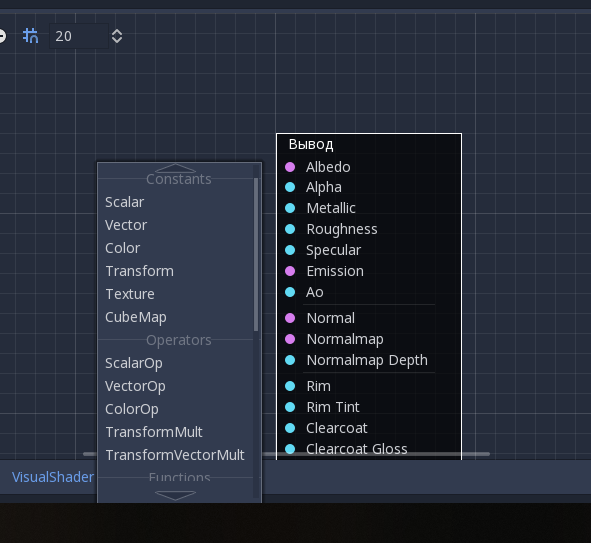
A mouse click does not process the layer, a click is made on any node from the stack.

And in general, in Godot, working with the viewport (3d / 2d - view) takes place through the mouse wheel, which not available for many people. Please do as in Blender the "emulate middle mouse button" mode.
Godot version:
3.1
OS/device including version:
win10, gt1030
Issue description:

In create node menu via right-click, there are no items to scroll through. You can scroll only with the mouse wheel, which is not available to me.
Please add any buttons for scrolling. For example:

A mouse click does not process the layer, a click is made on any node from the stack.

And in general, in Godot, working with the viewport (3d / 2d - view) takes place through the mouse wheel, which not available for many people. Please do as in Blender the "emulate middle mouse button" mode.