

Documentation Index
Fetch the complete documentation index at: https://docs.macroscope.com/llms.txt
Use this file to discover all available pages before exploring further.
Disabled by default. Enable per repo in Settings → Repos → Approvability.
How It Works
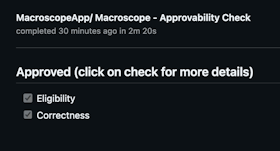
When a PR is opened or updated, Macroscope runs two checks. Both must pass for auto-approval. If either fails, the PR can still be approved manually.1. Eligibility
Is this PR a good candidate for auto-approval? Macroscope evaluates the changes, code ownership, git blame history, and the author’s role. If your repo has aCODEOWNERS file, Macroscope factors in the author’s relationship to changed files.
- Typically eligible: docs, tests, code behind feature flags, simple bug fixes, copy changes.
- Not eligible: large refactors, schema changes, security/auth/billing code, breaking changes.
2. Correctness
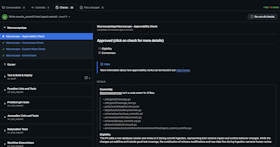
Did the PR pass Macroscope’s code review with zero issues flagged?Results appear as
Macroscope - Approvability Check in the Checks tab and as a PR comment with detailed reasoning.
Custom Eligibility Rules
Add a.macroscope/approvability.md file to your repo to define rules on top of the defaults. Your custom rules are additive — they are combined with the built-in eligibility criteria, not a replacement.
Plain text rules
The simplest approach is a plain markdown file with your rules:Front matter configuration
For more control, add YAML front matter to configure the approvability agent’s behavior:Supported fields
| Field | Default | Description |
|---|---|---|
tools | [] | Additional tools for the approvability agent. The agent always has file browsing and git tools; this field adds more capabilities. |
conclusion | neutral | Controls the check run result when a PR needs human review. neutral (default, recommended) means the check is informational — it never blocks merging. To gate merge on human approval, use GitHub’s required reviewers. failure makes the check hard-block merge via required status checks — see caveats before enabling. |
Available tools
Tools extend what the approvability agent can do beyond its defaults (file browsing and git tools):github_api_read_only— search code and read GitHub metadatamodify_pr— request reviewers or post PR reviewsslack— post messages to Slack channelslaunchdarkly— check feature flag statusweb_tools— search the webissue_tracking_tools— query linked Jira/Linear tickets
Using approvability as a required status check
If you want the approvability check itself to hard-block merge when the verdict is “needs human review,” setconclusion: failure in front matter and add Macroscope - Approvability Check as a required status check in your branch protection rules.
Be aware of how GitHub handles this combination:
- The check concludes as
failurewhen the verdict is “needs human review,” which blocks merge. - A PR review approval alone does not clear a failing required status check. GitHub treats approvals and status checks as independent gates.
- The check stays in
failureuntil a new commit is pushed or the check is manually re-run, at which point the approvability agent re-evaluates the PR.
The legacy path
macroscope_approvability.md at the repo root is still supported for backward compatibility, but .macroscope/approvability.md is the recommended location. Front matter is only supported in the .macroscope/approvability.md path — the legacy path treats the entire file as plain text rules.Setup
- Enable Approvability in Settings → Repos.
- (Recommended) Add a
CODEOWNERSfile to your repo. - (Optional) Add a
.macroscope/approvability.mdfile with custom eligibility rules and front matter configuration.
Macroscope cannot approve its own PRs.