
Google Pay ™ Integration
Google Pay™ is currently available to US Acquiring Merchants only.
Google Pay ™ provides an easy and secure process for customers to pay merchants. ConnexPay’s Payment SDK provides a simple process for enabling Google Pay functionality and already follows Google’s Brand Guidelines. ConnexPay supports both Android and Web merchants via our convenient SDK implementation. Click here to visit Google’s documentation on Google Pay for web or here for Android.
You you must adhere to the Google Pay™ APIs Acceptable Use Policy and accept the terms defined in the Google Pay API Terms of Service.
When a consumer chooses to pay with Google Pay™, the Google Pay™ API initiates a request to Google servers. This request includes the name of the processor along with other parameters. Google uses the processor’s public key to encrypt the response and sends a payment token back and ConnexPay processes the payment with that payment token.
To process a sale using Google Pay via the SDK, simply define the Google Pay element where you want to display the Google Pay button and specify Google Pay to render the button. See the Credit Card integration section for complete details.
ConnexPay SDK Google Pay Implementation
-
Add ConnexPay's SDK script and CSS link
-
Sandbox:

-
Production:

-
-
Add Google Pay element to the checkout screen

-
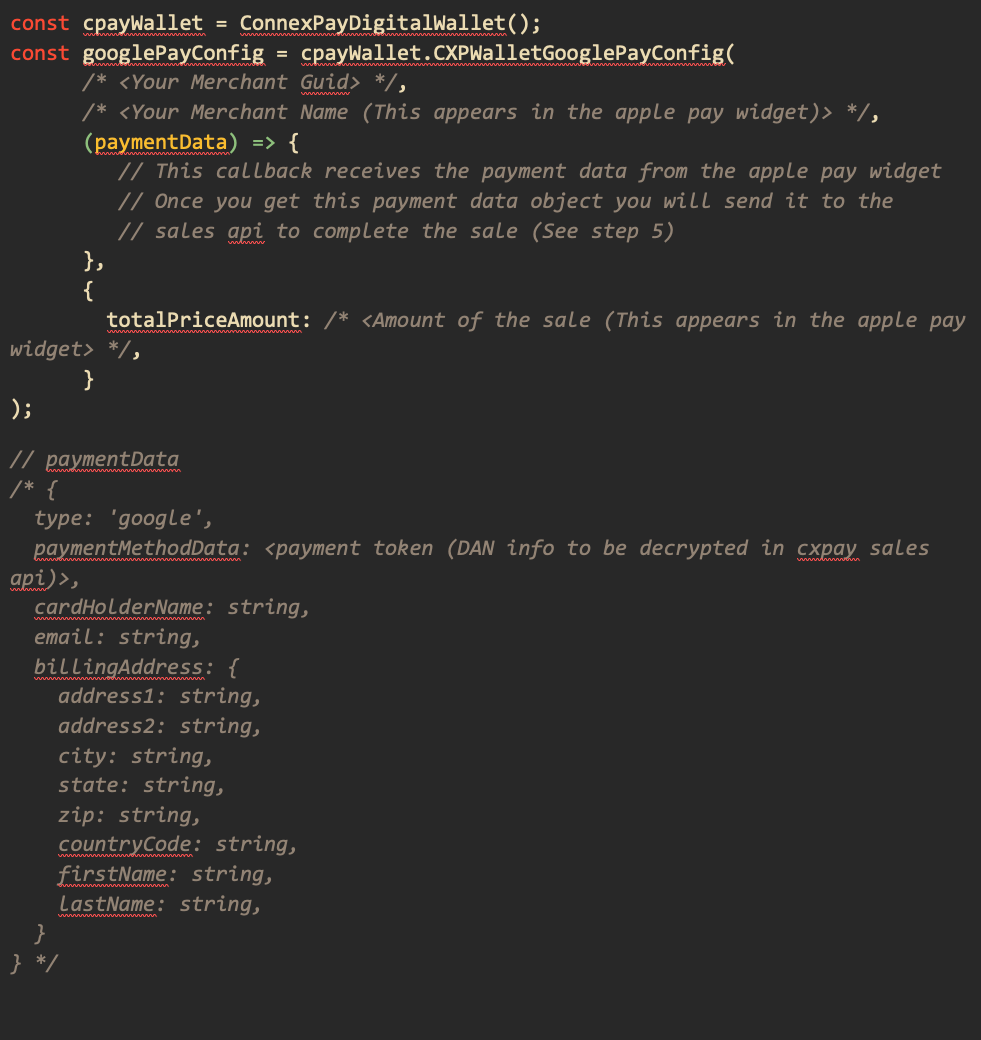
Configure the SDK / Google Pay button - this should happen when the checkout page first loads
-
Initialize the Google Pay button

-
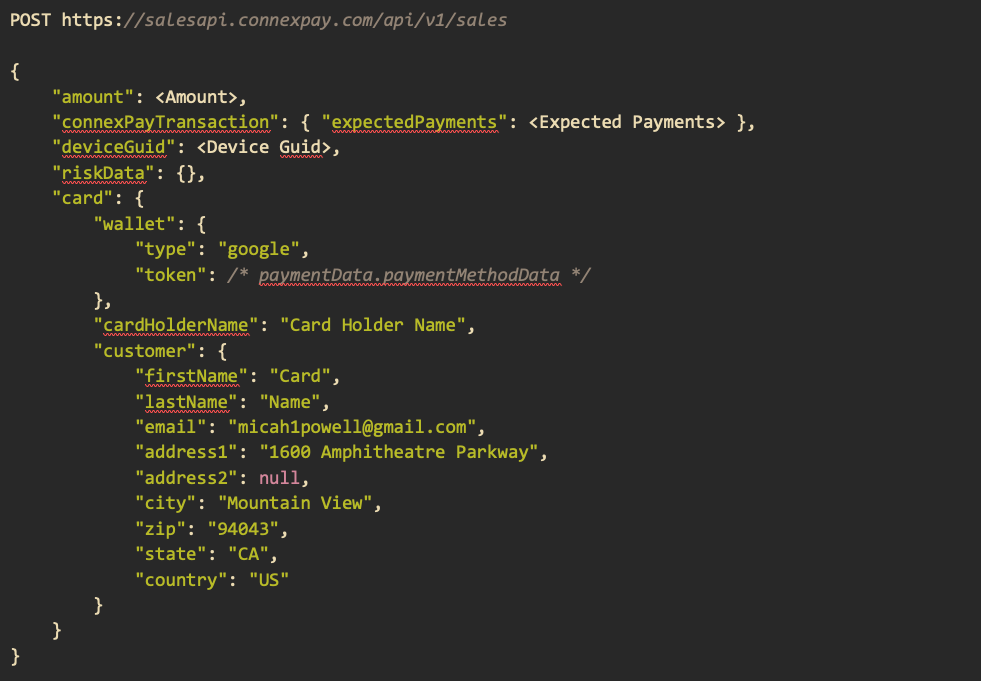
Send payment data to the Sales API
Testing
- First, navigate to the following link to join the Google Pay Test Card Suite group: <https://groups.google.com/g/googlepay-test-stub-data>
- When using the sandbox ConnexPay SDK, when the Google Pay modal displays, you will automatically be shown a collection of test cards to choose from.
- Choose a card from the Google Pay modal and click Continue.
CXP Google Pay in Production
Once ConnexPay’s Google Pay SDK has been tested in non-production, your domain and
implementation will need to be approved by Google to be able to run in production.
ConnexPay will submit this information to Google for approval. Approval should take less than
24 hours.
Please provide the following to ConnexPay:
- Website URL
- Screenshots of:
- Item Selection (When a user is browsing an item or service.)
- Pre-purchase screen (When a user is ultimately ready to make a purchase.)
- Payment method screen (When a user selects Google Pay as their payment method.)
- Google Pay API payment screen (When a user is shown the payment info they’ve saved
to Google Pay) - Post-purchase screen (When a user has made a successful purchase.)
ConnexPay has the ability to accept Visa, Mastercard, Discover, and American Express. However, each merchant account may be configured differently based on what was discussed and set up during the implementation process. All sales will be settled in USD. ConnexPay does not require a billing address in the Sales request, however, it is highly recommended.
Updated 11 months ago