


(no subject)
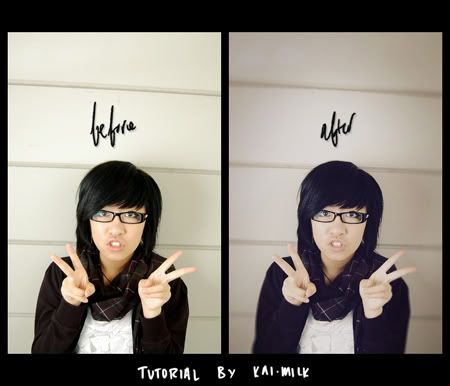
Going from This:  to this:
Made in Photoshop 7
Translateable: Nope
Difficulty: Pretty easy?
PSD: Of course!
Tutorial and PSD here @ pinky_place
to this: Made in Photoshop 7
Translateable: Nope
Difficulty: Pretty easy?
PSD: Of course!
Tutorial and PSD here @
pinky_place 1 tutorial
Go from  to
to 
Program: Photoshop CS2
Difficulty: Easy
Steps: 3
( steps & other stuff hereCollapse )
Program: Photoshop CS2
Difficulty: Easy
Steps: 3
PSD INCLUDED. Direct Comments & PSD here: http://community.livejournal.com/t…
( steps & other stuff hereCollapse )
Text Help, Please?
Heyy, so I've just recently started making icons and I'm really having some trouble with making text look alright when I add it.
Other than text, I've got everything else down pat, but it just seems like once I add the text it just looks plain stupid.
//:
Example:
I'm really having trouble. If anyone knows of any good tutorials or has any suggestions/tips, they would be much appreciated.
-
-
 frustrated
-
My first tut^__^
Tutorial 1.
No selective coloring. No curves and levels.
From to
to 
Translatable)
diz-gloria.livejournal.com/1091.ht… - my LJ.
Other examples


No selective coloring. No curves and levels.
From
to Translatable)
diz-gloria.livejournal.com/1091.ht… - my LJ.
Other examples

(no subject)
hey hey hey check it out herrreeee like foshaow.
note: made with PS CS2, uses selective colouring, levels, and curves.
Icon Table Generator update
I rolled out an update last night on my icon table generator. For those who might not know about it, the generator helps you post icons (or other similar photos) in batches on your Livejournal, similar to this one, for example. You just enter your URLs in a form, and it generates the HTML for you. There are currently 4 templates to choose from.
The update now allows you to include section headers in your icon post. This is useful for those multi-fandom icon posts ;) Sample output could be seen at this multi-fandom icon post of mine.
(Crossposted:creaticon, iconaddicts, ihearticons)
The update now allows you to include section headers in your icon post. This is useful for those multi-fandom icon posts ;) Sample output could be seen at this multi-fandom icon post of mine.
(Crossposted:
creaticon, iconaddicts, ihearticons)(no subject)

Wanna know how?
{Credit  ch4ndler is u must}
{Leaving a comment would be great}
{Showing me your outcomes is pure love}
{Feel free to friend me}
ch4ndler is u must}{Leaving a comment would be great}
{Showing me your outcomes is pure love}
{Feel free to friend me}
(no subject)
 to
to 
POA Icon Technique
Today we will be making:

For photoshop 7.
Set of icons made with this tutorial can be found here.
tutorial@my lj
For photoshop 7.
Set of icons made with this tutorial can be found here.
tutorial@my lj