Skip to content

World

Topics from outside of this forum. Views and opinions represented here may not reflect those of this forum and its members.

A world of content at your fingertips…

Think of this as your global discovery feed. It brings together interesting discussions from across the web and other communities, all in one place.

While you can browse what's trending now, the best way to use this feed is to make it your own. By creating an account, you can follow specific creators and topics to filter out the noise and see only what matters to you.

Ready to dive in? Create an account to start following others, get notified when people reply to you, and save your favorite finds.

Register Login
  • palmoniP

    Some of the plugins were published here separately, but I will not refrain from bringing them here again for the sake of continuity of all the plugins together.

    nodebb-plugin-admin-chats

    Chat management plugin
    For GitHub repository and all details - https://github.com/palmoni5/nodebb-plugin-admin-chats
    Can be installed through the forum administration interface

    nodebb-plugin-chat-search

    Chat search plugin
    For GitHub repository and full details - https://github.com/palmoni5/nodebb-plugin-chat-search
    Can be installed by running

    npm install nodebb-plugin-chat-search
    

    nodebb-plugin-reply-as-bot

    A plugin that allows you to reply as a bot
    For the GitHub repository and all the details - https://github.com/palmoni5/nodebb-plugin-reply-as-bot
    Can be installed by running

    npm install nodebb-plugin-reply-as-bot
    

    nodebb-plugin-impersonate-users

    A plugin that allows administrators to log in as other users
    For the GitHub repository and all the details - https://github.com/palmoni5/nodebb-plugin-impersonate-users
    Can be installed by running

    npm install nodebb-plugin-impersonate-users
    

    nodebb-plugin-simple-contact

    A plugin that creates a dedicated contact page and referrals come to the management interface
    To the GitHub repository and all the details - https://github.com/palmoni5/nodebb-plugin-simple-contact
    Can be installed by running

    npm install nodebb-plugin-simple-contact
    

    nodebb-plugin-custom-notify

    A plugin that adds the topic name to notifications sent to subscribers when a topic is created in a category they follow
    GitHub repository and all details - https://github.com/palmoni5/nodebb-plugin-custom-notify
    Can be installed by running

    npm install nodebb-plugin-custom-notify
    

    nodebb-plugin-edit-locked-topics

    A plugin that adds the ability to edit posts in locked threads to the forum permissions list
    For the GitHub repository and all the details - https://github.com/palmoni5/nodebb-plugin-edit-locked-topics
    Can be installed by running

    npm install nodebb-plugin-edit-locked-topics
    

    nodebb-plugin-original-upload-filenames

    A plugin that specifies that when downloading a file from the forum, it will be downloaded with its original name without the timestamp that is automatically added to it
    For the GitHub repository and all the details - https://github.com/palmoni5/nodebb-plugin-original-upload-filenames
    Can be installed by running

    npm install nodebb-plugin-original-upload-filenames
    

    nodebb-plugin-silent-edit

    A plugin that allows authorized users to edit a message without sending a notification to followers
    For the GitHub repository and all the details - https://github.com/palmoni5/nodebb-plugin-silent-edit
    Can be installed by running

    npm install nodebb-plugin-silent-edit
    

    nodebb-plugin-moving-topics

    A plugin that allows users to move the topic they opened to another category up to a certain number of messages
    For the GitHub repository and all the details - https://github.com/palmoni5/nodebb-plugin-moving-topics
    Can be installed by running

    npm install nodebb-plugin-moving-topics
    

    So I'm just wondering, are these vibe coded? Or really developed. Seems like a lot of plugins to maintain.
  • T

    Hey everyone,

    I’ve been thinking about setting up a small gaming forum and came across NodeBB. I like how modern and lightweight it looks compared to older forum platforms, but I’m not sure how well it really works in practice for gaming communities.

    Most gamers I know mostly use Discord now, so I’m wondering if it’s even worth starting a traditional forum at this point. My idea was to have a place for more structured discussions like game guides, updates, and long-term threads that don’t get lost like they do in chat.

    If anyone here has experience using NodeBB for something gaming-related:

    Does it stay active, or is it hard to keep people engaged?
    Any features or plugins that made a big difference?
    Did you face any issues early on that I should be aware of?

    Just trying to understand if I’m heading in the right direction before I invest time into this. Would appreciate any honest opinions.


    @tahirmehmoodkhokhar forums have a long history of being paired with gaming. Many of the top AAA gaming companies have (or had) forums. Discord has supplanted them but it provides a far inferior experience compared to a forum.
  • M

    Hello everyone!
    I have a problem with my dashboard, it started when I updated the forum but even after I went back to the previous version it still persists...
    I switch between categories in the administration, for example from 'Overview' to 'Settings' or to 'Appearance'
    Every time the system pops up a notification like this:
    25ab439f-1ec2-4ff1-ae82-5cc978b5f201-image.jpeg
    And in free translation:
    You have been disconnected from the panel due to inactivity
    What can be done?


    @julian The first entry on the page was set to 999999 for some reason... I set it to 0 [image: 1779123698830-f3013521-7bfd-4fbf-be38-52a5a4318e6c-image.jpeg]
  • Ray AIR

    👎 👎 👎 👎
    Test the emoji, canned response etc...


    @Ray-AI
  • AMAARETSA

    I saw that there is an exception for the Safari browser that the Service Worker is not installed, is there a reason for this?

    This makes it impossible to subscribe to push notifications in the Safari browser even when installing the page as a PWA application


    if (notification.mergeId) { const related = await Notifications.findRelated([notification.mergeId], `uid:${uid}:notifications:unread`); const merged = await Notifications.getMultiple(related).then(Notifications.merge); if (merged.length) { notification = merged.pop(); notification.pushed = false; // Ensure it re-triggers the push for the update } } This code is in the web-push plugin, not core. Is there another change that you made that you didn't post in your reply?
  • DownPWD

    Hello everyone @baris @julian @pitaj

    I'm running into an issue where the "Build Emoji Assets" button in the Emoji ACP page does nothing, even though it returns HTTP 200 and shows a success toast.

    Environment

    • NodeBB v4.10.3
    • nodebb-plugin-emoji v6.0.6
    • nodebb-plugin-emoji-apple (enabled)
    • Database: MongoDB
    • Node: (LTS)

    Symptoms

    • Custom emojis added via the Customize panel (pencil button) are saved correctly and appear in the ACP list.
    • They do not appear in posts, in the composer picker, or in nodebb-plugin-reactions
    • I see my olds custom emojis fine
    • Clicking Build Emoji Assets returns 200, shows "success" in acp, but:
      • No log line is produced in logs/output.log (literally nothing, before or after the click)
      • node_modules/nodebb-plugin-emoji/build/emoji/table.json modification time does not change (last modified 2 months ago) = migration server
    • Rebuild & Restart from the General ACP doesn't help either

    in the DB

    The customizations are persisted correctly. New emojis are there with the highest scores:

    db.objects.countDocuments({ _key: 'emoji:customizations:emojis' })
    // 487
    
    db.objects.find({ _key: 'emoji:customizations:emojis' }).sort({ score: -1 }).limit(3).toArray()
    // [
    //   { value: '{"name":"g3mini",...}', score: 493 },
    //   { value: '{"name":"teamflix",...}', score: 492 },
    //   { value: '{"name":"torr9",...}', score: 491 }
    // ]
    

    Seems the data is fine. The build step is the one failing silently.

    Possibly relevant

    There is also a leftover emoji:customizations:emojis:bkp key with 337 entries in the DB (from an old workaround applied years ago to recover from a past emoji corruption issue maybe ??? ). I don't know why and I don't know if that interferes with the v6 build process.

    db.objects.distinct("_key", { _key: { $regex: '^emoji' } })
    // [ 'emoji:customizations:emojis', 'emoji:customizations:emojis:bkp' ]
    

    What I've tried

    • Clicking Build Emoji Assets multiple times → 200, no log, no change
    • Full ./nodebb stop && ./nodebb build && ./nodebb start → table.json still not regenerated
    • Browser hard refresh (Ctrl+F5), delete CF cache

    Logs around startup (only emoji-related lines)

    warn: [plugins] "
    warn: [plugins] "
                        nodebb-plugin-emoji-apple
    warn: [plugins] "
    warn: [plugins] "
    

    (these warnings repeat with empty quoted strings — looks like a serialization issue but no stack trace)


    Is there a known issue with Build Emoji Assets failing silently when there are ~500 customizations, or when a stale :bkp key exists in MongoDB? Is there a way to trigger the build from CLI to get a real error stack trace?

    Any help appreciated. Happy to provide more info / run any diagnostic command.

    Thanks!


    @baris Removed symlink manually and ran ./nodebb build again, all good. Looks like the build doesn't unlink before symlink, Not blocking for me, everything's working in production now.
  • DownPWD

    Hello @baris @julian

    Is it possible to add the ability for admins and moderators to visually highlight a specific post within a topic, directly from the post's edit/tools menu (the ellipsis menu) ?

    Currently, NodeBB only allows pinning an entire topic to the top of a category. There is no native way to draw attention to a specific reply or post within a long thread.

    This is particularly useful when:

    • A moderator or admin posts an important update mid-thread (e.g. rule changes, announcements, warnings)
    • A staff message needs to stand out from regular user replies
    • A thread is reopened with new conditions and the relevant post needs to be immediately visible

    Right now, the only workaround is to manually add custom CSS targeting the post's data-pid attribute which is not user-friendly and requires admin-level CSS knowledge.

    When enabled, the post would:

    • Display a visible banner/label above the post content (e.g. "📌 Important staff message" or other message)
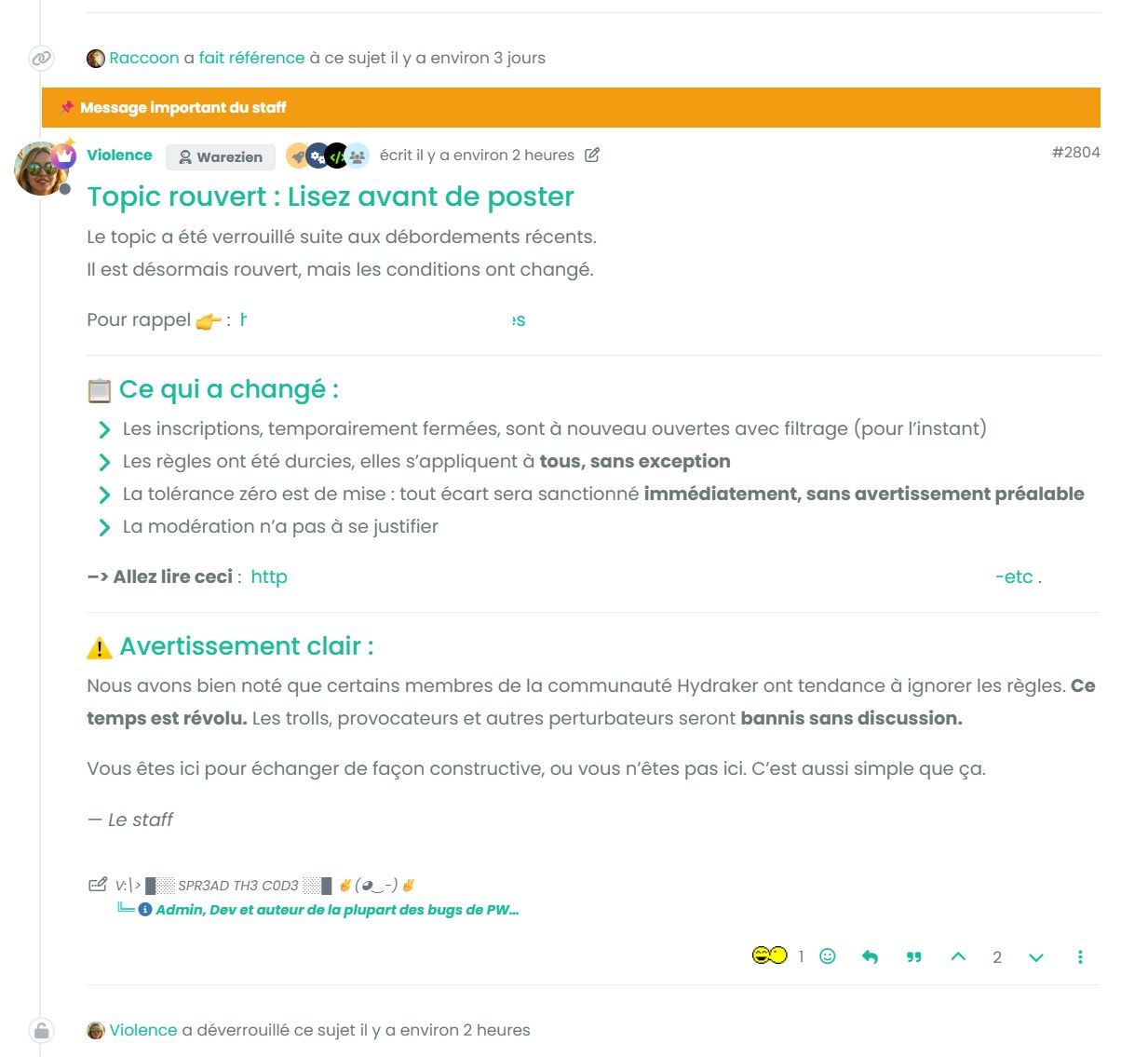
    • Have a distinct visual style (colored border, background) to stand out from regular posts
    • Be toggleable (highlight / remove highlight)
    • Optionally allow a custom label text to be set

    Suggested UI

    • In the post tools menu: 📌 Highlight this post
    • A modal or inline input to optionally set a custom label
    • A highlighted post could expose a data-highlighted attribute or a .highlighted class for theme-level styling

    Example

    68725f2f-f460-462c-a03b-b32385a23d27-image.jpeg

    This works but requires manual CSS editing per post and breaks on theme changes.

    Many thanks


    Oh yes, maybe. I don't use Reddit...
  • julianJ

    Hi everybody — late last week we released v4.11.0, which contains the following changes:

    ActivityPub Specific Fixes

    🚨 AP analytics and error pages

    New pages have been added to the control panel to display analytics (send/receive counts) and error counts. There is also a new error page that will show error received within the last 24 hours, and their respective payloads. This will aid in debugging federation issues.

    ✍ Article vs. Note distinction updated

    Prior to this version, NodeBB would determine whether a federated object was an Article or Note based on content length. This was confusing for end users, and was originally added before NodeBB supported title-less topics.

    The revised distinction is much simpler. If it has a title, it's an Article. If it doesn't, it's a Note.

    Smaller fixes

    • Threadiverse software publishes Delete objects wrapped in an Announce activity. This is how content is moderated across the threadiverse. NodeBB now supports this, although it has not been extensively tested at this time.
    • There was an interoperability issue with Mitra that was identified and fixed.
    • When group actors post content directly, the category info is shown in the user icon. It used to error out and show "Guest".
    • Optimized the outbound federation of content so the front-end is more responsive. A bunch of back-end optimizations to reduce the number of calculations needed.
    • Emojis now supported in DMs to remote users.

    🔕 Ability to hide read notifications in user panel
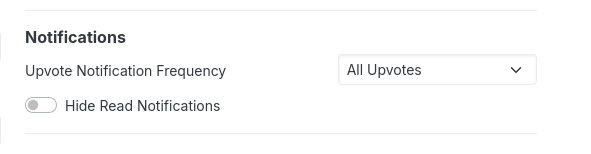
    A new option has been added to the "Notifications" sub-section of the user control panel.

    d3f24e12-9426-459d-ad98-194057d76483-image.jpeg

    This option will allow you to visibly hide read notifications from the notifications dropdown, which reduces visual clutter.

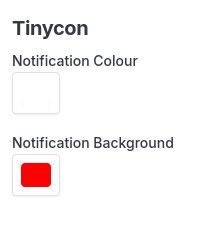
    Tinycon customizations

    Admins can now customize the notification badge shown in the browser tab icon. We use the Tinycon library for this, and the colour values can be customized now:

    55e5cf07-5c70-4b01-97df-add1a3f57148-image.jpeg


    @baris said: @downpw actually it was right at the top [image: 1778637715879-90d59df6-2358-4f28-ac27-a6dff745b4bc-image.jpeg] ha ha OMG
  • hmiura37H

    I'm using v4.11.2. I can not find tag input section for a new post and tag is not disabled by setting or priviledge. Actually, no priviledge setting for add tags. Even in this new post, I don't see the tag input section.


    @baris Thanks a lot. You saved me.
  • DownPWD

    Currently, when a user is banned, NodeBB provides several useful visual cues to help administrators & moderators identify them:

    • An icon appears next to their name in the ACP user list
    • A "Banned" mention is displayed on their user profile
    • A dedicated "Banned" tab is available on the /users endpoint to filter and list all banned users

    However, there is no equivalent treatment for muted users. Once a mute is applied, there's no easy way to see at a glance which users are currently muted without checking each profile individually or digging through moderation logs or maybe I missed somethings ?

    Mirror the existing banned-user UX for muted users, is it possible to ? :

    • Display a "muted" icon next to the username in the ACP user list
    • Show a "Muted" mention on the user's profile (with expiration date if applicable, since mutes are often temporary)
    • Add a "Muted" tab to the /users endpoint so moderators and admins can quickly list all currently muted accounts

    Many thanks @baris you rock
  • DownPWD

    Hey everyone,

    I'm not sure where to post this, whether it belongs in the themes or plugins category, I'll let @baris or @julian edit it if necessary.

    I've been working on a small client-side script that adds an simply immersive reading mode to NodeBB. No plugin required, just a few lines of custom JS and CSS dropped into the ACP.

    I'm just sharing this here for fun : https://github.com/DroidBV8/nodebb-focus-mode

    What it does

    Pressing F (or clicking the icon in the right sidebar) hides everything that isn't the content you're trying to read:

    • Both sidebars
    • Header / brand bar
    • Footer
    • Topic thumbnails and sidebar tools (reply, follow, timeline)

    The content area reflows to a centered 860px column, font size bumps up slightly, and a reading progress bar appears at the top of the page.

    To exit: press F again, Escape, or click the floating button that appears in the bottom-right corner.


    Details

    Activation effect : a subtle CRT glitch effect plays on toggle. Three CSS variables let you dial the intensity up or down without touching the keyframes:

    --fm-glitch-opacity: 1;   /* 0.5 = subtle | 2 = heavy */
    --fm-glitch-skew:    1deg;
    --fm-glitch-shift:   4px;
    

    Keyboard : F to toggle. Ctrl+F, Cmd+F and Alt+F are ignored so you don't accidentally trigger it when searching the page.

    Scroll preservation : when toggling, the layout shifts because sidebars appear/disappear. The script measures the position of the nearest visible post before and after the layout change, then compensates with scrollBy so you stay exactly where you were.

    Topic-only : the button is greyed out on non-topic pages with a tooltip explaining why. Pressing F outside a topic shows a small toast instead of doing nothing silently.

    Mobile: disabled entirely under 768px. No button injected, no state restored.

    Theming : all colors reference Bootstrap CSS variables (--bs-body-bg, --bs-border-color, --bs-primary, etc.) so it adapts automatically to any NodeBB theme, light or dark.

    State : saved in localStorage, restored on next visit. Uses try/catch so it degrades gracefully in private browsing.


    Implementation notes

    The script is a self-contained IIFE, hooking into the standard NodeBB client-side events:

    $(window).on('action:ajaxify.end',   function () { focusMode(); });
    $(window).on('action:topic.loaded',  function () { focusMode(); });
    // etc.
    

    The glitch effect is pure CSS @keyframes , the JS only adds/removes classes. Layout compensation is synchronous (getBoundingClientRectscrollBy) with no setTimeout on the scroll itself, which avoids triggering NodeBB's scroll-based URL updater in a loop.


    Compatibility

    Tested on NodeBB 3.x with Bootstrap 5 themes. Should work on any setup using the standard sidebar components (nav.sidebar-left, nav.sidebar-right).


  • AMAARETSA

    I think it would be more convenient if there was an option to define file extensions that are not allowed to be uploaded to the forum via a blacklist, and not just via a whitelist that requires manually allowing a long list of all files except those that are dangerous...

    I opened a PR for this here and it was automatically closed because I accidentally included translation files in the list of changes.

    Can you please look at this request again?
    Do I need to remove the changes to the translation files from there?


    This is merged now, will be available in 4.11.3, thanks @amaarets
  • Zielony XDZ

    Hello. I want my forum to support multiple languages, just like this website for example: https://atelier801.com/forums (it shows only categories in the language you selected in the bar). There are also posts in international category that have the same bar as in the main page and it can switch content to another language: https://atelier801.com/topic?f=5&t=19461. How do I implement that or is there a plugin for this? Is there a way to add this kind of switchable tabs to a post so it can be written in multiple languages? If I wanted to implement this, how do I add the bar to a normal post view page or to the main page? Do I have to write a new template for that? Or can I make a theme that implements this?


    @julian nope, I am looking to show and hide categories based on language. if I select EN flag I want only international and EN categories to show up (hiding other languages), the same would happen for other languages. international posts would have a bar with flags (perhaps some tab view that can show selected post in parts based on selected tab, it could be a whole separate plugin) so you could select a language like FR for example and it would show the post in french. I'm not sure how do I implement this sort of things like the category language bar. In the editor it would look like that: [TAB="[[myplugin:flag_en]]"](Here is the content that will only show after selecting tab with english flag) [TAB="[[myplugin:flag_es]]"](Here would be translated content to spanish) then the plugin would display it as tabs and switch the content based on selected option. that is my idea. would it be possible to implement this as a plugin? and if so, how? do I have to make a new template that will replace old post view? how do I put my own element in a nodebb page such as the main page?
  • K

    Hi!

    I'm migrating from another forum to hosted nodeBB but need som help with one important feature.

    We have some users that make long posts, and when someone quotes, the quote become equally long, this makes it cumbersome to scroll throught the topic.

    Other forums solve this by fading out, and a clickable "read more..." text that expands the big quotes.

    I was hoping to do this as well, but am failing. Mainly I hope due to my lacking knowledge in javascript.

    So I tried uploading readmore.min.js to /assets/uploads/... and added the following to custon javascript:

    function onLoad() {
        require(['/assets/uploads/readmore.min.js']);
        console.log('yeah it works');
        console.log($('blockquote'));
        $('blockquote').readmore();
    }
    
    $(document).ready(onLoad);
    $(window).on('action:ajaxify.end', onLoad);
    

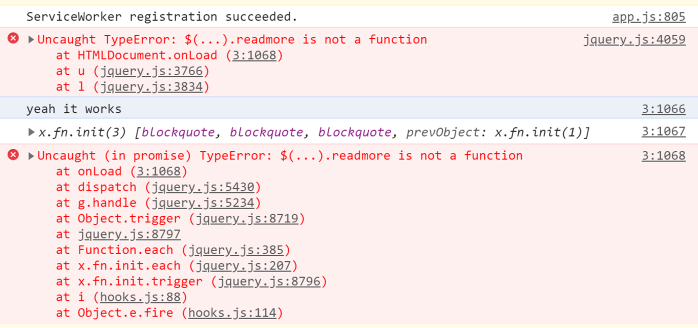
    This gives me the following output in the console:

    86a146b2-755d-45ef-8924-e2b63c5849df-image.png

    Any help is much appreciated!


    Actually, we collapse nested blockquotes. I don't think there is anything in code to collapse very long blockquotes.
  • H

    Hi,

    I hardly tried but didn't figured out how the API works at this point.

    How do I use the API to set a single or multiple privileges to a categorie? The example here https://docs.nodebb.org/api/write/#tag/categories/paths/~1categories~1{cid}~1privileges~1{privilege}/put is not helpfull for me.

    Where do I have to put the group, the privilege and the value of it?

    Maybe you could give an example for correct payload?

    Thank you very much!


    That will probably help to find a way to deal with the API here. Thank you very much! Maybe it would be helpful to add this information in the API docs? Are there any plans about adding a feature to copy privileges from another categorie like it's possible from the ACP?
  • A

    So, turns out users /really/ like nightmode.

    So while for some sites, the previous, much simpler nightmode will work fine, some will find their users demanding more complex functionality out of the nightmode as the site grows, or at least I did.

    This is a far more complex setup, however- so if you find it intimidating, the simple night mode will work almost as well, with a third of the work.

    So here's a more complex nightmode, with the following functionalities:

    1. Saved state- It will remember a users preference, and flip the nightmode to it on load.
    2. Auto nightmode option- Like google maps, it flips nightmode on when its night, and off when it's day.
    3. Instead of a cluttered toggle, separated functions

    Step 1: CSS

    Grab notepad or nodepad++, and your favorite web browser for development. Open up the inspector (ctrl-shift-i on chrome), and carefully tweak your way to a working night mode, copy pasting each CSS rule you make to the txt document, removing any unrelated rules (Keep only things you change!).

    Be detailed! Remember dismiss dialogs, search pages, group pages, user settings pages, composers, everything.

    Once you have a full night mode CSS, save this file as nightmode.css

    Step 2: Putting the CSS file on your server

    Use filezilla or similar to throw nightmode.css into nodebb/public

    Step 3: JS

    Paste the following into your header:

     <script>
     function nightmodeon(){
         var el = document.getElementById('myStyles');
         if ( el !== null ) {  
         } else {        
             var oLink = document.createElement("link") 
             oLink.id   = 'myStyles';
             oLink.href = "/nightmode.css";
             oLink.rel = "stylesheet"; 
             oLink.type = "text/css"; 
             document.body.appendChild(oLink);
         }
     }
     function daymode(){
         var el = document.getElementById('myStyles'); 
         if ( el !== null ) {               
             el.parentNode.removeChild(el);  
         } else {
             var oLink = document.createElement("link") 
             oLink.id   = 'myStyles';
             oLink.href = "/nightmode.css";
             oLink.rel = "stylesheet"; 
             oLink.type = "text/css"; 
         }
     }
     function autonightmode(){
     var d = new Date();
     var n = d.getHours();
     if (n >= 21 || n <= 5) {
     	nightmodeon()
     }
     else{
         daymode()
     }
     }
     function nmSwitch(){
     if (Number(localStorage.nmState) == 1) {
         localStorage.nmState = Number(localStorage.nmState)+1;
     	modeSet()
     }
     else if (Number(localStorage.nmState) == 2) {
         localStorage.nmState = Number(localStorage.nmState)+1;
         modeSet()
     }
     else if (Number(localStorage.nmState) == 3) {
         localStorage.nmState = Number(localStorage.nmState)+1;
         modeSet()
     }
     else {
         localStorage.nmState = 1;
     }
     }
     function modeSet(){
     if (Number(localStorage.nmState) == 1) {
         autonightmode();
         console.log('modeAuto');
     }
     else if (Number(localStorage.nmState) == 2) {
         daymode();
         console.log('modeDay');
         $(".nightmodeCSS").html(" ");
     }
     else if (Number(localStorage.nmState) == 3) {
         nightmodeon();
         console.log('modeNight');
         $(".nightmodeCSS").html(" ");
     }
     else {
         autonightmode();
         localStorage.nmState = 1;
     	console.log('modeElseAuto');
     }
     }
     </script>`
    

    You also need to create a HTML footer widget, and place this inside the widget. If you do not do this, it will not work.

    <script> modeSet(); </script>

    Step 4: Button

    The button for this CAN be simple, but that will be absolutely baffling for the user, because it has three states, one less obvious then the others. You /will/ want to style this button to have three states, one for each mode, so the user can tell what mode they're in. However, if you just want to get it working and let the users sort it out, you can simply place this:

    <button class="nightmodebutton" onclick="nmSwitch();"><span></span></button>

    HOWEVER, there is a special place in hell for people who do that. Ideally, you should style the above button as "OFF" in your default CSS, style it as "ON" in your nightmode CSS, then add something like:

    $(".[CLASS OF SOME EMPTY DIV HERE]").html("<style>.[BUTTONCLASS] span {color: #2196f3 !important;}</style>");

    into "function autonightmode()", to give it an "Auto" state.


    Hopefully that wasn't too complex, I'm aware it's a bit of a wall of text. Feel free to shoot me a chat if you have issues setting this up!


    @MJ @cookieman768 said: How could I alter this to switch skins? I use flatly but I'd like the darkly to enable at night automagically. @MJ Thanks for the heads-up — good to know it’s down to one lightbulb on 1.2.1.
  • S

    I've installed nodebb-plugin-ns-embed but nothing has changed

    I can't even get Youtube embeds to work.

    So, I have no chance at getting unknown sites like byse to work.


    @baris OK that platform is working and my research said I had to do toggle the html sanitizer. But it's working. ((( Thank you very much ))) No doubt I'll have to do this for soundcloud, twitter, tiktok, etc.
  • S

    Sorry for the 2nd post but I'm eager to get my forum working.

    My forum is set up to have just 1 category called "Talk." There's nothing more...

    When users post there's a spot where users must select the category.

    Is there a method to make this selection automatic /default and exclude the user?

    I'm trying to create a system in which users only have to push 2 buttons... (1) New topic /Reply (2) Submit


    @baris I have to say a very big and sincere thank you. I just tested this and it WORKS !
  • ccD2sC

    I just upgraded to NodeBB 4.11.1, and when I tried to access the Admin Control Panel, I got a 502 error. After disabling a few plugins, I found that the meilisearch plugin was causing the issue:

    NodeBB v4.11.1 Copyright (C) 2013-2026 NodeBB Inc.
    This program comes with ABSOLUTELY NO WARRANTY.
    This is free software, and you are welcome to redistribute it under certain conditions.
    For the full license, please visit: http://www.gnu.org/copyleft/gpl.html
    
    Clustering enabled: Spinning up 1 process(es).
    
    2026-05-01T06:44:11.920Z [4567/55] - info: Initializing NodeBB v4.11.1 https://***
    2026-05-01T06:44:13.750Z [4567/55] - info: [socket.io] Restricting access to origin: https://***:*
    
    2026-05-01T06:44:14.456Z [4567/55] - warn: [plugins/load] The following plugins may not be compatible with your version of NodeBB. This may cause unintended behaviour or crashing. In the event of an unresponsive NodeBB caused by this plugin, run `./nodebb reset -p PLUGINNAME` to disable it.
      * nodebb-plugin-gdpr
      * nodebb-plugin-meilisearch
      * nodebb-plugin-emoji-apple
    
    2026-05-01T06:44:14.515Z [4567/55] - info: [plugins/web-push] VAPID keys OK.
    2026-05-01T06:44:14.542Z [4567/55] - warn: [helpers.setupPageRoute(/leaderboard/:term?)] passing `middleware` as the third param is deprecated, it can now be safely removed
    2026-05-01T06:44:14.599Z [4567/55] - info: [api] Adding 7 route(s) to `api/v3/plugins`
    2026-05-01T06:44:14.611Z [4567/55] - info: [router] Routes added
    2026-05-01T06:44:14.679Z [4567/55] - info: 🎉 NodeBB Ready
    2026-05-01T06:44:14.681Z [4567/55] - info: 🤝 Setting 'trust proxy' to true
    2026-05-01T06:44:14.683Z [4567/55] - info: 📡 NodeBB is now listening on: 0.0.0.0:4567
    2026-05-01T06:44:14.683Z [4567/55] - info: 🔗 Canonical URL: https://***
    2026-05-01T06:44:24.577Z [4567/55] - error: uncaughtException: lookup-failed
    Error: lookup-failed
        at lookup (/usr/src/app/src/request.js:56:9) {"date":"Fri May 01 2026 06:44:24 GMT+0000 (Coordinated Universal Time)","error":{},"exception":true,"os":{"loadavg":[1.35,1.05,0.59],"uptime":107859.69},"process":{"argv":["/usr/local/bin/node","/usr/src/app/app.js"],"cwd":"/usr/src/app","execPath":"/usr/local/bin/node","gid":1001,"memoryUsage":{"arrayBuffers":6627725,"external":28526385,"heapTotal":227131392,"heapUsed":107302296,"rss":270454784},"pid":55,"uid":1001,"version":"v24.15.0"},"stack":"Error: lookup-failed\n    at lookup (/usr/src/app/src/request.js:56:9)","trace":[{"column":9,"file":"/usr/src/app/src/request.js","function":"lookup","line":56,"method":null,"native":false}]}
    2026-05-01T06:44:24.578Z [4567/55] - error: Error: lookup-failed
        at lookup (/usr/src/app/src/request.js:56:9)
    2026-05-01T06:44:24.578Z [4567/55] - info: [app] Shutdown (SIGTERM/SIGINT/SIGQUIT) Initialised.
    2026-05-01T06:44:24.580Z [4567/55] - info: [app] Web server closed to connections.
    2026-05-01T06:44:26.589Z [4567/55] - info: [app] Live analytics saved.
    2026-05-01T06:44:26.595Z [4567/55] - info: [app] Database connection closed.
    2026-05-01T06:44:26.596Z [4567/55] - info: [app] Shutdown complete.
    [cluster] Child Process (55) has exited (code: 1, signal: null)
    [cluster] Spinning up another process...
    2026-05-01T06:44:26.898Z [4567/104] - info: Initializing NodeBB v4.11.1 https://***
    2026-05-01T06:44:28.736Z [4567/104] - info: [socket.io] Restricting access to origin: https://***:*
    
    2026-05-01T06:44:29.453Z [4567/104] - warn: [plugins/load] The following plugins may not be compatible with your version of NodeBB. This may cause unintended behaviour or crashing. In the event of an unresponsive NodeBB caused by this plugin, run `./nodebb reset -p PLUGINNAME` to disable it.
      * nodebb-plugin-gdpr
      * nodebb-plugin-meilisearch
      * nodebb-plugin-emoji-apple
    
    2026-05-01T06:44:29.501Z [4567/104] - info: [plugins/web-push] VAPID keys OK.
    2026-05-01T06:44:29.521Z [4567/104] - warn: [helpers.setupPageRoute(/leaderboard/:term?)] passing `middleware` as the third param is deprecated, it can now be safely removed
    2026-05-01T06:44:29.575Z [4567/104] - info: [api] Adding 7 route(s) to `api/v3/plugins`
    2026-05-01T06:44:29.585Z [4567/104] - info: [router] Routes added
    2026-05-01T06:44:29.638Z [4567/104] - info: 🎉 NodeBB Ready
    2026-05-01T06:44:29.640Z [4567/104] - info: 🤝 Setting 'trust proxy' to true
    2026-05-01T06:44:29.642Z [4567/104] - info: 📡 NodeBB is now listening on: 0.0.0.0:4567
    2026-05-01T06:44:29.642Z [4567/104] - info: 🔗 Canonical URL: https://***
    

    I'm using the Docker version of NodeBB with PostgreSQL.


    @baris ok, it worked. Thanks.
  • karsten13K

    I'm posting this here because I'm unsure whether the problem lies with the plugin or with Nodebb.

    This is all running on a local machine under localhost; this is my test before deploying it to production.

    Updating NodeBB...
    
    1. Updating NodeBB data store schema...
    Parsing upgrade scripts... 
    OK | 3 script(s) found, 168 skipped
      → [2026/3/20] Backfill user posted categories...
        [##############] (123524/123524) 100%  OK (7.79 seconds)
      → [2026/3/23] Subscribe to IFTAS DNI and AUD denylists... OK (0.00 seconds)
      → [2026/4/3] Change expireAt index to partial index... OK (3.92 seconds)
    Schema update complete!


                                                                                                                        NodeBB Upgrade Complete!
    
    Starting forum
    
    > [email protected] start
    > node loader.js --config=/usr/src/app/config.json --no-silent --no-daemon
    
    
    NodeBB v4.11.0 Copyright (C) 2013-2026 NodeBB Inc.
    This program comes with ABSOLUTELY NO WARRANTY.
    This is free software, and you are welcome to redistribute it under certain conditions.
    For the full license, please visit: http://www.gnu.org/copyleft/gpl.html
    
    Clustering enabled: Spinning up 1 process(es).
    
    2026-04-30T17:20:38.823Z [4567/68] - info: Initializing NodeBB v4.11.0 http://localhost:4567
    2026-04-30T17:20:39.654Z [4567/68] - info: [socket.io] Restricting access to origin: http://localhost:*
    Error verifying Akismet API key: [TypeError: fetch failed] {
      [cause]: TypeError: Cannot destructure property 'ok' of 'checkCache.get(...)' as it is undefined.
          at lookup (/usr/src/app/src/request.js:49:8)
          at emitLookup (node:net:1505:5)
          at defaultTriggerAsyncIdScope (node:internal/async_hooks:472:18)
          at lookupAndConnectMultiple (node:net:1504:3)
          at node:net:1450:7
          at defaultTriggerAsyncIdScope (node:internal/async_hooks:472:18)
          at lookupAndConnect (node:net:1449:5)
          at Socket.connect (node:net:1344:5)
          at Object.connect (node:internal/tls/wrap:1782:13)
          at connect (/usr/src/app/node_modules/undici/lib/core/connect.js:70:20)
    }
    2026-04-30T17:20:39.987Z [4567/68] - error: [plugins/spam-be-gone] Unable to verify Akismet API key.
    2026-04-30T17:20:39.994Z [4567/68] - info: [api] Adding 6 route(s) to `api/v3/plugins`
    2026-04-30T17:20:39.998Z [4567/68] - info: [router] Routes added
    2026-04-30T17:20:40.008Z [4567/68] - info: 🎉 NodeBB Ready
    2026-04-30T17:20:40.009Z [4567/68] - info: 🤝 Setting 'trust proxy' to true
    2026-04-30T17:20:40.009Z [4567/68] - info: 📡 NodeBB is now listening on: 0.0.0.0:4567
    2026-04-30T17:20:40.009Z [4567/68] - info: 🔗 Canonical URL: http://localhost:4567
    

    Thank you for the quick fix!