Documentation Index
Fetch the complete documentation index at: https://checksum.ai/docs/llms.txt
Use this file to discover all available pages before exploring further.

Step 1: Project Setup
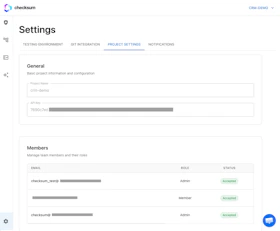
Get your CLI API key — this is used to authenticate the Checksum CLI when running tests and downloading environment variables.- Navigate to Settings → Project Settings
- Copy your API key
- Store it securely (you’ll use it in CI secrets and local development)
Step 2: Testing Environment
Configure where and how Checksum should test your application.| Field | Description |
|---|---|
| Environment URL | The URL of your application under test (e.g., https://staging.myapp.com) |
| Login URL | The URL of your login page, if your app requires authentication |
Step 3: Install Git App
Connect your GitHub or GitLab account so Checksum can:- Read your codebase to understand your application
- Write pull requests with generated or healed tests
Step 4: Initialize Your Test Repository
Set up your test repository with the Checksum CLI. For a full guide, see Repo & CLI Setup. Quick start — create a new repo for your tests:checksum/ folder with configuration files, a Playwright config, and an example test. If you’re adding Checksum to an existing repo, see the detailed setup guide for best practices.