Binary-Compatible Changes
The single most important rule with Live Updates: you can only update what already exists in the native binary. Changes that don't touch native code are called binary-compatible and can ship as a Live Update. Anything else needs a real app store release.
Understanding this rule comes down to understanding how your app is built, so let's start there.
The two layers of your app
Every Capacitor and Cordova app is made up of two distinct layers:
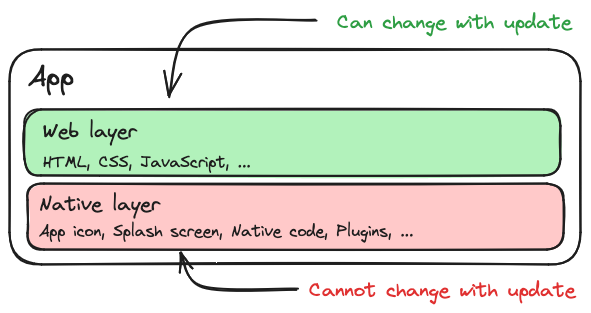
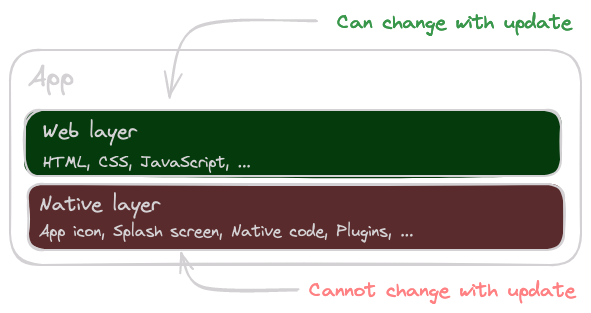
- The native layer is the compiled binary your users install from the App Store or Google Play. It contains the WebView, the native plugins, and the platform code that bridges JavaScript to native APIs. It can only be replaced by shipping a new build to the stores.
- The web layer is everything that runs inside that WebView — your HTML, CSS, JavaScript, and static assets. These files are not compiled into the binary; they sit on disk and are loaded at runtime.
A Live Update replaces the web layer only. The native binary stays exactly as it was installed. That's what makes over-the-air updates possible — and it's also the source of the one rule you have to respect.
What counts as binary-compatible
A useful mental model: if your change only modifies files inside your web project — your src/ and its build output — and doesn't add, remove, or upgrade a plugin or any native code or configuration, it's binary-compatible and can ship as a Live Update.
| Change | Binary-compatible? | Where it ships |
|---|---|---|
| HTML, CSS, JavaScript | Yes | Live Update |
| Images, fonts, JSON, web-only assets | Yes | Live Update |
| Web framework upgrade (Angular, React, Vue, …) | Yes | Live Update |
| Pure JavaScript dependency added or updated | Yes | Live Update |
| Capacitor or Cordova plugin added or removed | No | App store |
| Capacitor or Cordova plugin major version bump | Usually no | App store |
| Native code (Java/Kotlin/Swift/Objective-C) | No | App store |
AndroidManifest.xml, Info.plist, entitlements |
No | App store |
| App icon, splash screen | No | App store |
When in doubt, ask yourself a single question: does this change require recompiling the native project? If the answer is yes, it has to go through the app store.
Why it matters
Picture a user running version 5 of your native app. You publish a web bundle that calls a method on a plugin you only added in version 6. Because the native layer on that device still belongs to version 5, the method doesn't exist — and when the bundle tries to call it, the app crashes on launch. The user can't open the app to receive a fix, so their only way out is deleting and reinstalling from the store.
This is by far the most common production failure with Live Updates, and it's entirely preventable.
How to prevent it
Bind each web bundle to the range of native versions it is compatible with, so a bundle only ever reaches devices that can run it. Capawesome Cloud gives you two ways to enforce this, and the table below summarizes how they compare:
| Versioned channels (recommended) | Versioned bundles | |
|---|---|---|
| How it works | One channel per native version (e.g. production-<version>) |
One channel, each bundle tagged with a native version range |
| Where it's configured | Natively at build time | Per upload, via CLI flags |
| Adding a new native version | Automatic — the new build subscribes to its own channel | Nothing to change; set the range on each upload |
| Rollout accuracy | Accurate — only compatible devices count | Skewed — incompatible devices still count toward the percentage (see Rollouts) |
Both approaches are documented in detail on their own pages:
- Versioned channels (recommended) give each native release its own channel, so a bundle uploaded for one native version is never delivered to a device running another.
- Versioned bundles keep a single channel and attach a native version range to each upload instead.
When in doubt, choose versioned channels — they require no per-upload bookkeeping and keep rollout percentages accurate.