






Auto Clicker and Auto Typer is an app that allows you to make automatic clicks quickly on your Mac, as well as type certain words or phrases at determined intervals. This app was originally designed to help with the legendary MMO Runescape, allowing you to make some of the more tedious tasks in the game a little easier. However, it can also be used on any other app.
Two tools in one app
Auto Clicker and Auto Typer doesn't require any installation. You'll be able to open the app by simply clicking on the executable. When you do so, you'll see a window with four options: Auto Typer, Auto Clicker, Calculator, and Help/Update. By clicking on the Calculator button, you can open your Mac's calculator. By clicking on the Help/Update button, you can open the official website to check for any software updates and read any available documentation. The other two buttons allow you to open the two main features of the app.
Type whatever you want with Auto Typer
With the Auto Typer feature included on the app, you can program a certain word or phrase to appear on the screen from time to time. Doing so is very easy. Just type the word or phrase you want to appear inside the text box, choose a color and an effect from what's available (this is optional), and click add. After that, simply choose how often you want the text to appear. You can then use F1 or F6 to activate it and F2 or F7 to deactivate it.
Use the Auto Clicker with ease
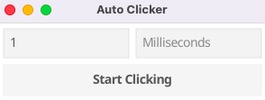
Unlike other similar apps, the Auto Clicker included with Auto Clicker and Auto Typer is very easy to use. Simply choose how many seconds or milliseconds you want between each click. That's all. Once you've entered a value, press F1 or F6 to activate this feature. To deactivate it, just press F2 or F7. And that's it.
All your automation needs in one place
Download Auto Clicker and Auto Typer if you're looking for a good app to automate tasks that require typing or clicking. This app is specially designed to help with MMOs and other similar video games, but it can also be very useful for other tasks. Best of all, this app takes up hardly any space (less than 10 MB) and is completely portable.


 1 reviews













Comments
There are no opinions about Auto Clicker and Auto Typer yet. Be the first! Comment