
I've seen this answer, but on my Italian keyboard I've got < between Z and Left Shift instead of the ~. So, how can I type it?


-
Is there anything wrong with fn + n?Gerry– Gerry2012-08-16 14:06:30 +00:00Commented Aug 16, 2012 at 14:06
-
@Gerry it's not the same tildeNicola Peluchetti– Nicola Peluchetti2012-08-16 14:07:37 +00:00Commented Aug 16, 2012 at 14:07
-
1try option and 5ICL1901– ICL19012012-08-16 14:14:07 +00:00Commented Aug 16, 2012 at 14:14
-
Despite a keyboard combination, if you don't want to use it by its own, you could still use the Character picker. Just press and hold the N, for instance, and a pop-Up will show, giving you the option of choosing the Ñ letter.Thecafremo– Thecafremo2012-08-16 14:22:08 +00:00Commented Aug 16, 2012 at 14:22
-
@Thecafremo But he doesn't want Ñ, he wants ~, and Character Picker is useless for doing that.Tom Gewecke– Tom Gewecke2016-02-10 16:01:40 +00:00Commented Feb 10, 2016 at 16:01
|
Show 1 more comment
6 Answers
Option ⌥ + 5
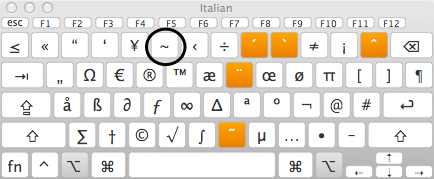
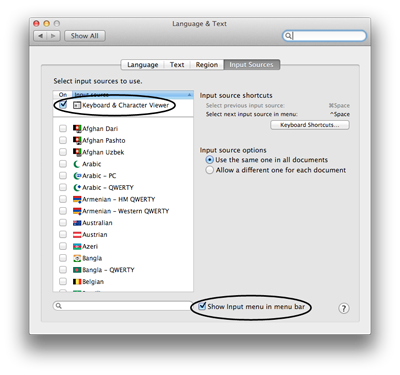
You can show the keyboard viewer from the input menu if it's enabled.


With the italian keyboard you can use alt + 5

It is left Alt + ^ which will give you tilda sign over Swedish Mac keyboard.

-
The question is for the Italian keyboard, not Swedishklanomath– klanomath2016-02-10 10:33:42 +00:00Commented Feb 10, 2016 at 10:33
Just change the language of your USA International Keyboard - PC for USA

-
You need to say which key/keys it is you type in order to get a tilde for this to be an "answer".Tom Gewecke– Tom Gewecke2020-02-13 04:33:31 +00:00Commented Feb 13, 2020 at 4:33
-
worked for me, I was in US layout and changing to US international PC was indeed a solution since it changes the behavior when pressing space changing the small tilde to a normal oneMehdi S.– Mehdi S.2021-01-11 16:21:19 +00:00Commented Jan 11, 2021 at 16:21
I struggled a lot about writing accents and special characters in macOS with an Italian keyboard. The most comfortable way to do them is to hold option + press a key.
Specifically, for tilde, as mention above is Option + 5 (try other keys also, you'll be used to it in a while).
There are other special combinations for accents which are:
- option + N and a letter for ñ
- option + U and a letter for ü
- option + 8 and a letter for ú
- option + 9 and a letter for ù
- option + ì and a letter for ô


Using an Italian Keyboard.
The option + N will Also give you a Small Tilde ˜ as apposed to ~

-
This small tilde is normally used to accent over the other letters. If you
Option + Nand then for exampleoyou will getõNot entering another compatible character while the small tilde is highlighted and moving on will leave you with˜markhunte– markhunte2014-01-16 18:34:07 +00:00Commented Jan 16, 2014 at 18:34 -
Totally fails to answer the question, tells you how to make the wrong tilde, should be deleted.Tom Gewecke– Tom Gewecke2016-02-10 13:16:12 +00:00Commented Feb 10, 2016 at 13:16