Emacs per-project colors #
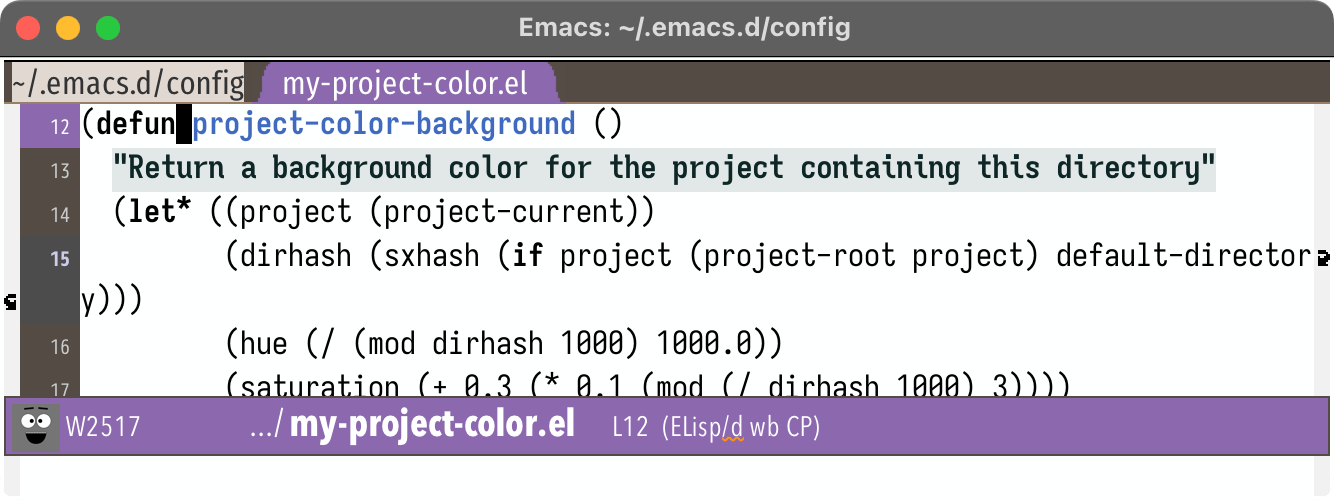
For several years now I've been using color in my Emacs buffers to mark whether it's a "work" project or a "personal" project. I think I first showed this in a blog post I wrote in 2017, when I had switched to spaceline's mode line. Since then I've extended that color to also work on the tab line, current line, and header line. I wanted to make it work with the cursor color but couldn't figure that out.
I saw a question on stack exchange today that made me realize I could extend this to have one color per project, similar to how rainbow-identifiers works.
Labels: emacs
Emacs Tree-sitter custom highlighting, part 3 #
In the last post I described how, for a particular project with certain naming conventions, I wanted to use emacs tree-sitter font-locking to highlight variables that might be used in the wrong context:
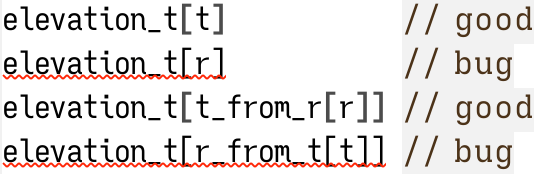
I found a way to make it work for simple expressions but it was relying on regular expression matching rather than tree-sitter parse trees. I set a goal of handling these types of expressions:
elevation_t[t]           // good
elevation_t[r]           // bug
elevation_t[t_from_r[r]] // good
elevation_t[r_from_t[t]] // bug
elevation_t[obj.t]       // good
elevation_t[obj.r]       // bug
elevation_t[t_from_r(r)] // good
elevation_t[r_from_t(t)] // bug
elevation_t[x.t_fn(x)]   // good
elevation_t[x.r_fn(x)]   // bug
elevation_t[x.t_arr[i]]  // good
elevation_t[x.r_arr[i]]  // bug
elevation_t[(t)]         // good
elevation_t[(r)]         // bug
Labels: emacs
Emacs Tree-sitter custom highlighting, part 2 #
In the last post I described my initial attempt at customizing font-lock using Emacs 29 tree-sitter. Regular font locking uses regular expression matching. Tree sitter allows combining regular expression matching with parse tree matching, like "variable declaration" or "function call". The ideas I came up with were mostly things that I could have implemented with regular expressions alone, but I wanted to experiment with the tree sitter approach. Here's the effect of conventional highlighting, using color for keywords and other syntax:


Labels: emacs
Emacs Tree-sitter custom highlighting, part 1 #
A few years ago I blogged about custom tree-sitter-based syntax highlighting in emacs. I started out with highlighting certain keywords in red. I wanted to show the keywords that interrupt control flow:
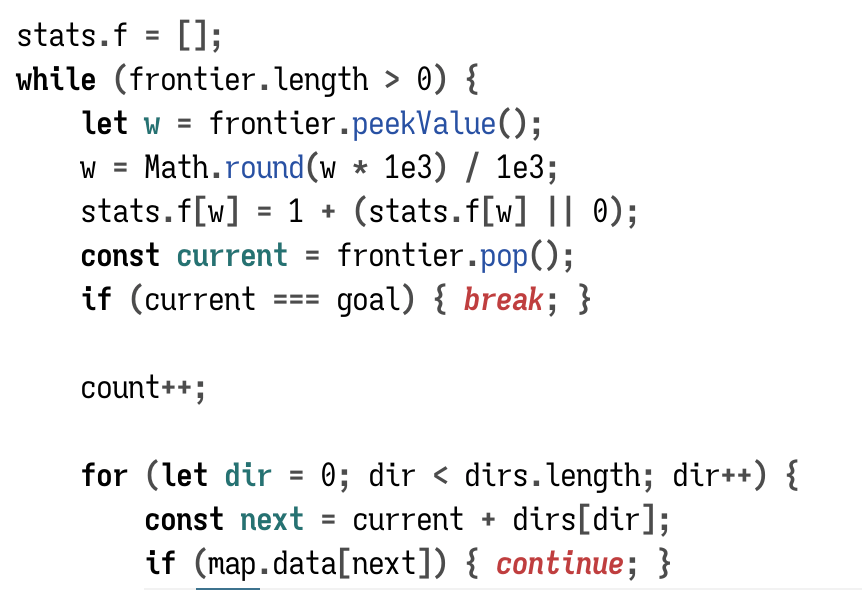
I highlight regular keywords (while, if) in bold. I highlight control flow interrupting keywords (return, continue) in red.
That's syntax highlighting.
But I also wanted to highlight names based on their meaning.
Labels: emacs
Emacs consult-buffer filenames #
When working on my web projects I often have same the same filename in different folders, such as projectname/index.html and anotherproject/index.html.
When opening files in Emacs, I might have to open index.html if I'm already in projectname/ or type ../anotherproject/index.html to open from another folder. I switch folders enough that I wanted to have a more consistent way to open things. I now use a global find-file that lets me match on the complete pathname. I can open projectname/index from anywhere, without having to type something different based on which folder I'm in.
When switching buffers, either with the built-in function or with consult-buffer from consult.el, I can type index.html if I only have one index.html file open. If I have more than one open, Emacs will rename them index.html<projectname>, index.html<anotherproject>, etc., and then I would type index projectname. But if I have only one open, then typing index projectname will fail. I wanted to make it more consistent so that I could always type index projectname whether there's only one index.html buffer open or multiple. I implemented this by putting the full filename instead of the buffer name into consult's buffer list:
Labels: emacs
Emacs and shellcheck #
Julia Evans had a great talk called Making Hard Things Easy. One of the takeaways for me was that I should be using tools for parts of a system I find hard to remember. In particular, when writing bash scripts I should be using shellcheck.
It turns out Emacs 29 has support for shellcheck, and older versions of Emacs can use the flymake-shellcheck page.
To set it up in Emacs 29:
(use-package flymake
  :bind (("H-e" . flymake-show-project-diagnostics)))

(use-package sh-script
  :hook (sh-mode . flymake-mode))
I use consult for navigating my errors, and I want to make errors more noticable in the mode line, so my flymake configuration is:
(use-package flymake
  :bind (("H-e" . my/consult-flymake-project))
  :preface
  (defun my/consult-flymake-project ()
    (interactive)
    (consult-flymake t))
  :custom
  (flymake-suppress-zero-counters t)
  :config
  (defface my/flymake-modeline-error-echo
    '((t :inherit 'flymake-error-echo :background "red"))
    "Mode line flymake errors")
  (put 'flymake-error 'mode-line-face 'my/flymake-modeline-error-echo)
  (defface my/flymake-modeline-warning-echo
    '((t :inherit 'flymake-warning-echo :background "orange"))
    "Mode line flymake warnings")
  (put 'flymake-warning 'mode-line-face 'my/flymake-modeline-warning-echo))
It's too early to know what other tweaks I might want, but so far it's alerted me to several errors in my shell scripts.
Update: [2023-10-07] Comments on HN pointed to bash-language-server which works with emacs lsp or eglot.
Labels: emacs
Emacs: marking text #
Although I primarily use Emacs, I love the idea of vim text objects, and wanted to incorporate them into my editing. The Kakoune introduction explains that vim uses verb first, noun second for its commands, whereas Kakoune uses noun first, verb second. I wrote a blog post about why I prefer noun-verb over verb-noun, not only in text editors but also in games and other applications.
Labels: emacs
Axial name highlighting #
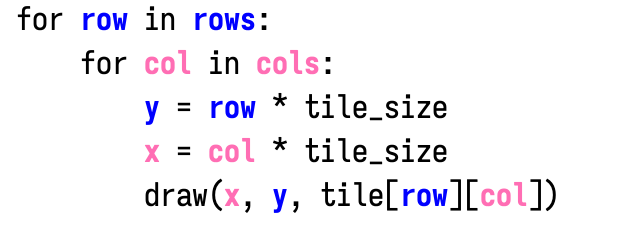
I like to try various things out in my editor to see if they're useful. Most are interesting but not useful. On my guide to hexagons I use colors for the three hexagon axes (q, r, s). I thought it might be cool to do something similar in the text editor, for x and y:
Labels: emacs, programming
Automatically generate IDs for emacs org-mode headings #
I write some of my web pages with emacs org-mode, and then export to html. Like markdown, org-mode is a convenient format to write a simple subset of html.
Each heading in the document will get exported with an ID so that it can be linked to from the table of contents. The default IDs look like #org3091de9. I usually replace these with a custom id that matches the section heading, so a heading Bounding box will get an id #bounding-box.
Labels: emacs
Building Emacs 27 on Apple ARM M1 #
On Mac, I sometimes run a prebuilt binary and sometimes compile my own. For Apple M1 (ARM) I started by using the x86 binaries from emacsformacosx.com but I wanted to try compiling a native ARM version too. I saw that the work branch of Mitsuharu Yamamoto's Mac port has M1 patches applied, so I decided to try it.

Emacs: prettier tab-line #
Back in 2018 I posted about making tabbar.el look pretty. Emacs 27 includes two built-in ways to display tabs:
tab-bar-modeworks per frame to show window configurationstab-line-modeworks per window to show buffers
Tab-line mode seems similar to tabbar.el, so I decided to switch from tabbar.el to tab-line.
Labels: emacs
Emacs mode line simplified #
Back in 2017 I posted that I switched from my own custom Emacs modeline to Spaceline. I liked having a simpler configuration with more features. Unfortunately I eventually realized that those features were slowing down my system. In particular, column number, which-function, and selection-info, and my custom unicode display had to be updated on every keystroke. I went back to the default mode line and used this trick to see when it was recalculated:
(defvar-local mode-line-eval-count 0 "Counting :eval")

;;; put this in mode-line-format
(add-to-list
 'mode-line-format
 '(:eval (progn
           (setq mode-line-eval-count (+ 1 mode-line-eval-count))
           (format "%+4d " mode-line-eval-count))))
Every recalculation, the counter increases. By experimenting with the default mode line, I found that having %c in the mode line (column number) causes it to redisplay (almost) every keystroke, and %l (line number) causes it to redisplay when changing lines. I also realized during this experimentation that Emacs felt faster with the default mode line than with Spaceline.
I decided to switch from Spaceline to the default mode line, much closer to my setup before 2017, but simpler, more modular, and matching my tabbar. It feels nice and it looks good. I thought I would miss a few of the fancy features from Spaceline, but I didn't miss them as much as I thought I would. Features I use:
- Read-only and modified status show a bright color on the left.
- Project directory and filename are in separate colors.
- The color theme depends on project (red for work, blue for personal, purple for configuration).
- Week number ties into my task tracking system.
- Line number uses Emacs 26's
line-numbers-modeinstead of the mode line.

I've put a simplified version of the code in a gist.
Labels: emacs
Emacs Org mode and KaTeX #
Emacs Org mode can handle LaTeX math, and exports it to HTML using MathJax. On my pages I have been using KaTeX instead of MathJax. It loads faster but doesn't support as many features. Org mode doesn't have direct support for KaTeX but for the simple things I do on my pages, I can redirect MathJax to KaTeX using KaTeX autorender:
(setq org-html-mathjax-template
"<link rel=\"stylesheet\" href=\"https://cdn.jsdelivr.net/npm/[email protected]/dist/katex.min.css\" integrity=\"sha384-9eLZqc9ds8eNjO3TmqPeYcDj8n+Qfa4nuSiGYa6DjLNcv9BtN69ZIulL9+8CqC9Y\" crossorigin=\"anonymous\"/>
<script defer=\"defer\" src=\"https://cdn.jsdelivr.net/npm/[email protected]/dist/katex.min.js\" integrity=\"sha384-K3vbOmF2BtaVai+Qk37uypf7VrgBubhQreNQe9aGsz9lB63dIFiQVlJbr92dw2Lx\" crossorigin=\"anonymous\"></script>
<script defer=\"defer\" src=\"https://cdn.jsdelivr.net/npm/[email protected]/dist/contrib/auto-render.min.js\" integrity=\"sha384-kmZOZB5ObwgQnS/DuDg6TScgOiWWBiVt0plIRkZCmE6rDZGrEOQeHM5PcHi+nyqe\" crossorigin=\"anonymous\" onload=\"renderMathInElement(document.body);\"></script>")
(it looks ugly but it's straight from the KaTeX autorender page, but with quotes backslashed)
This seems to work on the small tests I've done so far.
Emacs: prettier tabbar #
Back in 2007 I posted that I was going to try buffer tabs for Emacs. At the time I wasn't sure if I'd like it. People told me that there's no point in displaying them visually like in other editors, that Emacs had better ways of switching buffers. I ended up abandoning Tab Bar mode. But some time later, I started using it again, and I found the new version worked really well for my needs.
This post is mostly about the visual customization I use. I make the current tab blue, the other tabs gray, and the background dark gray. I use powerline to make the tabs look more like tabs:

Emacs: find files anywhere, updated for 2017 #
Back in 2016 I posted my emacs setup for finding files globally. It unifies find-file and switch-to-buffer, and also lets me find files without switching folders. I've been improving it since then and wanted to post an update.

The biggest change is speed. I profiled the code and found two bottlenecks in the construction of the global file list. The list is roughly 15000 elements, so I precomputed as much of that as I could, and the startup time went down from 0.8 seconds to 0.1 second. It feels instant now.
Building Mac OS X Emacs 26 #
On 11 Oct 2017 Emacs 26.0.90 pretest was released. For Mac, there's a build on emacsformacosx.com. I have been using the "Mac port" from Mitsuharu Yamamoto because it feels smoother and faster on my system, and I decided to try his development branch. Here's what I ran:
brew install gnutls texinfo libxml2
cd ~/Projects/src
git clone --branch work --depth 1 https://bitbucket.org/mituharu/emacs-mac.git
cd emacs-mac
./autogen.sh
export PATH=/usr/local/opt/texinfo/bin/:$PATH
export PKG_CONFIG_PATH=/usr/local/opt/libxml2/lib/pkgconfig
./configure --with-mac \
     --prefix=/PersonalApplications/Emacs.app/Contents/MacOS \
     --enable-mac-app=/PersonalApplications
make
make install
It runs nicely!
A minor note: the byte-compiled .elc files compiled under Emacs 26 are not compatible with Emacs 25, so if you go back to an older version, you'll need to recompile the .elc files.
Emacs spaceline mode line #
Back in 2011 I posted my Emacs mode line configuration. At the time I was thinking it'd be nice to have a more modular way to define the mode line. A few weeks ago I rewrote my mode line configuration to use Spaceline, the mode line library used in Spacemacs. I made it match my tabbar:

...

Emacs Org mode 9 #
Org mode 9 was just released, and it changed the syntax for export blocks. I need to change:
#+begin_html
…
#+end_html
to
#+begin_export html
…
#+end_export
The Org mode changes file includes some elisp to change this. However, I couldn't get it to work, and I also wanted to change all my files, not run this elisp on one file at a time. Here are the commands I ran:
ack -l --type-add=org:ext:org --org '#.begin_html' | xargs -n 1 perl -pi -e 's/#\+end_html/#+end_export/'
ack -l --type-add=org:ext:org --org '#.begin_html' | xargs -n 1 perl -pi -e 's/#\+begin_html/#+begin_export html/'
I only needed this for html, but you may need to extend this for other types you use. See what else you use with:
ack --type-add=org:ext:org --org '#.begin_(html|ascii|latex|odt|markdown|md|org|man|beamer|texinfo|groff|koma-letter)'
Emacs: find files anywhere, updated for 2016 #
Update: [2017-12-29] See the update for 2017
Back in 2014 I posted my emacs setup for finding files globally. It acts like switch-to-buffer, if all the files on my system were already open in buffers. I can type in a substring of any filename I'm likely to work on and switch to that buffer. Since them, helm has changed its interface, and I've updated my code, adding a few extra quality-of-life features.
I use the same hourly cron job to take inventory of all files I am likely to edit, putting recently modified files near the top, as they are most likely to be the best match. I save this list to ~/.global-file-list.txt.
What's changed is how I set up helm. In 2014 I was using helm-recentf and temporarily binding the recentf file list to my own list. This was a quick & dirty way to do it, and it worked, except when I opened a file, it didn't get put onto the recentf list, since I had let-bound that list to something else. Oops. I learned more helm (by reading the source code and John Kitchin's blog posts) and now construct my own helm source instead of abusing helm-recentf:
(defun amitp/helm-all-files ()
  "Global filename match, over all files I typically open"
  (interactive)
  (helm
   :sources '(amitp/helm-source-my-files helm-source-locate)
   :buffer "*helm all files*"))
Helm will look at this source to get the filename list:
(defvar amitp/helm-source-my-files
  (helm-build-sync-source "My files"
    :candidates #'amitp/helm-global-file-list
    :filtered-candidate-transformer #'amitp/helm-filter-my-files
    :keymap helm-generic-files-map
    :action 'helm-type-file-actions))
This source tells helm to call amitp/helm-global-file-list. This function returns the most recently modified files at the top, then the currently open files, then files in the current folder, then recently opened files, then the global file list. (I'm not happy with this order and am still experimenting.) Some filenames will be in more than one list so I eliminate duplicates.
(defun amitp/helm-global-file-list ()
  "Files to list in amitp/helm-all-files"
  ;; delete-dups much faster than cl-remove-duplicates
  (delete-dups
   (mapcar 'abbreviate-file-name
           (append
            (read-file-into-lines "~/.recent-file-list.txt")
            (amitp/buffer-file-names)
            (helm-skip-boring-files
             (directory-files default-directory t))
            recentf-list
            amitp/global-file-list))))
I also use a filter to remove some filenames from the list. Why? Normally I want to show only the “source” and not the “compiled” version of something. For example I want to show .el files but not .elc files. I want to show .c files but not .o files. I can hide these with helm-boring-file-regexp-list. However, for my web pages, some of them are directly written as .html files (*.html should be included) but others are written in Org mode or markdown or something else (*.html should be excluded). To decide whether a file ending in .html is source or not, I need to look at the other filenames in the list. I use a “filtered candidate transformer” (see the documentation for helm-source) to take the currently matching filenames and filter them further. If the filenames contain both $something.org and $something.html then I know that the html is not a source file, so I hide it.
(defun dominated-by-filename (regexp replacement filename candidates)
  "True if FILENAME with REGEXP replaced by REPLACEMENT is already in CANDIDATES"
  (let ((new-filename (replace-regexp-in-string regexp replacement filename)))
    (and (not (equal new-filename filename))
         (member new-filename candidates))))

(defun amitp/helm-filter-my-files (candidates _source)
  "Ignore a build target if a build source exists in the candidates"
  (cl-loop for filename in candidates
      unless
      (or
       (dominated-by-filename "\\.html$" ".org" filename candidates)
       (dominated-by-filename "\\.html$" ".md" filename candidates))
      ;; (I have more rules but you get the idea)
      collect filename))
I don't currently colorize the output. I've considered coloring by type (source code, prose, build file, etc.) and by origin (recentf, current folder, open buffer, global list) but neither of these seems particularly appealing. I'll continue to experiment.
The last change since 2014 is that my global file list doesn't have everything, and it is annoyingly missing any new files I've created in the past hour. In 2014 I set up C-l to switch to helm-locate so that if I was unable to find what I wanted, I could have it search more. However, I never remembered to use it.
I now have two ways to solve that problem. First, I augment my hourly cron job with a quick cron job that runs every minute, and reports back any files edited recently. I had started with any files added recently but realized if I changed it to files edited recently, I could put those files at the top of my list. I run this every minute:
mdfind -onlyin $HOME "kMDItemFSContentChangeDate > \$time.now(-7200)
   && kMDItemContentTypeTree = 'public.text'" >$HOME/.recent-file-list.txt
In the helm source, I read ~/.recent-file-list.txt (a very short list) and put those items ahead of others.
The second solution is to use helm-source-locate as a source in the main interface, even though the UI is incompatible (for regular results you can use space to separate words, but for locate you can't). It will show the locate results below the main results. For times when my global file list and my recent file list don't show anything, locate might find it.
(setq helm-locate-command "/Users/amitp/bin/locate %.0s %s")
I use Mac's mdfind (which is updated in real time) to find the base filename and then I filter that through grep to handle folders. For example, if I run locate foo/bar then I use mdfind to find files named bar, then in the results I grep for foo/bar. However if I run locate ar without a folder name then I should find bar as a substring match. The shell script isn't perfect but it's “good enough” for now.
#!/bin/bash
rawquery="$*"
suffix=$(basename -- "$rawquery")
pattern="${suffix}*"

if [ "$rawquery" = "$suffix" ]; then
    # If there's no folder then it should be a substring
    pattern="*${suffix}*"
    # NOTE: double wildcards are slower!
fi

mdfind -onlyin $HOME "kMDItemFSName = '$pattern'cd" \
    | sed -e "s:^$HOME:~:" \
    | fgrep -i -- "$rawquery" \
    | postprocess
So far I've not needed the locate results, so I might end up removing that part of the code. I think the minutely cron job might be all I need.
I'm much happier with my setup now compared to the original, but there's always more tweaking to do. It's Emacs after all!
Emacs: rainbow-identifiers, customized #
A few months ago I had read Evan Brook's post about using text editor colors for identifiers instead of keywords. I tried the two Emacs modes for this: rainbow-identifiers and color-identifiers-mode. I wrote up my thoughts back then, and that blog post led to some features being added to rainbow-identifiers. Pros and cons:
| rainbow-identifiers | color-identifiers | |
|---|---|---|
| colors are stable on reload/edit | better than | colors change on reload/edit |
| same name has the same color across buffers | better than | the same name has different colors across buffers |
| color assigned to every name | worse than | color assigned to important names |
| colors might be similar to each other | worse than | colors chosen to be distinguishable |
| universal configuration across modes | better than | separate configuration per mode |
Neither is a clear win. Try both and see. I ended up using rainbow-identifiers. However, there were too many identifiers being colored, which meant there were too many colors, which meant I couldn't really distinguish things anymore. Here's what color-identifiers looks like:
var edges = this.graph.edges_from(this.curr);
for (var i = 0; i < edges.length; i++) {
    var next = edges[i];
    var edge_weight = this.graph.edge_weight(this.curr, next);
    if (edge_weight != Infinity) {
        this.neighbors.push(next);
        mark_changed(next);
        if (!this.visited[next]) {
            this.g[next] = this.g[this.curr] + edge_weight;
            this.open.push(next);
            this.parent[next] = this.curr;
            this.visited[next] = true;
        }
    }
}
And here's what rainbow-identifiers looks like:
var edges = this.graph.edges_from(this.curr);
for (var i = 0; i < edges.length; i++) {
    var next = edges[i];
    var edge_weight = this.graph.edge_weight(this.curr, next);
    if (edge_weight != Infinity) {
        this.neighbors.push(next);
        mark_changed(next);
        if (!this.visited[next]) {
            this.g[next] = this.g[this.curr] + edge_weight;
            this.open.push(next);
            this.parent[next] = this.curr;
            this.visited[next] = true;
        }
    }
}
You can see that color-identifiers picks out local variables and not all names. And rainbow-identifiers colors lots of things, but it misses the variable declaration, which is important to color. So I configured rainbow-identifiers to do this:
var edges = this.graph.edges_from(this.curr);
for (var i = 0; i < edges.length; i++) {
    var next = edges[i];
    var edge_weight = this.graph.edge_weight(this.curr, next);
    if (edge_weight != Infinity) {
        this.neighbors.push(next);
        mark_changed(next);
        if (!this.visited[next]) {
            this.g[next] = this.g[this.curr] + edge_weight;
            this.open.push(next);
            this.parent[next] = this.curr;
            this.visited[next] = true;
        }
    }
}
It's in between the default configuration of the two packages. I highlight declarations in bold, and in color. I highlight local variables. I highlight local fields (this.x). But I don't highlight all names. Here's my configuration:
;; Customized filter: don't mark *all* identifiers
(defun amitp/rainbow-identifiers-filter (beg end)
  "Only highlight standalone words or those following 'this.' or 'self.'"
  (let ((curr-char (char-after beg))
        (prev-char (char-before beg))
        (prev-self (buffer-substring-no-properties
                    (max (point-min) (- beg 5)) beg)))
    (and (not (member curr-char
                    '(?0 ?1 ?2 ?3 ?4 ?5 ?6 ?7 ?8 ?9 ??)))
         (or (not (equal prev-char ?\.))
             (equal prev-self "self.")
             (equal prev-self "this.")))))

;; Filter: don't mark identifiers inside comments or strings
(setq rainbow-identifiers-faces-to-override
      '(font-lock-type-face
        font-lock-variable-name-face
        font-lock-function-name-face))

;; Set the filter
(add-hook 'rainbow-identifiers-filter-functions 'amitp/rainbow-identifiers-filter)

;; Use a wider set of colors
(setq rainbow-identifiers-choose-face-function
      'rainbow-identifiers-cie-l*a*b*-choose-face)
(setq rainbow-identifiers-cie-l*a*b*-lightness 45)
(setq rainbow-identifiers-cie-l*a*b*-saturation 45))
I also turned off colors for the font-lock faces, and made font-lock-variable-name-face bold. I still think it may be too many colors, so I may end up turning off rainbow-identifiers and trying some of the things Wilfred Hughes has suggested.