
New Case Study: SiteKiosk

Public self-service terminals are an excellent solution for organizations looking to streamline their customer support operations. However, there are still situations where kiosk users may need quick access to human assistance.
This is where Gruveo truly shines: By letting customers hop on a quick video call with a human agent - no signups or apps needed - Gruveo ensures that kiosk users get human assistance whenever they need it.
We are happy to announce that Gruveo now integrates with SiteKiosk's leading platform for public-facing kiosks. This partnership between SiteKiosk and Gruveo brings seamless, secure and scalable video calling experience to kiosks powered by the SiteKiosk Online platform, letting public-facing terminal customers benefit from instant access to real human support.
Check out our new SiteKiosk case study for the details on the integration and how it benefits organizations and their customers alike.
Announcing User Availability Status
Permanent Gruveo links are an amazing tool that lets your customers video call you without installing apps or signing up.
However, what if you don't want to receive any Gruveo calls outside of your business hours? Previously, the only way to make yourself unavailable on Gruveo was to log out on all your devices and then log back in the next morning.
The new user availability feature in Gruveo addresses this problem head-on. With this feature, Gruveo users can now set their availability to "online," "away," and "offline," indicating how they want to be notified of incoming calls.
Here's a quick summary of what these options mean:
- Online - You receive a notification for each incoming call as usual.
- Away - You don't receive incoming call notifications, but your callers are still placed in a call queue for when you return.
- Offline - No call notifications; same as when you are logged out of Gruveo.
To set your availability status, just head to your Gruveo dashboard, click your name in the upper right corner and choose the status in the drop-down menu.
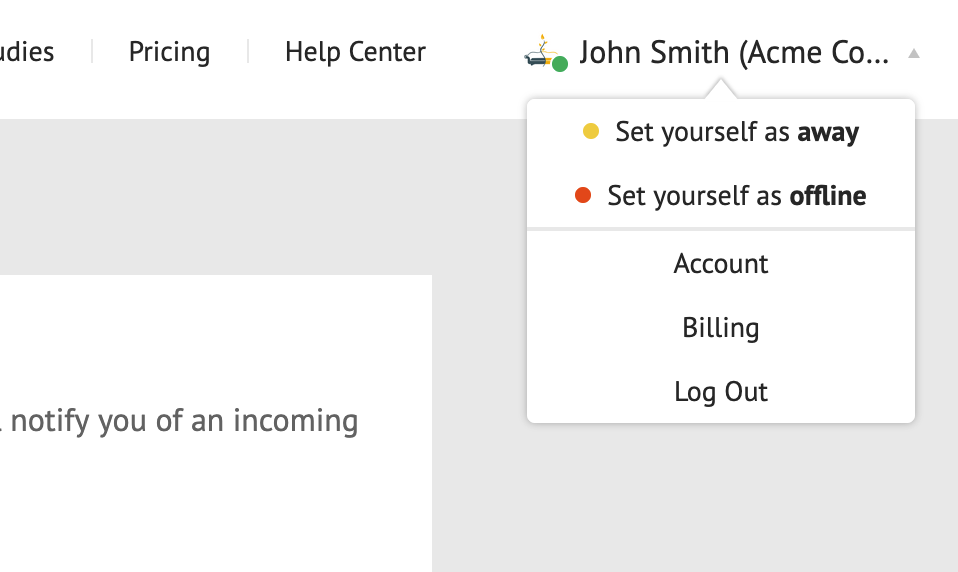
Setting your availability status is only supported in the Gruveo web app for now, but the status you set applies to all Gruveo apps where you are logged in – including Gruveo for iOS and Android. You can read more about setting your availability status in our Help Center.
Enjoy this new feature, and don't hesitate to reach out if you need help!
Gruveo Named Category Leader for Web Conferencing Software
We are thrilled to announce that Gruveo was named a Category Leader for Web Conferencing software by GetApp. Category Leaders are designed to help small businesses evaluate which software products may be right for them.
"We are honored to be recognized by GetApp as a Category Leader in Web Conferencing. This accolade reflects our commitment to providing an intuitive, reliable, and valuable communication tool for small businesses. We're proud that our users not only appreciate the functionality and support we offer but also trust in Gruveo to empower their daily business communications." – Art Matsak, Gruveo's Founder and CEO
Category Leaders is published on GetApp, the recommendation engine SMBs need to make the right software choice. Category Leaders rankings highlight top-ranked software products based on ratings from end-users in five key areas: ease of use, value for money, functionality, customer support, and likelihood to recommend.
Category Leaders for Web Conferencing software is available here.
Disclaimer: GetApp Category Leaders constitute the subjective opinions of individual end-user reviews, ratings, and data applied against a documented methodology; they neither represent the views of, nor constitute an endorsement by, GetApp or its affiliates.
Improving Caller Privacy on Gruveo

Since its launch more than 10 years ago, Gruveo has been primarily a peer-to-peer video calling service. Whenever possible, one-on-one calls were established directly. Only if there was a particularly restrictive firewall would the call get routed via one of our TURN relay servers. (It's important to note that even in that case, the call would remain encrypted end-to-end.)
Peer-to-peer connections have a drawback, however. A sufficiently tech-savvy person could delve into the browser's internals to determine the other party's IP address and, consequently, their approximate geographical location—usually the city they're in.
Although this is not a critical privacy issue in itself, this drawback concerned us enough to prompt a change: routing all one-on-one Gruveo calls through TURN servers. The transition process started earlier this year and is now fully complete.
Here is how TURN routing is a net positive for all Gruveo users:
- Instead of the other party's IP address, the curious tech-savvy user on a one-on-one call will only see the IP of the TURN server in the browser logs.
- The end-to-end encryption of one-on-one calls on Gruveo stays intact. The relay server is not able to decode the video and audio content.
- Gruveo has relay infrastructure in key points around the globe. This ensures a smooth calling experience with minimal latency, regardless of who you're calling.
Calls with three or more participants, as well as any recorded one-on-one calls, have been concealing the participants' IPs all along. This is because these calls are already routed through our SFU servers.
With the additional routing of one-on-one calls via TURN, we are now making your IP address safe across all of your Gruveo conversations.
If you have questions about Gruveo's privacy and security, check out our Privacy Policy for details and don't hesitate to get in touch.
New Recording Layout, IP Blocking and Other New Features
Over the past several months, we continued to improve Gruveo and bring new features to the web and mobile apps. This post summarizes the awesome new functionality that we have recently rolled out.
The "Follow My Screen" Recording Layout
Prior to the arrival of the new layout, you've had an option of either maximizing the active speaker on your Gruveo recordings ("Maximized active speaker"), or presenting all of the participants' videos in titles of approximately the same size ("Tiled"). The new "Follow my screen" layout looks a lot like "Maximized active speaker" but it dynamically maximizes whatever participant you have maximized on your own screen during the call.
This new layout is ideal for when you'd like to record a screen sharing presentation delivered via Gruveo and want to ensure that your screen always stays maximized on the recording. Here is how to do it:
- Switch to the "Follow my screen" layout in your recording settings prior to the call
- During the call:
- Start the screen sharing
- Click your own video preview to switch to the Selfie Mode
- Start call recording.
For as long as you have your own screen share maximized on your video call screen, it will be maximized on the recording, too.
Redirect to a Custom URL after a Gruveo Call
We have introduced the new optional endurl parameter to Gruveo call links that you can use to redirect the caller to a custom page after the call ends. Here is an example permanent link with this parameter:
https://www.gruveo.com/@acme?endurl=https://www.google.com
When you customer clicks that link, they will be redirected to the Google website after the Gruveo call finishes. The endurl parameter works for permanent Gruveo links as well as room ones.
This new feature is perfect for the following use cases:
- Redirecting your callers to a custom survey at the end of the call
- Gruveo implementations in kiosks: Redirecting your callers back to the kiosk's start page after the Gruveo call finishes.
Close the Gruveo Button Pop-Up after the Call
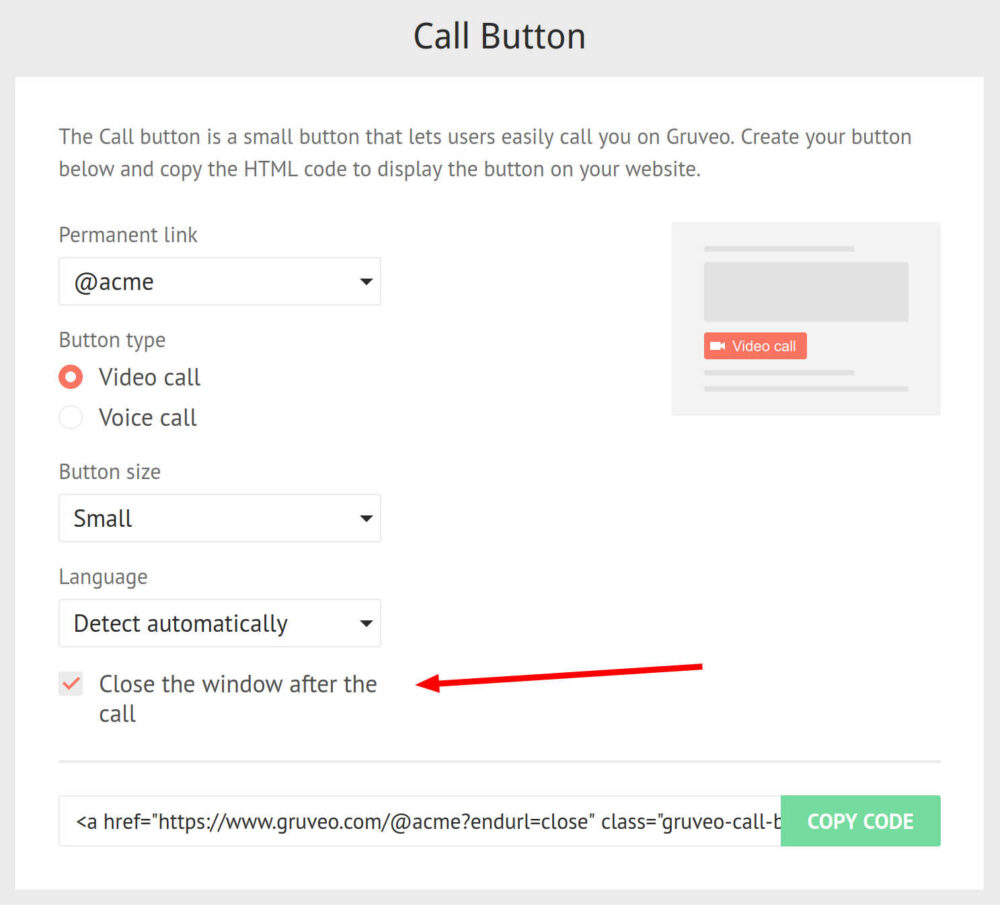
We have added an option to the Call Button builder to automatically close the Gruveo pop-up after the call finishes. Check this box and paste the new HTML code on your page to have your Gruveo button pop-ups close by themselves:
Caller Blocking by IP Address
In addition to blocking unwanted callers by country, you can now block them by the IP address mask in the form of 240.14.103.xxx. Head to your Caller Blocking page to specify the masks you wish to block:

The Call Log page in your account now displays the masked IP addresses of the callers, too. Click a masked IP to go to the Caller Blocking page with that mask pre-populated for addition to the blocking list.
Call Queuing Support in the iOS App
The recently released version 6.4 of our iOS app adds support for call queuing. Just like in the web and Android versions of Gruveo, you get notified when a new caller joins the queue, can add the first caller in the queue to the current call, and more.
We hope you will enjoy these new Gruveo features! If you have any questions or need help using them, don't hesitate to drop us a line.