Skip to Content

How to Disable WhatsApp Message Previews on iPhone

by

whatsappiconcleanedFacebook's free WhatsApp instant messaging app uses end-to-end encryption so that messages exchanged over the platform can only be read by the intended recipient.

If you use WhatsApp for important conversations and you want to further ensure your privacy, you can prevent WhatsApp messages from showing previews on your iPhone.

When you receive a WhatsApp message on your iPhone, the notification that appears displays a preview of the message content by default. You can disable message previews by following these simple steps.

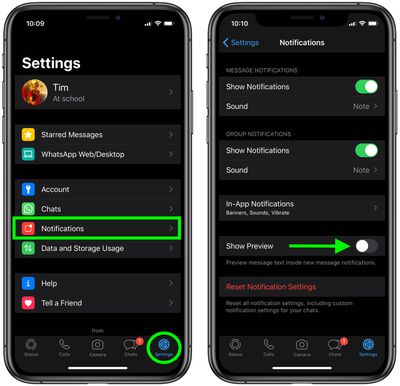
  1. Launch WhatsApp on your iPhone.
  2. Tap the Settings icon in the bottom-right corner of the screen.
  3. Tap Notifications.
  4. Toggle off the switch next to Show Previews.
    whatsapp

Once you've performed these simple steps you will only receive the sender's name whenever there a notification of a message from someone. To turn message previews back on, just toggle the Show Previews switch back to the green ON position.


Popular Stories

Whatsapp Feature

WhatsApp Plus Lands on iPhone With Custom Themes, Icons, and More

Monday May 11, 2026 2:41 am PDT by
WhatsApp has started rolling out its paid WhatsApp Plus subscription to iOS, following beta testing of the new personalization-focused tier amongst a small group of users, reports WABetaInfo. The plan is light on practical features, and is aimed more at heavier users who want to customize various aspects of the WhatsApp experience. It gives you access to premium sticker packs with fullscreen ...
meta ai incognito chat

Meta AI App Gets 'Incognito Chat' as OpenAI Faces Lawsuits Over Stored Chat Logs

Wednesday May 13, 2026 1:23 pm PDT by
The Meta AI app and Meta AI on WhatsApp have a new "incognito chat" option, which Meta CEO Mark Zuckerberg said is a "completely private way to interact with AI." Zuckerberg also said that Meta AI's incognito mode is the first major AI product where there is no log of conversations stored on servers. Zuckerberg likened the feature to end-to-end encryption, and said no one will be able to...
whatsapp wabetainfo share sheet%402x

WhatsApp Begins Rolling Out Redesigned Media Share Sheet on iOS

Tuesday May 19, 2026 7:46 am PDT by
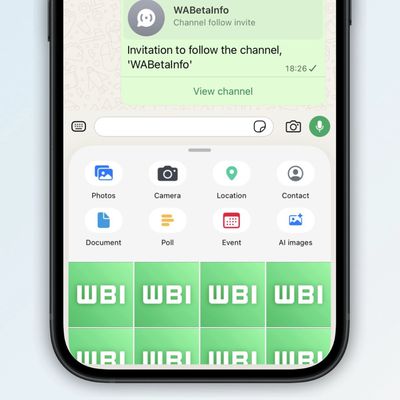
WhatsApp is rolling out a new media attachment sheet on iOS, providing iPhone users with a faster way to share their most recent files without losing sight of the chat. Usually in WhatsApp, sharing media within a chat requires you to tap a plus button to reveal the app's custom share sheet, and then tap into photos to see your full library, which takes over most of the screen. As spotted...