Skip to Content

Camera+ 2 for iOS Brings New Interface, Photo Library Integration, Raw and Depth Editing, and More

by

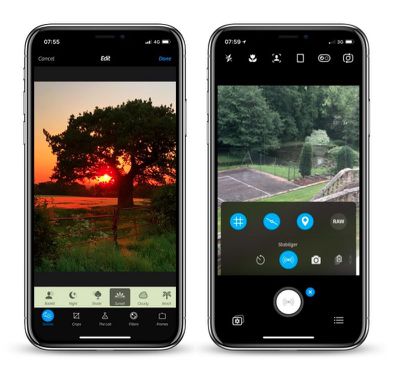
Camera+ 2 was released for iPhone and iPad today, a complete rewrite of the popular photography app of the same name that appeared almost eight years ago and sold over 14 million copies in that time. The successor app features a completely redesigned interface for accessing manual controls, raw shooting and editing, depth capture, and more.

As a universal app, Camera+ 2 promises a consistent experience across iPhone and iPad, with multitasking support for the latter baked in. Unlike its predecessor, the app also comes with all features, one-touch filters, and tools included as-is – no in-app purchases required.
camera 2
In shooting modes, the manual onscreen wheels and controls include traditional settings like shutter speed, ISO, White Balance, and Macro, with wide-angle and telephoto options available on dual-lens devices. These functions can also be hidden during casual shooting.

With depth capture enabled in Camera+ 2, the depth information is saved alongside the image, and the adjustments in The Lab section of the editor can be selectively applied to distant or close subjects. A collection of filters are also available, with options to adjust their strength and layer them to customize the aesthetic.
camera 2 1
A new Smile mode enables Camera+ 2 to detect smiles and shoot automatically, while a Stabilizer mode shoots only when the iPhone is steady enough to produce a sharp picture. The Slow Shutter mode meanwhile brings the ability to take long exposures, even in daylight, with additional Burst and Timer modes also included.

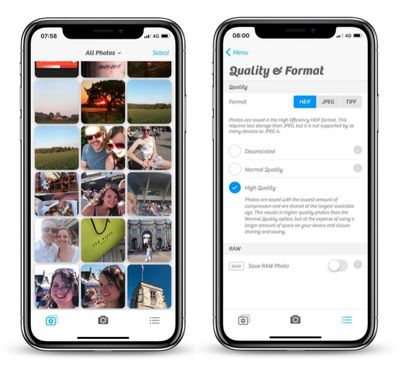
Elsewhere, in a much-requested change, Camera+ now has full Photo Library integration with editing support, with the added ability to switch between the Photo Library and the Lightbox with the tap of a button. Drag and drop gestures on the iPad are supported for copying or sharing photos, while Files and iTunes integration are also available for transferring pictures to a computer or other apps.

Camera+ 2 is available to download on the App Store for $2.99 and requires iOS 11 or later. [Direct Link]
Top Rated Comments

104 months ago
Really what I miss most from traditional cameras is the option to have the date and time stamp automatically applied to images in the proper bottom corner location. Without having to manually add it later.

That’s the feature I want. Otherwise, the built in camera seems adequate for me.
You mean like water mark, why you want to do this unless for print? Image file contains metadata already. Do you add label with GPS coordinates and time zone as well?
Score: 3 Votes (Like | Disagree)
104 months ago
Is this new app related to the original Camera+ app? This not just upgrade for Camera+ app. and looks like they formed a new company with a similar name to that of the original Camera+: both sellers are different but have LateNiteSoft in the name.
If indeed it's the same developers, I wonder why they chose to list this app as from a separate developer and not just alongside the original Camera+.. possibly to avoid backlash from customers since this is a paid app and not a free upgrade
Score: 2 Votes (Like | Disagree)
SantaFeNM Avatar
104 months ago
Mom, what did I tell you about posting on the internet?

(Seriously, that's what metadata is for. Having anything on the picture, ruins the picture. Any time I'm around her, I turn that off on her camera.)
[doublepost=1527685122][/doublepost]
There are circumstances where having the time and date on the photo is important to people. For instance I had a job where I did property inspections. It was important to have the time and date on the photos. Also for insurance purposes documenting belongings or accident damage. There are definitely instances where having it on the photo is important.

For general photos, I agree. I don't want the time and date on those.
Score: 1 Votes (Like | Disagree)
H3LL5P4WN Avatar
104 months ago
Really what I miss most from traditional cameras is the option to have the date and time stamp automatically applied to images in the proper bottom corner location. Without having to manually add it later.

That’s the feature I want. Otherwise, the built in camera seems adequate for me.
Mom, what did I tell you about posting on the internet?

(Seriously, that's what metadata is for. Having anything on the picture, ruins the picture. Any time I'm around her, I turn that off on her camera.)
[doublepost=1527685122][/doublepost]
Halide? Obscura 2? Camera+ 2?

Which one am I supposed to know is best for me?!
Only way to find out is to use them all.
He's pretty much right. I love Halide's GUI, haven't used Obscura 2, and just got Camera+ 2 for nostalgia's sake. It all depends on what you want.

The two camera apps on my main homescreen are Camera.app and Pro HDR X, if for no reason other than I still can't reliably denoise RAW files (and that's what I have Halide for, shooting RAW) on my phone. There's no "one touch" denoise app that I know of.

*goes and looks up Obscura 2*
Score: 1 Votes (Like | Disagree)
daniellidio Avatar
104 months ago
I bought Camera+ 2 just because I have the first since forever and I loved it and they constantly updated the app. 8 years of support by a developer is something very rare these days.

That being said, the new app is a bit buggy on the portrait mode for me (iPhone 8+, tested in iOS 11.3.1 and now on 11.4) and it's jittery/janky/laggy, hope they fix it soon.
Score: 1 Votes (Like | Disagree)
daniellidio Avatar
104 months ago
Really what I miss most from traditional cameras is the option to have the date and time stamp automatically applied to images in the proper bottom corner location. Without having to manually add it later.

That’s the feature I want. Otherwise, the built in camera seems adequate for me.
I sometimes need this as well, found a camera app a while a go called Procamera, it's by Cocologics. It adds Date, Time and Timezone. I will upload a file of mine so you can look how it works.

Also it is a really good camera app.

Attachment Image
Score: 1 Votes (Like | Disagree)

Popular Stories

Apple Watch Ultra 2 Black Titanium

watchOS 27 Will Add These New Features to Your Apple Watch

Sunday May 24, 2026 11:53 am PDT by
Apple will unveil watchOS 27 during its WWDC 2026 keynote on Monday, June 8, and a handful of new features have been rumored already. The first developer beta of watchOS 27 should be available immediately following the keynote, and a public beta typically follows in July. The update should be released to all users with a compatible Apple Watch model in September. Below, we recap watchOS...
Four iPhone 18 Pro Colors Mock Feature

iPhone 18 Pro Launching Later This Year With These 10 New Features

Tuesday May 26, 2026 6:32 am PDT by
While the iPhone 18 Pro and iPhone 18 Pro Max are not launching until September, there are already plenty of rumors about the devices. It was initially reported that the iPhone 18 Pro models would have fully under-screen Face ID, with only a front camera visible in the top-left corner of the screen. However, the latest rumors indicate that only one Face ID component will be moved under the...
iPhone 15 General Feature Green

Apple Preparing 'Most Significant Overhaul in the iPhone's History'

Friday May 22, 2026 1:36 pm PDT by
Apple reportedly plans to unveil its first foldable iPhone in September this year — it may be named "iPhone Ultra" — and expectations are high. In his Power On newsletter, Bloomberg's Mark Gurman said the foldable iPhone will be "the most significant overhaul in the iPhone's history." "iPhone 4, iPhone 6 and iPhone X were clearly a big deal, but this is a whole new design," he said....