An array is a collection of elements of the same type stored in a single variable. It allows you to access each element using an index. Arrays make it easy to store and manage multiple values together.
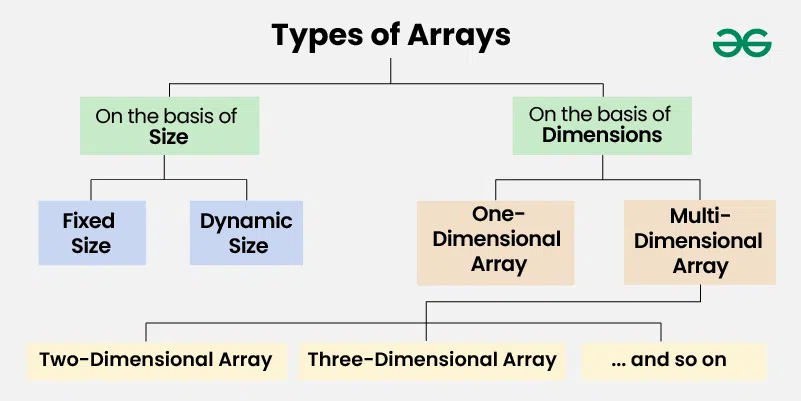
On the basis of Size:
1. Fixed Sized Arrays:
- The size of a fixed-size array cannot be changed after creation.
- Memory is allocated only for the size mentioned in square brackets [].
- Declaring a larger size than needed wastes memory.
- Declaring a smaller size than needed is not enough to store all elements.
- Fixed-size arrays are not preferred when the number of elements is unknown.
C++
#include <iostream>
using namespace std;

int main()
{
    // fixed-size array of 5 integers
    int arr[5];

    // storing values in the array
    for (int i = 0; i < 5; i++)
    {
        arr[i] = i + 1;
    }

    // printing array elements
    cout << "Array elements are: ";
    for (int i = 0; i < 5; i++)
    {
        cout << arr[i] << " ";
    }

    return 0;
}
#include <stdio.h>

int main()
{
    // fixed-size array of 5 integers
    int arr[5];

    int i;

    // storing values in the array
    for (i = 0; i < 5; i++)
    {
        arr[i] = i + 1;
    }

    // printing array elements
    printf("Array elements are: ");
    for (i = 0; i < 5; i++)
    {
        printf("%d ", arr[i]);
    }

    return 0;
}
public class Main {
    public static void main(String[] args)
    {
        // fixed-size array of 5 integers
        int[] arr= new int[5];

        // storing values in the array
        for (int i = 0; i < arr.length; i++) {
            arr[i] = i + 1; // storing 1,2,3,4,5
        }

        // printing array elements
        System.out.print("Array elements are: ");
        for (int i = 0; i < arr.length; i++) {
            System.out.print(arr[i] + " ");
        }
    }
}
# creating a fixed-size list of 5 elements
arr = [0] * 5

# storing values in the list
for i in range(5):
    arr[i] = i + 1
# printing list elements
print("Array elements are:", arr)
using System;

class Program {
    static void Main()
    {
        // fixed-size array of 5 integers
        int[] arr = new int[5];

        // storing values in the array
        for (int i = 0; i < arr.Length; i++) {
            arr[i] = i + 1;
        }

        // printing array elements
        Console.Write("Array elements are: ");
        for (int i = 0; i < arr.Length; i++) {
            Console.Write(arr[i] + " ");
        }
    }
}
OutputArray elements are: 1 2 3 4 5
2. Dynamic Sized Arrays:
- The size of a dynamic array can change during program execution.
- Elements can be added or removed as needed.
- Memory is allocated and de-allocated automatically.
- Don’t need to worry about the array size in advance.
- Dynamic arrays are flexible and useful when the number of elements is unknown.
C++
#include <iostream>
#include <vector>
using namespace std;

int main()
{
     // dynamic array
    vector<int> arr;

    // adding elements
    arr.push_back(10);
    arr.push_back(20);
    arr.push_back(30);

    // printing array elements
    cout << "Array elements are: ";
    for (int i = 0; i < arr.size(); i++)
    {
        cout << arr[i] << " ";
    }

    // removing last element
    arr.pop_back();

    cout << "\nAfter removing last element: ";
    for (int i = 0; i < arr.size(); i++)
    {
        cout << arr[i] << " ";
    }

    return 0;
}
#include <stdio.h>
#include <stdlib.h>

int main()
{
    // pointer for dynamic array
    int *arr = NULL;
    int size = 0;

    // adding elements dynamically
    size++;
    arr = (int *)realloc(arr, size * sizeof(int));
    arr[size - 1] = 10;

    size++;
    arr = (int *)realloc(arr, size * sizeof(int));
    arr[size - 1] = 20;

    size++;
    arr = (int *)realloc(arr, size * sizeof(int));
    arr[size - 1] = 30;

    // printing array elements
    printf("Array elements are: ");
    for (int i = 0; i < size; i++)
    {
        printf("%d ", arr[i]);
    }

    // removing last element
    size--;
    printf("\nAfter removing last element: ");
    for (int i = 0; i < size; i++)
    {
        printf("%d ", arr[i]);
    }

    free(arr); // free memory
    return 0;
}
import java.util.ArrayList;

public class Main {
    public static void main(String[] args)
    {
        // dynamic array
        ArrayList<Integer> arr = new ArrayList<>();

        // adding elements
        arr.add(10);
        arr.add(20);
        arr.add(30);

        // printing array elements
        System.out.print("Array elements are: ");
        for (int num : arr) {
            System.out.print(num + " ");
        }

        // removing last element
        arr.remove(arr.size() - 1);

        System.out.print("\nAfter removing last element: ");
        for (int num : arr) {
            System.out.print(num + " ");
        }
    }
}
# dynamic array
arr = []

# adding elements
arr.append(10)
arr.append(20)
arr.append(30)

# printing array elements
print("Array elements are:", arr)

# removing last element
arr.pop()

print("After removing last element:", arr)
using System;
using System.Collections.Generic;

class Program {
    static void Main()
    {
        // dynamic array
        List<int> arr = new List<int>();

        // adding elements
        arr.Add(10);
        arr.Add(20);
        arr.Add(30);

        // printing array elements
        Console.Write("Array elements are: ");
        foreach(int num in arr)
        {
            Console.Write(num + " ");
        }

        // removing last element
        arr.RemoveAt(arr.Count - 1);

        Console.Write("\nAfter removing last element: ");
        foreach(int num in arr)
        {
            Console.Write(num + " ");
        }
    }
}
OutputArray elements are: 10 20 30
After removing last element: 10 20
Note: In C, there is no built-in dynamic array like in other languages, but you can create one using pointers and malloc/realloc.
On the basis of Dimensions
1. One-dimensional Array :
- A 1-D array is a single row of elements stored in a sequence under one name.
- Each element can be accessed using an index starting from 0.
- It is used to store multiple values of the same type in a linear manner.
 C++
C++
#include <stdio.h>

int main()
{
    int arr[5] = {1, 2, 3, 4, 5};

    // printing array elements
    for (int i = 0; i < 5; i++)
    {
        printf("%d ", arr[i]);
    }

    return 0;
}
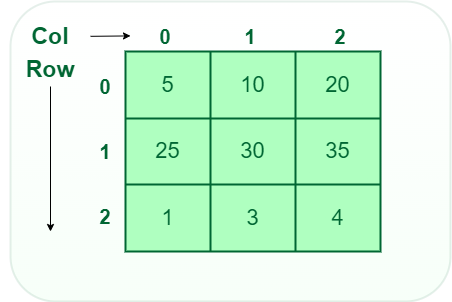
2. Two-dimensional (2D) array:
- A 2-D array is like a table or grid with rows and columns.
- Each element is accessed using two indices: one for the row and one for the column.
- It is used to store multiple values of the same type in a matrix-like structure.
 C++
C++
#include <stdio.h>

int main()
{
    int arr[2][3] = {{1, 2, 3}, {4, 5, 6}}; // 2 rows and 3 columns

    // printing array elements
    for (int i = 0; i < 2; i++)
    {
        for (int j = 0; j < 3; j++)
        {
            printf("%d ", arr[i][j]);
        }
        printf("\n");
    }

    return 0;
}
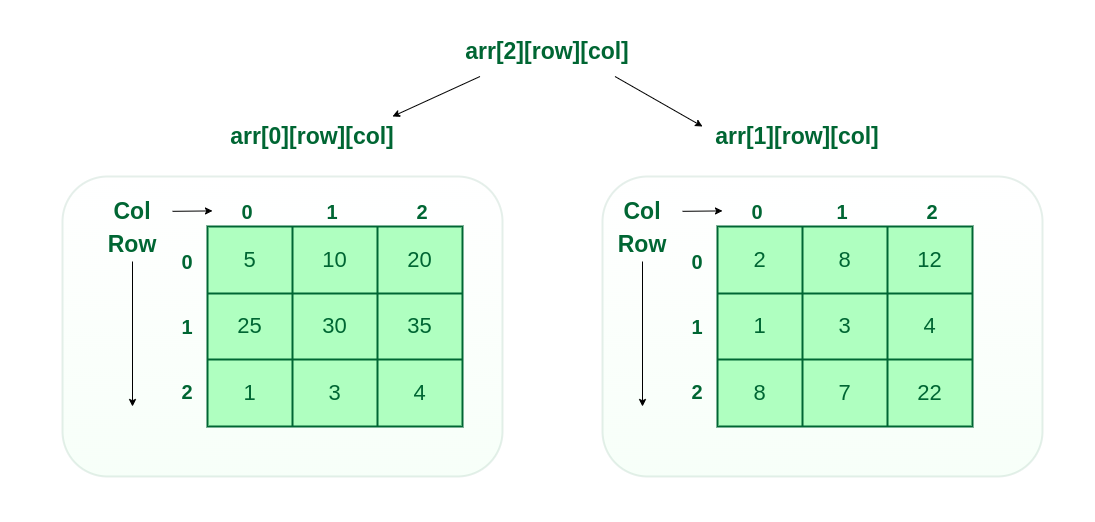
3. Three-dimensional array:
- A 3-D array is like a stack of 2-D arrays, forming rows, columns, and layers.
- Each element is accessed using three indices: for layer, row, and column.
- It is used to store multiple values of the same type in a 3-dimensional structure.
 C++
C++
#include <stdio.h>

int main()
{
    // 3-D array: 2 layers, 2 rows, 3 columns
    int arr[2][2][3] = {{{1, 2, 3}, {4, 5, 6}}, {{7, 8, 9}, {10, 11, 12}}};

    // printing array elements
    for (int i = 0; i < 2; i++)
    {
        // layer
        for (int j = 0; j < 2; j++)
        {
            // row
            for (int k = 0; k < 3; k++)
            {
                // column
                printf("%d ", arr[i][j][k]);
            }
            printf("\n");
        }
        printf("\n");
    }

    return 0;
}
Output1 2 3
4 5 6
7 8 9
10 11 12
Explore
DSA Fundamentals
Data Structures
Algorithms
Advanced
Interview Preparation
Practice Problem
My Profile