
SHA-1 (Secure Hash Algorithm 1) is a cryptographic hashing algorithm that generates a fixed 160-bit hash value from input data, mainly used to verify data integrity. It is now considered insecure due to vulnerabilities and has been replaced by stronger hashing standards.
- Produces a 160-bit (40-character hexadecimal) hash output
- Developed by the U.S. National Security Agency (NSA)
- Formerly used as a Federal Information Processing Standard (FIPS)
- Broken by collision attacks, making it unsafe for modern security use
- Declared insecure since 2005; major companies stopped support by 2017
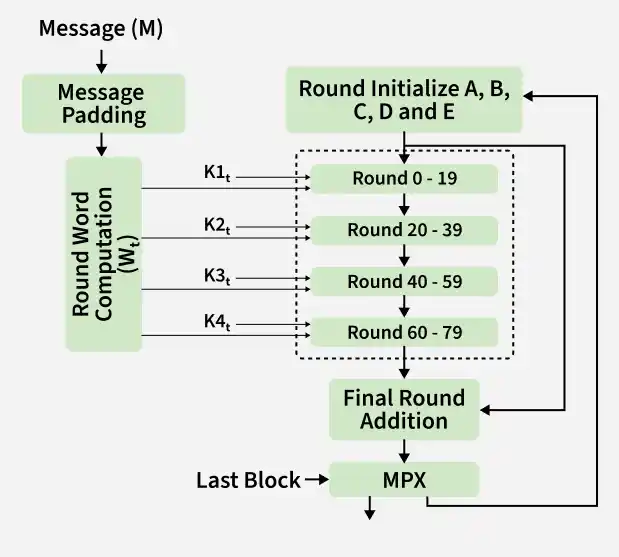
Working of SHA-1
The block diagram of the SHA-1 algorithm. Here’s a detailed description of each component and process in the diagram:
Process Flow
- Message (M): The original input data that needs to be hashed.
- Message Padding: The message is padded so its length becomes 448 modulo 512, making it ready for block processing.
- Word Computation: The padded message is divided into 512-bit blocks, each split into 16 words, which are then expanded into 80 words.
- Initialization: Five working variables A, B, C, D, and E are initialized with predefined constant values.
- Round Constants: Four constants (K1 to K4) are used across different round ranges (0–19, 20–39, 40–59, 60–79).
- 80 Rounds Processing: The algorithm performs 80 iterations, applying logical operations and transformations on A–E using the expanded words and constants.
- Final Addition: The results of the rounds are added to the initial values of A–E to form the intermediate hash.
- Message Digest (MPX): All values are combined to produce the final 160-bit hash output.
Cryptographic Hash Functions in Java
In Java, cryptographic hash values are generated using the MessageDigest class from the java.security package.
- Supported Algorithms: Java supports multiple hashing algorithms, including MD2, MD5, SHA-1, SHA-224, SHA-256, SHA-384, and SHA-512.
Execution Process
- Select algorithm using MessageDigest.getInstance()
- Input data is processed into a byte array
- Byte array is converted using BigInteger
- Final output is displayed as a hexadecimal string
Example Inputs and Outputs
- Input: hello world
- Output: 2aae6c35c94fcfb415dbe95f408b9ce91ee846ed
- Input: GeeksForGeeks
- Output: addf120b430021c36c232c99ef8d926aea2acd6b
Example Implementations
Example 1: Implementation of SHA-1 in Java
import java.math.BigInteger;
import java.security.MessageDigest;
import java.security.NoSuchAlgorithmException;

public class GFG {
    public static String encryptThisString(String input) {
        try {
            // getInstance() method is called with algorithm SHA-1
            MessageDigest md = MessageDigest.getInstance("SHA-1");

            // digest() method is called
            // to calculate message digest of the input string
            // returned as array of byte
            byte[] messageDigest = md.digest(input.getBytes());

            // Convert byte array into signum representation
            BigInteger no = new BigInteger(1, messageDigest);

            // Convert message digest into hex value
            String hashtext = no.toString(16);

            // Add preceding 0s to make it 40 digits long
            while (hashtext.length() < 40) {
                hashtext = "0" + hashtext;
            }

            // return the HashText
            return hashtext;
        }

        // For specifying wrong message digest algorithms
        catch (NoSuchAlgorithmException e) {
            throw new RuntimeException(e);
        }
    }

    // Driver code
    public static void main(String args[]) throws NoSuchAlgorithmException {
        System.out.println("HashCode Generated by SHA-1 for:");

        String s1 = "GeeksForGeeks";
        System.out.println("\n" + s1 + " : " + encryptThisString(s1));

        String s2 = "hello world";
        System.out.println("\n" + s2 + " : " + encryptThisString(s2));
    }
}
Output
HashCode Generated by SHA-1 for:

GeeksForGeeks : addf120b430021c36c232c99ef8d926aea2acd6b

hello world : 2aae6c35c94fcfb415dbe95f408b9ce91ee846ed
Example 2: Implementation of SHA-1 in PHP
<?php
    echo "HashCode Generated by SHA-1 for:";
    echo ("<br>");
    $myString = "hello world";
    echo $myString." : ";
    echo sha1($myString);
    echo ("<br>");
    $myString2 = "GeeksForGeeks";
    echo $myString2." : ";
    echo sha1($myString2);
?>
Output:
HashCode Generated by SHA-1 for:
hello world : 2aae6c35c94fcfb415dbe95f408b9ce91ee846ed
GeeksForGeeks : addf120b430021c36c232c99ef8d926aea2acd6b
Example 3: Implementation of SHA-1 in JavaScript
<!DOCTYPE html>
<html>
<head>
    <title>sha1 Hash function</title>
    <script src=
"https://cdnjs.cloudflare.com/ajax/libs/js-sha1/0.6.0/sha1.min.js">

    </script>
</head>
<body>
    <h1>GeeksforGeeks</h1>

    <h2>JavaScript sha1 Hash function</h2>

    <p id="pId"></p>
    <p id="pId2"></p>

    <!-- Script to return math property values -->
    <script>
        var myString = "hello world";
        var text = sha1(myString);
        document.getElementById("pId").innerHTML = myString + " : " + text;
        var myString2 = "GeeksForGeeks";
        var text2 = sha1(myString2);
        document.getElementById("pId2").innerHTML = myString2 + " : " + text2;
    </script>
</body>
</html>
Output:
GeeksforGeeks
JavaScript sha1 Hash function
hello world : 2aae6c35c94fcfb415dbe95f408b9ce91ee846ed
GeeksForGeeks : addf120b430021c36c232c99ef8d926aea2acd6b
Applications of SHA-1
SHA-1 is widely used in various domains to ensure data security, integrity, and authenticity.
- Cryptography: Generates a fixed, irreversible hash to verify data authenticity during transmission.
- Data Integrity: Detects any data modification by comparing original and current hash values.
- Digital Signatures: Ensures authenticity by hashing data and encrypting it with a private key.
- Digital Forensics: Verifies that digital evidence has not been altered during investigation.
- Password Storage: Stores passwords securely as hash values instead of plain text.
- Software Updates: Confirms file integrity by matching downloaded file hash with the original.