Book an Appointment
Call Chandler Computer Repair Company at 480-240-2946
                   

(480) 240-2946


Since 1999 Chandler Computer Repair Company has provided mobile computer repair in Chandler, AZ. We specialize in same day virus removal, hard drive data recovery, computer consulting for small business, and mobile computer repair in Chandler, AZ.

Mobile computer repair means we come to you, in your home or business, to resolve all your computer repair or computer service problems all throughout Chandler, AZ.

Why not use the #1 rated computer repair company in Chandler?

Computer Repair 4.9 / 5 stars from 297 reviews
Why use a computer tech when you can have a Chandler based Computer Engineer for computer repair? Matt Karls Mon-Sun 8:00am - 8:00pm

Call us at (480) 240-2946

Text us at (602) 633-4584

Email us your questions

Book an Appointment

"I first became acquainted with this company in 2005. Not being a sophisticated computer user, I have had many occasions over to enlist their expertise with complete confidence in their ability to assist me and resolve any problems I have encountered. Matt, Chris, Bryan and David are first-class and really know their stuff. I have never been disappointed!!"
Chandler Computer Repair Company 5 / 5 stars
"David was very helpful and resolved our computer issue. Thanks for the great service!"
Chandler Computer Repair Company 5 / 5 stars
"William was able to help me fast, so I was able to get back to working :) Thank you so much!"
Chandler Computer Repair Company 5 / 5 stars
"Chris is terrific - I am so happy with the results!"
Chandler Computer Repair Company 5 / 5 stars
"Matt is a terrific guy, he helped me with all I needed."
Chandler Computer Repair Company 5 / 5 stars

Who is Chandler Computer Repair Company?

Chandler Computer Repair Company is owned by Matt Karls, an Electrical Engineer and a Computer Systems Engineer. We are a team of computer professionals focused on service and quality, all our work is guaranteed.

If you need computer repair, computer service or have any technology problem in Chandler, AZ we can fix it. We have been performing computer repair in Chandler full time since 1999.

Chandler Computer Repair Company's Computer Engineer

What is your Service Area for on-site Computer Repair?

Chandler Computer Repair Company has serviced Chandler and the entire Phoenix metro area for over a decade.

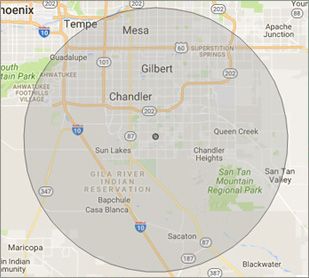
Our primary on-site computer repair service area includes Chandler and most of the East Valley of the Phoenix metropolitan area.

We provide on-site computer repair to Chandler, Sun Lakes, Ahwatukee, Tempe, Gilbert, Queen Creek, Mesa, San Tan Valley, Chandler Heights, Sun Lakes and Johnson Ranch.

Chandler, AZ on-site Computer Repair Service Area

What should someone expect that hires you for Computer Service?

Our mission is to fully resolve your computer problems quickly and affordably. If you want a Computer Engineer that can fix all of your computer repair and computer service problems instead of a computer tech, a computer geek, a technician or a computer guy that can only fix some of your computer problems; call us at (480) 240-2946.
 

What types of Computer Repair Services do you perform?

We provide services to businesses and clients in their homes, including:
 
  • Diagnose / repair hardware or software problems
  • Spyware, malware, trojan and virus removal
  • Setup wireless and small business networks
  • Laptop repair, PC repair and Apple repair
  • Hard drive data recovery
We are your computer repair specialists in Chandler, AZ.

Chandler Computer Repair Company Contact Information

Chandler Computer Repair Company
4960 S Gilbert Rd #1-170, Chandler, AZ 85249
(480) 240-2946

Book an Appointment


4.9 / 5 stars from 297 reviews

"I'm stationed in California, I live in Arizona and I came home one weekend with a virus on my computer. William remoted in within 10 minutes, on a Saturday and got it all cleaned up. Awesome bunch of guys, thanks."

Chandler Computer Repair Company 5 / 5 stars

"The guys at Chandler Computer Repair Company have fixed several of our servers and other computers over the years."

Chandler Computer Repair Company 5 / 5 stars

"I've used Matt more than a few times for mostly dumb fixes that I didn't know how to repair."

Chandler Computer Repair Company 5 / 5 stars

"I had a bad virus on my computer and David was able to clean it off in no time at all."

Chandler Computer Repair Company 5 / 5 stars

Best Antivirus Software of 2026: The Ultimate Guide to Cybersecurity Brands

In 2026, the digital threat landscape has shifted. We are no longer just fighting simple viruses; we are defending against AI-generated phishing, sophisticated ransomware-as-a-service, and complex identity theft. Choosing the right antivirus brand is no longer optional—it is the foundation of your digital life. At Karls Technology, we’ve analyzed the top-performing security suites of the […] The post Best Antivirus Software of 2026: The Ultimate Guide to Cybersecurity Brands appeared first on Computer Repair Blog.

Removing Icons on Desktop

One of the quickest and easiest methods to free up space and boost Windows 10’s performance is to get rid of the icons cluttering your desktop. In Windows 10, you can quickly and easily clear your desktop of icons with only a few clicks. It’s as simple as right-clicking an icon on the Windows 10 […] The post Removing Icons on Desktop appeared first on Computer Repair Blog.

MacOS Ventura Update is Available

Check Software Update in the System Settings App. macOS Ventura makes the things you do most on Mac even better, with powerful new ways to get more done, share and collaborate in your favorite apps, immerse yourself in next‑level games, and take full advantage of your other devices. Source: Apple The MacOS Ventura 13.0 update is now […] The post MacOS Ventura Update is Available appeared first on Computer Repair Blog.

New Processor Compatibilities on Windows 11

The rigorous system requirements of Windows 11 and Microsoft’s insistence on using only the most recent hardware earned widespread criticism even before the operating system was made available to the public. According to Windows Latest, many PCs will not be able to acquire an official transition to Windows 11 from previous Windows operating systems. Windows […] The post New Processor Compatibilities on Windows 11 appeared first on Computer Repair Blog.

‘What is my IP address’ on Mac

Internet Protocol (IP) addresses are needed for computers including desktops, portable devices, and hosts to communicate with one another via the network. It is important to know where to find the IP address, if it’s needed for any future issues. If you’re needing to find your IP address on your Mac, look no further. There […] The post ‘What is my IP address’ on Mac appeared first on Computer Repair Blog.

Check if Website is Safe

You can inquire as to the security of a website using Google if you have doubts as to whether or not it is dangerous. According to famous tech company, Google’s unified approach to security, dubbed “Safe Browsing,” enables safer Internet experiences for users everywhere. To check to see if the website you’re wishing to visit […] The post Check if Website is Safe appeared first on Computer Repair Blog.

Benefit of Reducing Amount of Tabs and Windows on PC

The processing power of your computer is shared by all of the apps you run. If you’re trying to execute software and it’s taking a long time, you should be patient. If your computer freezes for a minute, you should not instantly press the power button to shut it off. Trust your instincts about whether […] The post Benefit of Reducing Amount of Tabs and Windows on PC appeared first on Computer Repair Blog.

Applications Won’t Work

When an application fails to install on your computer or it won’t work properly, it could be for a handful of reasons. Your computer’s hardware and software probably aren’t compatible with the program in question. The prerequisites for running any given piece of software on a computer are known as its “system requirements.” These might […] The post Applications Won’t Work appeared first on Computer Repair Blog.

New Microsoft Defender SmartScreen Feature

In an effort to ward off phishing attacks and encourage users to use strong passwords, Microsoft released Defender SmartScreen. The Windows 11 22H2 update, which Microsoft issued at the end of the previous month, included a new feature that should make it easier for users to keep their credentials secure. When logging into an app […] The post New Microsoft Defender SmartScreen Feature appeared first on Computer Repair Blog.

Free Up Storage Easily

Free up some space on your hard drive. On Windows, you can utilize Storage Sense, while Mac users can access helpful tools within the Storage application. Windows also includes a tool called Disk Defragmenter for cleaning up disk fragmentation. Data that you can’t bear to lose should be moved to an external drive or cloud […] The post Free Up Storage Easily appeared first on Computer Repair Blog.