
Hub
A hub can refer to any of the following:
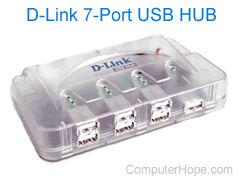
1. In general, a hub refers to a hardware device that enables multiple devices or connections to connect to a computer. An example is a USB hub, which allows multiple USB devices to connect to one computer, even though that computer may only have a few USB (Universal Serial Bus) connections. Pictured is an example of a 7-port USB hub. In this example, this device would add an additional six USB ports to a computer, the seventh port is used to connect the device to the computer.
In the Device Manager, the root hub is your computer and the first USB hub.
Another example of a hub is a FireWire hub, which allows multiple FireWire devices to connect to a computer.
Devices like an A/B box and a KVM (Keyboard, Video, and Mouse) are like a hub in that they allow multiple devices to work with one computer. However, these are different technologies with different abilities.
How many ports does a USB hub have?
The number of ports on a USB hub can vary from four ports to over 100 ports depending on the hub. The USB standard supports over 100 devices, so it's also possible to connect multiple USB hubs to one computer.
Where can I buy a USB hub?
Below is an Amazon Associates affiliate link to a USB hub. As an Amazon Associate, Computer Hope earns from qualifying purchases, and those earnings help keep our services free. If Amazon isn't available in your area, we also have a link to other places to buy computer parts.
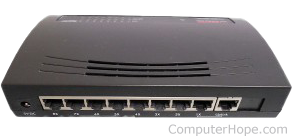
2. With a network, a hub is the most basic networking device that connects multiple computers or other network devices. Unlike a network switch or router, a network hub has no routing tables or intelligence on where to send information and broadcasts all network data across each connection. Most hubs can detect basic network errors, such as collisions, but having all information broadcast to multiple ports is a security risk and causes bottlenecks. In the past, network hubs were popular because they were cheaper than a switch or router.
Today, network switches don't cost more than a network hub and are a better solution for any network. Most locations no longer sell hubs and instead sell unmanaged switches, which are an improved hub.
Do hubs have an IP address?
No. A hub is a basic (dumb device) and does not need an IP address.
How many ports does a network hub have?
The number of ports on a network hub can vary from 4 to 100 ports depending on the hub.
Where can I buy a network hub?
Below is an Amazon Associates affiliate link to unmanaged network switches. As an Amazon Associate, Computer Hope earns from qualifying purchases, and those earnings help keep our services free. If Amazon isn't available in your area, we also have a link to other places to buy computer parts.
Bridge, Cascading hubs, Hardware terms, Network terms, Router, Switch