
Local Testing Internals
Description of the data flow process, security policies, and internal architecture for Local Testing on BrowserStack.

Connection setup

-
STEP 1: BrowserStack Local makes a REST call using the user's access key to browserstack.com.
-
STEP 2: browserstack.com chooses a repeater to establish a secure connection for Local Testing. The repeater exists within the BrowserStack cloud infrastructure.
-
STEP 3: browserstack.com supplies BrowserStack Local with the information necessary to establish a connection with the repeater.
-
STEP 4: BrowserStack Local initiates a connection to the repeater on port 443, using our custom SSL-encrypted protocol.
-
STEP 5: A secure, bi-directional, and persistent connection is established between the end user machine and the repeater. We use Secure WebSockets as part of our communication framework. If your enterprise firewall blocks the WebSocket protocol, we fall back to a legacy protocol which is also SSL encrypted, but much slower than WebSockets. For best results, we recommend that outgoing WebSocket connections be allowed in your firewall.
Data flow

-
STEP 1: The user sends a request to browserstack.com to start the remote browsing session.
-
STEP 2: browserstack.com identifies a virtual machine from the cloud, and allocates it to the user. The remote browser is started on this virtual machine, and the user will interact with it during their testing session. browserstack.com also instructs the virtual machine to use the repeater as a proxy.
-
STEP 3: browserstack.com instructs the repeater to allow access for virtual machine in its access control layer (ACL).
-
STEP 4: All the requests on virtual machine use the repeater as a proxy to resolve web traffic.
-
STEP 5: Requests from the remote browser are then routed to BrowserStack Local, through the secure connections described in the previous step.
-
STEP 6: BrowserStack Local then forwards these requests to the local server. All responses are sent back via the same channel.
Teardown process
Stopping the remote browsing session

-
STEP 1: The user sends a request to browserstack.com to end the remote browsing session.
-
STEP 2: browserstack.com instructs the repeater to sever the secure connection to the virtual machine in the cloud.
-
STEP 3: The repeater then severs the connection to and from the virtual machine.
-
STEP 4: browserstack.com takes the virtual machine offline, to securely erase all user information such as browser history, cookies, cache, form data, downloaded files (if any), saved passwords, etc. and restore it to its original, pristine state. This ensures that the virtual machine does not retain any information pertaining to the user's session.
-
STEP 5: Repeater confirms to BrowserStack Local that the virtual machine has been disconnected.
-
STEP 6: BrowserStack Local closes any open connections it had established to the local servers, ending the Local Testing session.
The secure connection between BrowserStack Local and the repeater remains alive, and can be used for another remote testing session on another platform or with another browser.
Stopping the Local Testing connection (Only for command line binaries)

-
STEP 1: The user requests a teardown of the Local Testing connection by hitting Ctrl + C from their command-line interface. Immediately BrowserStack Local severs the secure connection with the repeater. It also deletes all the information it had about the repeater. Thus it cannot set up another connection unless the user initiates it.
-
STEP 2: BrowserStack Local informs browserstack.com about the disconnect request.
-
STEP 3: browserstack.com makes sure the repeater also closes the connection from its end and deletes any information about the concluded Local Testing session.
Recommended setup

BrowserStack Local is capable of establishing the Local Testing connection through most enterprise proxy servers and firewalls. The app makes two types of outgoing connections which may require special rules in your enterprise proxy and firewall:
Type 1HTTP(S) requests to www.browserstack.com in the form of web requests (when the website is opened in the user's browser) and AJAX calls (for setting up Local Testing) at port 80 and 443.
Type 2Secure WebSocket (WSS) connections to the repeater (*.browserstack.com) at port 443.
The proxy server should support WebSockets and the CONNECT method to allow TLS/SSL connections.
Internal architecture of BrowserStack Local
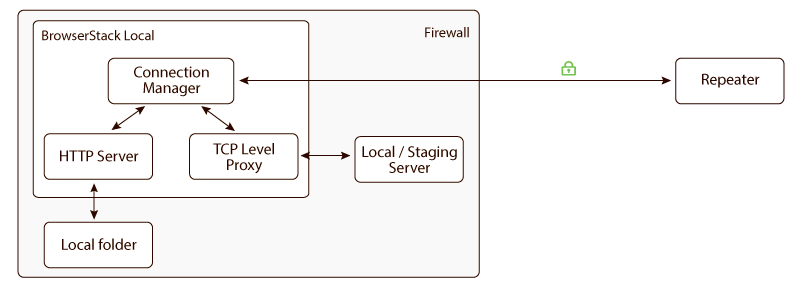
BrowserStack Local has three main modules:
The Connection ManagerResponsible for authenticating the user using their access key and establishing a secure connection to the repeater. It makes sure the connection does not drop while the user is testing and closes the connection when the user disconnects.
TCP Level ProxyThe Local Testing connection is designed to provide a transparent communication channel between the remote web browsers (on BrowserStack infrastructure) and the user's local servers. Unlike traditional HTTP proxies, BrowserStack does not look into the request headers or any user data. BrowserStack Local enables a TCP level connection to be established between the remote browser and the local servers. This allows for testing of HTTPS websites and technologies such as WebSockets.
HTTP ServerThis applies to local folder testing only. When the user wishes to test local HTML design files, BrowserStack Local starts a tiny HTTP server within the app on a random unprivileged (>40000) port. This HTTP server has read-only access to the folder mentioned by the user. It loads a file from disk only when requested and does not cache file data. It is shut down when the Local Testing connection is disconnected.
This HTTP server is treated as a local server and the aforementioned mechanism takes over.