A/B testing, also called split testing, sends different portions of your audience to different destination URLs so you can optimize marketing campaigns based on real performance data.
UseClick's A/B testing feature makes it easy to set up experiments, track results, and identify winning variations that drive more conversions.
Whether you're testing landing pages, offers, or content variations, this guide helps you make data-driven decisions for your link marketing strategy.
A/B Testing Interface
Create and manage your A/B tests through UseClick's testing dashboard:
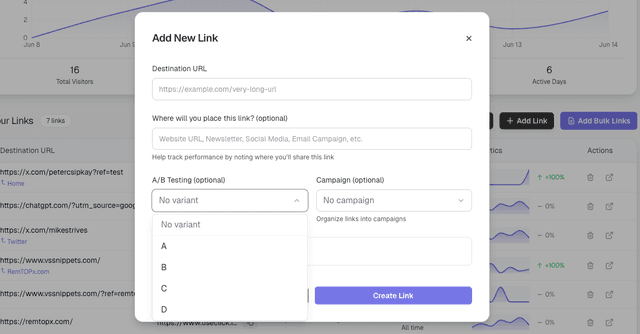
Set up experiments with up to 4 different destination URLs per test.
Setting Up Your First A/B Test
Creating an A/B test with UseClick is straightforward. Follow these steps to start optimizing your links:
Choose Your Base Link
Select an existing short link or create a new one to use as the foundation for your test. This link receives all incoming traffic.
Add Destination Variations
Add up to 4 different destination URLs that you want to test against each other. Each variation receives an equal portion of traffic by default.
Configure Traffic Distribution
Adjust the percentage of traffic sent to each variation. You can allocate 100% to one option to pause testing, or split evenly for equal distribution.
Monitor Performance
UseClick allows you to control how traffic is split between your test variations:
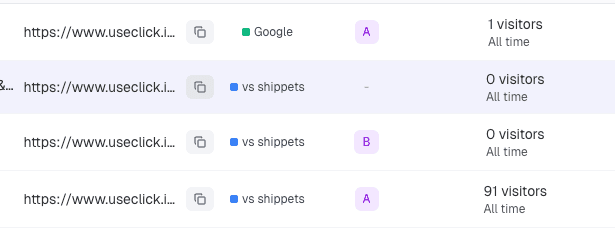
50/50 Split
Equal distribution for standard A/B testing
Custom Ratios
Adjust percentages based on your testing strategy
3. Test Duration and Sample Size
For reliable results, your A/B tests need sufficient traffic and time:
Minimum Sample Size
Ensure statistical significance with adequate traffic:
- • At least 100 visitors per variation for basic insights
- • 1000+ visitors per variation for reliable conversion data
- • Higher traffic needs for smaller expected differences
Test Duration
Run tests long enough to account for behavioral patterns:
- • Minimum 1 week to capture daily variations
- • 2-4 weeks for seasonal or weekly patterns
- • Avoid ending tests during unusual traffic periods
Tracking Performance and Results
UseClick provides comprehensive analytics for your A/B tests, helping you understand not just which variation wins, but why it performs better.
Key Metrics to Monitor
Click-Through Rate (CTR)
The percentage of people who click your short link when they see it
Higher CTR indicates more compelling link placement or context
Conversion Rate
The percentage of visitors who complete your desired action
Track using UTM parameters and destination page analytics
Time on Page
How long visitors spend on your destination pages
Longer engagement often correlates with higher conversion rates
Geographic Performance
How different variations perform across locations
Useful for international campaigns and localization testing
For advanced geographic targeting, learn how to use our Geo Link Targeting feature to deliver location-specific content and maximize your affiliate marketing performance.
Understanding Statistical Significance
UseClick helps you determine when your A/B test results are statistically significant and reliable enough for business decisions.
Confidence Levels
The platform calculates confidence levels to help you understand result reliability:
When to Stop Your Test
UseClick provides clear indicators for when your test has collected enough data:
- Statistical significance achieved - Clear winner with 95%+ confidence
- Practical significance - Difference large enough to matter for your business
- Sufficient sample size - Adequate data for reliable conclusions
- Complete business cycles - Full weeks or campaign periods captured
Common A/B Testing Scenarios
Here are proven A/B testing strategies that work well with UseClick's platform:
Email Marketing Optimization
Test different landing pages for the same email campaign:
Social Media Campaign Testing
Optimize social media traffic with targeted landing pages:
Content Marketing Tests
Test different content formats and approaches:
A/B Testing Best Practices
Test One Variable at a Time
Keep tests focused to identify what drives performance changes:
- • Change headlines OR images, not both simultaneously
- • Test page layout OR content, not multiple elements
- • Run sequential tests for complex optimizations
Document Your Hypotheses
Keep clear records of what you're testing and why:
- • Write down expected outcomes before starting
- • Note the reasoning behind each variation
- • Track learnings for future test planning
Organize your A/B tests within campaigns to keep related tests grouped together for easier management and analysis.
Consider External Factors
Account for variables that might affect your results:
- • Seasonal trends and holidays
- • Marketing campaign timing
- • Website changes or updates
- • Industry events or news
- • For large-scale A/B tests with many variations, consider using our bulk upload feature to efficiently create and manage test links
Track the performance of your A/B tests with our analytics dashboard to measure statistical significance and identify winning variations.
Testing Workflow Blocks
Run repeatable A/B testing cycles with clear structure for better conversion decisions.
Define Variants
Set up destination variants for offers, headlines, or landing page angles.
Split Traffic
Distribute clicks across variants from one public link for cleaner tests.
Measure Results
Compare conversion signals, click quality, and campaign-level performance.
Roll Out Winner
Promote the best variant and continue iterative testing for ongoing gains.