In this post I will show you how you can create a custom content security activity and store that to Episerver activity log (change log) when access rights are changed in Episerver.
This blog post was inspired by the fact that there is no out of the box audit log about content access rights changes and often it is a requirement in customer projects that the changes are logged. Episerver IContentSecurityRepository exposes events of changes and we are interested of the ContentSecuritySaved event where we get the information what content the change is about and what changes were done. So in projects we can have an audit logger (log4net) that we use to log these changes or have custom DB table where we store this information but then we need to implement a custom view to see the entries or the audit log is only available to developers or if Application Insights is used then those entries can be seen there (but there is a drawback with Application Insights, it is not preserved enough long).
But what we could do is have a custom Episerver activity and then store the access rights changes to Episerver activity log (well it is called ‘Change log’ in admin view). And the people with admin view access can see the changes in the log using the built-in ‘Change log’ view. NOTE! read the activity loggin developer instructions and configuration – activity log entries are kept for one month and then archived for 12 months by default. In the admin view you can view the archived entries but if you need longer than 12 months retention then you must change the configuration.
Custom activity code
The code needed is quite simple – we need a custom activity class to present the activity in the log (or category), enum to hold different actions related to the activity and an initialization module to register the activity and hook to the IContentSecurityRepository ContentSecuritySaved event.
Action type enum
Here is the enum used as the different actions related to our custom activity. The enum values map to the same values used on EPiServer.Security.SecuritySaveType, as this was fast way not to try to invent my own actions – we are logging the access rights chnages after all.
This file contains hidden or bidirectional Unicode text that may be interpreted or compiled differently than what appears below. To review, open the file in an editor that reveals hidden Unicode characters.
Learn more about bidirectional Unicode characters
| namespace EpiAuditLogging.Web.Features.AuditLogging | |
| { | |
| /// <summary> | |
| /// Content security action type (maps directly to <see cref="EPiServer.Security.SecuritySaveType"/>). | |
| /// </summary> | |
| public enum ContentSecurityActionType | |
| { | |
| // same as EPiServer.Security.SecuritySaveType | |
| None = 0, | |
| RecursiveReplace = 1, | |
| RecursiveModify = 2, | |
| Modify = 3, | |
| Replace = 4, | |
| ReplaceChildPermissions = 5, | |
| MergeChildPermissions = 6 | |
| } | |
| } |
Custom ContentSecurityActivity
This is the custom activity class we use. The dictionary passed in the constructor is the data that is going to be logged to the activity log.
This file contains hidden or bidirectional Unicode text that may be interpreted or compiled differently than what appears below. To review, open the file in an editor that reveals hidden Unicode characters.
Learn more about bidirectional Unicode characters
| using System.Collections.Generic; | |
| using EPiServer.DataAbstraction.Activities; | |
| namespace EpiAuditLogging.Web.Features.AuditLogging | |
| { | |
| public class ContentSecurityActivity : Activity | |
| { | |
| /// <summary> | |
| /// Name of this activity (used for example to register this activity). | |
| /// </summary> | |
| public const string ActivityTypeName = "ContentSecurity"; | |
| /// <summary> | |
| /// Creates a new instance using the given action type. | |
| /// </summary> | |
| /// <param name="action">What kind of action was done, <see cref="ContentSecurityActionType"/>.</param> | |
| public ContentSecurityActivity(ContentSecurityActionType action) : base(ActivityTypeName, (int)action, new Dictionary<string, string>(0)) { } | |
| /// <summary> | |
| /// Creates a new instance using the action type and dictionary containing the data that will be logged. | |
| /// </summary> | |
| /// <param name="action">What kind of action was done, <see cref="ContentSecurityActionType"/>.</param> | |
| /// <param name="extendedData">The data in dictionary that will be logged to the activity log.</param> | |
| public ContentSecurityActivity(ContentSecurityActionType action, IDictionary<string, string> extendedData) : base(ActivityTypeName, (int)action, extendedData) { } | |
| } | |
| } |
Custom initialization module
And finally we need an initialization module to register our custom activity and hook to the access rights changed event. NOTE! the code that registers the activity uses Episerver internal API from EPiServer.DataAbstraction.Activities.Internal.IActivityTypeRegistry but I hope this will be moved to public API so that we don’t loose our sleep if they suddenly would decide to make it internal or make other changes to the signatures. You have been warned 😀
This file contains hidden or bidirectional Unicode text that may be interpreted or compiled differently than what appears below. To review, open the file in an editor that reveals hidden Unicode characters.
Learn more about bidirectional Unicode characters
| using System; | |
| using System.Collections.Generic; | |
| using System.Linq; | |
| using EPiServer.DataAbstraction; | |
| using EPiServer.DataAbstraction.Activities; | |
| using EPiServer.DataAbstraction.Activities.Internal; | |
| using EPiServer.Framework; | |
| using EPiServer.Framework.Initialization; | |
| using EPiServer.Logging; | |
| using EPiServer.Security; | |
| namespace EpiAuditLogging.Web.Features.AuditLogging | |
| { | |
| [InitializableModule] | |
| [ModuleDependency(typeof(EPiServer.Web.InitializationModule))] | |
| public class AuditLogInitializationModule : IInitializableModule | |
| { | |
| private static readonly ILogger Logger = LogManager.GetLogger(typeof(AuditLogInitializationModule)); | |
| private IActivityRepository _activityRepository; | |
| public void Initialize(InitializationEngine context) | |
| { | |
| // just DEMO CODE – separate catches just to log the details what really happened | |
| // and return used in each catch just to be able to switch the order or if something is later added | |
| // if there is an Exception we should not continue any execution because the dependencies are not working | |
| try | |
| { | |
| // register the custom ContentSecurityActivity and the action types | |
| RegisterContentSecurityActivity(context.Locate.Advanced.GetInstance<IActivityTypeRegistry>()); | |
| } | |
| catch (Exception ex) | |
| { | |
| Logger.Error("Failed to register ContentSecurityActivity and action types.", ex); | |
| return; | |
| } | |
| try | |
| { | |
| _activityRepository = context.Locate.Advanced.GetInstance<IActivityRepository>(); | |
| } | |
| catch (Exception ex) | |
| { | |
| Logger.Error("Failed to get IActivityRepository service.", ex); | |
| return; | |
| } | |
| try | |
| { | |
| var repo = context.Locate.Advanced.GetInstance<IContentSecurityRepository>(); | |
| repo.ContentSecuritySaved += ContentSecuritySaved; | |
| } | |
| catch (Exception ex) | |
| { | |
| Logger.Error("Failed to register content security saved handler.", ex); | |
| return; | |
| } | |
| } | |
| public void Uninitialize(InitializationEngine context) | |
| { | |
| try | |
| { | |
| var repo = context.Locate.Advanced.GetInstance<IContentSecurityRepository>(); | |
| repo.ContentSecuritySaved -= ContentSecuritySaved; | |
| } | |
| catch (Exception ex) | |
| { | |
| Logger.Error("Failed to uninitialize the content security saved handler.", ex); | |
| } | |
| } | |
| private void ContentSecuritySaved(object sender, ContentSecurityEventArg e) | |
| { | |
| try | |
| { | |
| // what access rights changes were made, target can be user or group (including visitor groups if those are set to be usable to protect content) | |
| var permissions = e.ContentSecurityDescriptor?.Entries?.Select(entry => $"{entry.EntityType}: {entry.Name} access level set to: {entry.Access}."); | |
| string creator = e.ContentSecurityDescriptor.Creator; // this is always null/empty, why? | |
| string userFromContext = PrincipalInfo.CurrentPrincipal.Identity.Name; // this is guranteed to return a valid principal | |
| string msg = $"Access rights changed by '{userFromContext}' (creator value: '{creator}') to content id {e.ContentLink}, save type: {e.SecuritySaveType}. Following changes were made: {string.Join(" ", permissions)}"; | |
| // just log for reference in the demo | |
| Logger.Information(msg); | |
| // the logged data to activity log | |
| // you could have multiple keys for example to format the data in the 'change log' view | |
| Dictionary<string, string> activityData = new Dictionary<string, string> | |
| { | |
| { "message", msg } | |
| }; | |
| // ContentSecurityActionType uses same values as SecuritySaveType so just casting from e.SecuritySaveType | |
| var activity = new ContentSecurityActivity((ContentSecurityActionType)e.SecuritySaveType, activityData); | |
| var result = _activityRepository.SaveAsync(activity).GetAwaiter().GetResult(); | |
| Logger.Information($"New activity saved with id: {result}."); | |
| } | |
| catch (Exception ex) | |
| { | |
| Logger.Error("Failed to handle content security saved event.", ex); | |
| } | |
| } | |
| private void RegisterContentSecurityActivity(IActivityTypeRegistry activityTypeRegistry) | |
| { | |
| if (activityTypeRegistry == null) | |
| { | |
| throw new ArgumentNullException(nameof(activityTypeRegistry)); | |
| } | |
| // this is similiar code that the Episerver implementations use to register the activities | |
| // NOTE! The enum value None, value zero is excluded from the list as the UI will never show that | |
| // in the dropdown filter in 'change log' view, assumed to be filter that shows all | |
| // so remember not to use the value zero in your type for anything that 'means' something | |
| ActivityType activityType = new ActivityType(ContentSecurityActivity.ActivityTypeName, | |
| from ContentSecurityActionType x in Enum.GetValues(typeof(ContentSecurityActionType)) | |
| where x != ContentSecurityActionType.None | |
| select new ActionType((int)x, x.ToString())); | |
| // the implementation calls AddOrUpdate so it is safe to always call it | |
| // the backing type currently is ConcurrentDictionary not database | |
| activityTypeRegistry.Register(activityType); | |
| } | |
| } | |
| } |
Localizing the activity ‘category’ and action types
The activity ‘category’ and ‘action’ filters in the ‘Change log’ view can be localized using the default XML based localization.
This file contains hidden or bidirectional Unicode text that may be interpreted or compiled differently than what appears below. To review, open the file in an editor that reveals hidden Unicode characters.
Learn more about bidirectional Unicode characters
| <?xml version="1.0" encoding="utf-8" standalone="yes"?> | |
| <languages> | |
| <language name="English" id="en"> | |
| <changelog> | |
| <activitytypes> | |
| <contentsecurity> | |
| <description>Content security</description> | |
| <!– ContentSecurityActionType –> | |
| <recursivereplace>Recursive replace</recursivereplace> | |
| <recursivemodify>Recursive modify</recursivemodify> | |
| <modify>Modify</modify> | |
| <replace>Replace</replace> | |
| <replacechildpermissions>Replace child permission</replacechildpermissions> | |
| <mergechildpermissions>Merge child permission</mergechildpermissions> | |
| </contentsecurity> | |
| </activitytypes> | |
| </changelog> | |
| </language> | |
| </languages> |
Wrapping up
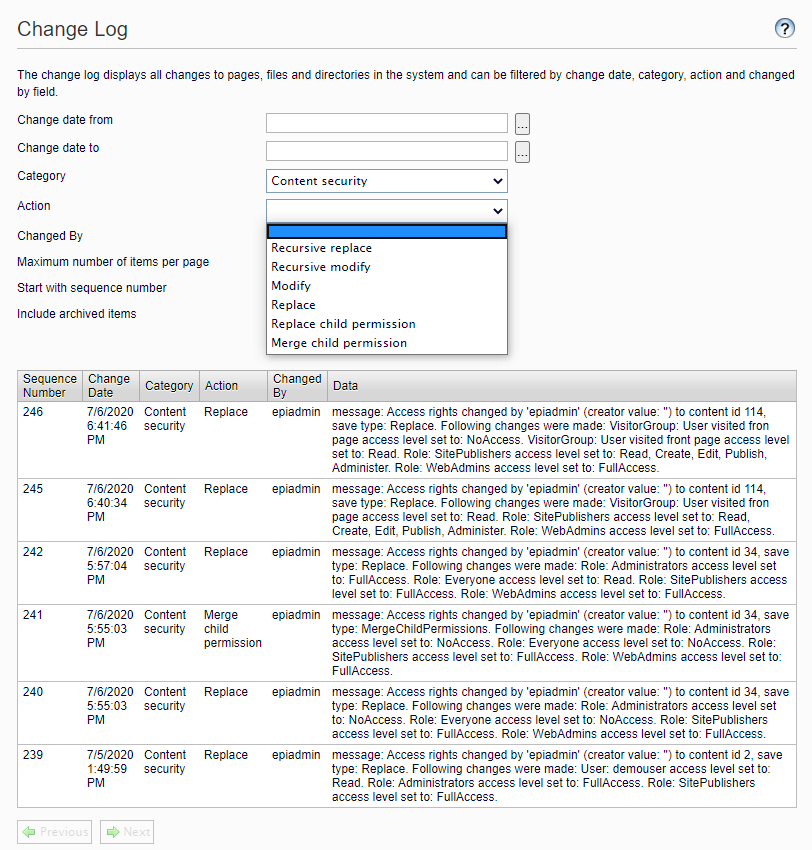
Now we can view the access rights changes and filter by action in Episerver admin view under the ‘Change log’.
 Share your code
Great stuff, thanks for sharing!
Thanks David 🙂
Where do I place the AuditLog.xml for localization
Hi Dileep, good question if you are not that familiar with Episerver.
Episerver uses XML localization by default and there is a default folder where the localization XML files are loaded, in web root you can create a folder called ‘lang’.
See Episerver documentation https://world.episerver.com/documentation/developer-guides/CMS/globalization/Localization-service/ and at the bottom of the page there is the section ‘Localization providers’.
Other section about is in https://world.episerver.com/documentation/developer-guides/CMS/globalization/localizing-the-user-interface/
‘How it works’ section explains this.
Thank you very much. I didn’t realize that. Still getting used to different parts of EpiServer. This is a great stuff and would definitely use it sometime in my application.