Hi! The shadows in this specific pack were programmatically removed rather than being rendered without them, which I think is messing with some of the other effects. I'll see if I can get this fixed!
The Run animations are missing some frames at the end (like 3-4 frames are the same and it doesnt loop right :( ), check 6Mage spritesheet with shadows.
Hi, the 8DarkLord also has a similar issue with the Run animation, I tested the v1.2 and the issue persists. I'm trying to skip some frames but it just does not look right. Any chance you can take a look at this too? Thanks!
I recently purchased the bundle containing all your packs, and I have to say, huge congratulations on your work! The quality is truly exceptional. It’s going to allow me to make real progress on my game without spending too much time on asset creation.
I’ve started integrating the characters from the HD pack, but I’m running into an issue with the '180 turn' animation. When I trigger it during a direction change, the animation plays correctly, but as soon as the character switches back to the 'run' animation, they 'teleport' (snap) a few pixels away. I can't seem to get a smooth transition between the '180 turn' and the 'run' state.
Do you have any ideas or advice on how to fix this?
Thank you for the kind words! I have to try this myself to see how it works. But you can try and solve it programmatically by moving the character that way during the animation. But I'll look into it!
Thanks for your quick reply. I tried several solutions:
- moving the player during the animation - reducing its speed - canceling the movement while the animation is playing - preventing the animation from freezing...
but I haven't found a solution yet. I'll try again in the next few days when I have time. I took the opportunity to ask you because I thought you might already have a simple solution cause in your video there is 0 glitch :-)
Im actually leaning on removing the 180 turn because it's very hard to make it sync with the other animations and to be honest I don't think it's a necessary animation, turning the character looks good without it (it's not being used in the video for example) and most similar packs doesn't have it. But we'll see, I'll look into it a bit more first.
Haha, true, it's not essential. However, it shows how much love and attention to detail you put into this pack. For me, that level of polish is what separates an average game from an immersive experience where players feel like everything has been considered. But I will remove it from my game because as you said, turning the character already looks good without it.
That attention to detail is the reason I went with this pack. I just wish the Fantasy Character Creator also had the front flip & dash animations.
Truth to be told, your pack is so absolutely cool that it must probably be my fault. If I may, I mentionned your pack in a post (see https://www.reddit.com/r/gamedev/comments/1olpwh8/paid_character_assets_i_feel_t...) and imho, your low res characters are more stylish than your HD ones (they are cool, more than 99% of the assets I've found, but your low res ones are even better). Is it harder to make a realistic, HD stylish character?
I noticed that the strafe left has 15 frames as usual but strafe right only has 12 frames. this is both in sprites and spritesheets. is this intentional? I also noticed that the death animations for several characters (checked archer, wizard and mage but could affect others as well) can start in the wrong direction and midway through the animation change direction again. sometimes both happen at the same time. this happens both in sprites and spritesheets. is this an export error? the paladin seems to work as intended facing the correct direction and dying towards that direction.
EDIT: perhaps instead of checking each error 1 by 1, export everything again and check if there are any issues with the exporter itself. this is assuming you have an automated export process. could prevent future issues in other packs if they use a similar system
EDIT2: Decide to test the fantasy character creator with the frost mage preset and these 2 issues were not present. Strafe had all frames. For the death animation it's a bit tricky since the creator uses a different animation for death so even though it exported correctly it is not an apples to apples comparison
The missing strafe frames is only affecting the casters currently and a fix for this is coming in the near future. For the death animations, this is intentional. Most animations in the creator are not the same as the ones found in this pack.
Removed my previous comment because I just realized there already are files for the projectiles VFX. Regarding walking I find it interesting there's only backwards animation for running. why not also walking? Can walking just be reversed from the original?
Yeah its called RunBackwards but if you look at the animation it works for walking aswell I would say. I havent treid reversing the Walk animation, maybe it would look even better not sure.
nvm. apparently i got them mixed up. the NON hd character pack is the one that has projectiles, the folder names were similar so I thought those files belonged to this pack. I think this packs still has none. Then I guess my original question is still valid. Are the HD VFX still in the works or in the backlog or are they not gonna happen anymore?
saw the email a couple mins ago. They look great. A question regarding usability. I expected the tip of projectile to stay in the same relative place in the sprite and for the "tail" to appear/disappear as it travels but right now the projectile itself also moves forward in the sprite. This is for the sprites in "spells" and "arrows". Won't this make collisions harder to make correctly in engine since I'll have to displace the collision or the sprite itself each frame of movement to make them match? Is it possible to have a version in which these are exported with the projectile all the way to the right (since all sprites already have the same size in pixels anyway) and only trail updates to the left? Am I missing something obvious? I don't recall if the non hd projectiles have the same issue (i glanced over them a while ago but haven't used them yet).
EDIT: I just remembered that the issue is worse if you make a spell that follows a target or somehow turns around since if you 180 the spell right now, since it is off-center (because "center" which is the projectile itself keeps moving) the projectile would "jump" position because it would apply the off-center displacement in the other direction, basically rotating around the center. It can be corrected in engine like I said before but seems so much work that can be avoided by a small tweak in the sprites themselves. At least I don't know the advantage of having them like this. Maybe someone can teach me (not sarcasm)
You're absolutely right about your feedback — the projectile animations aren't fixed in place. This design choice allows for built-in visual effects llikemagic trails directly within the sprite, so you don’t need to rely on line or trail renderers. It works well for straightforward, linear projectiles, but I agree it’s not ideal for homing or path-following projectiles that require dynamic movement.
For those types of projectiles, I’d recommend using a particle system or a more modular setup instead. But if your projectiles travel in a straight line, these animations can work nicely — just make sure to destroy the game object on impact and avoid looping the animation.
That said, these projectiles are really more of a bonus — the main focus of the pack is definitely the characters. Thanks again for the thoughtful feedback! If I create new VFX in the future I'll be sure to keep your feedback in mind.
I agree the main focus of the pack are the characters but having these vfx in the same style gives an extra flare to the game while keeping aesthetic cohesion. I was already happy to see these come out as fast they did since your last comment on them. For now I'll probably use a script or the AnimationPlayer to realign the collision with the VFX. If you develop a new export method in the future for a new projectile pack/update that lessens this problem (what i suggested or exporting the projectile and trails separately or something else you come with) consider retrofitting it to older packs. i think even in that case the current way should stay for compatibility for people that will use right now but if there's a new better solution having that as separate option would be great. With that said, I understand that is probably not high in the priority list but would be cool it could be somewhere in the backlog for a future improvement. Thanks for the effects and the reception of feedback.
Este paquete enorme de 9 personajes animados en 2D con vista cenital! Completamente animado en 8 direcciones con más de 30 animaciones únicas cuesta $3,250.36 en dólares o en pesos argentinos?
great, thanks :) i dont want be pesimist, but castspell got a bit different character rotation :D (last issue is idle2 :D im sorry, but its too quick movement between frames -> cant recognize... single swing?)
Thanks for the feedback! I will look into these aswell and see if they need improvement. I think the CastSpell is fine as it is, but the idle2 is perhaps a bit too quick as you mentioned!
← Return to asset pack
Comments
Log in with itch.io to leave a comment.
You created it youself , or you took 3D animated , and pixel it? with the dead cells technique?
These are all pre-rendered graphics, not hand pixelated.
The shadowless sprites don’t just lack shadows, their detail is worse than the shaded ones, and some of them just look wrong, which is really annoying
Hi! The shadows in this specific pack were programmatically removed rather than being rendered without them, which I think is messing with some of the other effects. I'll see if I can get this fixed!
ok let me know if you fixed them, thanks
Hello, there are slight visual differences between the Paladin character’s left and right strafe movements. Could you fix this as well?
The Run animations are missing some frames at the end (like 3-4 frames are the same and it doesnt loop right :( ), check 6Mage spritesheet with shadows.
Awkward run animation video
Thank you for finding this bug, I'll fix that asap.
Pls also check other spritesheets, i checked the 3Wizard and has the same issue. I tested death knight and it worsk fine. So i think its wizard types.
Its fixed now, download v1.2 and it should be fine. Thank you for pointing out the bug.
Wizards work now :), ty so much <3
Hi, the 8DarkLord also has a similar issue with the Run animation, I tested the v1.2 and the issue persists. I'm trying to skip some frames but it just does not look right. Any chance you can take a look at this too? Thanks!
Thank you for letting me know! I'll look into it
Hello SmallScaleInteractive,
I recently purchased the bundle containing all your packs, and I have to say, huge congratulations on your work! The quality is truly exceptional. It’s going to allow me to make real progress on my game without spending too much time on asset creation.
I’ve started integrating the characters from the HD pack, but I’m running into an issue with the '180 turn' animation. When I trigger it during a direction change, the animation plays correctly, but as soon as the character switches back to the 'run' animation, they 'teleport' (snap) a few pixels away. I can't seem to get a smooth transition between the '180 turn' and the 'run' state.
Do you have any ideas or advice on how to fix this?
Thanks again for the amazing work!
Thank you for the kind words! I have to try this myself to see how it works. But you can try and solve it programmatically by moving the character that way during the animation. But I'll look into it!
Thanks for your quick reply. I tried several solutions:
- moving the player during the animation
- reducing its speed
- canceling the movement while the animation is playing
- preventing the animation from freezing...
but I haven't found a solution yet. I'll try again in the next few days when I have time. I took the opportunity to ask you because I thought you might already have a simple solution cause in your video there is 0 glitch :-)
Im actually leaning on removing the 180 turn because it's very hard to make it sync with the other animations and to be honest I don't think it's a necessary animation, turning the character looks good without it (it's not being used in the video for example) and most similar packs doesn't have it. But we'll see, I'll look into it a bit more first.
Haha, true, it's not essential. However, it shows how much love and attention to detail you put into this pack. For me, that level of polish is what separates an average game from an immersive experience where players feel like everything has been considered. But I will remove it from my game because as you said, turning the character already looks good without it.
That attention to detail is the reason I went with this pack. I just wish the Fantasy Character Creator also had the front flip & dash animations.
Awesome feedback, much appreciated 👍 yeah I've gotten a few requests for the Front Flip / dash for the creators so it's on the to-do list.
I need an assassin class, please save me heheh <3
Why does the longbow character have this weird blue color that appears on it? It looks buggy rather than ... whatever the designer intended to do
I thought it looked cool. It's subjective of course.
Truth to be told, your pack is so absolutely cool that it must probably be my fault. If I may, I mentionned your pack in a post (see https://www.reddit.com/r/gamedev/comments/1olpwh8/paid_character_assets_i_feel_t...) and imho, your low res characters are more stylish than your HD ones (they are cool, more than 99% of the assets I've found, but your low res ones are even better). Is it harder to make a realistic, HD stylish character?
Is it possible to get access to the map/floor sprites? I just purchased a few of your packs and can't seem to find them anywhere! Thanks.
If you mean the one in the video, it's just an AI generated picture, not tiles. Its just for demonstration purposes.
Hi, do you know any compatible vfx pack for skills and effects? I couldn't find any actually
I'm afraid not, there are tonnes of packs out there of course but it's up to you what you think looks best with your project!
I noticed that the strafe left has 15 frames as usual but strafe right only has 12 frames. this is both in sprites and spritesheets. is this intentional? I also noticed that the death animations for several characters (checked archer, wizard and mage but could affect others as well) can start in the wrong direction and midway through the animation change direction again. sometimes both happen at the same time. this happens both in sprites and spritesheets. is this an export error? the paladin seems to work as intended facing the correct direction and dying towards that direction.
EDIT: perhaps instead of checking each error 1 by 1, export everything again and check if there are any issues with the exporter itself. this is assuming you have an automated export process. could prevent future issues in other packs if they use a similar system
EDIT2: Decide to test the fantasy character creator with the frost mage preset and these 2 issues were not present. Strafe had all frames. For the death animation it's a bit tricky since the creator uses a different animation for death so even though it exported correctly it is not an apples to apples comparison
The missing strafe frames is only affecting the casters currently and a fix for this is coming in the near future. For the death animations, this is intentional. Most animations in the creator are not the same as the ones found in this pack.
The paid version, do they come with blend files by any chance including the projectiles?
no blender files included, just aloot of spritesheets.
Removed my previous comment because I just realized there already are files for the projectiles VFX. Regarding walking I find it interesting there's only backwards animation for running. why not also walking? Can walking just be reversed from the original?
Yeah its called RunBackwards but if you look at the animation it works for walking aswell I would say. I havent treid reversing the Walk animation, maybe it would look even better not sure.
Hey, where did you find the folder for the projectile VFX? I can´t seem to find them
nvm. apparently i got them mixed up. the NON hd character pack is the one that has projectiles, the folder names were similar so I thought those files belonged to this pack. I think this packs still has none. Then I guess my original question is still valid. Are the HD VFX still in the works or in the backlog or are they not gonna happen anymore?
They'be been in the backlog for some time now, I've been prioritising other things. But I'll make sure to add them asap!
Many thanks
The VFX files are added now, please see the "projectiles" downloadable file.
saw the email a couple mins ago. They look great. A question regarding usability. I expected the tip of projectile to stay in the same relative place in the sprite and for the "tail" to appear/disappear as it travels but right now the projectile itself also moves forward in the sprite. This is for the sprites in "spells" and "arrows". Won't this make collisions harder to make correctly in engine since I'll have to displace the collision or the sprite itself each frame of movement to make them match? Is it possible to have a version in which these are exported with the projectile all the way to the right (since all sprites already have the same size in pixels anyway) and only trail updates to the left? Am I missing something obvious? I don't recall if the non hd projectiles have the same issue (i glanced over them a while ago but haven't used them yet).
EDIT: I just remembered that the issue is worse if you make a spell that follows a target or somehow turns around since if you 180 the spell right now, since it is off-center (because "center" which is the projectile itself keeps moving) the projectile would "jump" position because it would apply the off-center displacement in the other direction, basically rotating around the center. It can be corrected in engine like I said before but seems so much work that can be avoided by a small tweak in the sprites themselves. At least I don't know the advantage of having them like this. Maybe someone can teach me (not sarcasm)
You're absolutely right about your feedback — the projectile animations aren't fixed in place. This design choice allows for built-in visual effects llikemagic trails directly within the sprite, so you don’t need to rely on line or trail renderers. It works well for straightforward, linear projectiles, but I agree it’s not ideal for homing or path-following projectiles that require dynamic movement.
For those types of projectiles, I’d recommend using a particle system or a more modular setup instead. But if your projectiles travel in a straight line, these animations can work nicely — just make sure to destroy the game object on impact and avoid looping the animation.
That said, these projectiles are really more of a bonus — the main focus of the pack is definitely the characters. Thanks again for the thoughtful feedback! If I create new VFX in the future I'll be sure to keep your feedback in mind.
I agree the main focus of the pack are the characters but having these vfx in the same style gives an extra flare to the game while keeping aesthetic cohesion. I was already happy to see these come out as fast they did since your last comment on them. For now I'll probably use a script or the AnimationPlayer to realign the collision with the VFX. If you develop a new export method in the future for a new projectile pack/update that lessens this problem (what i suggested or exporting the projectile and trails separately or something else you come with) consider retrofitting it to older packs. i think even in that case the current way should stay for compatibility for people that will use right now but if there's a new better solution having that as separate option would be great. With that said, I understand that is probably not high in the priority list but would be cool it could be somewhere in the backlog for a future improvement. Thanks for the effects and the reception of feedback.
yaay thanks for the goodies!
Hey! Lil bug on the 4Paladin walk sprite-sheet the first row is south-east and the last one east instead of east to north-east like all the others.
I loove the jumps/and rolls!
Hey I bought the HD Pack, I noticed that the last 4 frames on the wizard Run animation uses the same frame making it appear like he freezes
Thank you for letting me know! I will fix this asap.
Este paquete enorme de 9 personajes animados en 2D con vista cenital! Completamente animado en 8 direcciones con más de 30 animaciones únicas cuesta $3,250.36 en dólares o en pesos argentinos?
Incredible pack! Just bought it, thank you!
Thank you!
bug: shield block mid got different offset than last frame of block start.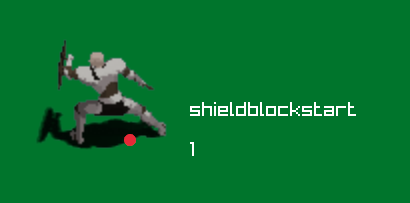
Thank you for pointing this out. I will make an update as soon as possible!
UPDATE> Its fixed now, thanks again for letting me know.
great, thanks :) i dont want be pesimist, but castspell got a bit different character rotation :D (last issue is idle2 :D im sorry, but its too quick movement between frames -> cant recognize... single swing?)
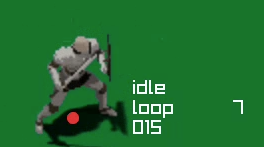
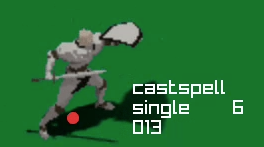
Thanks for the feedback! I will look into these aswell and see if they need improvement. I think the CastSpell is fine as it is, but the idle2 is perhaps a bit too quick as you mentioned!
Only downside of this pack is "Skill objectile effects in the pack video arent put in the pack"
I hope you release character pack 2 in HD as well. These are fantastic :)
Thanks man! Yes im working on it, aswell as some boss/mobs packs in HD:)