
Raspberry Pi vs Mini-PC’s: Things to Know Before Buying
As new models become more powerful, the differences between devices like the Mini PC and Raspberry Pi are becoming harder to spot. If you’re trying to figure out which is right for you, you’re at the right place. Let’s find out which is the right choice for you.
The main difference between a Raspberry Pi and a Mini-PC is their design and purpose. Mini-PCs are more powerful and run full operating systems like Windows, while a Raspberry Pi is a single-board computer focused on affordability and flexibility for DIY (Do It Yourself) Projects.
In this article, I’ll highlight the main differences, so you can make the right choice for yourself.
If you’re feeling lost in all the Raspberry Pi jargon, I’ve got something to help you out. I’ve created a free glossary that explains all the essential terms and abbreviations in a way that’s easy to understand. It’s a great resource to have by your side. Get your free copy here.
Budget: Beware of hidden costs

Let’s talk about the most important topic of the comparison, the price, it is one of the factors that will help you decide which option is better. There is a quite noticeable difference between the two devices, but it all depends on your reasons for choosing one or the other.
A Mini-PC will always be more expensive than a Raspberry Pi, but you will have the advantage that it will be ready to use and its performance will be much higher. However, a Raspberry Pi allows you to be more creative with its accessories.
A Mini-PC will cost between $200 and $400 for a typical configuration (Intel Core with enough RAM for desktop usage). The price range is pretty wide depending on the components and manufacturer. Here are a few examples you can check:
| Device | Specifications | Price |
| Intel NUC 7 | Intel Core i5-7300U 2.6 GHz, 8GB RAM DDR4, 256GB SSD | 💲💲💲💲 Check the current price |
| Dell OptiPlex 7050 Micro Computer | Intel Core i5-6500T 3.1 GHz, 16GB RAM DDR4, 256GB SSD | 💲💲 Check the current price |
| HP ProDesk 600 G6-Mini | Intel Core i5-10500T 2.3 GHz, 8GB RAM DDR4, 512GB SSD | 💲💲💲 Check the current price |
| Beelink S12 Pro Mini | Intel 12th Gen N100 3.4 GHz, 16GB RAM DDR4, 500GB SSD | 💲💲💲 Check the current price |
Almost all Raspberry Pi models are available below $100 for the main board, but you’ll have to include the cost of at least an SD card, power supply, and most likely a case. You can still find kits way cheaper than Mini-PC, here are some examples:
| Device | Specifications | Price |
| Raspberry Pi 5 | ARM Cortex-A76 2.4 GHz 4GB or 8GB RAM MicroSD Storage | 💲💲 Starter kit with case (Amazon) |
| Raspberry Pi 4B | ARM Cortex-A72 1.5 GHz 2GB, 4GB, or 8GB RAM MicroSD Storage | 💲💲 Starter kit with case (Amazon) |
| Zero 2W | ARM Cortex-A53 1.0 GHz 512MB RAM MicroSD Storage | 💲 Starter kit with case (Amazon) |
| Zero W | ARM11 1.0 GHz 512MB RAM MicroSD Storage | 💲 Starter kit with case (Amazon) |
If you are lost with all these options, I recommend reading my Raspberry Pi buying guide. It will help you decide which model is right for you, so you can have a specific budget and specs in mind before reading the next sections.
As prices change all the time, I’ll let you click on the links to check the current prices on Amazon, but the general statement remains true: Raspberry Pi kits are cheaper than most Mini PCs. Now it’s time to see what you get for the money.
Performance comparison: Power vs Efficiency
Performance is an important part of selecting which one you want to buy, as it determines the capacity and what it can be used for.
Overall, mini PCs come with a more powerful CPU and often more memory than any Raspberry Pi model, leading to a big performance gap when comparing one type of computer to the other.
Even if each new Raspberry Pi model comes with a significant boost in CPU, it’s still far from competing with most Intel Core mini PCs you’ll find on the market. Here is a quick overview of the typical differences:
If you are lost in all these new words and abbreviations, request my free Raspberry Pi glossary here (PDF format)!
Download now

Even if you don’t understand all the jargon in this infographic, it’s pretty clear that processor speeds and RAM are much higher on a mini PC than on a Raspberry Pi.
When it comes to storage, mini PCs are usually powered by an SSD m.2 drive, while the Raspberry Pi uses micro SD cards. This leads to another big performance gap right out of the box. SD cards are much slower and have less storage space than SSDs.
Recent Raspberry Pi models now support SSD boot, which means you can swap out the SD card for an SSD, via an external USB adapter, a HAT or a case that supports it. There’s an extra cost, but it’s worth it for the performance boost.
If you need more space than the typical SD card size, there’ll be an added cost. You can use external USB drives easily for added storage. In summary, here are the key points to keep in mind:

To sum up, if you’re looking for the best performance, the choice is obvious. A Raspberry Pi can’t compete with most mini PCs on the market, but it has other advantages we’ll discuss later. For now, let’s focus on the software part of each solution.
Related: Raspberry Pi 6 Release Date, Specs, and Rumors
Operating Systems & Software Compatibility

Another key difference between Mini PCs and Raspberry Pis is that they don’t share the same architecture, which has important implications for the systems and applications that can run on each type of computer.
What exactly is the architecture and why is it so important? The architecture is the type of processor the device has, which determines its compatibility with different software and operating systems.
Check this: 15 Easy Projects for Raspberry Pi Beginners
Mini-PCs typically use the x86 architecture, which is used in most existing OS and software (Windows and Linux). On the other hand, Raspberry Pi uses ARM, which is a little less common, so not all operating systems are compatible.
ARM is great for power efficiency, which is one of the key benefits of using a Raspberry Pi, but systems like Microsoft Windows are not (yet) natively supported on it. It means you can’t expect to install Windows on a Raspberry Pi and use it as your old computer.
If you are lost in all these new words and abbreviations, request my free Raspberry Pi glossary here (PDF format)!
Download now
Raspberry Pi mostly uses Linux as its primary system, and there are many distributions available for all tastes and preferences (you can see my favorite systems here), but keep in mind that this is an important limitation, especially if you’re working with Windows software or in a team where others are running Windows.
Note: Installing Windows on a Raspberry Pi is a work in progress (click to see my tutorial), but it’s far from perfect, so I wouldn’t recommend it if it’s your main computer.
Don’t be afraid to use Linux too much though, there are plenty of great distributions that look good and professional, it’s no longer just a terminal. You can do the same things as on Windows, with added security and stability. Here are some popular distributions you can check:
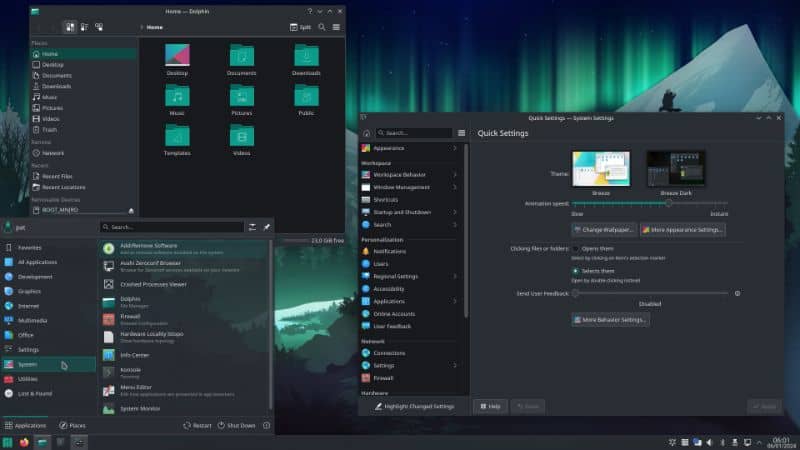

Another limitation is that not all applications will be available on Raspberry Pi. This is for two reasons:
- System incompatibility: Some applications are only available for Windows or macOS. Editors tend to forget Linux, especially for professional software. So if you’re using something specific (often it’s paid software as in this case), check before switching to Linux.
- Architecture incompatibility: Sometimes, even if the application is available for Linux users, it may not be available for ARM architectures.
You can generally find good alternatives for almost anything, but it’s an extra step to keep in mind when using a Raspberry Pi that you don’t have to worry about with a traditional Mini PC. This brings us to our next section: do you want something easy, or is a bit of a challenge right up your alley?
Check this: 15 Easy Projects for Raspberry Pi Beginners
Ease of Use: Plug and play or Tech Savvy?
If you’re reading this article, and especially if you’re still considering both options, it’s likely that you’re not afraid of a little technical challenge. But let’s lay out the facts: how do Mini PC and Raspberry Pi differ in terms of ease of use?
On the one hand, a mini PC comes ready to use as a desktop; plug in a keyboard, mouse, and monitor, and it’s ready to go. On the other hand, Raspberry Pi is a device that requires some assembly, knowledge, and more steps to get started.
This factor is entirely personal, depending on your experience with technology, you may feel comfortable with either option, but for someone with little to no experience with technology, it is something to consider when choosing a device.
While I love the Raspberry Pi and would be willing to use it for almost anything, I wouldn’t buy one for my mom. It’s not that the Raspberry Pi is so complex, but it could be a challenge for those who already have some issues with technology stuff.

I should mention that while Raspberry Pi does require some prior knowledge to use (understanding the hardware, Linux basics, etc.), it’s not that complicated, and it’s easy to find help online. Raspberry Pi has a huge community of users, and RaspberryTips is always here to help you with any project or question you may have.
Here are some good places to start if you want to learn more about the Raspberry Pi environment and ecosystem:
- 7 Reasons Raspberry Pi Still Beats Every Alternative in 2025
- What Is A Raspberry Pi? (Hardware, Software, Goal & Usage)
- What Is Raspberry Pi OS? (Goal, Installation & Benefits)
- Why Starting with Raspberry Pi is Easier Than You Think
- What’s the Difference Between a Raspberry Pi and a Computer?
- Start Here: A page where I link all the important resources to get started.
Download the free PDF, keep it open, and stop wasting time on Google.
Download now
You can also check out my beginner’s course or my books (like “Master Raspberry Pi in 30 days“) if you need more step-by-step help to get started.
In summary, if you like to learn and experiment with new things, Raspberry Pi is great. If you don’t want to mess around and want something plug-and-play, a mini PC is a better option.
Design & Size
Overall, Mini PCs and Raspberry Pis are much smaller than traditional computers. A Mini PC is generally a square block of about 15 cm on each side and 5 cm high. The Raspberry Pi’s motherboard is almost half that size, at 8.5 cm long and 5.6 cm wide.
The full size of the Raspberry Pi depends on the model and case you use for it, but it’s generally much smaller, making it the perfect companion for travel, home servers and discreet appliances.

Keep in mind that you’ll probably have more components in the beginning for a Mini PC than in a Raspberry Pi Starter Kit. For example, if you want to use an SSD, it’s already there in a Mini PC, but it will be outside for a Raspberry Pi.

In addition to the size of the setup, the Raspberry Pi is generally a better choice for mobile setups. You wouldn’t put a mini PC on a robot kit or drone. The Pi can run for hours on battery, it’s completely silent, and it doesn’t take up any space if you attach it to your TV or use it as a security camera.
Now, if you plan to use this device on a desktop, plugged in 24/7, and never use it for anything else, the size of a Mini PC is still great, and whether you go for one or the other doesn’t matter.
It’s also worth noting that the size of a Mini PC generally allows for more room for upgrades, which brings us to the next key difference.
Customization, Flexibility, and Upgrades
Before you make your final choice, think about upgrading your future setup. There are pros and cons to using a Mini PC or Raspberry Pi. They have different advantages for different use cases and development, so it’s a more personal choice than a clear winner.
- A Mini PC allows you to upgrade components to increase performance (CPU, memory & storage), making it more future-proof if you need more computing power in the future.
One of the disadvantages, however, is that we are limited to traditional accessories (keyboards, mouse, etc…). - Motherboard components on a Raspberry Pi can’t be upgraded (CPU, RAM), but it offers more options for additional peripherals, modules and sensors.
That’s the whole point of using a Raspberry Pi.
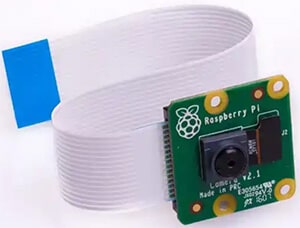
It’s made for DIYers, and we can connect almost anything to it, whether it’s the traditional USB ports or the various pins and connectors on the motherboard itself: GPIO pins, camera ports, display ports, etc.
Download the free PDF, keep it open, and stop wasting time on Google.
Download now
The GPIO pins are not only for creating your electronic circuits (which might seem a bit challenging for beginners) but there are also some extensions (called HATs) that can be stacked on top of the Raspberry Pi motherboard to add extra features (see a list of ideas here).
If you’re interested in all the accessories you can use with a Raspberry Pi, you can see Patrick’s recommended products here to learn about the best gear for this device.
In summary, the Raspberry Pi is your best option if you want to experiment with interesting projects that go beyond the operating system and require some external peripherals. A Mini PC is just a regular, boring computer. It works for work and surfing the web, but beyond that, it’s pretty limited.
Here are some project ideas using Raspberry Pi to give you an idea of what I’m talking about:
- 15 Easy Projects for Raspberry Pi Beginners (With Links)
- 7 Raspberry Pi Projects That Will Save You Money
- Top 25 Raspberry Pi Home Projects (+Links)
If you enjoy learning about Raspberry Pi, you’ll feel right at home in the RaspberryTips Community. It’s a friendly group of makers helping each other grow. Join us today for $1 and see what it’s like inside.
Use Cases & Recommendations
Now that you understand the differences between a Raspberry Pi and a Mini-PC, you might wonder: which one is the right choice for you?
The answer depends on what you plan to use the device for and how much you’re willing to invest.
If you want a device that comes ready to use and can be used for everyday tasks without too many complications, then you should choose a mini PC. Remember that it may be more expensive, but it will give you more options.
A mini PC is a solid choice for a main computer (daily use on office tasks or light gaming), or even for some home servers if you can afford the extra cost.
A Raspberry Pi is a great choice if you’re tech-savvy, not afraid to learn, or on a smaller budget. It’s also a better choice for home projects, electronic and programming projects.
With the new Raspberry Pi Model 5, it’s now possible to use it as your main computer for light tasks (web browsing, media playback, and office work). But the magic happens when you expand beyond that with projects like network servers, Python programming or electronic stuff.
If you still have questions, need specific advice, or want to hang out with other Raspberry Pi users, please join the community and leave a message in our private forums. See you inside!
Whenever you’re ready, here are other ways I can help you:
Test Your Raspberry Pi Level (Free): Not sure why everything takes so long on your Raspberry Pi? Take this free 3-minute assessment and see what’s causing the problems.
The RaspberryTips Community: Need help or want to discuss your Raspberry Pi projects with others who actually get it? Join the RaspberryTips Community and get access to private forums, exclusive lessons, and direct help (try it for just $1).
Master your Raspberry Pi in 30 days: If you are looking for the best tips to become an expert on Raspberry Pi, this book is for you. Learn useful Linux skills and practice multiple projects with step-by-step guides.
Master Python on Raspberry Pi: Create, understand, and improve any Python script for your Raspberry Pi. Learn the essentials step-by-step without losing time understanding useless concepts.
You can also find all my recommendations for tools and hardware on this page.