
Top 13 Raspberry Pi Hats You Need to Try in 2025
You already know that Raspberry Pi is a pretty versatile little computer that is capable of many fascinating projects right out of the box. But did you know that you can easily plug in expansion cards to add more features and unlock even more project ideas? That’s what “HATs” are.
HAT is a clever acronym with an obvious first meaning, short for “Hardware Attached on Top”. The problem is that there are tons of them, so it’s hard to know which ones are really useful, and to decide which one to get.
Well, I’ve tested many of them and can now share my top picks in this list. Keep reading, I’m sure you’ll find your next HAT (and project) very soon!
If you’re looking for inspiration for your next Raspberry Pi project, I’ve put together a list of 75+ ideas with full descriptions, difficulty ratings, and links to tutorials. Whether you’re a beginner or more advanced, there’s something here for you. Grab the list for free here!
TLDR: The best hats for Raspberry Pi
- Best HAT for beginners: Raspberry Pi Sense HAT
- Best HAT for kids: Adafruit Capacitive Touch
- Best HAT for advanced projects: SunFounder Robot HAT
- Best HAT for performance boost: Raspberry Pi M.2 HAT
All-in-One Sensor Add-on for Your Pi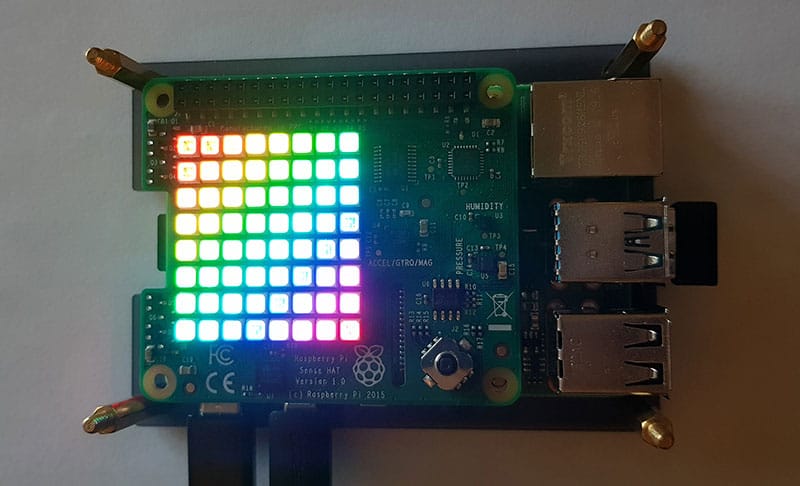
The Sense HAT is the one you need to try, so I have to start with it. It’s a bestseller, with many reviews, tests and publications.
The sense HAT provides many new sensors to the Raspberry Pi:
- Accelerometer (get the movement speed of the PI).
- Gyroscope (capture the rotation movement of the Raspberry Pi).
- Magnetometer (magnetic field measurement).
- Air pressure sensor.
- Temperature and humidity sensors.
And there is also an LED display matrix and a joystick on it.
The Raspberry Pi Foundation created this HAT originally for the Astro Pi project, to send Raspberry Pi to space and measure everything we can. But even on Earth, it’s possible to make many projects with this extension (educational at least).
I strongly recommend this HAT, whatever your current level on Raspberry Pi. It allows you to use it for many projects and it’s affordable (check the current price on Amazon).
Once you have it, you can follow my Sense Hat Tutorial here, and discover how you can use it.
Fast Storage for High-Performance Pi Projects

Even the more powerful Raspberry Pi models we’ve got recently are still powered by this tiny piece of plastic: the SD card. While it’s great for many reasons (cheap, easy to switch, enough storage, etc.), it’s not the safest or most efficient solution.
If you’re looking for more speed or reliability, you might want to consider switching to a better option. Right now, the trend is to use M.2 SSDs, which are almost as small as an SD card but way faster.
Until recently, it was only an external option, using USB adapters to connect them, which wasn’t ideal. But with the Raspberry Pi 5 and its PCIe port, you can now use an H2 like the M.2 HAT+ in the picture to get the best speed in a compact format.
The HAT itself is cheap (check the price here), but requires an additional M.2 drive compatible with it (like this one). Make sure it’s NVMe compatible, with the right format (key), not all drives work with this HAT.
I highly recommend getting this HAT for home or server projects (file server, home assistant, media center, etc.). If you have a Pi 5 for desktop use, you’ll see a significant boost in performance by replacing your SD card with an SSD.
Need some inspiration for your next Raspberry Pi project? Get access to my personal list here!
Download now
Monitor Your Environment

The Enviro HAT is perfect for indoor monitoring. You can measure temperature, pressure, humidity, light, and noise level with it. It’s great for keeping tabs on what’s going on in rooms in your house, office, or elsewhere.
The Enviro extension adds these sensors to your Raspberry Pi system:
- Light and proximity sensors.
- Temperature, pressure and humidity sensors.
- Microphone.
It’s in pHAT format (great for the Pi Zero family) and includes a tiny LCD screen to display the data. Once installed, a Python library is available to build your projects easily.
This HAT is available on Pimoroni. I recommend it for projects with a Raspberry Pi Zero, but if you are using another model, I think the Sense HAT (first on this list) will do a better job because you have additional sensors and don’t need to solder it.
Add a Touch of Magic to Your Pi
This one is funny, and I’ll never be able to explain it better than by showing you this video, so check it out and keep reading after for more details:
The Adafruit Capacitive Touch HAT adds 12 capacitive sensors to your Raspberry Pi projects. A capacitive sensor detects changes in electrical charge to sense touch, which means you can link specific actions to each connector. For example, you can create an instrument like she did in the video.
The Adafruit Capacitive Touch HAT is available from Adafruit directly (link here).
You’ll also need alligator clips to connect the objects to the extension board (check this set for example).
They have a Python library on GitHub with a few examples to get you started.
A Mythical Light Show for Your Pi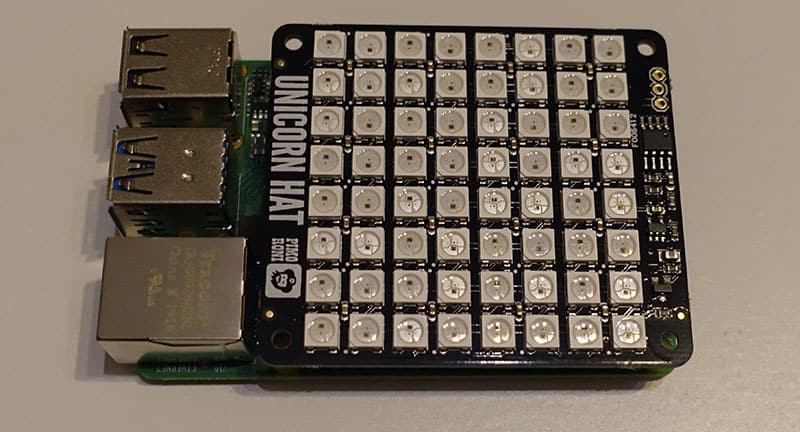
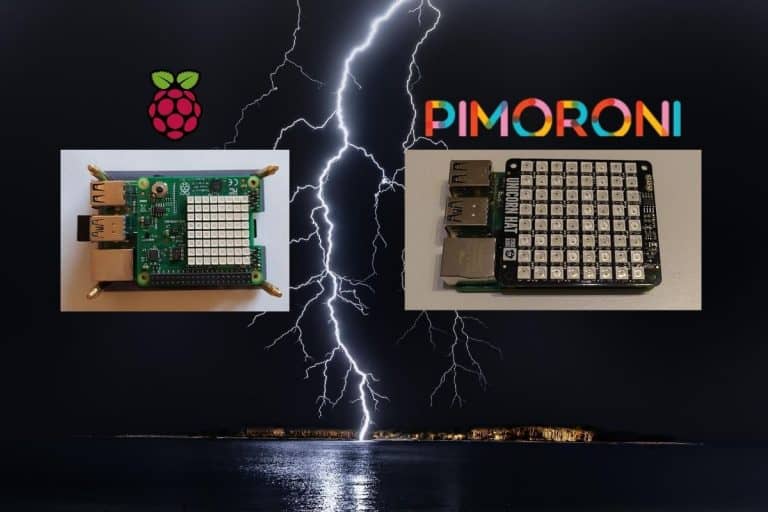
With a funny name, the Pimoroni Unicorn brings a 64 LED matrix display to decorate your Raspberry Pi. It also comes with a Python library to code the light as you want to.
In the image, you can’t see it, but this 64 LED model will look like the Sense Hat once powered.
And there is also an HD model with 256 LED.
This HAT opens all kinds of projects, from a basic but fun light test to an awakening dawn simulator.
You’ll enjoy this HAT and your kids too (more details on Amazon).
If you hesitate with the Sense Hat, you can check my comparison Sense Hat vs Unicorn here.
Need some inspiration for your next Raspberry Pi project? Get access to my personal list here!
Download now
One Cable to Power It All

The Raspberry Pi PoE HAT is a recent product created by the Raspberry Pi Foundation.
The goal is to power your device with your Ethernet cable.
PoE stands for “Power over Ethernet” and allows you to power devices like phones without additional power sources.
With this HAT on your Raspberry Pi and a PoE switch (check this one on Amazon if you want to try), you can remove the power supply.
It’s awesome because you only need an Ethernet socket somewhere to put your Raspberry Pi on it.

There is no additional RJ45 port on this HAT, it’ll use the default one and collect the electricity from it to run your Raspberry Pi.
This HAT is available on Amazon (direct link here) or the official Raspberry Pi website.
We have a tutorial that explains in detail how to use the Raspberry Pi PoE HAT, including how to decide which model to get (very important), so be sure to read it before you buy anything.
Automate Your Projects

The Automation HAT from Pimoroni is also a must-have in this listing.
It’s a monitoring and automation board, you can plug into your Raspberry Pi to add many features.
With relays, analog channels, powered outputs and buffered inputs you can bring many extensions to your basic Raspberry Pi.
Download the free PDF, keep it open, and stop wasting time on Google.
Download now
Here is a list of all features included:
- 3 x 24V @ 2A relays (NC and NO terminals).
- 3 x 12-bit ADC @ 0-24V (±2% accuracy).
- 3 x 24V tolerant buffered inputs.
- 3 x 24V tolerant sinking outputs.
- 15 x channel indicator LEDs.
- 1 x 12-bit ADC @ 0-3.3V.
- LED indicators for each port.
It’s available for all Raspberry Pi models, including the Pi Zero.
Check the price on Amazon if you want to try it.
Your Gateway to Machine Learning on Pi

You can’t go anywhere without hearing about AI (artificial intelligence). Raspberry Pi has always been a great way to experiment with it, but we needed something more powerful to drive more projects efficiently. That’s now possible with the AI HAT from the Raspberry Pi Foundation.
The Raspberry Pi AI HAT is available in a few different versions. There’s a kit and at least two variants (13 or 26 TOPS). Make sure you choose the right one for your project (check the price on Amazon).
It’d also be a good idea to get a Raspberry Pi 5 and the Raspberry Pi AI camera with it so you can fully experiment with AI without limitations. I know it’s a big budget, and it’s not for everyone, but it’s an interesting topic you can now dig into without breaking the bank with the need for powerful GPUs.
Once you’ve got everything you need, I’ve put together a few tutorials on the topic that you might find helpful.
- What is a Raspberry Pi AI Kit? Everything You Need to Know
- 5 Easy AI Projects on Raspberry Pi for Beginners
- TensorFlow and AI on Raspberry Pi: A Beginner’s Guide
- Install OpenCV on Raspberry Pi: The Only Guide You Need
A DAC for Audiophiles

Using a Raspberry Pi for media projects is great, I have a lot of software solutions on RaspberryTips (LibreElec, Volumio, etc.), but the hardware doesn’t necessarily match up to the expectation, with limited audio capabilities and quality.
If you’re into this, consider adding a dedicated audio HAT, like the Pi-Dac Pro on my picture or a similar one from Amazon (check this one for example).
By the way, DAC stands for “Digital-to-Analog Converter”. Most of them are detected automatically by Raspberry Pi OS and you can control the output and volumes via the usual interface.
All DACs have the same purpose, improving audio quality and adding ports to your Raspberry Pi (typically two RCA connectors and a jack).
Turn Your Pi into a TV Tuner

The TV Hat is a product from the Raspberry Pi Foundation. It allows you to receive digital streams (DVB connector) and watch TV channels on your Raspberry Pi.
The installation on your Raspberry Pi is easy, you need to install a new package on Raspberry Pi OS: tvheadend
It’s also possible to use it with Kodi or LibreELEC to improve your media center device with traditional TV channels.
Download the free PDF, keep it open, and stop wasting time on Google.
Download now
You might also like: Yes, you can access your Pi from anywhere. Here's how.
The best price I have found is on Pi-Supply. The shipping is fast all over the world, and if you are lucky, you’ll receive some candy in your delivery.
Uninterruptible Power Supply (UPS)
We saw a lot of HATs that added new features to use in code or with specific software.
This one doesn’t, but it’s awesome.
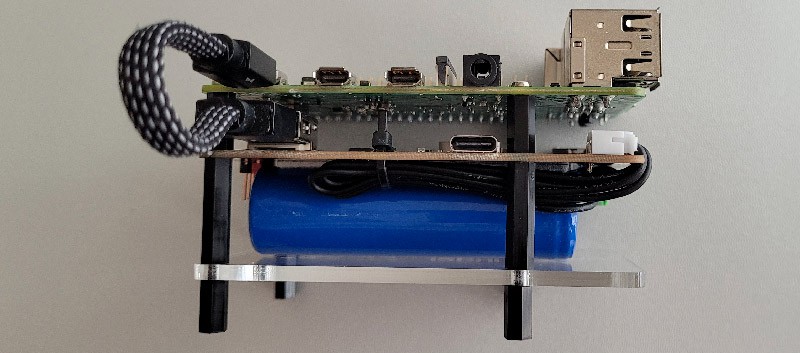
This HAT allows you to connect a battery to your Raspberry Pi to protect it from power outages. This ensures that you will not lose data and that your critical projects can run all day without interruption.
I’ve tested it in detail here if you’re interested, or you can grab it directly from our partner SunFounder on their website.
No soldering or anything complicated, it’s almost plug and play, just a bit of assembly and it’s ready to use. Perfect for outdoor use!
Portable Display, Perfectly Powered by GPIO

It’s not technically a “HAT,” but I was impressed by this product, so I wanted to include it as a bonus. It’s a small touch screen (5″) that you can power via the GPIO pins (like a HAT), and you connect an HDMI adapter on the side to get the display from your Raspberry Pi system.
It’s got a stylus, so you can access the menus and run apps quickly and easily. It’s a great addition to many projects. It’s slightly bigger than the Raspberry Pi board, but it’s compact enough for various uses.
You might also like: Are you sure your Pi is secure? Here are 17 simple tips to protect it.
The model I’ve got in the picture is the 5″ monitor from Elecrow, with an 800×480 resolution, but you can find various similar options. If you are uncomfortable with headless setups or need a tiny display for some projects, you should consider it.
If this project doesn’t work as expected on your setup, don’t worry. You can get help directly from me and other Pi users inside the RaspberryTips Community. Try it for $1 and fix it together.
Bring Your Pi to Life with Robotics
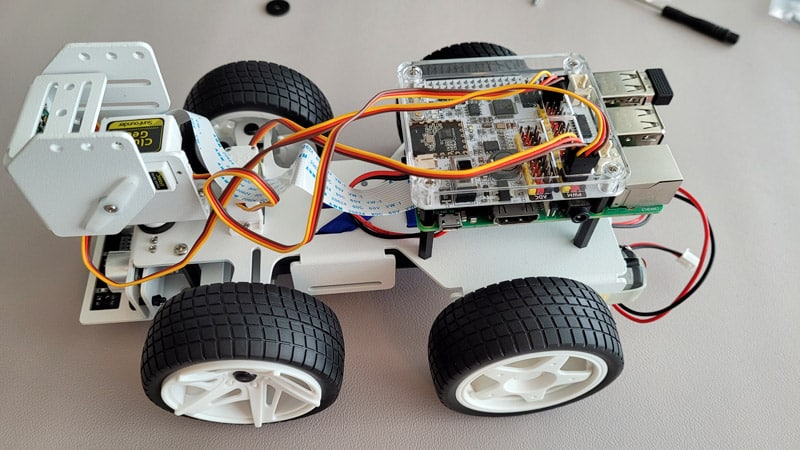
Well, I agree, it’s a full robot kit in the picture, not just a HAT, but you can buy the HAT separately to control anything you want, so it deserves to be on this list!
SunFounder’s Robot HAT is the centerpiece of any robot kit from this brand, connecting your Raspberry Pi (the brain) to the servos to make your robots move the way you want.
The Robot HAT is a handy add-on for Raspberry Pi that bundles essential features like motor control, audio output, and power management into one easy-to-use board. It offers perfect GPIO compatibility and can be connected to a lithium battery for mobile projects.
You can get the Robot HAT from SunFounder directly on their website, or check my full list of robot kits for Raspberry Pi here if you want to start with a complete kit to see how it works.
Whenever you’re ready, here are other ways I can help you:
Test Your Raspberry Pi Level (Free): Not sure why everything takes so long on your Raspberry Pi? Take this free 3-minute assessment and see what’s causing the problems.
The RaspberryTips Community: Need help or want to discuss your Raspberry Pi projects with others who actually get it? Join the RaspberryTips Community and get access to private forums, exclusive lessons, and direct help (try it for just $1).
Master your Raspberry Pi in 30 days: If you are looking for the best tips to become an expert on Raspberry Pi, this book is for you. Learn useful Linux skills and practice multiple projects with step-by-step guides.
Master Python on Raspberry Pi: Create, understand, and improve any Python script for your Raspberry Pi. Learn the essentials step-by-step without losing time understanding useless concepts.
You can also find all my recommendations for tools and hardware on this page.