Building a GP2x breakout board in 2026

Posted by pulkomandy on Tue Apr 28 23:06:44 2026  •  Comments (0)  • 

A long time ago, I bought a GP2x. I was in high school back then and had limited money. So I couldn't afford getting the cradle to go with it. In case you didn't know about it, the GP2x was a game console running Linux, and partially a follow-up to the earlier GP32 (the development team disagreed, and the console was released by a different company but by the same designer team, or something like that).

Anyway, the console sold approximately 60000 units, of which most stayed in Korea, where it found some use as an english language teaching aid. I used mine running a few games (including the great Wind And Water Puzzle Battles) and also as a music player. At some point I moded the case to be able to use an RCR-V3 lithium battery instead of AA that would last barely a day.

The cradle allows to do more with the console: it adds serial and JTAG ports, as well as USB host ports and S-Video output for connecting to a TV. This turns the console into a nicer tiny computer, if you add an USB mouse and keyboard.

When I had enough money to buy the cradle, it was not available anymore. The company, and also the community, had already moved on to the next console (the GP2x Wiz, then the Caanoo, then the Pandora and Pyra or maybe the Dingoo). I guess today the trendy thing that's somewhat in that lineage is Ambernic handheld consoles. You get a Linux system, you can deploy some apps to it, there is a menu to launch them.

Anyway, at the time, I looked into making myself a "breakout cable". See, the Cradle is just a big chunk of plastic with some wiring and connectors inside. And the pinout was well documented. So, surely I could make my own cable.

The information on the GP2x connector was (and still is) not exactly great, however. At the time, the recommended option was to buy a data cable for some specific model of Samsung phone which supposedly happened to use the same connector. I did that, but the connector I received only wired the 4 pins it needed, which were not the right one, and I could do nothing with it (I gave up after trying and failing to move one of the pins around).

Recently, I took another look at this. The GP2x community is very much dead now, but people cared enough to keep most things online still. In the time since I last looked into this (which is almost 20 years), people had figured out where to get the proper connector, not already attached to a cable. But now I came too late: all these websites are now gone or out of stock. However, they do mention a few more mobile phone models to which the connector is compatible.

Eventually this allowed to identify the connector. It is known as TTA-24 and is in fact standardized by the Korean Telecommunications Technology Association as TTAS.KO-06.0028/R2. Unfortunately for us, later revisions of that standard switched to a smaller 20 pin connector as smartphones and MP3 players moved to smaller and smaller form factors. Korea did not quite succeed to set this as an international standard, but eventually everyone agreed on USB-C at the end of these standardization efforts.

Interestingly, while the TTA-24 connector ended up used in several devices, since the standard was outdated, development teams for various phones and MP3 players just assigned pins at their convenience. In the end, the connector itself is standard, but the cables and accessories are not interchangeable.

Anyway, with the connector identified, I could find lists of devices (for examples from pinouts.ru, but don't miss that other list for things that number pins the other way around. Eventually I found one place that may or may not be selling the right connector. They didn't have a picture of it, just a generic connector picture and a "don't worry, you will get the right one when you order even if the picture doesn't match" message. They also have it marked compatible with a list of phones that disagree with everyone else (including their other cables and adapter using the very same connector). I emailed them asking for clarification. I waited a few days for the guy running the website to come back from vacations (that was announced on the website homepage). The answer was "yes, that kind of problem is exactly what we're here for" but after a second mail asking to check why their list of phones didn't match, and confirm which connector it was, the second reply was "hey, it costs only 3 euros, buy it and you'll see for yourself if it fits your device".

So that's what I did. The ordering process was also somewhat sketchy: they don't have a normal checkout (apparently, it's broken). So you have a choice of bank transfer, or going to their stripe page where they sell only .10€ "coins" or "parts" (I don't know which one they mean, same word in French). You enter your order number in the "custom message" field and select the right number of coins to pay for your order. And you feel like a hacker ordering things from the dark web.

But it works, a few days later the connector was in my mailbox. And it's the right one, and fits perfectly in the GP2x ext port. I'm happy about that, because it looks like no one else had found that connector anywhere since 2010 or so. Other projects use an alternate one from Hirose, but that one doesn't have the righ grooves in the plastic and it needs to be re-cut to fit (even if the electric connection is close enough to be compatible).

So anyway, if you are looking for a TTA-24 or GP2x EXT connector, maybe the last place to sell them on the entire internet is Wexim. You will have to get their C-LG7 for LG 1100/7200, ignore the incompatible list of phones it is sold for, and trust me that the website is not a scam and actually ships the connectors.

I assembled the cable using mine today. Now I'm waiting for the breakout board (based on Orkie's design with my own tweaks). I could not recover their EasyEDA project (the website was recycled and doesn't have the old projects anymore, don't host your stuff on someone else's service...). But there was a PDF of the schematics, which I used as a base. I made a few changes: using a jack instead of miniDIN for the S-video output (it matches the cables and connectors I already have), removing the MAX232 for serial and using instead a TTL serial to USB adapter, and using a more compact JTAG connector compatible with my USB blaster. I hope I didn't make any stupid routing mistakes and I can soon use my GP2x to its full power!

My new audio setup

Posted by pulkomandy on Thu Apr 16 22:56:22 2026  •  Comments (0)  • 

This story starts a few month ago, when I found an amplifier and an FM receiver on the sidewalk while returning from work. At the time, I didn't really have any need for them, but I didn't want them to go to the trash and be crushed and burnt, so I brought them home, where they sat unused and untested.

Now, I have moved to a new flat and I have a different setup, in particular my homeserver which is also my MPD server is not installed anywhere near my computer and its loudspeakers (I was using them for both, just moving the jack plug around as needed). So, I decided to try to use this amplifier to play my MPD music.

This meant finally opening, cleaning and testing this gear. The first problem was quite obvious: someone had spotted this on the sidewalk before me, but they only took the power wire to recycle it for copper. So that was unceremoniously cut at the back of the unit (the FM receiver didn't have a cable at all, it is designed for an unpluggable one).

So, my first task was to reinstall a power cable. I opened the device and found that the remnants of the old cable are connected to the power supply PCB with an easy to unplug connector. I had more trouble with adjusting the grommet, as my replacement cable (itslef salvaged a long time ago from a defective power strip) was larger than the old one. But eventually I managed to pop the grommet out, cut it wider, and install it back.

The amplifier with the top metal cover open Close up view of the power supply PCB, which has a thin layer of fine dust all over it Cable spliced with the old connector, heatshrink tube is on the wires and ready to be shrunk to protect the solder joint

This amp is from the 1990s, it appears to have nicely designed electronics and a solid design, but also some modern computer assisted features including a remote control. There are even jacks at the back that can be used to drive tape decks from the same remote control. This means some extra stuff like a motor to drive the volume knob, and a rotary encoder for the source selector instead of a mechanical solution. This results in several relays clicking when switching inputs. Unfortunately I don't have the remote, I will look for a compatible one or some other solution with something that has an infrared emitter. It also has controlled power outputs on the back, which means the remote control (and the main switch on the unit) can turn the entire setup on or off.

The FM receiver is a bit older and simpler. Nothing really fancy, a mechanical tuning know, a sliding led to indicate the frequency. No quartz lock, no digital frequency indicator, no RDS, nothing like that. It does receive FM as well as long and medium wave AM. Interestingly, it is not limited to the FM range in EU, and can pick lower and higher frequencies. I guess that allowed to sell exactly the same model in Japan (which uses a different frequency range for public audio FM broadcast). This means I can pick some digital transmissions, possibly from the private digital radio system for the electricity distribution company (how do I know? I used to work on the design of their radio system, and it was in that frequency range). Of course it just results in annoying electronic noises.

Anyway, after the power cable replacement and cleaning a bit of the dust inside, everything powered up just fine and I could confirm that the audio was working at least to the headphones output. Since I previously had no use for this, I also didn't have matching speakers. So I went online and found some. U bought a pair of Technics speakers from the 1900s. I got them from the original owner, who purchased them in a previous life when he was 16 years old, and took good care of them for the next 35 years! He had been using them for a home cinema setup, apparently. I got them for just 10€, and since he was replacing the entire home cinema setup, I also got 3 smaller speakers he was using at the back of the room, for which I have no use now.

Unfortunately, after connecting them to the amplifier I heard... nothing at all! That was surprising since the headphone jack at the front was working just fine (and was confirmed to be able to send full volume audio to the headphones, as this dates back from before any laws preventing such devices to cause permanent hear damage at the slightest mistake). So I grabbed the service manual for the amplifier and started looking into the schematics. The headphone output appears to be pretty much directly connected to the speakers output, except for a switch that allows to turn the speakers on and off. After some more disassembly, I gained access to the PCB where these switches are located. And indeed a quick continuity check revealed that neither of them (there are two outputs) were conducting any electricity. Which is actually good news: it's just a problem with these switches, and the amplifier electronics are otherwise fine.

So I then de-soldered and disassembled the switches. They are quite easy to open with a thin flat screwdriver. Inside, there is a springloaded mechanism to allow to move the switch to on and off positions by pushing it (similar to a retractable ball pen). And more importantly there are two small sliders that are supposed to connect the terminals together. Unfortunately, over time, the grease used to lubricate these gets spread out so evenly that it forms an isolation layer (possibly combined with dust and oxidation). So, these parts went into a bath of claning alcohol, and scrubbing with an old paintbrush.

Close-up view of the inside of a switch Switch taking a bath in alcohol More switch bathing

I managed to fix one of the two switches, unfortunately, while reassembling the second one, I misaligned something and bent the copper sliders. So the switch couldn't work anymore. I also didn't have a replacement in the same shape, but I had smaller ones. I only had to make an adaptation bracket to make it fit. I briefly considered having to 3D model and print something, and then I looked at the parts of the old switch on my table and realized that would make a very good bracket. I attached some longer legs to the switch (recovered from resistors and capacitors installed in other projects). Then I could set it in place inside the casing of the old switch, and solder it to the pins inside the switch (being careful with the pinout, as these switch are not constructed the same internally). And finally I secured it all with hot glue, and soldered the switches back in place. The way the amp is designed, the case of these switches is what attaches the PCB to the front of the amplifier. Which seems the right thing to do, as this means pushing on the switches does not put any stress on the solder joints.

The new switch, ready to be grafted The new switch, installed in the body of the old one All soldered back and further hotglued to the bracket All soldered back and further hotglued to the bracket All soldered back and further hotglued to the bracket

After this fix, I could reassemble everything and finally listen to some music! I didn't get the alignment of the new switch perfectly right, but it's good enough that I can still turn the speakers on and off if needed (I will probably not need it, and won't use these buttons often).

Test listening session

Next I turned my attention to the speakers. While the owner generally took good care of them, there still was some damage specifically to the protection domes at the center of the speakers. This isn't a super important part, it's just here to hide the speaker coil and protect it from dust. Which they did well, but they were still a bit damaged. One I could fix by using a vacuum cleaner (on a low setting, and with the bleed valve open) to straighten it out without having to disassemble anything. The other one was too damaged for that, but it turns out you can buy replacement domes quite easily. So I did that and installed the new dome with a bit of neoprene glue. Now it looks as new!

Pre-restoration picture of the speakers (actually from the seller's posting). One of the speaker has a hole in the speaker dome, and both are quite distorted. Close up of the speaker with the replaced dome.

Now I can listen to the radio and to audio CDs (with a small portable player, that happens to have a line output perfect for use in this setup). But the initial goal was to play music from my MPD server, which is at the other side of my flat. I first looked at FM transmitters, but I didn't find quite what I was looking for. Few of them take input from an audio jack these days, and most except 12V input from a car "cigarette lighter" port. Which my server doesn't have. So I looked for other solution and eventually found 1Mii RTS5066 wireless transmitters (which are actually designed and manufactured by Ankbit, but 1Mii is the name everyone knows. These transmit the audio over 2.4GHz and are super easy to setup. They also seem to be high quality devices, with an external antenna, a nice powe supply, and a metal case. I didn't do any measurement of the latency and output quality, but they sound good, which is all matters to me. So now I can control the music from my phone with an MPD client and listen it on this nice hifi system from the 1990s, isn't that nice?

Automating my rolling shutters

Posted by pulkomandy on Thu Mar 26 23:23:11 2026  •  Comments (0)  • 

I just moved to a new flat! I now have motorised shutters, which were equipped with wired controls (up and down switches mounted on the walls). So much more convenient than the previous flat with a manual crank to raise and lower them.

I decided to set up a way to control them from a computer, so I could close them during the night and open them during the day (or the opposite in the summer).

Chosing the hardware

Since the shutters didn't already come with wireless controls, I was free to pick any protocol. I went with ZWave. IT was designed by Zensys in 1999, initially as a proprietary protocol, but then they started licensing it to other companies and eventually opened the specification and transferred the ownership of the protocol to an alliance, and it is now an ITU standard. So there are devices from several manufacturers and I shouldn't get into too much problemns if I ever want to expand my home automation network.

The ZWave Alliance provides certifications that should make sure there are no compatibility issues. Moreover, the protocol runs on the 868MHz frequency band, avoiding interferrences from Wifi, Bluetooth, and microwave ovens, unlike Zigbee. It also provides encryption with dedicated keys for each network. Just in case one of my neighbors would try to mess with my shutters.

So I got 3 Shelly Qubino Wave Shutter modules, as well as a Zooz ZWave+ 700 USB dongle. Installing them went without much problems. The Shelly modules connect between the motor and the switches, as well as to the power supply (line and neutral). They are quite small and fit without problems into the junction box.

The USB dongle is even easier: it's recognized as an USB-serial adapter, with no driver needed.

Installing the software

The typical recommendation is to set up Home Assistant or one of its competitors. They all ship as all-in-one Docker images or even SD card images for a Raspberry Pi. I don't like these things, so let's look into installing just the necessary things on my already existing Debian install (which runs on a machine in my flat and already hosts this website, my mail, and various other things).

There are two major implementations of ZWave as open source software. The historical one is openzwave. It's written in C++ and predates the publication of the specification, and was initially based on reverse engineering efforts. It's not maintained anymore, and the replacement is ZWave JS, written in nodejs. I also found some Rust libraries, but they look less complete and less easy to use. Maybe I'll re-explore that in a few years.

ZWave JS is not just an implementation of the ZWave protocol. It also provides a web user interface and an MQTT server, in the zwave-js-ui package. The main instructions offer snap, docker, and other similar things. But there are also instructions for a standalone install, which turns out to be a single "npm install" command. After making sure I have the latest version of nodejs installed, this goes smoothly, and manually starting the server, I can confirm that it works fine and the web interface is working.

Next I have to make sure the server is launched in the background at the machine boot. The official instructions suggest to use pm2, I have no idea what that is and it looks complicated. Let's just write a systemd service to put in /usr/lib/systemd/system/zwave-js-ui.service:

[Unit]
Description=ZWave JS UI

[Service]
Environment="STORE_DIR=/etc/zwave-js-ui"
Type=simple
ExecStart=/home/pulkomandy/node_modules/.bin/zwave-js-ui
User=pulkomandy

[Install]
WantedBy=multi-user.target

A few notes about this: it sets the STORE_DIR environment variable, which zwave-js-ui uses for storage of all the configuration, including the list of associated nodes, the network encryption keys, the "scenes" (preconfigured settings of commands to send). The default storage for this is in the node_modules installation directory, which means it would get overwritten with any update of the software. The service is of type "simple" which means it just runs the executable. I'm using my "pulkomandy" user because that's what I had used to run the npm install command. Don't be like me, set up a dedicated user for this. Finally, the service is added to multi-user.target which means it will be started when the machine is powered on.

Now let's reload systemd so it picks up the new service and let's start it.

systemctl daemon-reload
systemctl start zwave-js-ui

The web itnerface is then available on port 8091 on my local network. The next step is to select the serial port corresponding to the ZWave dongle (my user was already in the dialout group, so no permissions issues here), and then generate the encryption keys (there are several of them for different protocol versions). All of this is just a few clicks in the web interface.

Next it's time to associate the modules with the network. Each module comes with a QR Code to enter in the application, that contains an identification of the hardware and a pairing key. It's important to keep the QR code in case the module needs to be paired to another network controller someday. My server doesn't have a webcam, so I scanned the QR Cod with my phone and the Binary Eye app. The web interface has a text field to enter the QR code as text, and I also kept a backup of the QR Code contents.

The modules themselves should also be in pairing mode, which is done in one of various ways, such as cutting their power, pressing the shutter switches in a specific pattern, or using a tiny button on the module. The pairing takes several minutes, just be patient while it runs.

One of my modules was fully identified and even received a firmware update. The other two are not fully recognized and show as unknown, but it doesn't matter, as the protocol is self-describing and so all available commands do show up in the user interface. From there, I can start the calibration procedure, and also configure things in case of a mis-wiring (swap directions ofthe motor and/or of the switches).

To set the shutter position, I just have to set a "target value" in the "multilevel switch" setting. 0 corresponds to fully closed, 99 to fully open, and 50 to about 2/3 closed. This is a rather raw interface, not as nice as what home assistant would allow to do. But it works!

Interfacing with MQTT

Once the initial configuration is done, the web interface is not so useful for my automation goals. So let's configure the MQTT access. You will need to install mosquitto and mosquitto-clients (using apt or your favorite package manager). In the web interface settings, check the "MQTT gateway" and restart the server after saving the parameters when the UI asks for it. The default install of mosquitto listens on port 1883 already, so there's no need to change any other setting.

To check everything is working, mosquitto clients can be used to view and change the data:

mosquitto_sub -h localhost -t "#" -v
  • -h localhost: connect to the server on localhost
  • -t "#": listen to all topics topics
  • -d: show the topic in addition to the value

Everything accessible in the web interface is also exposed here. Now let's figure out how to send commands to control the shutters. The topic depends on the name and location of each device as previously set in the web interface.

Setting parameters is just as simple:

mosquitto_pub -t zwave/Salon_Ouest/Shutter_Salon_Ouest/switch_multilevel/endpoint_1/targetValue/set -m '0'

Finally we can set this up automatically using a script and a cronjob.

The cron rule just runs the script every 5 minutes:

*/5 * * * * pulkomandy /usr/local/bin/shutters.py

The main logic is in the Python script, which currently is as follows (I will likely tweak it later to improve the rules)


#!/usr/bin/python3

import paho.mqtt.client as mqtt
from datetime import datetime
import sys
import argparse

now = datetime.now()

action = None

OPEN = 99
WARN = 90
HALF = 50
CLOSE = 0

shutters = [
    "zwave/Salon_Ouest/Shutter_Salon_Ouest/switch_multilevel/endpoint_1/targetValue/set",
    "zwave/Salon_Est/Shutter_Salon_Est/switch_multilevel/endpoint_1/targetValue/set",
    "zwave/Cuisine/Shutter_Cuisine/switch_multilevel/endpoint_1/targetValue/set",
]

parser = argparse.ArgumentParser(prog="shutters.py", description="Control shutters using MQTT and ZWave-JS-UI")
parser.add_argument("-l", "--level", type=int)
args = parser.parse_args()

if "level" in args:
    action = args.level
else:
    if now.month < 4 or month > 9:
        # Winter mode: close at night
        if now.hour == 7 and now.minute >= 40 and now.minute < 45:
            action = OPEN
    
        # Close a little bit first, make sure everyone is inside
        if now.hour == 20 and now.minute >= 55 and now.minute < 60:
            action = WARN
        if now.hour == 21 and now.minute >= 0 and now.minute < 5:
            action = CLOSE
    else:
        # Summer mode: close during the day
        # On weekends, only half-close to let some light in
        if now.weekday() > 4:
            if now.hour == 8 and now.minute >= 25 and now.minute < 30:
                action = WARN
            if now.hour == 8 and now.minute >= 30 and now.minute < 35:
                action = HALF
            if now.hour == 23 and now.minute >= 0 and now.minute < 5:
                action = OPEN
        else:
            if now.hour == 8 and now.minute >= 25 and now.minute < 30:
                action = WARN
            if now.hour == 8 and now.minute >= 30 and now.minute < 35:
                action = CLOSE
            if now.hour == 17 and now.minute >= 25 and now.minute < 30:
                action = WARN
            if now.hour == 17 and now.minute >= 30 and now.minute < 35:
                action = HALF
            if now.hour == 23 and now.minute >= 0 and now.minute < 5:
                action = OPEN

# If there is nothing to do, well, do nothing
if action is None:
    sys.exit(0)

client = mqtt.Client(mqtt.CallbackAPIVersion.VERSION2)

# Number of pending requests
pending = -1

# Callback called when the client is connected.
# Publish all commands and set "pending" to continue looping until they are processed.
@client.connect_callback()
def on_connect(client, userdata, flags, reason_code, properties):
    global pending
    pending = len(shutters)
    for shutter in shutters:
        client.publish(shutter, action)

# Publish esponse callback. Decrement the pending request count
@client.publish_callback()
def on_publish(client, userdata, mid, reason_code, properties):
    global pending
    pending = pending - 1

# Connect and wait for all requests to be processed
client.connect("localhost")

while pending != 0:
    client.loop()

Unsollicited advice about stackframes

Posted by pulkomandy on Sun Dec 7 13:46:10 2025  •  Comments (0)  • 

Stacks are everywhere

In my daily life I do a lot of debugging, reverse engineering, and software development. For some of these tasks, understanding how computer works in unnecessary detail is, well, sometimes useful. In particular, stacks and stackframes are very central to how most modern computing works. And, annoyingly, the implementation is slightly different depending on CPU architecture, compiler, operating system, but also CPU generation and compiler options.

Every time I need to dig into it, I have to refresh my memory or re-understand how it works on a specific setup. I may save a lot of time, for myself and hopefully for others, if I start writing it down. So, here you go, my currently very incomplete guide about how stacks and stackframes work!

This article does not attempt to retrace the history of how all features of a computer call stack work. For that I can recommend Sten Henriksson's A brief's History of the Stack, which will take you all the way to Babylonian folklore, with a brief detour through tax avoidance schemes. Here I will introduce concepts in a way that seem convnient for explaining them.

Note: I start this article from the very beginning. Maybe the relevant bits for you will be near the end. But this allows to introduce the notations and concepts progressively and make the article somewhat standalone, and answering more questions than it opens. Skip some sections if you feel bored, come back to them later if you are lost, let me know if more details about some parts are needed!

What's a stack?

A stack is a data structure where you can only access the top element. More precisely, you can:

push
a new element to the top of the stack. It is stored "above" the previous one.
pop
the top element from the stack. The previous "top" becomes visible again.
peek
at the top element to get its value. This does not change the stack.

Of course, popping and peeking is not allowed if the stack is empty.

In its simplest form, a stack is just a pointer to the top element. From now on we will not consider linked stacks, as these are rarely used in modern computers. Instead we will consider that the elements are stored next to each other, in consecutive memory addresses. This results in the following definition for the 3 operations:

peek
is just dereferencing the stack pointer,
pop
is decrementing the stack pointer,
push
is incrementing the stack pointer and writing the new value there.

From now on, the stack pointer will be notated as SP.

Basic stack operations: pushing adds an item on top of the stack and makes SP point to it. Popping removes an item from the stack and restores SP to the previous top item.

Call stacks

The concept of a call stack may seem obvious, as it is deeply engraved into how modern programming languages and CPUs work. It was not always this way. Going without a stack, or at least allowing yourself other ways to manage control flow in your code, would allow for other ways to think about it, the most popular of these probably being coroutines.

Anyway, let's look at how the typical functional/imperative programming paradigm nowadays typically uses a stack for control flow.

Usually, a CPU executes instructions one after another, in the order they are stored in memory. But if allowed only that, computers would be a lot less smart. Some instructions (usually called "control flow instructions" allow to "jump" around in the code. In particular let's have a look at the CALL and RETURN instructions (on z80 and x86 these are called CALL and RET, other CPU architectures may use different names such as BSR (branch to subroutine) or implement things slightly differently. More details about specific architectures are in later sections of the article).

These instructions allow to implement the notion of a procedure or subroutine call. The idea is simple: there are some tasks in a program that need to be performed several times in different contexts. Repeating the same code over and over in many places would make the software difficult to maintain, as all these copies of the code would have to be kept in sync, and, moreover, it woudl be waste of memory space. So, let's have only one copy of this code. Whenever we need to run that code, we can call into it by using the CALL instruction. When the code is finished, it uses the RETURN instruction to tell the CPU, and execution resumes in the initial code flow, just after the CALL.

Control flow diagram of code calling a subroutine. The execution flows linearly into the code until reaching the CALL instruction. It then goes to the subroutine, executes all instructions there until the RETURN instruction. Then it comes back to the caller code, resuming just after the CALL.

One important observation here is that the code in the subroutine does not make any assumptions about where it was called from. The RETURN instruction is just that, RETURN. It does not have any parameters. So how does this work? Well, the CALL instructions stored the return address, and the RETURN instructions retrieved it. Of course, we are not limited to only one level of CALL and RETURN. The subroutine may itself need to call more subroutines, and so on. So, these addresses are stored on a stack, with the CALL instruction doing a PUSH, and RETURN doing a POP.

Parameters and recursion

This is all nice and fine, but it only works if the subroutine needs to perform exactly the same work each time it is called. However, this is unlikely to be the case. Typically it would need to perform the same operations, but work on different data. For this, we need to be able to pass some information to the subroutine so it knows on which data to operate. This is called parameters.

There are many ways to achieve this. For example, we could put the parameters in CPU registers or fixed memory locations (agreed in advance between the subroutine and the caller). CPU registers have an obvious limitation: there are only so many of them, what if a function needs more parameters, or parameters too large to fit in registers? So let's look closely at the other option and see how it would look like.

Control flow diagram of code calling a subroutine with arguments. It is similar to the previous diagram, but before the CALL instruction is a

For each subroutine, we will dedicate a small amount of memory for its arguments. Before calling, the caller code will set these to the parameter values, and the subroutine can access them as needed. Problem solved, right?

Unfortunately, there are two limitations with this approach. One is just an inefficiency problem, but the other is more structural and makes some things impossible. Let's start with the first one.

The inefficiency here is that there are usually not that many subroutines running at the same time. However, the memory allocated to each subroutine parameter is static: it is reserved for the use of that subroutine's parameters, and can't be used for anything else, even when the subroutine isn't running. Usually, subroutines don't take a lot of parameters, so each of them only uses up a small amount of memory, but there will be a lot of subroutines, and this memory usage adds up.

But let's not forget the other, more structural problem: what if we need to run the same subroutine multiple times at once? At first this may seem impossible, since the code execution is generally linear, but there are two cases where this can happen. The first one is recursion: a subroutine may call itself to perform some work. The second one is multitasking. This may happen because you have a system with multiple execution threads, or more simply while handling hardware interrupts, which stop the currently running code to do something else.

Both of these problems can be pretty annoying: one to the hackers who hate wasting even a single byte of memory, and the other to computer theorists who like to express their algorithms in recursive form for elegance, or really want to play with concurrent threads of execution on the same machine. As a result, everyone was annoyed and a solution was found.

Static, dynamic, and automatic variables

The solution is automatic variables, but for completeness I will also introduce the other two types of storage, if only to explain the naming used here.

We have already seen in the previous paragraph what a static variable is, but let's define it clearly. A static variable is one whose address in memory is fixed (hence the name static: it doesn't ever move). The address for these variables is determined at compile time (I am using a very liberal definition of "compile time" here, let's say, "before the program starts executing"). If the programmer wishes to reuse the same address for two different variables, it is possible, but it is up to the programmer to make sure the two variables will never be in use at the same time. This is way too much information to track for an human brain, and so this approach was quickly abandoned.

The second option is dynamic allocation. In this case, the memory address for a variable is determined while the program is executing. This is typically done with the malloc() function (at least in systems using the C programming language). Here, the programmer asks for a piece of memory large enough to hold their variable. When the variable is not in use anymore, they use another function (free()) to give that chunk of memory back to the system. The memory allocator keeps track of which chunks of memory are available, and, as long as the programmer uses the malloc and free functions correctly, the memory is managed cleanly, and there is no risk to reuse the same chunk of memory for two things.

There are, once again, two problems with this approach. One of performance, and one of stability and predictability. Let's again start with the first one. Over the years, many approaches were suggested for dynamic memory management. Besides the simple malloc and free, let's mention reference counting and garbage collection. They all suffer from the same problem: a lot of work has to be done "at runtime", while the program is executing, just to keep track of which parts of the memory are or are not in use. The more generic and flexible the memory allocation scheme is, the higher the overhead gets. The algorithms in play are also quite complex and do not lend themselves well to being efficently optimized by hardware.

The other problem is, of course, more annoying. With the simple malloc/free scheme, there is still a lot of reliance on the programmer to correctly declare what memory they need, and to release it when done. Decades of experience show that programmers will usually not get this right. And since everything is dynamic, this results in complex to diagnose bugs, that are not always predictably reproductible. Dynamic memory is still in use today, but it is too slow and dangerous to use as a basic building block for something as simple as calling a function with parameters.

This is where automatic variables come in. The name "automatic" derives from the fact that there is no need to explicitly allocate and free these. Their lifetime is automatically managed by the control flow of the program: they are allocated by calling a function, and freed when returning. This is so convenient that, in C, it became the default way to allocate memory for local variables. You can still explicitly use the "auto" keyword when declaring a local variable, but no one bothers to do it, since it is the default in pretty much all C compilers.

For the implementation, the idea is simply to put these variables on the stack. This is done typically using instructions like PUSH and POP (again, exact instruction naming will vary, and we will talk about specific CPUs later, I promise!). The compiler now takes care of pushing the parameters to a function before calling it, and cleaning up after the function returns.

Let's have a look at how things are organized in memory now (here for a traditional UNIX type memory layout, there are of course other ways to set things up).

Typical memory organization in UNIX programs: executable code and constants at the bottom, then static variables, then dynamic variables, and finally the stack at the very top of memory

I will not get into all the details of why things are in this specific order today. The interesting point here is that both the heap (used for malloc/free) and the stack share the same RAM area (whatever is free after the static code, constants and variables are loaded). The heap gets to use this area from its start, and the stack uses it from the end. The point where they meet is called the "break" or "brk". This organization allows to efficiently share that block of memory between the two, without having a fixed size for either, and things will sort of auto-adjust depending on how much stack and heap each execution of the program needs. Anyway, the main point here is, to achieve this, we had to turn the stack upside-down. Now, pushing things to the stack will decrement SP, and poping will increment it. This is a bit disturbing at first, and sometimes in the litterature you see the stack still represented with the topmost item on the top. But we will see in the next chapters that having the stack upside down allows some neat tricks, so I think it is important to show it the "right" way, however confusing it may be at first. Maybe picture a stack of helium baloons, or some antigravity powered device?

To avoid further confusion, I will avoid using the notion of a stack "top" from now on. I will instead say "head".

Local variables

Whew, I think that's where we end the basics introduction and finally enter the part I wanted to write about in the first place?

I realize that I have not shown a stack diagram in a while. Let's see how it looks now with our complete setup, that is:

  • A main function calling a subroutine,
  • The subroutine has three parameters,
  • The stack grows downwards (towards low memory addresses).

Let's look at it just after the CALL instruction has put the return address on the stack.

Typical stack frame organization: the arguments are at higher addresses, and then the return address at the stack head

We immediately notice a problem: until now, we were only able to access the head of the stack. In this case, that would be the return address, put there by the CALL instruction. But our subroutine will not need the return address until the very end, and surely will use the parameters a lot before reaching that point. Without any other primitives, we would need to store the return address somewhere else in order to access the other parameters, this seems pretty annoying.

Fortunately, the stack is stored in random access memory (at least in current computer architectures that we care about here). So, we can also do random access to it. Let's introduce a new notation for that: SP-relative addressing. The idea is very simple, let's use our stack pointer SP as a base pointer and process the stack as if it was an array. This leads to: SP[0] being the return address, SP[1] being the 3rd argument, SP[2] being the second and... wait, this argument order seems not very helpful?

Indeed, if the caller function pushes the arguments in that order (first to last), on a stack growing downwards, and we then access the stack as an array, we get the arguments in the reverse order of the array indices. The C language solves this simply by having the caller push the arguments last-to-first instead.

So let's have another look at a bit of pseudocode and the resulting stackframe with fixed argument order:

PUSH arg3
PUSH arg2
PUSH arg1
CALL subroutine
resulting stackframe from the above pseudocode: SP[0]is the return address, SP[1] is argument 1, SP[2] is argument 2, and so on

Now let's talk about local variables. Unlike arguments, these are not set by the caller function, but are handled by the subroutine for its own use. Looking at our stack, we see that there is a lot of space just below SP. So let's just put our local variables there. We could access them as SP[-1], SP[-2], etc. But we have to keep in mind that the stack is still... well a stack. Any function call will use that same space we just set aside for local variables to store the parameters and return address for the called function. And, even more annoyingly, interrupts may happen at any time and also make use of the stack to store their own temporary data. Of course, we don't want either of these to alter our local variables.

The solution is to move the stack pointer downwards and "reserve" some space for the local variables. Typically, upon entering a function, you will see an instruction like SUB SP,nn to do so (if your processor has such an instruction, not all of them do, and achieving the same thing without a dedicated instruction can require some tricky code. We are getting into the details of specific implementations soon, I promise!).

SP moved down to point to the first local variable. Now the return address is at SP[3] and the first argument at SP[4]

Ok, this looks good. We lost the direct mapping between SP[n] and argument n, but the compiler can compensate that for us, as the offset is fixed and depends just on the number of local variables. Or is it?

More fun with local variables

Unfortunately, it is not quite so. There are several cases where the stack pointer has to be moved to different addresses.

Note: it's possible that some of these cases were introduced after the solution exposed later in the article was set in place, as they then became trivial to implement. Again, this is not an history of how things developed, just a convenient way to build things up progressively in this article.

Scoped allocations

In the C language it is possible to do something like this:
void subroutine(void)
{
	int aVariable;

	// Some code here...

	{
		int bVariable;

		// Some more code here...
	}

	// Even more code here...
}

Basically, a variable can have a scope (and lifetime) shorter than an entire function. In this situation, it would make sense that the compiler temporarily allocates spaces for the new variable at the opening of the corresponding block, and releases it at the closing block. If implemented strictly in this way, it means the offset to access aVariable would be SP[0] while outside the block, but SP[1] in the block where bVariable exists.

This problem can be avoided, of course, by keeping bVariable allocated from the start to the end of the function, which is what most compilers will do. So let's look at the real problems below instead.

Call frame setup

The call frame setup is what happens when a function needs to call another one. Because of the function arguments, this is a multi-step process: first push the arguments one by one, and then call the function. Each of these PUSH and CALL instructions move the stack pointer. What if we want to pass the value of a local variable or of one of our own arguments to the called function? The compiler then has to keep track of how many things it already pushed, and make sure to adjust all accesses to local variables and arguments accordingly. Relatively easy job for the compiler, but not much fun for the developper, as they also have to track this when reading the generated code (for example in a debugger). What is SP[1] at one place in the code may well become SP[6] a bit further down, and then change again and again. Wouldn't it be much easier if things stayed where they are?

Variable length arrays

This one is possibly the most annoying and difficult to solve the for the compiler. Sometimes, the size of a local variable is not known at compile time. Let's say your function needs a temporary array to perform some work. The size of the array depends on a parameter. Something like this:

void function(int count)
{
	int array[count];

	// Perform some work on the array...
}

Or, if you use an older version of C where variable length arrays are not a thing, a similar approach with the alloca() function, which just allocates memory on the stack:

void function(int count)
{
	int* array = alloca(count);

	// Perform some work on the array...
}

Here, the compiler does not know at compile time how to adjust the references to local variables, since it depends on a runtime parameter. So, we'll need some additional data at least in this case.

Other uses of the stack: register spills

Finally, the compiler may generate PUSH, POP and other stack access instructions for many other reasons. One of them is "register spills": temporary storing registers in the middle of a calculation to the stack, and getting them back later. This is how the stack is typically used on, for example, the z80 and 8080, where it was not designed for SP-relative addressing.

Introducing frame pointers (finally!)

Looking carefully at usages for the stack pointer, we see that there are, in fact, two different usages for it.

  • As a stack pointer: with the typical PUSH and POP operations, as well as CALL and RETURN.
  • As an array base pointer: for access to function arguments and local variables.

These two tend to work together (for example: the caller uses PUSH to send arguments, but the callee rather accesses them as an array). But they also work against each other when SP needs to be moved and it offsets all access that use it as an array.

If you look at it this way, the solution becomes obvious: let's split these two roles into two separate registers! We will keep SP as the stack pointer, and introduce BP to use as the array base pointer (using the x86 name for the register this time, it is sometimes also called FP for frame pointer).

This requires a bit of extra work at the start and end of each function, to point BP at the right place, and restore it to its previous value when returning to the caller. In general, this will involve saving the previous value of BP to the stack itself. This opens an interesting new way to look at the stack memory: in addition to being a stack and an array, the successive values of BP saved to the stack can be used to traverse it as a linked list! This is used in debuggers in order to print a call stack, but it can also find other uses such as unwinding the call stack in languages that support exceptions.

This is where the exact details depend on the exact CPU used, and it will be time to look at it in more details in the next sections of the article. I will complete it progressively as I come accross various schemes, and try to build similar quickreference cards for each of them. So, please have a look at the next sections for the details.

8086 - Unknown compiler used for Philips PM3580 custom disassembler tool

Function prologue
PUSH BP ; Save the caller BP
MOV BP, SP ; Initialize BP to the current frame
MOV AX,frameSize ; Allocate space for local variables
CALL stackAdjust
PUSH r ; As needed if some registers need to be saved
PUSH s ; As needed if some registers need to be saved
Function epilogue
POP s ; Matching what was saved in the prologue
POP r ; Matching what was saved in the prologue
MOV SP, BP
POP BP
RETN
Call template
MOV AX, argN
PUSH AX
MOV AX, argM
PUSH AX
...
MOV AX, arg0
PUSH AX
CALL subroutine
ADD SP, nArg ; Caller is responsible for removing arguments from the stack
Stack adjust helper
stackAdjust:
	POP CX ; Remove address for stackAdjust from stack
	MOV BX, SP
	SUB BX, AX ; Reserve stack space
	JB .stackOverflow
	CMP BX, stackLimit
	JB .stackOverflow
	MOV SP, BX ; Set SP to the adjusted address
	JMP CX ; Return to the caller function

.stackOverflow
	XOR AX, AX
	JMP runtimeError ; Trigger a runtime error 0 and abort the program
Stack frame on 8086. BP points to saved BP from previous function, BP[1] is the return address, BP[2] to BP[N+1] are arguments, BP[-1] to BP[-n] are local variables

The stack adjust routine is a separate function in the prologue to add bounds checks for the stack. This is optional. In fact, functions from the standard library in this disassembly projet use a simpler prologue:

PUSH BP
MOV BP, SP
SUB SP, frameSize ; Direct change of SP without bounds checks
PUSH r ; As needed ...
PUSH s ; As needed ...

Analysis tips

When reading the code it can be difficult to tell at first glance if a particular PUSH instruction is setting up a function argument for a call, or just saving a register for restoring it later. Sometimes, you can look at the instruction after the CALL to get a hint: it will be an ADD SP to remove the arguments from the stack, and its parameter gives you an hint about the arguments total size. However, the compiler may also optimize this and make it harder to follow. For example, if the code calls several subroutines in succession, the arguments for several of them may be kept on the stack, until a final ADD SP,xx removes them all at once.

68000 - Unknown compiler used for Philips PM3580 custom disassemblers

Function prologue
LINK.W A6, #frameSize
MOVE.L r, -(A7) ; As needed if some registers need to be saved
Function epilogue
MOVE.L -$4(A6), r
UNLK A6
RTS
Call template
	MOVE.L A0,-(A7)
	MOVE.L A1,-(A7)
	JSR subroutine

	ADDQ.W #$8, A7
Stack frame on 68000. It is exactly the same as on 8086, escept for the register names.

The 68000 uses A7 as a stack pointer. It does not enforce a specific register to use as a frame pointer, but A6 is a common choice. The instructions LINK and UNLK allow to do in a single instruction what the 8086 is doing in three: save the old frame pointer, set the new one, and subtract a constant value from the stack pointer to make space for the stack frame.

The UNLK instruction does the opposite in the function epilogue. Note that, since it resets the stack pointer, restoring the registers is done using A6-relative addresses and doesn't bother to increment the stack pointer when getting the values.

When multiple registers need to be saved, MOVEM instructions can be used. For a big function something like MOVEM.L D2-D7/A2-A5, -(a7) will be typical, with the matching movem.l -$128(A6), D2-D7/A2-A5 in the prologue. Note that in this case, D0, D1, A0 and A1 are considered "scratch" registers, the called function is free to modify them and the caller does not assume their value will be preserved. So simple functions that only need these four registers may end up with a 1-instruction prologue and 2-instruction epilogue!

The way to call functions is very similar to the 8086, almost the same instructions, just with different names.i The 68000 wins because it has an instruction to push a constant directly onto the stack: MOVE.W #$6, -(A7) for example. On the 8086, you have to first load the constant into a register, and then push that register.

Analysis tips

The epilogue does not have any parameters, it is always the same two instructions. This make the resulting 4 byte sequence (4E 5E 4E 75) easy to identifiy when looking for function boundaries.

Unlocking a Chromebook

Posted by pulkomandy on Wed Oct 29 17:17:51 2025  •  Comments (0)  • 

Recently a Chromebook landed on my bench. It came from the training center of a supermarket chain, which gives such machines to trainees as a support for coursework and communication, apparently (with everything stored on Google services).

The device is locked by the training center and if you attempt to do a factory reset or enable developer mode, it won't work. It just shows a message asking to send it back to them.

The device is an HP Chromebook 11 G8 EE. If you own an unlocked one, it is apparently easy to reflash the BIOS from ChromeOS directly (you still have to disassemble the machine and unplug the battery, if I understand correctly). But the one I have is locked, and so, I cannot access ChromeOS.

So, the onl way is to disassemble the machine, unsolder the flash chip containing the BIOS, and rewrite it with a new firmware. The disassembly is fairly easy, with a few screws to remove and a few clips to unclip. The keyboard has a flat cable long enough that you can easily lift it away and access the connectors to remove it. Then, you have to extract the motherboard from the machine (with a few more things to unplug), because the flash chip we're looking for is on the underside of the motherboard.

You can find Youtube videos showing the disassembly process. I confirmed the flash chip was the one I was looking for, using an USB microscope to check its part number (that should start with 25) and also that it has the expected pin count (8).

I used a CH374a based programmer. It comes with a voltage adapter (as the chip is 1.8V and the programmer runs on 2.5V). It also comes with a "chip clip" that you can attach to the chip. This seems to work for reading but not for writing, for two reasons: the chip is write-locked by one of its pins (you would have to unlock that using ChromeOS software), and the chip clip lead is too long, making the communication too unreliable (I checked this by putting the chip in the clip after desoldering it). Instead I had to desolder the chip using a hot air gun, and then solder it onto the adapter board provided with the ROM programmer (mine didn't come with a suitable ZIF adapter, the included one was too narrow).

Once that's done, the process to read and reflash the ROM is quite easy. You have to take care to extract the old content of the chip because it contains some hardware serial numbers such as the MAC address. Then there is a tool to inject that into the new ROM file. I flashed a coreboot/UEFI firmware provided by Mr. Chromebox. This turns the machine into a regular PC instead of a chromebook.

This process is slightly annoying and at first I didn't understand why it was made at the same time so complicated (requiring a soldering iron and a few other special tools) but at the same time not so involved (the chip is relatively easy to desolder, there is no extra signature validation on it or anything like that). But after discussing it with other people, the reason is clear. The goal is not to protect access to the machine itself. The goal is to protect the user's data. Locking the chip from being written by unprivileged software makes it quite well protected from "rootkits" that could store malicious data and software there. Now, such attacks requires physical access to the inside of the machine, that is less easy to achieve. And apparently, the firmware checksum is used as part of computing a decryption key for the eMMC flash storage where all the user files are saved. So, despite hacing full control of the machine, I have no exploitable access to any data left there by the previous owner. This makes sense with the Chromebook system: making the hardware itself a relatively cheap commodity, and instead focusing on the data which is the most valuable thing here (both for the user, and for Google, who loves all data they can get their hands on).

After flashing and rebooting, the machine started Haiku just fine from an USB drive. I now have a few drivers to write and debug: for the I2C bus handling the touchpads (interrupts aren't coming in as expected), for the eMMC storage (I made some fixes to the SDHCI host controller but for now the storage driver in Haiku only handles SD and SDHC cards, not MMC and eMMC). The machine runs a Celeron N4120 and 8GB of RAM, which is quite reasonable. Not a super high end machine for compiling WebKit and other big projects, sure, but it will be more than enough for a bit of coding, word processing, and web browsing. And it's entirely passive cooled which is nice.

Some website updates

Posted by pulkomandy on Thu Sep 25 18:56:15 2025  •  Comments (0)  • 

Hello There!

You may have noticed some changes on this website recently. First of all, I joined a webring! With the web becoming full of LLM generated nonsense, I figured out it would be a good idea to start having links to other real websites. Fediring is a ring for people who post on the fediverse, so it covers a wide range of topics. Anyway, it means this website now has neighbors! So, go visit pfriedma's and lily's websites.

I also made some changes to the CSS to make it more friendly to mobile devices and narrow/low resolution displays. The sidebar will move to the bottom of the page in that case. This wasn't really possible when I first set up this CSS theme a few years ago, but now with media queries, it is. I also removed the footer link to Free CSS Template (which was required by the original CSS File I based things on), as the website is now gone and replaced with something farming such links.

Finally, I have recently released a FastCGI app to allow logging in to my Trac bugtracker instance using XMPP accounts. I will be deploying it to all the Trac projects I run over the next few years, and hopefully it will make it easier for people to use these.

I have also fixed some XHTML markup issues in some articles. So if you read this website using ATOM/RSS, you may have seen old articles get re-posted because of these changes. Sorry about that. I hope you enjoyed re-reading them.

That's all for today! The next few weeks will be a bit busy (in a good way) so there may not be more posts and projects here for a while. But I'll surely be back as things get quieter otherwise and I get to spend time in front of a computer.

News about VTech stuff

Posted by pulkomandy on Tue Sep 9 18:45:34 2025  •  Comments (0)  • 

Hello, happy year 2025!

Four years ago, I wrote an article starting with a note on how I had not made any progress on VTech hacking projects since 2017. So it seems it's about time for a new update.

That old article has a few wrong things. First of all, the CQFD Scientus is not a z80 computer as I expected, instead it is a 68HC05. Which is a bit ridiculous given it has quite a lot of ROM and RAM, and so, that poor CPU with a tiny address space is constantly bankswitching, making the ROM not very fun to disassemble. I understood the banking scheme and a few other things, but didn't go much further, because that doesn't seem like a very fun platform to write code for.

The other wrong thing is about the mysterious audio chip. I wrote that it could be just a volume controller, but I think that's not right and I have since identified a possible TI microcontroller with matching pinout. But I forgot what it was.

Anyway, a lot has happened as I got into the V.Smile console. This also has a weird CPU but at least no bank switching. I ended up porting an entire compiler to it that is now working acceptably (the code is not optimized, but it works). The next step is figuring out some issues with controller input and writing drivers for the sound system, and then probably trying to make some games for it.

But that's not what I'm writing about today. I also have some news about the IQ Laptop. I had bought a german version of it, but since then I also found a French one, called VTech Le Manager. The packaging and user manual seems a bit confused, not sure if it is just a kid's toy or a serious machine. I'd say it fails to deliver on both fronts: not really usable as a serious machine, but also not fun enough to be a good toy. The hardware seems pretty good, anyway, so, as long as the software can be replaced, that should be fine.

I mentionned a Linux port in the previous post, well, that is now working. It runs from an external cartridge for now. I would like to replace the internal ROM instead, and I have learnt that the French version of the laptop may have shipped with flash chips internally instead of ROM. Either they needed to update it until the last minute, or the production volume was so low that they didn't bother making proper ROMs for it. I will try to dump that memory for future emulation.

Here are some random notes about the machine:

  • 2MB of RAM and 2MB of ROM (or Flash internally)
  • Grounding one of the CPU pins can switch it into an internal debugger, allowing to load and execute code from the serial port. So it's easy to prototype things on.
  • The cartridge port uses a 45 pin, single row, 1mm spacing connector. Connector references are either JST ICM-A45H-SD14 or DDK MCB-545A, but both of these are out of stock and not manufactured. Sullins SFM210 could be somewhat compatible (right number of pins and spacing at least). To be confirmed when I get to make expansion RAM cartridges.
  • 0000 0000 - 001F FFFF: 2MB internal RAM
  • 0020 0000 - 002F FFFF: Internal ROM or Flash
  • 0300 0000 - 0307 FFFF: Internal data flash
  • 0300 0000 - 03FF FFFF: Internal IO space
  • 0400 0000 - 04FF FFFF: Cartridge port 1
  • 0500 0000 - 05FF FFFF: Cartridge port 2

Each cartridge port gets 22 address bytes for up to 16MB of address space. Extra RAM cartridges could push this thing all the way to 34MB of RAM! I received GERBER files from Alexandre for his cartridge and adapter, I can use that to document the cartridge port pinout if I need to make my own cartridges. And I also wonder how much the DragonBall EZ CPU could be overclocked safely?

David Given has ported EmuTOS to the AlphaSmart Dana, which uses the same CPU. With that and Alexandre's Linux work as sample (for the keyboard driver mainly), an EmuTOS port to this machine should be within reach?

Jean Gastinel's Thesis - Design of an Alphanumeric Terminal

Posted by pulkomandy on Tue Sep 9 18:45:10 2025  •  Comments (0)  • 

Most of this happened in march 2025, but I forgot to write an english blog post about it.

I have previously written about Thomson EFCIS lineup of display controllers.

During that research I had found about the EF9364 (aka SF.F 96364), designed by Jean Gastinel. I had found a patent, a datasheet, and mentions of it in Philippe Matherat's thesis as he based parts of his design for the EF9365 on it.

What was missing was Jean Gastinel's thesis, which had not made it on the internet. So, I subscribed to the nearest university library and asked for an inter-library loan to get it out of the archives, and I digitized it.

That thesis did not disappoint. It is made of 3 parts. The first one is an overview of integrated circuit manufacturing process at the time, explaining how to make a transistor and the process used to deposit various layers and apply masks on the silicon substrate, and then how to build simple logic gates from that.

At the time, most ICs were entirely manually routed, but not this one. The circit was quite complex, and so the idea was to instead design a few basic "logic blocks" that could be easily copypasted and chained together. There is also a performance evaluation to determine what can and cannot be done inside the chip (for example, the pixel shifter is too fast and had to be moved out to a separate component).

The second part of the thesis documents the design and operation of the alphanumeric terminal circuit and the design choices that led to it begin this way. The goal was to build a terminal to access remote machines. Other parts of such a device (such as the keyboard scanner, UART and modem) were already available in integrated ciruits at the time, and so the only missing part was the CRT controller.

Moreover, the availability of relatively affordable DRAM opened the way for a discrete design with good performance. Previous terminals used a delay line as a memory, as that was much cheaper, but it made the logic quite complicated and slow.

Finally, the third part of the thesis puts it all together, showing how the desired circuit can be implemented using the basic logic blocks, how it was prototyed on wire wrapping boards, and then put into production.

You can read the entire thesis (in French) in my digitized HTML version. The original was typed on a typewriter, with pictures pasted at the right place, and equations manually touched up. I mention this because it helps understanding how futuristic the idea of a cheap diplay terminal for a computer would have sounded at the time.

So that's it for the thesis. It is now available for all to enjoy. However, it also raised some further questions. In the conclusion, Jean Gastinel suggests that the process of building a complex circuit from basic elements could be automated by some kind of compiler, but that people were pushing against it because this way to design ICs with pre-made logic blocks was not in use in the USA at the time, instead there they drew transistors one by one on a huge drawing area.

This could be just a thesis student being convinced that his way to do things must be better against all evidence. However, he was right: what he describes is exactly how you would design an IC today, and it indeed allows to make much more complicated circuits.

Overall, this gives a feeling that these people were, in a way, living in the future (even more so in the conclusion of Philippe Matherat's thesis, where his graphical terminal circuit is used to connect to some remote machines and display 3D wireframe graphics and other cool things, all the way back in the late 1970s). These were things that were not even in movies and popular culture at the time.

So, how did they end up there? It doesn't look quite like your typical research thesis, especially when you consider that this was supposed to be a mathematics thesis (computer science wasn't yet a thing in French universities). Besides the mentions of the future possibility to build a compiler for assembling the basic logic blocks into a manufacturable chip, there are not a lot of mathematics in there.

Fortunately, the story doesn't stop here. After I shared the thesis online, a few people read it, and one of them decided to contact Philippe Matherat, to ask if he could share a bit more backstory about this. You can find the unedited replies posted publicly as comments on the linuxfr forum.

If you don't want to read it in the original French, here is a summary.

People working on these things are from the 1973 promotion of the Ecole Normale Supérieure. That is one of France very prestigious schools. Jean Gastinel, in particular, is the son of Noël Gastinel, who was one of the early adopters of computers in France. Noël worked at Grenoble university and got the university to set up an IBM 370 after visiting IBM and US universities.

However, that was still a large, room-sized computer. Jean Gastinel worked was a hacker playing with elctronics and things like remote controlled model airplanes. He got interested into computers and asked his father how to go about building one. His father sends him to François Anceau at Grenoble univeristy, who in turn addresses him to Gerard Noguez, at Paris 6 univeristy. Jean then gets two of his friends (Jean-Marc Frailong and Jean-Luc Richier) in the adventure and, from 1973 to 1975, they set out to work on designing and building a 12 bit computer using Texas Instruments MSI circuits. So, even before his thesis, he was already experimenting with cutting edge technology.

Overall, it is still a bit of an unlikely story. Essentially, a group of students designed a computer and an integrated terminal for it, and then added pixel graphics with hardware accelerated drawing. What a project already! And then, they signed a contract with a company who would manufacture the chips they had designed. Interestingly, they were not interested in creating a start-up, instead the money went to the school and allowed to create a real computer science research lab.

This created an interesting situation. Initially, EFCIS was more used to working on custom design for specific customers (what we would call ASICs today). But in this case, all the work was in public (although patented) and they were allowed to sell the resulting circuits to the general public. They also owned the patents (well, the parent company Thomson did), which allowed to later reuse them in upgraded and modified versions of the circuits, eventually leading to an entire family of display controller with various capabilities.

This in turn eventually shaped a lot of the french microcomputer industry in the following years. Not only the Minitel, but also the VG5000, the Alice, the Squale, the Goupil, the Videopac+ all use chips that derive from this initial work.

Philippe Matherat also says that they continued for a while to work in this way: designing things in a research lab, and hoping that some company would pick it up and industrialize it. Maybe that would explain why there is not quite a French Silicon Valley: for that to work, you may need the designers of the new technologies to fund their own companies and push their own thing commercially and raise funds to support it.

Later on, the commerical strategy at EFCIS meant that they stopped collaborating with ENS students. Around 1982, one of the project was an 8 bit computer called Monocarte-THEMIS, which was designed to deploy in French high schools. But eventually, some cheaper and simpler designed were selected for that (I guess it would be Thomson MO and TO machines).

So now, we can only dream about what could have been, and enjoy the nice video chips that resulted from all of this.

This story is not completely over. During my research, I also looked at other thesis mentioning alphanumeric terminals, I have found one that may be closely related to the Minitel. Unfortunately, the place where it is stored is reorganizing its documents and could not make it available, so this one will have to wait a bit more. We may also soon get a picture of a de-capped EF9364. That would be nice, as the thesis opens with a view of the circuit die, but in quite bad quality in the printed copy I got, and insufficient to attempt a reverse engineering. Maybe I can soon replace it with an actual picture of the chip. I'm curious if all the markings will be exactly the same.

I guess the conclusion is: public libraries are awesome and better than the internet. We should use them more.

Mhing - Mah Jongg simplifié

Posted by pulkomandy on Tue Sep 9 18:44:27 2025  •  Comments (0)  • 

Il y a quelques temps j'ai acheté un jeu de Mah Jongg. Les règles classiques fournies avec sont un peu compliquées et protocolaires (mise en place du mur, détermination des vents de chaque joueur par tirage au dé, etc), et en plus elles sont en anglais et ne se jouent qu'à 4 joueurs. J'ai donc découvert le jeu de Mhing, plus simple et qui peut se jouer à 2 et jusqu'à 6.

Objet du jeu

Le but du jeu est d'être le premier joueur à totaliser 500 points. Les points se comptent lorsqu'un joueur annonce "Mhing" en constituant quatre séries de 3 cartes chacune, accompagnées d'une paire. Les séries sont formées soit en séquences (3 cartes qui se suivent), soit en brelans (3 cartes identiques).

Résumé du jeu

Chaque joueur reçoit 13 tuiles. Le reste forme le puits gardé face cachée (par exemple dans un sac de tuiles). Le donneur commence en tirant une tuile du puits, puis défausse une tuile de sa main. Les cartes défaussées peuvent être utilisées par les autres joueurs pour compléter une série ou pour "sortir" et terminer la manche. Le jeu continue ainsi, dans le sens horaire, chaque joueur piochant dans le puit ou récupérant la tuile défaussée jusqu'à que l'un des joueurs annonce "Mhing".

Lorsqu'un joueur annonce "Mhing", il marque les points correspodnants à la combinaison des séries qu'il a formées. L'intérêt du jeu augmente avec la familiariosation des joueurs aux multiples combinaisons possibles.

Les tuiles du Mah Jongg

Le jeu comporte 144 tuiles: 108 tuiles réparties en 3 couleurs, 28 tuiles d'honneur et 8 tuiles de fleurs.

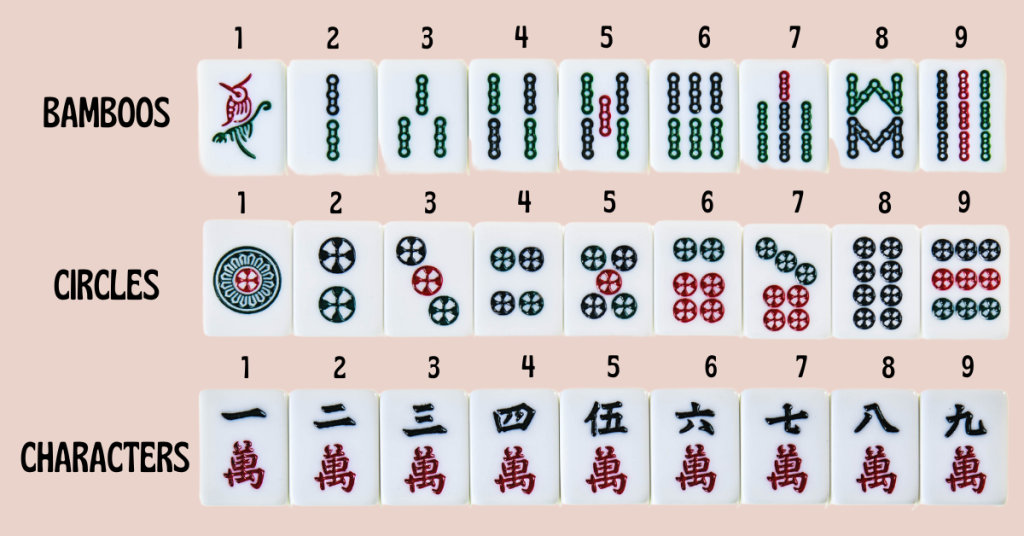
Les tuiles des couleurs

Il y a 3 couleurs: les bambous, les ronds, et les caractères. Chaque couleur comporte 4 séries de 9 tuiles allant du 1 au 9.

Tuiles de base du jeu

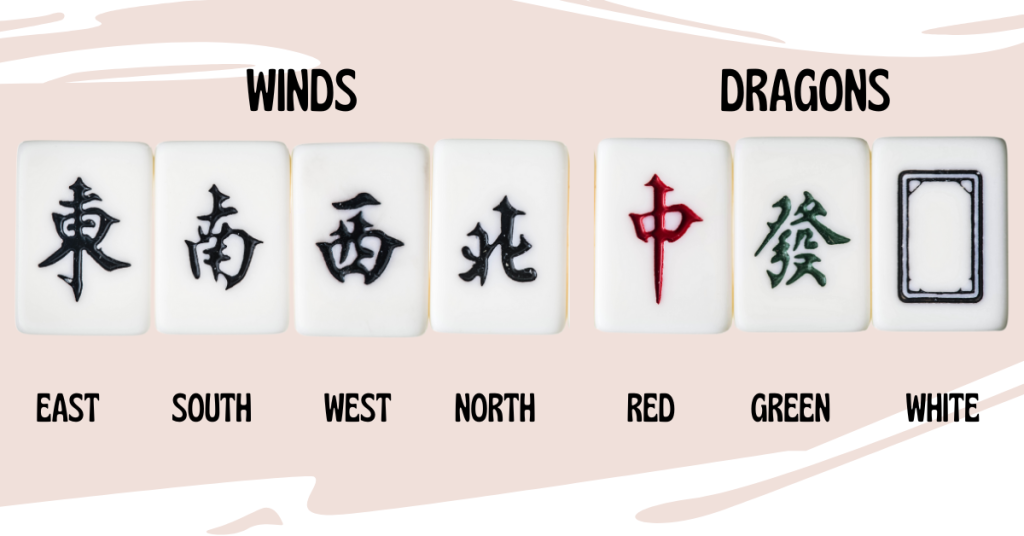
Les tuilles d'honneurs

Les honneurs sont les 4 vents (ouest, nord, sud, est) et les 3 dragons (rouge, vert, blanc). Il y a 4 tuiles de chaque honneur.

Tuiles d'honneurs du jeu

Les tuiles de fleurs

Les 8 tuiles fleurs ne sont pas utilisées dans votre main pour former des combinaisons. Lorsqu'elles sont tirées, posez-les face visible devant vous et tirez une autre tuile pour votre main. Elles rapportent des points supplémentaires en fin de partie.

Mise en place

Chaque joueur tire 13 tuiles, puis étale face visible les tuiles de fleurs et les remplace par le même nombre de cartes du puits.

Les combinaisons

Le but du jeu est de composer 4 séries de 3 cartes chacune, plus une paire. Lorsque vous atteignez cet objectif, vous ne jetez pas de tuile. La combinaison gagnante comporte donc 14 tuiles. Le premier joueur a réussir cette combinaison remporte la manche et gagne les points correspondant à ses combinaisons.

Séries

Les séries peuvent être constituées de 2 manières, soit en séquence (3 cartes qui se suivent de la même couleur), soit en brelan (3 cartes identiques, y compris les honneurs). Les séries de 4 cartes ou plus ne comptent pas.

Une paire est composée de 2 cartes identiques.

Le jeu

À son tour, chaque joueur pioche puis rejette une tuile de sa main. Les autres joueurs peuvent récupérer la tuile défaussée dans 2 conditions:

  • Soit pour constituer une série
  • Soit pour constituer la paire permettant de faire "Mhing" et de terminer la manche.

Si aucun joueur ne souhaite prendre la défausse, la main passe au joueur suivant, qui pioche à son tour une carte, et ainsi de suite.

Réclamer la défausse

Une défausse peut être réclamée par n'importe quel joueur même si ce n'est pas son tour de jouer. Réclamer la ´defausse est possible jusqu'à que le joueur suivant aie commencé son tour en piochant une carte, ensuite la défausse est "morte" et ne peut plus être récupérée.

Lorsqu'un joueur réclame la défausse pour compléter une série, il dépose devant lui face visible la série ainsi obtenue. Il doit ensuite défausser une tuile pour garder une main de 13 cartes (sauf s'il met fin à la manche en faisant Mhing).

Seules les séries constituées avec l'apport de la défausse sont étalées. Les séries constituées uniquement en tirant des tuiles du puit restent dans la main du joueur.

Une défausse réclamée doit être étalée avec la série qu'elle complète. Elle ne peut jamais être gardée en main.

Score

Seul le joueur qui fait Mhing marque des points. Les adversaires ne sont pas pénalisés par les tuiles qu'ils ont en main à ce moment là. Le joueur gagnant compte ses crédits puis les crédits sont convertis en points selon le tableau suivant:

1 crédit2 points 11 à 13 crédits128 points 29 à 31 crédits8192 points
2 crédits4 points 14 à 16 crédits256 points 32 à 34 crédits16384 points
3 crédits8 points 17 à 19 crédits512 points 35 à 37 crédits32768 points
4 crédits16 points 20 à 22 crédits1024 points 38 à 40 crédits65536 points
5 à 7 crédits32 points 23 à 25 crédits2048 points 41 crédits131072 points
8 à 10 crédits64 points 26 à 28 crédits4096 points

Ce principe incite chaque joueur à tenter d'obtenir plus de crédits en améliorant ses combinaisons, tout en prenant le risque qu'un adversaire fasse Mhing avant lui, rendant sa main sans valeur.

Les crédits

Les crédits dépendent des combinaisons de séries. Il en existe 18 sortes illustrées dans les feuilles de marque. Ces combinaisons peuvent être arrangées de millions de façons différentes, multipliant de ce fait l'intérêt du jeu à mesure que les joueurs les connaissent mieux.

1 crédit

  • 1 crédit est attribué pour chaque fleur
  • 1 crédit est attribué pour la paire, si c'est une paire de 2, de 5, ou de 8
  • 1 crédit est attribué pour une double suite, c'est-à-dire deux suites de même hauteur mais de couleur différente
  • 1 crédit est attribué pour un double brelan, c'est-à-dire deux brelans de même valeur
  • 1 crédit est attribué pour une suite royale brisée, c'est-à-dire la combinaison de la suite 1-2-3 et de la suite 7-8-9 dans la même couleur, sans le 4-5-6.
  • 1 crédit est attribué pour chaque brelan d'honneurs
  • 1 crédit est attribué si le jeu ne contient que deux couleurs différentes (sans honneur)
  • 1 crédit est attribué pour un jeu ne contenant que des suites (sauf la paire qui est obligatoire), c'est-à-dire qu'il n'y a aucun brelan.

3 crédits

  • 3 crédits sont attribués pour une double suite identique, c'est-à-dire deux suites de même hauteur et de même couleur
  • 3 crédits sont attribués pour une suite royale c'est-à-dire la combinaison des suites 1-2-3, 4-5-6 et 7-8-9 dans la même couleur
  • 3 crédits sont attribués pour un rien ne s'accorde (voir plus haut)
  • 3 crédits sont attribués pour une main d'une seule couleur et des honneurs
  • 3 crédits sont attribués pour un jeu ne contenant que des brelans (sauf la paire qui est obligatoire), c'est-à-dire qu'il n'y a aucune suite.

5 crédits

  • 5 crédits sont attribués pour une main avec une combinaison de bambous, une de cercles, une de caractères, une de vents et une de dragons
  • 5 crédits sont attribués pour une basse main, c'est-à-dire si aucune carte n'est au-dessus du 5 (sans honneur)
  • 5 crédits sont attribués pour une haute main, c'est-à-dire si aucune carte n'est en dessous du 5 (sans honneur)

8 crédits

  • 8 crédits sont attribués pour un jeu présentant trois brelans de dragons, un de chaque couleur. Ces huit crédits ne sont pas cumulés avec les crédits donnés individuellement pour les brelans de dragons.
  • 8 crédits sont attribués pour une main à couleur unique, sans honneur
  • 8 crédits sont attribués pour un rien ne s'accorde avec honneur (voir plus haut)

Rien ne s'accorde

Le rien ne s'accorde est une alternative au jeu normal, qui consiste à tenter d'avoir le jeu le plus dépareillé possible. Ce jeu est défini non seulement par l'absence de toute combinaison étalée ni de combinaison en main, mais aussi l'absence de toute combinaison en devenir (par exemple un 1 de cercles et un 3 de cercles, auxquels seul manque le 2 de cercles pour faire une suite)

De manière formelle, on peut dire que les cartes de même couleur doivent avoir au moins 3 unités d'écart (1-4-7 ou 2-5-8 ou 3-6-9 est le plus serré à être acceptable). Si on tente le rien ne s'accorde, on ne peut jamais prendre la défausse, puisque cela obligerait à étaler une combinaison avec la carte ramassée, sauf pour faire Mhing.

Quand après avoir pioché, on se retrouve avec un jeu dans cette configuration, on peut annoncer Mhing et on remporte la manche.

Le rien ne s'accorde avec honneur est une variante du rien ne s'accorde où l'on a en plus un dragon de chaque couleur et un vent de chaque direction.

Obscure Soundchip Tuesday: The SGS M114

Posted by pulkomandy on Fri Aug 22 17:28:16 2025  •  Comments (0)  • 

(yes, I'm writing this article on a Monday. But the title sounded better this way. Whatever.)

As you may know, I'm interested in old computers and sound and music. Recently I was reminded by a youtube video about the Amstrad CKX100, a toy-synthetizer from 1988. I had already heard about it but never had an opportunity to disassemble one, so I didn't know how it was built. Well, this video did just that and got me curious about the soundchip used, the ST M114S. I had not heard about it before and was curious how it worked and if I could possibly connect it to a computer to play some music.

So, a few web searches later, I didn't find a lot, but I found what I was looking for: a datasheet and a research paper from the chip creators, both explaining in some detail how the chip operates.

The research paper is dated from 1985 and mentions that the chip was developped in cooperation with GEM, another synth keyboard manufacturer (who went on to use it in several of their keyboards). It was designed by SGS before merging in ST, so it was the opportunity for me to learn a little more about the Italian side of ST Microelectronics. Previously I had known them mostly for the EF9345 (used in the Matra Alice and the Minitel) and some of the chips used in the Thomson TO8 and MO6 machines, mainly the palette circuit that was developped for the TO9 but later became an off-the-shelf component in ST databooks.

The chip uses an 8KB ROM where sound samples are stored. The samples are in power of two sizes from 16 to 2048 bytes, and are played in a loop to sustain the sound. They use delta coding, which means they encode the derivative of the actual sound. An analogue integrator is used to turn this back into the original signal, which has the advantage of providing some level of smoothing of the output.

The chip does a bit more than just playing the table, however, it can smoothly transition from one sample to another by mixing them together. And it can also play the sample at various speeds by using only one out of two or one out of four bytes (but this risks having a not perfectly balanced signal, which will drive the integrator into saturation).

Moreover, it is indeed designed to be driven by a CPU. It is not a "keyboard-on-a-chip" system that would handle keyboard scanning directly and generate the sounds from there. Instead there is an interface for a normal CPU bus where you can send commands to trigger notes. The commands are made of 8 6-bit words. This may seem a bit strange, 6 8-bit words may have made more sense (especially as most of the values transmitted are indeed 8 bits), but I guess it allowed to save some pins and fit the thing in a 40 pin DIP package.

As a result, this chip was apparently used in some pinball and arcade machines. However, MAME doesn't have an emulation for it yet.

During my search for the Datasheet, I of course looked at ST databooks, and found that there is a larger version called M114A. This one has a 48 pin package, which allows to address 265K of memory instead of 8K. Surely this must allow for much more complex sounds.

Interestingly, the datasheet for the M114S shows a clever hack to increase the ROM space to 16K instead of 8. The chip has an "output enable" pin to signal the ROM when it wants to read a byte. This signal will always trigger twice within a short time since the chip will always read a byte from two samples (remember, it then mixes them together). So, they suggest connecting a flip-flop to this output and resetting it with an RC circuit tuned to a longer delay. The output is then used as an extra address bit, and as a result, the first sample will be from the first half of the ROM, and the second sample from the second half. This simulates the behavior of one of the pins of the M114A, which probably does the same without needing an RC circuit as it knows about the chip internal timing.

Of course I am interested in wiring the chip to RAM. The datasheet says it's possible, but some arbitration will be needed to make sure the M114 and CPU don't try to both access the RAM at the same time. Should I go with dual port RAM? Can I simply block the M114 from accessing the bus when the CPU wants to use it? Maybe I can do some fun tricks where the CPU manages to synchronize itself with the chip and feed it data without using the RAM at all? And, first of all, can I even get one of these chips? There seem to be someone selling them ("used") online, but will they be real chips, or will they be some random other chip being relabelled?

I'm also considering writing an emulator for this chip, just to hear how it could sound like. However, to do anything like that, I think I need ROM dumps from one or more of the original devices using it. At least to make sure my understanding of the storage format is correct. There is a dump from one of the pinball machines using it, but it is using mainly or only PCM samples, and not delta encoding.

Finally I am surprised that this chip was not more popular, for example in home computers. Ok, maybe needing a whole 8K of ROM may be the cause. But it sounds quite nicely, and it would have been interesting to see it alongside the AY3, the SID, and the various options from Yamaha, don't you think?

Programming notes

This information is directly from the datasheet, but here in easier to read HTML format.

All communication with the chip is made with 8 byte commands (only 6 bits in each byte). The bytes must be no more than 128us apart, otherwise the chip considers itself out of sync and the command is aborted.

The command layout is as follows:

ByteBit543210
1Attenuation
2OutputT1 address MSBT2 address MSB
3T2 address LSB
4T1 address LSB
5T1 lengthMode
6InterpolationImmediateOctave Divider
7ChannelTuning LSB
7NoteTuning MSB
  • Attenuation: higher values for lower volume
  • Output: route the channel to one of the four outputs
  • Table addresses: bits A12-A4 of the ROM address to read from
  • Length: number of bytes in T1 sample, from 16 to 2048
  • Mode: various ways to access the two samples, see below
  • Interpolation: Mixing value K. The generated output is S1 * (K + 1)/16 + S2 * (15 - K)/16. A value of 15 plays only table 1, and lower values add more and more of the second sample to the mix.
  • Immediate: apply the new attenuation immediately (otherwise a ramp from the previous value is generated)
  • Octave divider: divide the frequency by two, to play an octave lower
  • Channel: channel on which the command must be run
  • Tuning: finetune the selected note, see below.
  • Note: from 0 to E, 15 possible notes a semitone apart, covering a bit more than an octave. F is reserved for special commands (See below)

The possible values for the tuning:

  • 0 to 5: detune by -6/12 to -1/12
  • 6: detune by -2/1000
  • 7: detune by -1/1000
  • 8: exact note
  • 9: detune by 1/1000
  • A: detune by 2/1000
  • B to F: detune by +1/12 to +5/12

The special commands are not related to a channel. They are globally applied

  • F8: ROM ID mode. The chip will generate addresses 0 to 8 in a loop and send them to the ROM.
  • F9: SSG, enable synchronous mode globally. In synchronous mode, frequency changes are delayed until the next loop point in the sample
  • FB: RSG, disable synchronous mode. Frequency changes happen immediately.
  • FA: RSS, invert the state of synchronous mode just for the next command.
  • FC: Keep the existing frequency from a previously played note.
  • FF: Immediately stop the channel playing.

TODO: SSG and RSG are swapped in another part of the datasheet. Check which one is correct.

And finally the modes affect how the waveforms are accessed:

ModeT1 speedT2 speedT2 length
000 /2 /2 =T1
001 1 1 =T1
010 /4 /4 =T1
011 1 1 max(T1/2, 16)
100 1 /2 T1/2
101 1 1 max(T1/4, 16)
110 1 /4 T1/4
111 1 1 max(T1/8, 16)

Emulation

It turns out someone already wrote an emulator!

Example ROM

Thanks to Victor Baeza, here is an example sample ROM from a Baldwin/Viscount C400 organ. I have converted it to a WAV file so you can get an idea how the samples are typically organized.

Next steps

I'm looking for ROM dumps of the Amstrad CKX100 (both the samples and the CPU code) so I can learn more about how it uses the chip. Anyone has one and is willing to dump the ROMs?

Leaving Twitter

Posted by pulkomandy on Wed Aug 30 18:25:20 2023  •  Comments (0)  • 

That's it. I'm off Twitter now.

I used it for 5 years. I now have archives of everything I posted there.

Now you can find me on Mastodon instead. See you there!

Website mirroring

Posted by pulkomandy on Sat Jan 1 15:19:32 2022  •  Comments (0)  • 

Please do not mirror my whole website using wget mirroring mode, WebReaper, or other similar tools. It results in a lot of requests to my poor old server, too much memory and CPU use, and the server fan spins up and makes a lot of annoying noise. So I will ban your IP or IP range from accessing the website if you try this.

If you want a full copy of some parts of the website, please contact me so we can set up a better way to share the data (I can set up an ftp or sftp or rsync thing, for example)

Hello World

Posted by pulkomandy on Sun Feb 18 16:30:21 2018  •  Comments (4)  • 

This is the new server of the PulkoTeam! Enjoy your stay here.

On this website you can find various stuff I work on, around the Haiku project, electronics, 8bit computers, and random things depending on the day mood.