Linux comes with several different shells. Different Linux distributions have different default shells, users can change to another type or install a new one.
If you're looking to change your default shell, knowing the different available types helps provide a clear overview of the possible options.
This article showcases the importance and features of eight different Linux shells.
What is a Linux Shell and Why is it Important?
A shell is a command-line interpreter program that parses and sends commands to the operating system. This program represents an operating system's interactive interface and the kernel's outermost layer (or shell). It allows users and programs to send signals and expose an operating system's low-level utilities.
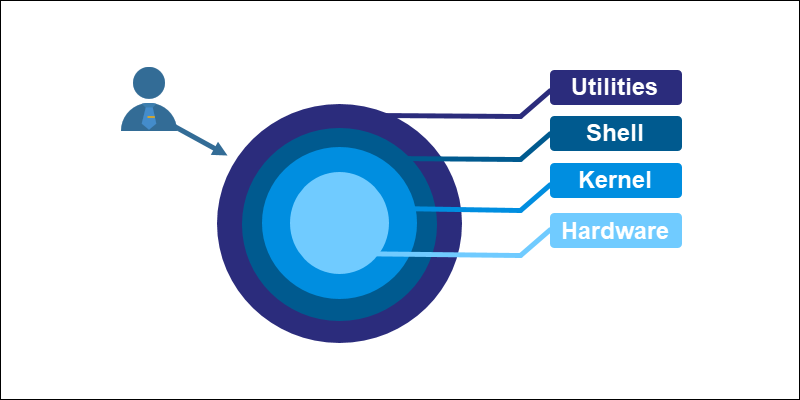
The terminal program (or terminal emulator) enables interaction with the system's utilities. When we run any command in the terminal, such as ls or cat, the shell parses, evaluates, searches for, and executes the corresponding program, if found.
Types of Linux Shells
Linux offers different shell types for addressing various problems through unique features. The shells developed alongside Unix often borrowed features from one another as development progressed.
Below is a brief overview of different shell types and their features.
1. Bourne Shell (sh)
The Bourne shell was the first default shell on Unix systems, released in 1979. The shell program is named sh, and its traditional location is /bin/sh. The prompt switches to $, while the root prompt is #.
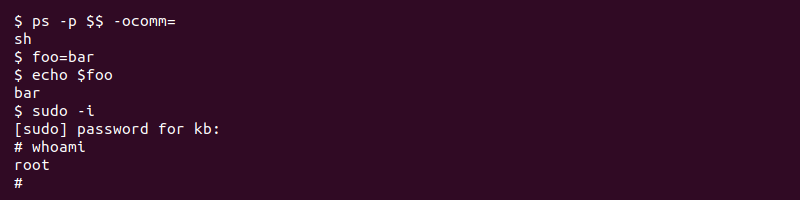
The Bourne shell quickly became popular because it is compact and fast. However, sh lacks some standard features, such as:
- Logical and arithmetic expansion.
- Command history.
- Other comprehensive features, such as autocomplete.
Modern Unix-like systems include the /bin/sh executable. The program does not start the Bourne shell; instead, it acts as an executable that points to the default system shell.
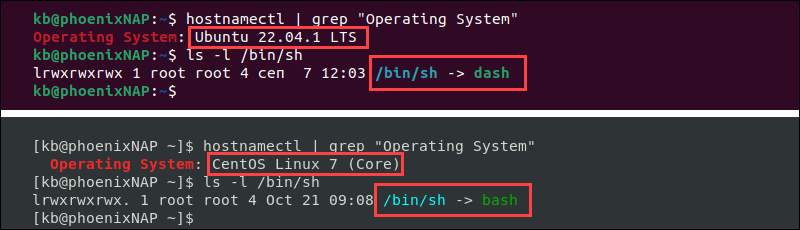
In most systems, the hard or symbolic link points to bash, whereas on Ubuntu and Debian, it points to dash. In both cases, the link mimics the Bourne shell as much as possible.
2. C Shell (csh)
The C shell (csh) is a Linux shell from the late 1970s whose main objective was to improve interactive use and mimic the C language. Since the Linux kernel is predominantly written in C, the shell aims to provide stylistic consistency across the system.
The path to the C shell executable is /bin/csh. The prompt uses % for regular users and # for the root user.
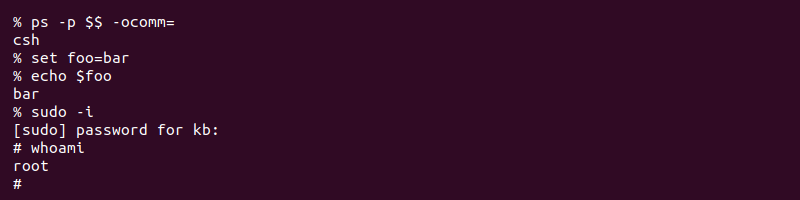
New interactive features included:
- History of the previous command.
- User-defined aliases for programs.
- Relative home directory (~).
- Built-in expression grammar.
The main drawbacks of the C shell are:
- Syntax inconsistencies.
- No support for standard input/output (stdio) file handles or functions.
- Not fully recursive, which limits the handling of complex commands.
The C shell improved readability and performance compared to the Bourne shell. The interactive features and innovations in csh influenced all subsequent Unix shells.
3. TENEX C Shell (tcsh)
The TENEX C shell (tcsh) is an extension of the C shell (csh) merged in the early 1980s. The shell is backward compatible with csh, with additional features and concepts borrowed from the TENEX OS.
The TENEX C shell executable path is in /bin/tcsh. The user prompt is hostname:directory> while the root prompt is hostname:directory#. Early versions of Mac OS and the default root shell of FreeBSD use tcsh.
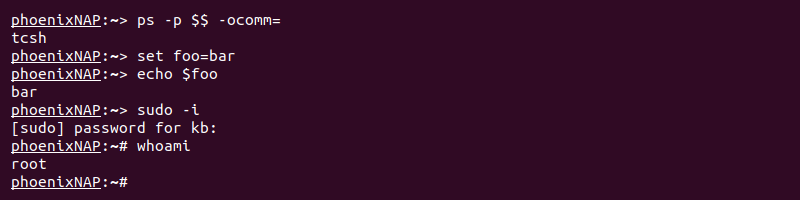
Additional features of the shell include:
- Advanced command history.
- Programmable autocomplete.
- Wildcard matching.
- Job control.
- Built-in where command.
Since tcsh is an extension of the C shell, many of its drawbacks persist.
4. KornShell (ksh)
The KornShell (ksh) is a Unix shell and language based on the Bourne shell (sh) developed in the early 1980s. The location is in /bin/ksh or /bin/ksh93, while the prompt is the same as the Bourne shell ($ for a user and # for root).
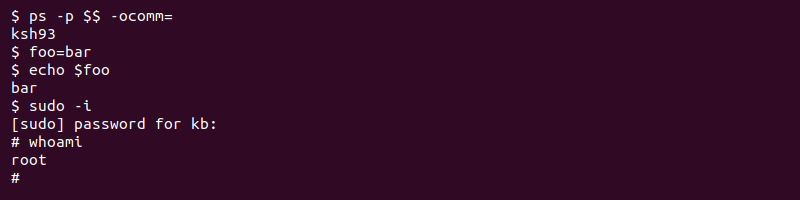
The shell implements features from the C shell and the Bourne shell, focusing on both interactive commands and programming features. The KornShell adds new features of its own, such as:
- Built-in mathematical functions and floating-point arithmetic.
- Object-oriented programming.
- Extensibility of built-in commands.
- Compatible with the Bourne shell.
The shell is faster than both the C shell and the Bourne shell.
5. Debian Almquist Shell (dash)
The Debian Almquist Shell (dash) is a Unix shell developed in the late 1990s from the Almquist shell (ash), which was ported to Debian and renamed.
Dash is famous for being the default shell for Ubuntu and Debian. The shell is minimal and POSIX-compliant, making it convenient for OS startup scripts.
The executable path is /bin/dash, and /bin/sh points to it on Ubuntu and Debian. The default and root user prompt is the same as in the Bourne shell.
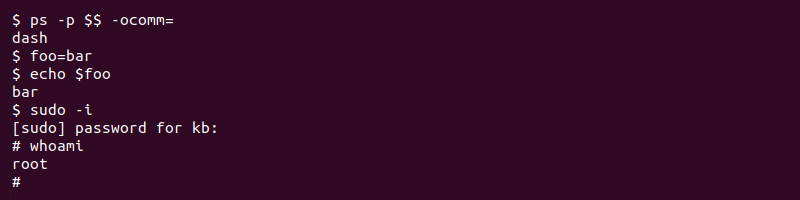
Dash features include:
- Execution speeds up to 4x faster than bash and other shells.
- Requires minimal disk space, CPU, and RAM compared to alternatives.
The main drawback is that dash is not bash-compatible. The features not included in dash are known as "bashisms." Therefore, bash scripts require additional reworkings of bashisms to run successfully.
6. Bourne Again Shell (bash)
The Bourne Again Shell is a Unix shell and command language that extends the Bourne shell (sh) from 1989. The shell program is the default login shell for many Linux distributions and earlier versions of macOS.
The shell name shortens to bash, and the location is /bin/bash. Like the Bourne shell, the bash prompt is $ for a regular user and # for root.
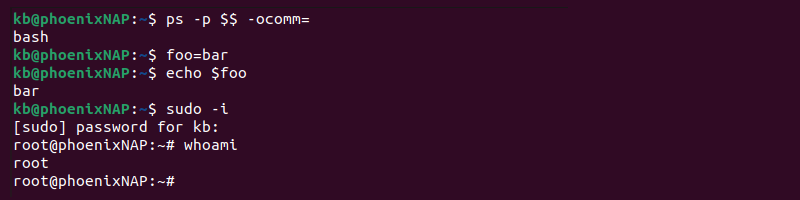
Bash introduces features not found in the Bourne shell, some of which include:
- Brace expansion.
- Command completion.
- Basic debugging and signal handling.
- Command history.
- Conditional commands, such as the bash if and bash case statements.
- Heredoc support.
Note: Some features are not unique to Bash, but rather borrowed from other shells.
Since bash is a superset of the Bourne shell, most sh scripts execute in bash without any additional changes.
7. Z Shell (zsh)
The Z shell (zsh) is a Unix shell created as an extension for the Bourne shell in the early 1990s. The feature-rich shell borrows ideas from ksh and tcsh to create a well-built and usable alternative.
The executable location is in /bin/zsh. The prompt is user@hostname location % for regular users and hostname# for the root user. The Z shell is the default shell of Kali Linux and Mac OS.
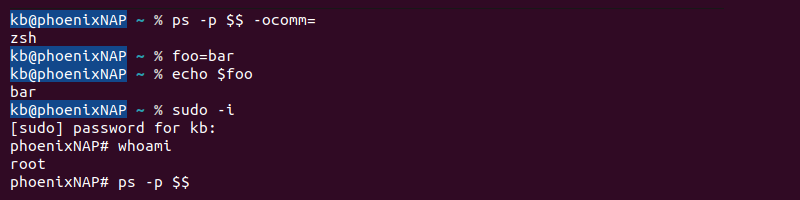
Some new features added to the zsh include:
- Shared history among all running shell sessions.
- Improved array and variable handling.
- Spelling corrections and command name autofill.
- Various compatibility modes.
- Extensibility through plugins.
The shell is highly configurable and customizable thanks to community-driven support via the Oh My Zsh framework.
Note: Learn, how to set environmental variables in ZSH or how to switch from Zsh to Bash on Mac.
8. Friendly Interactive Shell (fish)
The Friendly Interactive Shell (fish) is a Unix shell released in the mid-2000s, focused on usability. The feature-rich shell requires no additional configuration, making it user-friendly from the start.
The default executable path is /usr/bin/fish. The user prompt is user@hostname location>, while the root prompt is root@hostname location#.
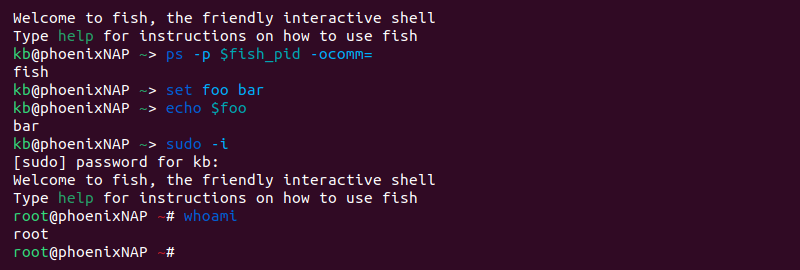
Features in the shell include:
- Advanced suggestions/tab completion based on the current directory history.
- Helpful syntax highlighting and descriptive error messages.
- Web-based configuration.
- Command history with search options.
The main drawback of fish is non-POSIX compliance. However, the developers aim to improve the flaws in POSIX.
Conclusion
After reading about several different shell types in this article, you have a better overview of the available Linux shells. Other shells exist for specific use cases, and every shell type addresses different problems.