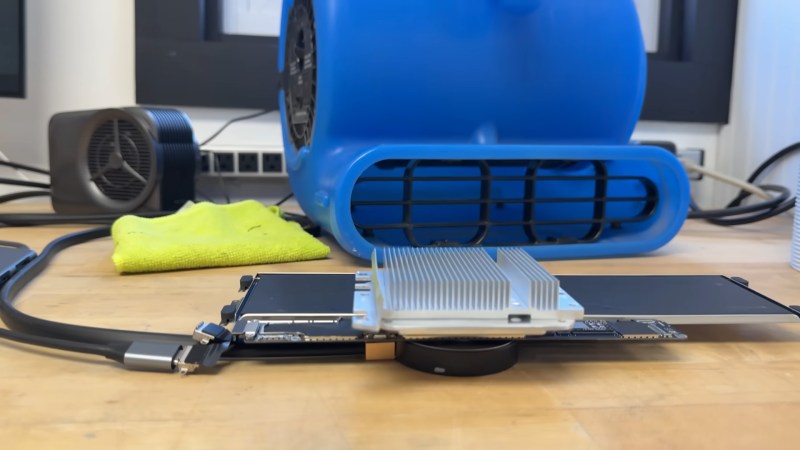
Yes, that's a MacBook Neo. The important parts, anyway.

Unlocking The True Power Of A MacBook Neo By Cooling It

Mobile devices generally have one Achilles’ heel when it comes to computing power: thermal throttling. Outside of bulky desktop and server systems, chips have to run at a fraction of their true potential to keep from cooking themselves to death. The MacBook Neo, with its iPhone-derived A18 processor, is no exception. Since Apple’s budget offering first came out, though, there’s been an arms race on the benchmark sites to see just how far you can push it, and [Salem Techsperts] briefly claimed the accolade of ‘fastest MacBook Neo’, and of course provided a video showing how it’s done.

It’s hardly rocket science: you cool the chip. Outdoing Apple’s cost-cutting design in that regard is not difficult; you can evidently get notable performance increases just with decent thermal paste. [Techsperts] goes further than that, combining PTM7950 phase-change thermal paste with a peltier cooler to actively suck watts of heat out of the SOC, heatsinks that likely weigh more than the laptop itself, and an industrial air blower to serve as the highest CFM air cooler we’ve probably ever seen.

By this point it’s hardly a laptop anymore, with the logic board removed to sit inside a cooling sandwhich– water cooled with the peltier on one side, and air-cooled by the blower on the other–but the point wasn’t to have a light, practical daily-driver here. Apple already covered that. The point was to go fast. With 41.47% higher Cinebench scores than the stock laptop, and a power draw of 11W compared to the stock 4W, we can say he’s succeeded in that. Interestingly enough, [Techsperts] could not best the top 3DMark score, in spite of his Cinebench success. It’s possible he just lost the silicon lottery when it comes to the GPU section of this particular A18 chip, but if you have another theory, be sure to let us know in the comments.

Of course you could go colder. For all the absurd impracticality of this setup, it’s not liquid nitrogen cooling, which means there are still gains to be made-– we saw a Pi 5 clocked at 3.6GHz that way last year— and that just means the crown is laying in the gutter, waiting for anyone to pick it up. Unless they already have by the time this prints. In which case, all hail the cryogenic king, and please send us a tip so we can hail their glory.

Continue reading “Unlocking The True Power Of A MacBook Neo By Cooling It”

Upgrading A MacBook Neo Using A 1 TB IPhone NAND Flash

The nekkid Flash footprint with unused pads perimeter. (Credit: dosdude1, YouTube)

For some reason the newly introduced MacBook Neo appears to be the subject of a lot of modding, though a recent mod by [dosdude1] leans into the fact that this laptop has been assembled using what are effectively iPhone 16 parts inside a laptop case. This consequently means that there’s an overlap with certain iPhone 16 components, such as the NAND Flash. Incidentally storage on the Neo is limited to 512 GB when you purchase it from Apple, which is weird since the same SoC in the iPhone 16 Pro happily uses 1 TB.

Even if it was just a price point thing that Apple went for, there’s seemingly nothing standing between a Neo owner with a hot air gun and sheer determination. As long as you’re comfortable soldering a fine-pitched BGA NAND Flash package, natch.

Of course, there was always the possibility that Apple used a different NAND Flash package footprint, but the installed 256 GB model chip that comes installed matches the replacement 1 TB model K8A5 chip as hoped. This just left disassembly and preparing the PCB for a storage replacement. Removal of the BGA underfill and desoldering the old chip without taking out surrounding SMD parts is definitely the hardest part, but handled in the video with the equivalent of an IC spatula and a temporary removal of some capacitors.

Interestingly, the uncovered IC footprint shows a whole perimeter of unused pads that might target other NAND Flash packages. Regardless, the new chip installed fine, giving the Neo 1 TB of storage and a slightly faster read/write performance.

Continue reading “Upgrading A MacBook Neo Using A 1 TB IPhone NAND Flash”

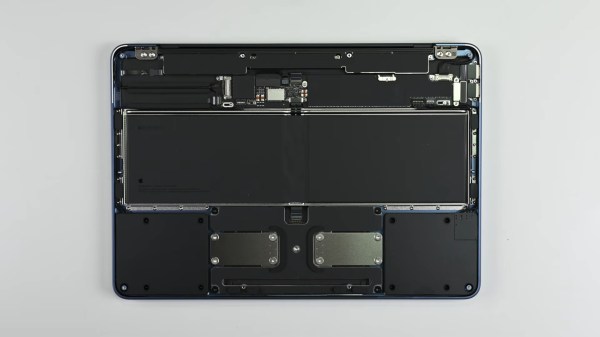
An upside down laptop with its cover removed on a grey surface. The inside of the laptop is a series of black modules connected to the frame with glorious amounts of screws and not glue!

Apple’s Most Repairable Laptop Is Thanks To Right-to-Repair

The common narrative around device design is that you can have repairability or a low price, but that they are inversely proportional to each other. Apple’s new budget MacBook Neo seems to attempt a bit of both.

Brittle snap-fit enclosures or glue can make a device pop together quickly during manufacture, but are a headache when it comes time to repair or hack it. Our friends at iFixit tore down the Neo and found it to be the most repairable MacBook since the 2012 unibody model. A screwed in battery, and modules for many of the individual components including the USB ports and headphone jack make it fairly simple to replace individual components. Most of those components are even accessible as soon as you pop the bottom cover instead of requiring major surgery.

As someone who has done a keyboard replacement on a 2010 MacBook, the 41 screws holding the keyboard in brought back (bad) memories. While this is a great improvement over Apple’s notoriously painful repair processes, we’re still only looking at an overall 6/10 score from iFixit versus a 10/10 from Framework or Lenovo.

The real story here is that these improvements from Apple were spurred by Right-to-Repair developments, particularly in the EU, that were the result of pressure from hackers like you.

If you want to push a Neo even further, how about water cooling it? If you’d rather have user-upgradeable RAM and storage too in a Mac, you’ve got to go a bit older.

Continue reading “Apple’s Most Repairable Laptop Is Thanks To Right-to-Repair”