Documentation Index
Fetch the complete documentation index at: https://docs.sprig.com/llms.txt
Use this file to discover all available pages before exploring further.
Coming Soon!
What is mParticle?
mParticle is a customer data platform (CDP) that helps B2C companies unify existing customer data and allows for them to connect it anywhere in order to improve marketing performance, enhance analytics, and transform the customer experience.What Inputs Does Sprig Support?
We currently support Web and Mobile (iOS) mParticle will forward data server to server if they detect that the Sprig kit is not included in your product. In this case, Sprig will not be able to deliver studies. Choose from one of the supported inputs in mParticle.mParticle Web SDK Setup
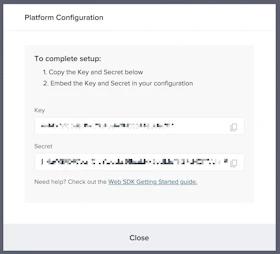
To send data from your web app to your mParticle workspace input, navigate to Setup > Inputs and select the Web platform. The web SDK only needs the API Key (not the API secret), which you’ll replace in the snippet below. Reference the guide section for information on creating inputs. The following snippet should be included on every page of your web app. Ideally, it should be placed within the<head> tag or otherwise be loaded as soon as possible on each page
mParticle Mobile (iOS) SDK Setup
Sprig supports iOS as an input for passing events and attributes from mParticle. For full documentation, read their iOS guideFinding your API Keys
- In the Sprig app, click Connect > mParticle > Get API Keys.
- Confirm which Environment you are in. Based on the current Environment, take note of either the Development ID or Production ID.
- Copy the Environment ID for use in a later step.
How to Connect Sprig & mParticle
 Here’s a direct link to Sprig .
 Let’s start by configuring events to send to Sprig
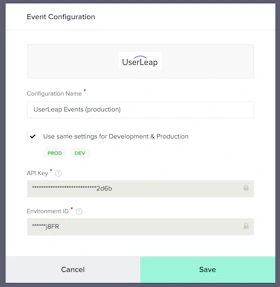
 Both your Environment ID and API Key can be found on the Sprig Connect page. If you would like to keep the same settings for development and production, you can choose to do so.
Give the configuration a name - the idea is to have two setups one for your Sprig production environment and the other for the Sprig development environment.
See above on how to find your API keys for mParticle.
Both your Environment ID and API Key can be found on the Sprig Connect page. If you would like to keep the same settings for development and production, you can choose to do so.
Give the configuration a name - the idea is to have two setups one for your Sprig production environment and the other for the Sprig development environment.
See above on how to find your API keys for mParticle.
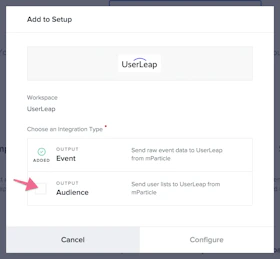
 You may need to create an audience in mParticle if you have not done so already. Go to the Audience page in mParticle to create a new audience.

Can mParticle Trigger a Sprig Study?
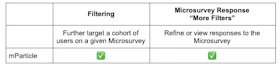
Yes! Events sent from the mParticle SDK can in fact be used to trigger a Sprig study. For full details on events, please read more here (or see table below).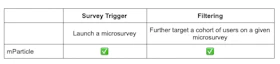
Warning: Warning mParticle events sent using server-to-server (mParticle firehose) cannot be used to trigger a study. These events can however be used as a study filter.
Can mParticle Events/Attributes be Used as a Sprig Filter?
For study filters you can use events that are sent through the mParticle SDK or events that are sent network to network from mParticle to Sprig. Attributes sent from mParticle (also known as audiences in mParticle) can be used as a study filter. To learn more about attributes, read here (or see table below).