

The social media management tool you choose can set the tone for how you grow your presence. You want it to be easy and flexible, without stretching your budget.
Buffer and Later are two names you’ll see often, each offering different ways to help you schedule posts, connect with your audience, and analyze performance.
If you’re weighing your options between Buffer and Later, you’re in the right place. The key differences and similarities to look for between them are:
- Pricing structure: Buffer charges per channel, starting at $6/month. Later uses bundled “social sets” with plans starting at $25/month.
- Free plan: Buffer offers a free plan for up to three channels. Later no longer offers a free plan; it only offers free trials of their paid plans.
- Platform support: Buffer connects to 11 platforms, including X/Twitter, Bluesky, Mastodon, and Google Business. Later supports eight, including Snapchat.
- Visual planning: Later leans into visual-first planning with a drag-and-drop calendar and grid preview. Buffer focuses on simplicity and flexibility across multiple channels.
- AI tools: Buffer includes unlimited AI-assisted content creation on all plans. Later offers AI credits on paid plans, with limits based on your tier.
- Engagement features: Both tools help you manage comments and conversations, though availability varies by plan.
- Extras: Later offers add-on products for social listening and influencer marketing. Buffer keeps its focus on publishing, engagement, and analytics.
In this guide, we’ll compare the two platforms so you can decide which is the better fit for your brand.
Jump to a section
Buffer vs. Later features overview
Here's a look at all the key features and costs for Buffer and Later at a glance.
Plans and pricing
Cost can be one of the biggest factors when choosing a social media management tool, with good reason. You need a tool that has the features you need at a price that makes sense for your brand or business.
Buffer pricing
- Free plan: $0 for up to three social media accounts/channels.
- Essentials plan: $6 per channel per month (or $5 per channel paid annually) for one user account
- Team plan: $12 per channel per month (or $10 per channel paid annually) with unlimited team members
See Buffer’s full pricing guide here →
Buffer provides complete flexibility when choosing channels. You can select the exact channels you need and only pay for those channels, so you're only paying for what you actually use.
Later pricing
- No free plan
- Starter plan: $25 per month for one user (or $18.75 per month paid annually) and one social set
- Growth plan: $50 per month for two users (or $37.50 per month paid annually) and two social sets
- Scale plan: $110 per month for four users (or $82.50 per month paid annually) and six social sets
See Later’s full pricing guide here →
Later’s listed prices are the minimum for each plan, and the final cost could go up depending on the number of users on your team and the social channels you connect.
Later requires paid users to purchase “social sets.” Each social set includes one account from each supported platform (Instagram, Facebook, Threads, Pinterest, TikTok, LinkedIn, YouTube Shorts, and Snapchat).
This bundled approach means you can't pick and choose individual channels. If you only want to connect a Facebook Page and a LinkedIn profile, you're still paying for a full set. And if you need multiple accounts on the same platform, say, two Instagram profiles, you'd need to buy additional social sets, which adds to the cost.
Number of users or seats included
Buffer and Later structure user accounts in different ways. For social media managers especially, it’s worth knowing what each plan includes so you can choose the setup that fits best.
Buffer user accounts
Buffer’s Free and Essentials plans each include one user account, and the Team plan includes unlimited users. This is a major reason why small and medium-sized businesses pick Buffer, since the cost doesn’t increase if you add more users to your team.
Later user accounts
Later’s Starter plan includes one user account. For teams, the Growth plan includes two user accounts, and the Scale plan includes four user accounts. If you need more user accounts, you can purchase additional seats at $5 per user per month ($3.75 per user billed annually) on the team plans.
What this means for you
Buffer and Later price things differently, and those differences can add up, especially as your team or the number of channels grows.
For creators
Later's Starter plan includes one social set at a monthly cost of $18.75 with an annual commitment.
If you need multiple accounts on the same platform (e.g., a LinkedIn profile for your personal brand and a LinkedIn page for your business), you’d need the Growth plan, which is priced at $37.50 per month paid annually.
Buffer has a free plan for up to three social media channels, and paid plans start at $5 per month per channel paid annually.
For teams
Later has a fixed number of users on its plans. If you have two social platforms and two users on your marketing team, Later would cost you $37.50 per month paid annually, or $50 paid monthly.
If you need a third channel on the same platform, you’d have to purchase additional social sets. If you need more users, you can upgrade to the next tier or purchase more seats.
Buffer’s pricing is based on channels. For two channels and unlimited users, Buffer would cost $20 per month, paid annually, or $24 monthly.
| Scenario | Buffer (paid annually) | Later (paid annually) |
|---|---|---|
| 1 platform, solo user | Free or $5/month | $18.75/month |
| 3 platforms, solo user | Free or $15/month | $18.75/month |
Free trials
If you're curious to see how these features stack up, both Buffer and Later offer free trials of their plans, letting you test everything out for yourself before you pay.
Buffer free trial: 14 days on Essentials and Teams Plans, and you can use up to three social media channels on the free plan.
Later free trial: 14 days on all plans.
Social media scheduling and planning
Both Buffer and Later offer plenty of features to easily schedule posts across multiple platforms from a single dashboard.
Let's look at them in more depth.
Available channels
Here's a breakdown of the various social media platforms Buffer and Later support.
Creating and scheduling posts
Both Buffer and Later make it easy to draft and schedule content to multiple social media accounts at the same time. You can customize captions or images for each network as you go, and both tools let you set up pre-defined time slots so you don't have to manually pick a posting time for every single post.
It's worth knowing that some platforms (Instagram in particular) have API-level limitations that can affect how posts are published. Depending on the post type and your account type (business, creator, or personal), you may occasionally need to use notification-based publishing instead of full auto-publish. This applies regardless of which scheduling tool you use.
Beyond these basics, there are some differences in how Buffer and Later work at this stage of your workflow.
Number of scheduled posts
Buffer supports scheduling 10 posts at a time per channel on the free plan and unlimited scheduling on all paid plans. You can have as many posts in your drafts as you'd like.
Later has limits on the number of posts you can schedule, even on paid plans. The Starter plan lets you schedule 30 posts per profile per month, and the Growth plan lets you schedule 180. Unlimited scheduling is available on the Scale plan.
Captions and hashtags
Later includes a feature that lets you save captions, which can be handy if you frequently reuse announcements, reminders, or hashtags. You can also get hashtag suggestions, which are generated based on the text of your post.
Buffer has a dedicated hashtag manager, where you can save and organize groups of hashtags to add to your posts quickly. There's also a free Instagram hashtag generator available to everyone, even if you don't have a Buffer account.
Bulk content posting
If you’re planning content at scale, Buffer supports bulk scheduling of up to 100 posts at a time from a CSV file on paid plans. If you plan content in spreadsheets or manage campaigns at scale, you can upload an entire content calendar in minutes rather than scheduling posts individually.
Later doesn’t support bulk scheduling via a CSV, so there’s more manual work involved to schedule larger campaigns.
Channel groups
Buffer's channel groups let you save frequently used combinations of social accounts and publish to them simultaneously. For example, you could create a "Company Accounts" group containing Facebook, LinkedIn, and Threads, then schedule to all three with one click.
Later offers channel grouping features through its social sets. Social sets group-specific social profiles tied to a single brand or client, which allows you to schedule one post across multiple channels at the same time.
First comment scheduling
Buffer supports scheduling a first comment on Instagram, Facebook, and LinkedIn posts for paid plans. Later supports first comment scheduling only on Instagram.
Instagram-specific features
Later offers a visual planner you can use on all platforms, which helps you see your Instagram grid (and Pinterest) before you publish. You can drag images from the media library onto the calendar, then add captions directly from there.
Buffer has an Instagram grid preview feature on all plans as well, but there’s no drag and drop directly onto the calendar.
There are also some differences when it comes to posting on Instagram. Later doesn’t support publishing to personal profiles, and Instagram Stories can only be auto-published for business accounts.
If you have a creator profile, you’ll need to use notification publishing for stories. Later’s Android app isn’t available in all countries, so that could pose a challenge for some creators.
Buffer provides more options for Instagram publishing. It supports posting to personal profiles through notifications on the mobile app, and you can post automatically to both creator and business profiles.
AI features
Both Buffer and Later offer AI tools to speed up content creation, but the biggest difference is access. Buffer includes unlimited AI usage on every plan (including the free one), while Later ties its AI features to paid plans with a credit-based system.
Buffer
Buffer’s AI Assistant is available without limits on all plans, including the free one. You can generate fresh ideas whenever you need them, draft or refine posts or captions, and even repurpose content across multiple social media platforms without worrying about running out of credits.
For creators or teams posting regularly, this removes the risk of hitting a ceiling in the middle of a campaign.
Later
Later offers its AI-powered Ideas tool on paid plans, with a credit system that helps manage how many ideas you can create each month. The number of credits you get depends on your plan, and you spend one credit to generate a caption or three content ideas.
Once those credits are used up, you’ll need to wait until the next month or purchase additional credits.
Capturing ideas and planning content
A great idea for a post can strike at any time, and both Buffer and Later give you a dedicated space to save these ideas so they don't get lost.
Buffer
The Create Space is an ideas hub where you can collect and organize anything you might want to turn into a post later.
You can save notes, text snippets, links, and media, then tag and sort them into a flexible, Kanban-style board that makes it easy to move posts from concept to publish-ready.
The Create Space also includes a template library and access to the AI Assistant to help you get started without staring at a blank screen.
Buffer also has a browser extension for Chrome, Safari, Opera, Firefox, and Edge, which you can use to easily save ideas that inspire you on the web.
Lastly, Buffer's Feeds feature automatically pulls content from RSS feeds, blogs, and YouTube channels into your workspace. This makes it easier to curate content, monitor industry trends, and gather inspiration without leaving Buffer.
Later
Later’s idea space leans heavily on AI to get you going. You start by providing a description of your brand, and the AI will generate content pillars (which you can edit) and a few initial post ideas for you.
From that point, you can continue to use the AI to generate more ideas or add your own thoughts to these pillars.
This gives you a structured starting point, though it’s more narrowly focused on generating prompts than on storing and organizing a wide variety of content inputs and inspiration.
Social media engagement
Both Buffer and Later let you manage comments and conversations from a single dashboard, but they differ in who gets access. Buffer's engagement features are available on all plans, including free. Later's social inbox is limited to team plans.
Here's how each tool handles engagement.
Buffer
As the name suggests, the Community feature helps you build an engaged social media community across multiple accounts. You can reply to comments quickly from the Community tab right within Buffer, and the AI Assistant even gives you suggestions to kick off the conversation.
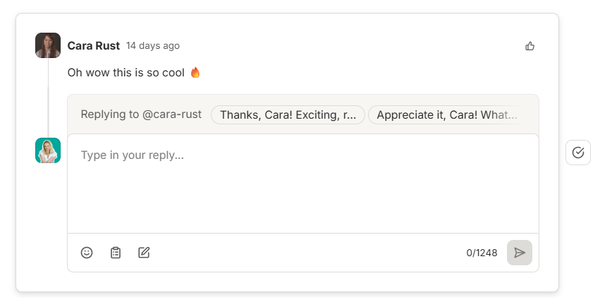
You can also save responses to commonly asked questions. This lets you answer these FAQs quickly without rewriting the same message every time.
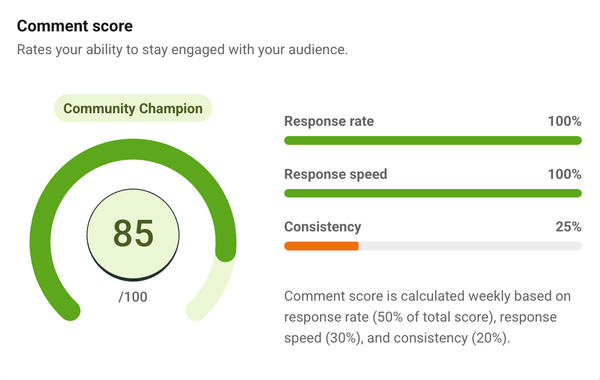
To help you see how you're doing, you get a comment score for each channel that tracks how fast and consistently you respond. This visibility helps you see where you’re engaging well and where conversations might be slipping.
The Community tool also gives you insight into how people are engaging with your content. You can zoom in on comments for a single post or look at replies and mentions across an account. Simply ask the AI to break down the response, highlight patterns, and even suggest new content ideas or ways to keep the conversation active.
Later
The social inbox in Later gathers your Instagram and Facebook DMs and comments, along with TikTok comments, in one space. It has a useful feature that lets you hide comments directly from the inbox, which removes them from view on the original platform — handy when you’re dealing with spam or inappropriate replies. The social inbox is available on team plans.
Later also offers a social listening tool to help you understand the sentiment around your brand. It finds brand mentions, highlights trending topics, and provides competitive benchmarking to see how you stack up against other brands in your industry.
These features, however, are only available as a paid add-on for users on the Scale plan, and it comes at an additional cost that Later says depends on “each brand’s unique needs and goals.”
Social media analytics and insights
Social media analytics tools give you a clearer view of how your content performs, helping you understand what's working and where to adjust.
Buffer and Later both provide analytics, but they differ in two important ways: which plans include them, and which platforms they cover. Buffer offers basic post analytics on all plans (including free) and advanced analytics on paid plans. Later reserves most analytics for paid plans, though link-in-bio analytics are available on all tiers.
They also support different platforms for analytics. Here's the breakdown.
Buffer’s analytics features
Buffer keeps things easy to follow and includes clear post analytics for every channel it supports so you can see results at a glance. These basic analytics are available for users on all plans, including free.
Advanced analytics become available on the Essentials plan and above, giving you deeper insights for Facebook Pages, Instagram Business and Creator accounts, X/Twitter, and LinkedIn Pages.
These detailed analytics include a cross-channel overview, which pulls data from all of your connected channels into one dashboard.
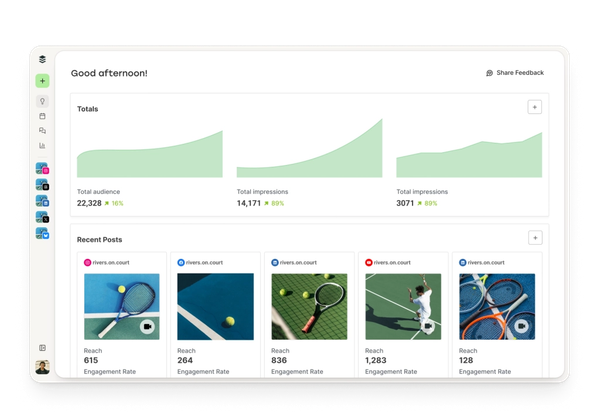
You can dig a little deeper into the analytics for each available channel and see important performance metrics like impressions, reach, engagement, new followers, and likes.
Where Buffer really shines is what it does with this data. You get the raw numbers, and you also get a personalized analysis that shows you how to put these numbers to work.
Under the Answers tab, you'll find recommendations on:
- The best day to post for your audience (for Instagram, you'll also get the best time)
- Your best performing content type or format
- The ideal frequency for you to post
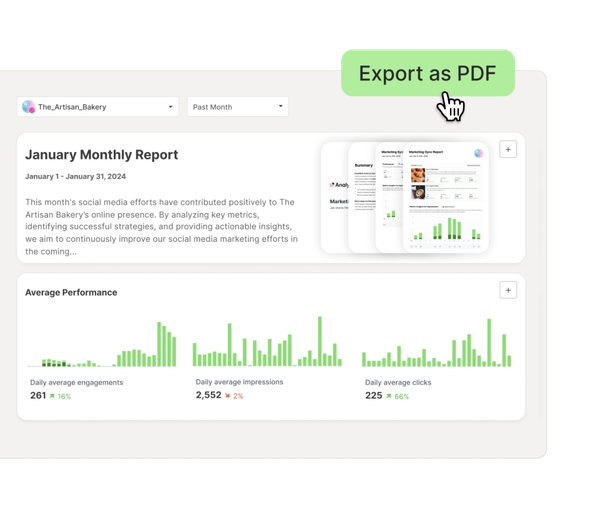
You can create customized reports to share with your boss or partner brands. Click the + button next to any section you'd like to include and add it to an existing report or create a new one.
When you're ready, head over to the Reports tab and add a logo and any notes you may want, then export a PDF file you can easily share.
Later’s analytics features
Later’s analytics give you a deep dive into your performance on Instagram Business and Creator profiles, Facebook Pages, TikTok, Threads, and Pinterest accounts.
What you see depends on the platform, but you’ll usually get a channel overview, audience insights, and how your individual posts are doing.
Later gives you some really useful specifics, too. For Instagram, Facebook, TikTok, and Threads, Later breaks down your audience demographics for you — gender, location, and age. And if you're active on Instagram or TikTok, it will even pinpoint when your followers are online and most likely to engage with your content.
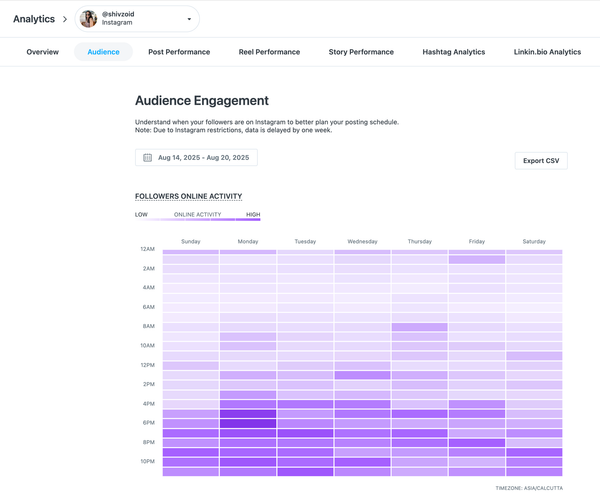
It’s a little trickier if you’d like to see analytics from multiple social media accounts in one view. The feature is available, but only on the highest-tier plan.
Reporting has some restrictions, too. While there’s no option to create and export PDFs directly, you can easily download the data as a CSV file.
For Instagram users, there’s also a neat option to generate a shareable performance report link for the past 90 days. It’s an in-depth analysis of your Instagram performance with metrics for profile growth and audience demographics, as well as post and story data.
Link-in-bio tools
Buffer and Later both offer link-in-bio tools you can share in your social media profile bios. Both let you add links to your social profiles, buttons with links, and an email signup form to build your email list.
Beyond those shared features, there are a few differences worth noting.
Buffer Start Page
There are plenty of ways you can use Buffer’s link-in-bio tool, known as Start Page:
- Share links to websites or pages you'd like to highlight
- Embed YouTube videos and Spotify tracks, playlists, or podcasts
- Add a custom image grid (with links)
- Schedule unique posts specifically for this page
Each of these content types works as a block, and you can add multiple blocks of the same type.
What does this mean? If you'd like to create two image grids — one to show off your latest products, and another to highlight brand collabs — there's no stopping you.
Later's Link in Bio page
Here's how you can use Later's link in bio tool:
- Embed featured media, such as a YouTube video, your latest TikTok or Instagram post, or a custom image
- Add a featured banner to promote your most important link
- Add an image banner with multiple linked items
- Embed posts from your Instagram or TikTok profile with custom links
The image banner works as a carousel, allowing you to display multiple images.
For every other content type, you can only use one at a time. So if you'd like to highlight a YouTube video, you won't be able to add a custom graphic as well.
A really handy add-on to Later’s link-in-bio tool is its integration with affiliate marketing platform Mavely. For supported brands, you can convert your links into affiliate links right within the tool to earn a commission.
You can absolutely add affiliate links to and earn a commission from your Start Page as well. You’ll just have to copy the link from your affiliate network and paste it into the block.
Team collaboration features
For social media managers, agencies juggling multiple clients, or creators working alongside a consultant, team collaboration tools can make a big difference in how smoothly things run.
Both Buffer and Later have collaboration features that help teams stay aligned and keep content moving without a lot of back-and-forth.
Managing teams in Buffer
You can add an unlimited number of users to the platform on Buffer's Team plan, and set different access and permissions.
You can give users:
- Full posting access: They can schedule posts to be published without another team member's approval.
- Approval required: All their scheduled social media content will need approval from someone with full posting access before it is published.
You can also restrict which accounts they have access to so they can schedule or post to only specific social media accounts. It’s a straightforward scheduling process with just two user roles.
Buffer also now offers a public API on all plans. That means that businesses can connect Buffer to automation tools, custom workflows, internal systems, AI-powered processes, and whatever tools they're using.
Managing teams in Later
Later uses access groups to manage who can see and work with social profiles, media libraries, and calendars. This can be useful for teams and agencies working across multiple brands or clients.
That said, the setup can feel inflexible. Each access group is tied to a full social set, and each social set can only include one profile per platform.
So if you need two profiles on the same platform — like a LinkedIn profile and a LinkedIn Page — they can't live in the same social set. You'd have to assign them to separate sets, then assign both sets to the same Access Group. The catch? That locks other Access Groups out of those accounts.
To work around this, you'd need to purchase an additional social set, which adds to the overall cost.
You can add multiple users to an access group, and you can add users to multiple access groups. Like Buffer, you can set roles and permissions for scheduling:
- Reviewer: They can schedule and publish posts without another user's approval, and they can approve other users' posts.
- Member: They can schedule and publish, but they can't approve posts.
- Member (Restricted): All their scheduled content will need approval from someone with Reviewer permissions.
Since Later offers visual content planning, it has a useful shared media library for each Access Group. Users in the group can upload media to the library, and then set labels, make notes, or create alt text. This media can then be dragged and dropped into the calendar to easily schedule.
There’s no equivalent in Buffer, but you could use images saved in the Create Space as the starting point for a post.
Influencer marketing features
In addition to its social media management tools, Later also has a separate product built for influencer marketing. Brands and agencies can use it to run campaigns, find and manage influencer relationships, and measure results.
There are a few extras too, like a Shopify integration that makes it easy to send products to influencers, or the option to get creative support from Later’s team.
It’s separate from the social media management platform, and pricing isn’t listed upfront.
Creators using Later’s social media scheduling tools get access to a Creator hub. You can put together a media kit, apply to campaigns, and manage collaborations, all included in your existing plan.
At Buffer, we don't offer influencer marketing tools. Our focus is on helping creators, small businesses, and solopreneurs grow their presence in a way that's sustainable. Publishing, engagement, and analytics are all built in, so you can stay focused on what matters: showing up consistently and building a real audience.
Which tool is right for you?
Buffer and Later both have plenty of features to help you manage your social media, so the right choice really comes down to what matters most to you.
They aren’t identical tools, and the main differences show up in pricing, flexibility, and the features included on each plan. Here's a quick guide to help you decide:
Buffer might be the better fit if you:
- Want a simple, flexible tool that's easy to get started with
- Manage multiple platforms and want to pay only for the channels you actually use
- Need support for platforms like X/Twitter, Bluesky, Mastodon, or Google Business
- Want unlimited AI-assisted content creation on every plan, including free
- Have a growing team and want unlimited users without per-seat pricing
Later might be the better fit if you:
- Focus primarily on visual platforms like Instagram and TikTok
- Want a drag-and-drop visual planner and Instagram grid preview
- Need social listening or influencer marketing tools (available as paid add-ons)
- Post to Snapchat and need scheduling support for it
If you’re on the fence (or you’ve decided to give Buffer a go) and have questions, our team is always happy to help. You can reach out to us at hello@buffer.com, and someone from our global team will be on hand to answer your questions.
Sign up today to use our free plan or to test Buffer’s paid plans for free.
FAQ on Buffer vs. Later
What are Buffer and Later?
Buffer and Later are social media management tools that let you schedule posts, track performance, and manage multiple accounts from one place.
Buffer offers flexible, channel-based scheduling across a wide range of platforms with a free plan that supports up to three social media channels. Later leans into visual content planning, with a drag-and-drop calendar and features built around Instagram and TikTok workflows.
What's the difference between Buffer and Later?
The main difference between Buffer and Later is how they approach social media management. Buffer focuses on flexibility, offering channel-based pricing, support for more platforms, unlimited AI tools on every plan, and features like bulk scheduling and Channel Groups.
Later is more focused on visual content planning, with a drag-and-drop calendar, Instagram-first workflows, and optional influencer marketing and social listening tools.
Do Buffer and Later offer free trials?
Both tools offer a 14-day free trial on their paid plans. Buffer also has a permanent free plan that supports up to three social media channels, with 10 scheduled posts per channel and unlimited access to the AI Assistant.
More social media marketing resources
- The 11 Best Social Media Management Tools, Tried + Tested
- 9 Tools for Social Media Automation (+ Automation Pro Tips)
- The Best Social Media APIs for Developers + Vibe Coders
- 8 Best Free Hashtag Generators
- The Top 10 AI Writing Tools I Recommend as a Professional Writer
- The 21 Best Social Media Marketing Tools to Try
- The 11 Best Social Media Analytics + Reporting Tools
Try Buffer for free
200,000+ creators, small businesses, and marketers use Buffer to grow their audiences every month.

