

Forum Widgets
Latest Discussions

Cannot change some cells to date format in Excel
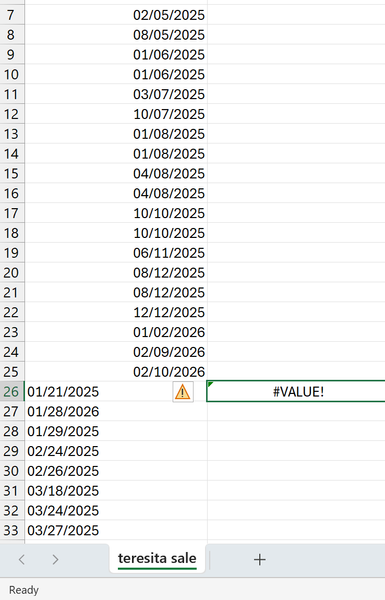
A downloaded Bank statement refuses to allow some but not all cells to be converted to date formats. I have tried simply to format them as dates converted text to columns using both fixed width and delimiter options copied the text to notebook in the hope of stripping off hidden characters =DATEVALUE(A1) ->error Simply justifying the numbers right incantations Any thoughts? Thank youSolvedjlockleyMay 22, 2026Copper Contributor57Views0likes4Comments
Column formatted as h]:mm:ss defaults to AMPM time upon editing cell
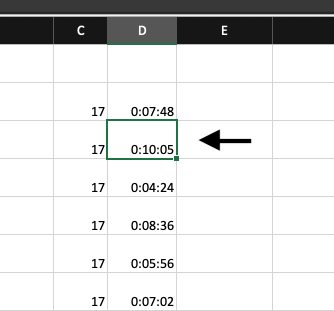
In Excel, I have a list of minutes and seconds as a 'timer for separate tasks' function, but even after formatting the whole column as [h]:mm:ss it is still reading as AMPM time. I also tried formatting the column as h:mm:ss, no change. The minutes and seconds read correctly in the sheet, but when I make a mistake entering the minutes and seconds, and double click on a cell to edit, it reads as an AM/PM. I am on a Mac. Screenshots to show the issue:cherj1904May 22, 2026Occasional Reader18Views0likes0Comments
.xlsm files fail to open
.xlsm files fail to open with “file or extension not valid” + Excel reports file is opened in another application Hello, I am experiencing a persistent issue where any .xlsm file (including brand‑new test files created locally) fails to open in Excel. Instead, I receive one of the following messages: “Le fichier ou l’extension n’est pas valide” “/TEST.xlsm est ouvert dans une autre application. Veuillez fermer ce fichier et réessayer.” The second message sometimes includes a OneDrive‑style URL: https://d.docs.live.net//.../TEST.xlsm However, even after unlinking OneDrive, pausing sync, and moving the file to a fully local folder, the error persists. The file does not open at all—Excel shows the warning and stops. What I have already tried: OneDrive / Sync Unlinked OneDrive from the PC Paused sync Stopped OneDrive completely Moved files outside all OneDrive folders (confirmed local paths) Deleted OfficeFileCache and WEF folders Cleared %localappdata%\Microsoft\Office\16.0\OfficeFileCache Excel Trust Center Disabled all Protected View options Ensured macro setting is “Désactiver les macros avec notification” Opened the Paramètres de blocage des fichiers page Verified file‑blocking settings and default behaviors Registry checks Checked the following keys and they contain correct values: HKEY_CURRENT_USER\Software\Microsoft\Office\16.0\Excel\Security HKEY_CURRENT_USER\Software\Microsoft\Office\16.0\Common\Security Excel resets Deleted %appdata%\Microsoft\Excel Restarted PC Ran excel /safe (same issue) Ran excel /regserverMariKaaMay 22, 2026Copper Contributor77Views0likes1Comment
Counts+unique+filter
Hi, I have a problem when I use the following to count the job formula Is =counta(unique(filter($a:$a, ($b:$b=1)*($c:$c=2))) the formula is correct, however, I found an error if no data match all scenarios, the answer should be 0, but, i got “1” now. Could you please help? I tried to set data source instead of whole volume but no changeSolvedKa_ChunLMay 22, 2026Copper Contributor59Views0likes4Comments
pdf to excel
hi, is it possible to import a formula that is within a pdf document into Excel to then be able to use that formula for calculations? This is to prevent the transcription of complex formulae into the excel document. Thanks.justinausMay 21, 2026Copper Contributor286KViews0likes12CommentsExcel Documents printing an extra border around the outside of all of my documents
I have been printing and previewing my excel documents recently. I am not sure when this issue started. Any time I preview and/or print an Excel spreadsheet this extra border shows up AROUND the entire document. It is not the cells within the document. Also, it shrinks my entire document to fit it within this border. I have done all the things the website has recommended: turning off "print gridlines", gridlines are off when in print preview, checking margins, turning on/off borderless printing, set the correct print area, etc. Keep in mind, this has nothing to do with anything I have done within the spreadsheet. It is outside of the spreadsheet. It is almost like I took a picture of the spreadsheet, saved it, and now a border image shows up. I have gone back and looked at all of my OLD documents that I have saved for years and those documents, like Invoices, now have this extra border around them that were never there before. I have even changed the printers in the pull down box. I tried changing it to my old printer which I never uninstalled the software and I get the same thing regardless. Does anyone have any ideas?Murph87May 21, 2026Copper Contributor61Views0likes2Comments
VLookup returning incorrect results
I can't understand why this small section of a spreadsheet returns the wrong values. Tried Lookup and Vlookup and get the same result. =LOOKUP(A23+0.01,'FA Devices'!$B$8:$B$710,'FA Devices'!$C$8:$C$710) 20 Unit 53 Clipso 21 Unit 52 Mr Simms 22 Unit 54 Dental Surgery 23 Unit 54 Dental Surgery 24 Unit 54 Dental Surgery 25 Unit 37 Bakers & Bari This is the FA Devices Sheet 123 21.0 Unit 52 Mr Simms 124 21.02 UNIT 52 FIRE 125 21.02 UNIT 52 FAULT 126 22.0 Unit 54 Dental Surgery 127 24.02 UNIT 54 FIRE 128 23.0 Unit 51 Waffle Wands 129 23.02 UNIT 51 FIRE 130 23.02 UNIT 51 FAULT 132 24.0 Unit 50 Elements by Nature 133 24.02 UNIT 50 FIRE 139 25.0 Unit 37 Bakers & BariJeremyTBMay 21, 2026Occasional Reader35Views0likes1Comment
RH
Is it possible to select a color in Excel and highlight different cell by only clicking on them and not selecting fill the whole time?RH_May 21, 2026Copper Contributor125Views0likes7Comments
Tags
- excel43,814 Topics
- Formulas and Functions25,360 Topics
- Macros and VBA6,562 Topics
- office 3656,328 Topics
- Excel on Mac2,738 Topics
- BI & Data Analysis2,485 Topics
- Excel for web2,009 Topics
- Formulas & Functions1,716 Topics
- Need Help1,703 Topics
- Charting1,697 Topics